Efficient shipping starts with clear, consistently formatted labels. The best shipping label printers for retail stores can reduce packing time, eliminate ink costs, and connect smoothly with the selling and carrier platforms your team already uses.
We compared 10 popular 4 x 6 thermal printers across connectivity, compatibility, ease of setup, portability, and small-business practicality to help you choose the right fit for your store’s fulfillment workflow.
Best 10 Shipping Label Printers for Retail Stores Picks for 2026
Best Overall Value
Rollo USB Shipping Label Printer

- USB setup for Windows and Mac
- One 4x6 label per second at 203 DPI
- Supports shipping, marketplace, and custom labels
Best For: Retail counters using a wired computer setup
Best for Flexible Media
Arkscan 2054A Shipping Label Printer
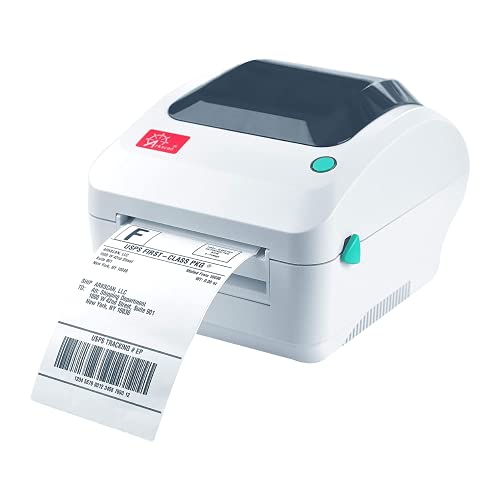
- Supports roll and fanfold labels
- Prints up to 5 inches per second
- Includes design software and U.S. tech support
Best For: Retailers printing shipping and warehouse labels
Best Wireless Option
Rollo Wireless Shipping Label Printer

- Wi-Fi and USB connectivity
- Prints from mobile and desktop platforms
- One 4x6 label per second at 203 DPI
Best For: Retail teams printing from multiple devices
Best Commercial-Style Ethernet Pick
Westinghouse Thermal Label Printer

- Prints up to 6 inches per second
- Supports USB, Ethernet, and major desktop systems
- Works with rolls and fanfold labels
Best For: High-volume wired retail shipping stations
Best Wireless Setup
JADENS 4x6 Bluetooth Label Printer

- Ink-free 203 DPI thermal printing
- Bluetooth and USB connectivity
- Supports roll and fanfold labels
Best For: Small retail stores using varied shipping platforms
Best for App-Based Flexibility
KNAON Portable 4x6 Label Printer

- App offers 3,000+ templates
- USB and app-based Bluetooth printing
- Supports labels up to 4.2 inches wide
Best For: Retailers needing portable, customizable label printing
Best for High-Volume Workflows

- Rated for up to 970,000 labels
- DAC auto-calibration reduces misalignment
- Supports labels up to 4.25 inches wide
Best For: Busy retail packing stations and inventory workflows
Best Wireless Value
Nelko Bluetooth Thermal Shipping Label Printer

- Bluetooth app printing plus USB connectivity
- Up to 72 4x6 labels per minute
- Supports roll and fanfold labels from 1.54 to 4.1 inches wide
Best For: Retailers needing flexible mobile and computer printing
Best App Features
NULLTONEX Bluetooth 4x6 Label Printer

- App includes 1,800+ templates and 300+ fonts
- Bluetooth and USB connectivity
- Prints up to 72 labels per minute at 203 DPI
Best For: Stores creating customized shipping and barcode labels
Best Automatic Feeding
Rongta RP425 Bluetooth Label Printer

- Automatically detects and feeds labels
- Supports media from 0.98 to 4.37 inches wide
- Bluetooth app printing plus Windows, Mac, and Chrome OS support
Best For: Stores using multiple label sizes throughout the day
Best Overall Value – Rollo USB Shipping Label Printer
For retail stores seeking shipping label printers for retail stores, the Rollo USB offers a straightforward, ink-free setup with broad marketplace and carrier compatibility. It prints standard 4×6 labels at up to one label per second and can also handle smaller custom labels.
Best For: Retail counters and small fulfillment areas using a Windows or Mac computer over USB.
Pros:
- Works with Windows and Mac systems and connects by USB.
- Prints 4×6 labels at 150mm/s with 203 DPI resolution.
- Supports major carriers, marketplaces, and shipping platforms.
- Handles label widths from 1.57 to 4.1 inches for product labels, barcodes, stickers, and more.
Cons:
- USB connectivity does not provide built-in Wi-Fi printing.
- The printer is limited to monochrome, simplex output.
The Rollo USB is a practical choice when a store wants dependable desktop label printing without ink or toner. Its broad software compatibility and custom-label flexibility make it useful beyond shipping.
Best for Flexible Media – Arkscan 2054A Shipping Label Printer
The Arkscan 2054A is a versatile option for retail stores that print more than standard shipping labels. Among shipping label printers for retail stores, it stands out for supporting both roll and fanfold media, wide label-size ranges, and several operating systems.
Best For: Stores that need shipping, product, barcode, and warehouse labels from one printer.
Pros:
- Supports Windows, Mac, Chromebook, and Android through USB.
- Prints at up to 5 inches per second without ink or toner.
- Accepts both roll paper and fanfold labels.
- Includes BarTender UltraLite software and U.S.-based technical support.
Cons:
- BarTender UltraLite is limited to Windows.
- Connectivity is USB rather than wireless.
- Its larger footprint may require more counter space.
With support for labels from 0.75 to 4.25 inches wide and lengths up to 90 inches, the 2054A gives retailers considerable media flexibility. It is especially appealing when labeling needs extend into inventory and product organization.
Best Wireless Option – Rollo Wireless Shipping Label Printer
The Rollo Wireless is designed for retail environments where staff need to print from phones, tablets, laptops, or multiple operating systems. It combines Wi-Fi and USB connectivity with ink-free 4×6 printing, making it a convenient choice among shipping label printers for retail stores.
Best For: Retail teams that want wireless printing from mobile devices or computers.
Pros:
- Prints through AirPrint from iPhone, iPad, and Mac, with Wi-Fi support for Android, Windows, Chromebook, and Linux.
- Also includes an optional USB connection.
- Prints one 4×6 label per second at 203 DPI without ink.
- Supports custom labels from 1.57 to 4.1 inches wide.
Cons:
- Wireless setup depends on the store’s network environment.
- It remains a monochrome, simplex printer.
The Wireless Rollo is a strong fit for stores that do not want printing tied to one wired workstation. Its wide device compatibility and long stated printhead life of about 650,000 shipping labels add convenience for active shipping operations.
Best Commercial-Style Ethernet Pick – Westinghouse Thermal Label Printer
The Westinghouse WHTP203e is a commercial-grade desktop printer for retailers that want fast 4×6 shipping labels and the option of wired Ethernet connectivity. It supports USB, fanfold labels, and rolls while avoiding ink and toner costs.
Best For: Retail or ecommerce workstations that favor fast wired printing and Ethernet capability.
Pros:
- Supports Windows, macOS, and Linux, plus ZPL software.
- Prints at up to 6 inches per second with 203 DPI resolution.
- Accepts fanfold labels and rolls in widths from 0.78 to 4.6 inches.
- Includes starter labels, a holder, USB cable, power accessories, and a USB flash drive.
Cons:
- It is not Bluetooth-capable.
- Ethernet cable and USB-C cable or adapter are sold separately.
- It has a larger desktop footprint than compact label printers.
The WHTP203e is worth considering when a retail store values speed, durable daily-use construction, and Ethernet flexibility. Its included starter supplies also make initial setup more convenient, though stores should plan for the required cable accessories.
Best Wireless Setup – JADENS 4×6 Bluetooth Label Printer
For retail stores seeking shipping label printers for retail stores, the JADENS JD268BT offers flexible wireless and USB printing for common 4×6 shipping labels. Its ink-free thermal design helps reduce ongoing supply needs, while support for roll and fanfold labels suits varied packing workflows.
Best For: Small retail operations that want Bluetooth printing, broad shipping-platform compatibility, and support for multiple label sizes.
Pros:
- Prints without ink or toner at 203 DPI.
- Supports Bluetooth on compatible Windows and Mac devices, plus USB connections.
- Works with labels from 1.57 to 4.1 inches wide, including roll and fanfold media.
- Compatible with platforms including ShipStation, Shopify, eBay, Amazon, and Shippo.
Cons:
- Android and iOS printing requires the JADENS printer app rather than direct Bluetooth printing.
- Label size must be identified and calibrated when changing media.
The JADENS is a practical choice for stores balancing desktop and mobile workflows. Its one-year warranty and included setup resources add reassurance for businesses setting up their first dedicated label printer.
Best for App-Based Flexibility – KNAON Portable 4×6 Label Printer
The KNAON Y813BT is one of the shipping label printers for retail stores suited to shops that need compact, app-centered printing. It supports USB connections across several operating systems, offers Bluetooth through the FlashLabel Pro app, and can print labels up to 4.2 inches wide.
Best For: Retailers wanting portable label printing, customizable templates, and compatibility with major marketplaces and shipping services.
Pros:
- Supports Windows, macOS, ChromeOS, Linux, iPhone, Android, and tablets through the stated connection methods.
- FlashLabel Pro includes more than 3,000 templates, 5,000 icons, and 100 fonts.
- Prints shipping, barcode, price, name, and other small thermal labels.
- Offers printing speeds up to 180 mm/s and includes 10 test papers.
Cons:
- Mobile and Bluetooth printing requires the FlashLabel Pro app.
- Shipping-platform labels need to be saved as PDFs and imported into the app.
- The supplied notes list differing speed specifications, so real-world output may vary.
Choose the KNAON when label customization and device flexibility matter as much as standard shipping output. Its compact design can fit conveniently in a checkout, stockroom, or small packing area.
Best for High-Volume Workflows – MUNBYN RW403B Label Printer
For stores processing frequent orders, the MUNBYN RW403B is among the shipping label printers for retail stores designed around durability and consistent output. It handles direct thermal labels from 1.57 to 4.25 inches wide and uses DAC technology to auto-calibrate for more precise label positioning.
Best For: Busy retail packing stations that need broad label-size support, quiet operation, and a long stated service life.
Pros:
- Supports shipping, return, product, inventory, and barcode labels from 1.57 to 4.25 inches wide.
- Rated for up to 970,000 labels with a stated jam rate below 0.01%.
- DAC dynamic algorithm technology auto-calibrates label positioning.
- Operates at a stated 60 dB and includes a two-year manufacturer warranty.
Cons:
- The supplied details identify Bluetooth and USB connectivity but do not specify the exact app or desktop setup process.
- It prints monochrome labels only.
The MUNBYN stands out when a retail store prioritizes longevity and reduced interruptions over advanced color printing. Its wide media range also lets one printer cover more than standard outbound shipping labels.
Best Wireless Value – Nelko Bluetooth Thermal Shipping Label Printer
For retail stores seeking shipping label printers for retail stores, the Nelko PL70E-BT combines Bluetooth and USB connectivity with fast direct-thermal printing. It supports common 4×6 labels, smaller formats, and major ecommerce and shipping platforms, while its compact design helps conserve counter space.
Best For: Retailers that want flexible phone, tablet, or computer printing with low ongoing supply costs.
Pros:
- Bluetooth printing through the NELKO app on iOS and Android, plus USB support for Windows, Mac, and Chrome OS.
- Prints up to 72 4×6 labels per minute at 203 DPI.
- Uses roll or fanfold labels from 1.54 to 4.1 inches wide without ink or toner.
- Works with platforms including Amazon, eBay, Shopify, USPS, UPS, Etsy, and PayPal.
Cons:
- Bluetooth printing requires the NELKO app rather than a direct device connection.
- Mac computers support USB printing only, aside from the specified M1/M2 app setup.
The Nelko is a practical all-around choice for a retail packing station, especially when wireless mobile printing and broad label-size support matter. Its included 50 4×6 labels also make initial setup easier.
Best App Features – NULLTONEX Bluetooth 4×6 Label Printer
The NULLTONEX is a compact option among shipping label printers for retail stores, pairing direct thermal printing with Bluetooth and USB connections. Its FlashLabel Pro app adds templates, fonts, editing tools, and offline storage for stores that create more than standard carrier labels.
Best For: Small retail businesses that want customizable label designs alongside routine shipping-label production.
Pros:
- Prints sharp 203 DPI black-and-white labels at speeds up to 72 labels per minute.
- Offers Bluetooth and USB connectivity for phones, laptops, and PCs.
- FlashLabel Pro includes more than 1,800 templates, 300 fonts, editing tools, and offline capability.
- Supports 4×6 labels and sizes from 1.57 to 4.3 inches wide, along with Amazon, Shopify, Etsy, USPS, UPS, FedEx, and DHL.
Cons:
- Prints in black and white only.
- The included starter supply is limited to 25 sheets of 4×6 thermal labels.
With its template-rich app and dual connectivity, the NULLTONEX stands out when a store needs barcode, mailing, or custom labels in addition to shipping labels. Built-in printhead overheat protection is another useful feature for longer print runs.
Best Automatic Feeding – Rongta RP425 Bluetooth Label Printer
The Rongta RP425 is a versatile pick for shipping label printers for retail stores, with Bluetooth app printing, USB support, and automatic label identification. Its broad media range makes it suitable for standard shipping labels as well as smaller barcode, QR, and circular labels.
Best For: Retail counters and small businesses that use several direct-thermal label sizes.
Pros:
- Automatically detects, grabs, and feeds labels to reduce manual adjustment.
- Supports direct-thermal media from 0.98 to 4.37 inches wide, including 4×6, 2×2, 2×1, and 1×1 formats.
- Works wirelessly with iOS and Android through the RONGTA app.
- Compatible with Windows 7 or newer, Mac OS 10.11 or newer, and Chrome OS through driver software.
Cons:
- Computer setup requires downloading driver software from Rongta’s website.
- Bluetooth connections are made through the RONGTA app.
The RP425 is a strong fit for stores that switch frequently between shipping, barcode, and QR labels. Its automatic feeding and compact build can simplify daily operation, while 150 mm/s printing helps maintain workflow speed.
How We Picked the Best Shipping Label Printers for Retail Stores
We focused on the features that matter most in a retail shipping operation: reliable 4 x 6 label output, straightforward setup, broad device compatibility, and support for common marketplaces and carrier services. We also considered whether each printer uses direct thermal printing, which avoids ink and toner, and whether its connection options suit a fixed packing station or a more flexible workspace.
Because retail environments vary, this list includes wired USB models, Wi-Fi printers, Bluetooth options, and compact designs. Compatibility claims should still be checked against your specific computer, phone, operating system, label software, and sales channels before purchase.
Quick Comparison
| Printer type | Best for | Main advantage |
|---|---|---|
| USB | Dedicated packing stations | Simple, stable connection |
| Wi-Fi | Shared retail workspaces | Flexible network printing |
| Bluetooth | Mobile or occasional fulfillment | Easy phone and tablet connectivity |
| Portable | Pop-up shops and back rooms | Compact footprint |
Key Buying Factors
Connectivity and Device Support
USB is often the most dependable choice for a permanent workstation. Wi-Fi can let multiple employees print from different devices, while Bluetooth is useful when labels are created on phones or tablets. Confirm whether the printer works with your operating system and the exact apps used for orders.
Marketplace and Carrier Compatibility
Look for support for platforms such as Shopify, Amazon, eBay, Etsy, PayPal, ShipStation, and shipping services including USPS, UPS, and FedEx. Compatibility may depend on drivers or label software, so verify current requirements before buying.
Speed, Alignment, and Label Handling
Choose a printer that can keep up with your daily order volume and consistently detect 4 x 6 labels. Automatic calibration, clear alignment, and easy roll or fanfold loading can prevent wasted labels during busy periods.
Space, Maintenance, and Total Cost
Thermal printers eliminate ink purchases, but you still need to budget for compatible labels. Measure your packing area, check whether the printer accepts the label format you use, and consider replacement supplies and warranty support.
Who Should Buy Which Shipping Label Printers for Retail Stores?
Choose a USB model if your store has one primary packing computer and dependable wired performance matters most. A Wi-Fi printer is better for teams that need to send labels from several computers or locations on the same network. Bluetooth models suit sellers who process orders from mobile devices or want a less cluttered counter.
Small retailers with limited workspace should prioritize compact or portable designs. Higher-volume stores should favor reliable connectivity, quick output, easy label loading, and broad software compatibility over the lowest upfront price. Whichever model you choose, confirm the printer’s current driver and app support before placing your order.