The best RGB computer memory kits combine dependable performance with lighting that complements your gaming PC. The right choice depends on more than appearance: memory generation, capacity, speed, latency, and motherboard compatibility all matter.
Our roundup covers DDR4 and DDR5 options ranging from compact 16GB kits to spacious 64GB sets, with support for Intel XMP, AMD EXPO, or both. Use the guide below to narrow the list by build type, workload, and budget.
Best 10 RGB Computer Memory Kits Picks for 2026
Best AMD DDR5 Pick
TEAMGROUP T-Force Delta Alpha RGB 32GB

- 32GB DDR5-6000 kit with CL38 latency
- AMD EXPO and Intel XMP 3.0 support
- Wide RGB lighting and lifetime warranty
Best For: AMD Ryzen 7000 desktop builds
Best Budget DDR4 RGB Kit

- 16GB DDR4-3200 kit in two modules
- CL16 timing at 1.35V
- Low-profile RGB with XMP support
Best For: DDR4 gaming and everyday desktop upgrades
Best High-Speed Intel DDR5 Kit
TEAMGROUP T-Force Delta RGB 32GB
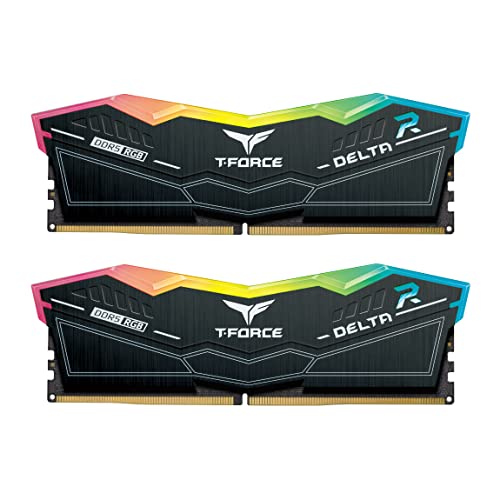
- 32GB DDR5-6400 kit with CL40 timing
- Intel XMP 3.0 support
- Wide RGB lighting and PMIC cooling design
Best For: Compatible Intel 600-series DDR5 desktops
Best High-Capacity DDR4 Kit

- 64GB DDR4 capacity in a 4x16GB kit
- Up to 3600MT/s with CL16 timing
- JEDEC and Intel XMP profiles included
Best For: High-capacity DDR4 desktop workstations and gaming PCs
Value DDR4 RGB Pick
Silicon Power Zenith RGB 16GB 3600MHz Kit

- 16GB capacity in a 2 x 8GB kit
- 3600 MT/s rated speed with CL18 timing
- Intel XMP support and lifetime warranty
Best For: Compatible DDR4 gaming desktops needing an affordable 16GB RGB kit
High-Speed DDR5 RGB Pick
G.SKILL Trident Z5 RGB 32GB 6400

- 32GB capacity in a 2 x 16GB kit
- Up to 6400 MT/s with CL32 timing
- Intel XMP 3.0 support for compatible platforms
Best For: Intel DDR5 enthusiasts seeking high rated memory speed
Balanced DDR4 RGB Pick
Timetec Pinnacle Konduit 32GB 3200

- 32GB capacity with CL16 timing
- Eight RGB zones per module
- AMD and Intel DDR4 compatibility with XMP 2.0
Best For: DDR4 gaming desktops wanting 32GB and broad RGB software support
Best High-Capacity DDR5 RGB Kit
G.SKILL Trident Z5 RGB 64GB DDR5-6000

- 64GB matched 2x32GB DDR5 kit
- 6000MT/s rated speed with CL36 timings
- Intel XMP 3.0 and AMD EXPO support
Best For: High-capacity gaming and productivity desktops
Best Heavy-Duty Pick
GIGASTONE Game TURBO 32GB DDR4-3200

- 32GB matched 2x16GB kit
- DDR4-3200 speed with CL16 timings
- RGB LEDs and Intel XMP 2.0 support
Best For: DDR4 gaming desktop upgrades
Best Low-Latency DDR5 RGB Kit
Biwin Black Opal DW100 48GB DDR5-6000
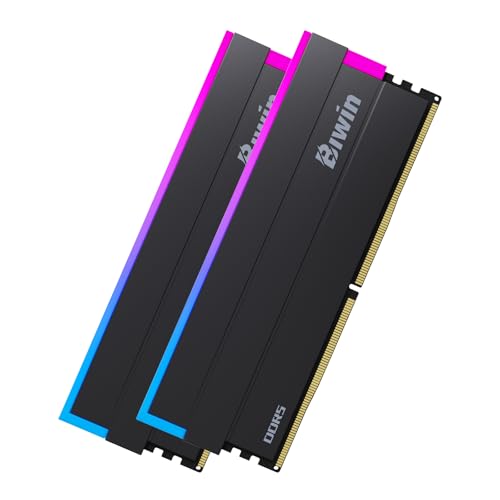
- 48GB matched 2x24GB DDR5 kit
- 6000MHz speed with CL28 latency
- Intel XMP 3.0 and AMD Expo compatible
Best For: Enthusiast DDR5 desktops needing 48GB
Best AMD DDR5 Pick – TEAMGROUP T-Force Delta Alpha RGB 32GB
For shoppers comparing RGB computer memory kits for an AMD desktop, the TEAMGROUP T-Force Delta Alpha combines 32GB capacity with a 6000MHz DDR5 speed rating. It supports AMD EXPO for one-click overclocking while also offering Intel XMP 3.0 compatibility, though motherboard and CPU support should be checked first.
Best For: AMD Ryzen 7000 systems using compatible X670-series motherboards and builders who want DDR5 RGB lighting.
Pros:
- 32GB (2x16GB) DDR5-6000 kit with CL38 latency.
- AMD EXPO and Intel XMP 3.0 support.
- 120-degree-wide RGB lighting with support for lighting-effect software.
- PMIC cooling design, on-die ECC, and lifetime warranty.
Cons:
- Compatibility depends on the motherboard QVL, CPU memory controller, and BIOS.
- Its AMD-focused positioning may require extra verification for a particular Intel build.
This is a well-rounded RGB computer memory kit for a modern AMD platform, especially when easy EXPO tuning and 32GB of DDR5 capacity matter more than the lowest latency.
Best Budget DDR4 RGB Kit – Kingston FURY Beast RGB 16GB
Kingston FURY Beast RGB 16GB 3200MT/s DDR4 CL16 DIMM (Kit of 2) Computer Memory KF432C16BB2AK2/16
Check Price On AmazonThe Kingston FURY Beast RGB is a straightforward choice among RGB computer memory kits for DDR4 desktops. This 16GB kit uses two modules rated at 3200MT/s with CL16 timing, and it supports Intel XMP alongside AMD Ryzen-ready compatibility.
Best For: DDR4 gaming and general-purpose desktop upgrades where 16GB, RGB lighting, and CL16 timing are sufficient.
Pros:
- 16GB kit of two DDR4 DIMMs rated at 3200MT/s.
- CL16 timing at 1.35V.
- Low-profile RGB lighting.
- Intel XMP Certified, XMP-Ready, and ready for AMD Ryzen.
Cons:
- Lower capacity than the 32GB and 64GB kits in this roundup.
- It is DDR4, so it is not suitable for a DDR5-only motherboard.
Choose this kit when your system uses DDR4 and you want an uncomplicated RGB upgrade with solid rated speed and timing rather than maximum capacity.
Best High-Speed Intel DDR5 Kit – TEAMGROUP T-Force Delta RGB 32GB
For an Intel desktop with a compatible DDR5 motherboard, the TEAMGROUP T-Force Delta RGB offers a 32GB (2x16GB) kit rated at 6400MHz. It is designed for Intel 600-series chipsets and includes XMP 3.0 support for one-click overclocking.
Best For: Intel 600-series DDR5 systems seeking a high rated memory speed and prominent RGB lighting.
Pros:
- 32GB DDR5 kit rated at 6400MHz.
- Intel XMP 3.0 support for simplified overclocking.
- 120-degree-wide RGB lighting compatible with various lighting-effect software.
- PMIC cooling design and on-die ECC for system stability features.
Cons:
- CL40 latency is higher than the CL38 rating of the slower 6000MHz kit listed here.
- Requires an appropriate Intel 600-series DDR5 platform and BIOS support.
This kit is a sensible fit for Intel builders prioritizing rated DDR5 bandwidth and RGB presentation, provided the motherboard supports the specified memory configuration.
Best High-Capacity DDR4 Kit – G.SKILL Trident Z Neo 64GB
The G.SKILL Trident Z Neo is the high-capacity option among these RGB computer memory kits, providing 64GB through four 16GB DDR4 modules. It is rated up to 3600MT/s with CL16-19-19-39 timings and includes an Intel XMP profile, but reaching its maximum speed may require BIOS adjustments.
Best For: Desktop users who need 64GB of DDR4 memory and have a motherboard validated for a four-module configuration.
Pros:
- Large 64GB capacity in a matched 4x16GB kit.
- Rated up to 3600MT/s with CL16 primary latency.
- Includes JEDEC defaults and an Intel XMP overclock profile.
- Designed for Intel and AMD desktop platforms.
Cons:
- Maximum rated speed requires overclocking or BIOS adjustments.
- Four modules can place greater demands on motherboard and memory-controller compatibility.
- The manufacturer advises against mixing this kit with other memory kits.
This is the strongest choice here for capacity-conscious DDR4 users, but checking G.SKILL’s QVL or RAM Configurator is particularly important before using all four DIMM slots.
Value DDR4 RGB Pick – Silicon Power Zenith RGB 16GB 3600MHz Kit
For shoppers comparing rgb computer memory kits for a DDR4 desktop, this Silicon Power Zenith kit combines 16GB of capacity with a rated 3600 MT/s speed. Its aluminum heatsinks, RGB lighting, Intel XMP support, and lifetime warranty make it a practical option for compatible gaming builds.
Best For: DDR4 gaming desktops using compatible Intel platforms and a two-module 16GB configuration.
Pros:
- 3600 MT/s rated speed with CL18 timing.
- Aluminum heatsinks and RGB lighting add cooling and visual customization.
- Supports Intel XMP and comes with a lifetime warranty.
Cons:
- Advertised speed requires XMP or an equivalent BIOS profile.
- Compatibility and actual performance vary by motherboard and CPU.
- Its 16GB capacity is lower than the 32GB kits in this selection.
This kit is a straightforward DDR4 choice when 16GB is sufficient and you want RGB styling without moving to DDR5. Confirm platform compatibility and enable the appropriate memory profile to reach the rated speed.
High-Speed DDR5 RGB Pick – G.SKILL Trident Z5 RGB 32GB 6400
This G.SKILL Trident Z5 kit is a high-speed option among rgb computer memory kits, pairing 32GB of DDR5 with a rated speed of up to 6400 MT/s and CL32 timing. It uses Intel XMP 3.0 and is aimed at compatible Intel desktop platforms.
Best For: Enthusiasts building compatible Intel Z890, Z790, B860, or B760 desktops who want 32GB of fast DDR5 memory.
Pros:
- 32GB capacity in a matched 2 x 16GB kit.
- Up to 6400 MT/s speed with CL32 timing.
- Supports Intel XMP 3.0 and includes RGB styling.
- Uses a matched kit designed to run together.
Cons:
- Maximum speed requires overclocking or BIOS adjustments.
- Platform compatibility should be checked against G.SKILL’s QVL or RAM Configurator.
- Mixing this kit with other memory kits can cause instability or failure.
Choose this model when your system supports its DDR5 platform requirements and you are prepared to configure XMP. At default BIOS settings, compatible systems boot at the JEDEC profile rather than the advertised maximum speed.
Balanced DDR4 RGB Pick – Timetec Pinnacle Konduit 32GB 3200
For a balanced DDR4 upgrade, this Timetec Pinnacle Konduit kit provides 32GB at 3200MHz with CL16-18-18-38 timings. It combines eight RGB LED zones per module with broad lighting-software support and compatibility with AMD and Intel DDR4 motherboards.
Best For: AMD or Intel DDR4 gaming desktops that need 32GB, RGB synchronization, and one-click XMP 2.0 overclocking.
Pros:
- 32GB capacity in a 2 x 16GB kit with CL16 timing.
- Eight RGB LED zones per module support major motherboard lighting ecosystems.
- Compatible with AMD and Intel DDR4 motherboards.
- Includes XMP 2.0 support and a lifetime warranty.
Cons:
- 3200MHz requires activating XMP; otherwise, the memory may run at 2400MHz.
- Installing four DIMMs may reduce the maximum memory speed on some systems.
- Motherboard compatibility should be checked before purchase.
This is a sensible middle-ground kit for DDR4 systems that prioritize capacity and coordinated RGB lighting over extreme memory speeds. Enable XMP in the BIOS and verify the motherboard’s specifications, especially if filling all four memory slots.
Best High-Capacity DDR5 RGB Kit – G.SKILL Trident Z5 RGB 64GB DDR5-6000
For demanding desktop builds, this G.SKILL kit is a strong option among rgb computer memory kits. It combines 64GB of DDR5 capacity with a rated 6000MT/s speed, CL36 timings, and support for both Intel XMP 3.0 and AMD EXPO profiles.
Best For: High-capacity gaming, productivity, and enthusiast desktop systems using compatible DDR5 platforms.
Pros:
- Large 64GB capacity in a matched 2x32GB kit
- DDR5-6000 performance rating with CL36 timings
- Supports Intel XMP 3.0 and AMD EXPO
- Matte white Trident Z5 RGB design
Cons:
- Rated speed requires compatible hardware and BIOS or memory overclocking adjustments
- DDR5 platform compatibility is required
- G.SKILL advises against mixing memory kits
This kit offers a useful balance of capacity and speed for newer Intel and AMD desktop platforms. Verify your motherboard and CPU support before enabling the rated profile, since final performance depends on the rest of the system.
Best Heavy-Duty Pick – GIGASTONE Game TURBO 32GB DDR4-3200
This GIGASTONE Game TURBO kit is a practical choice for shoppers seeking rgb computer memory kits for compatible DDR4 desktops. The matched 32GB configuration runs at DDR4-3200 with CL16 timings and includes Intel XMP 2.0 and AMD Ryzen support.
Best For: DDR4 gaming desktops needing a 32GB dual-channel memory upgrade with RGB lighting.
Pros:
- 32GB capacity supplied as 2x16GB
- DDR4-3200 speed with CL16 timings
- RGB lighting with eight individual LEDs
- Supports Intel XMP 2.0 and AMD Ryzen platforms
Cons:
- Designed for DDR4-compatible systems rather than DDR5 platforms
- Rated performance depends on compatible system settings and overclocking support
With a straightforward 32GB capacity and mainstream DDR4 speed, this kit suits an existing DDR4 gaming build. Confirm desktop compatibility and profile support before purchase, particularly when pairing it with an older or specialized motherboard.
Best Low-Latency DDR5 RGB Kit – Biwin Black Opal DW100 48GB DDR5-6000
The Biwin Black Opal DW100 stands out among rgb computer memory kits with a 48GB capacity, DDR5-6000 speed, and notably low CL28 latency. Its 2x24GB configuration also supports Intel XMP 3.0 and AMD Expo for compatible desktop systems.
Best For: Enthusiast DDR5 desktops seeking a middle-ground capacity and low-latency 6000MHz memory.
Pros:
- 48GB capacity in a 2x24GB kit
- DDR5-6000 speed rating with CL28 latency
- Compatible with Intel XMP 3.0 and AMD Expo
- RGB lighting and a black Black Opal design
Cons:
- Requires a compatible DDR5 desktop platform
- Rated profile support depends on motherboard and system compatibility
- Listed voltage is 1.4V
This kit is an appealing fit for buyers who want more than 32GB without moving to a 64GB kit, while keeping latency relatively low at its rated speed. Check the motherboard’s memory support before relying on XMP or EXPO operation.
How We Picked These RGB Computer Memory Kits
We focused on desktop memory kits with integrated RGB lighting, dual-module configurations, and clearly stated specifications. The selection includes both DDR4 and DDR5 models, covering common capacities from 16GB to 64GB and speeds from mainstream 3200MT/s DDR4 kits to high-performance 6400MT/s DDR5 options.
We also considered advertised timings, Intel XMP and AMD EXPO support, kit configuration, and intended use. Because memory compatibility can vary by motherboard, processor, BIOS version, and the number of installed modules, treat rated speeds as target profiles rather than guarantees.
Quick Comparison
| Best For | Recommended Type | What to Look For |
|---|---|---|
| Budget DDR4 gaming | 16GB or 32GB DDR4 | 3200–3600MT/s, CL16–18 |
| New gaming builds | 32GB DDR5 | 6000MT/s class speed, XMP or EXPO |
| Content creation | 64GB DDR4 or DDR5 | Higher capacity and stable profiles |
| Performance-focused builds | Fast DDR5 | 6000–6400MT/s with suitable timings |
Key Buying Factors for RGB Computer Memory Kits
DDR4 Vs. DDR5
Choose memory that matches your motherboard. DDR4 and DDR5 are not interchangeable, and a motherboard designed for one generation cannot use the other. DDR5 generally offers higher bandwidth and is the better fit for newer platforms, while DDR4 remains practical for upgrades and value-oriented systems.
Capacity and Module Count
For a current gaming PC, 32GB is a strong all-around target. A 16GB kit can still suit entry-level gaming, especially when two modules run in dual-channel mode. Choose 64GB for video editing, 3D work, large creative projects, heavy multitasking, or long-term headroom.
Speed, Timings, and Profiles
Higher MT/s can improve bandwidth, but timings also affect latency. Compare both the rated speed and CAS latency rather than choosing on frequency alone. XMP and EXPO profiles simplify setup, but you may need to enable the profile in the BIOS and confirm that your CPU and motherboard support the advertised setting.
RGB and Physical Compatibility
Check whether your motherboard’s lighting software supports the kit or whether the modules use a compatible lighting ecosystem. Also verify DIMM clearance around a large CPU cooler, since tall heat spreaders can interfere with installation.
Who Should Buy Which RGB Computer Memory Kits?
- Budget upgraders: Choose a 16GB or 32GB DDR4 kit if your existing motherboard supports DDR4 and you want a noticeable capacity or lighting upgrade.
- New mainstream gaming builds: A 32GB DDR5 kit around 6000MT/s offers a balanced mix of performance, capacity, and platform longevity.
- Intel-focused enthusiasts: Look for strong XMP support and higher-rated DDR5 speeds, provided your motherboard and processor can handle them.
- AMD Ryzen builders: Prioritize EXPO-compatible kits and verify the recommended memory speed for your specific AM5 platform.
- Creators and multitaskers: Select a 64GB kit, especially if you regularly edit high-resolution video, use virtual machines, or run demanding applications together.
Before ordering, confirm the exact memory generation, motherboard QVL where available, maximum supported capacity, and return policy. Those checks are more important than RGB style alone.