A good wall-mounted monitor arm can make a standing desk more comfortable, stable, and easier to organize. The right model also keeps valuable desktop space open for keyboards, speakers, and accessories.
We compared these 10 monitor wall mounts for screen compatibility, weight capacity, adjustability, installation style, and useful extras such as keyboard trays or CPU holders.
Best 10 Monitor Wall Mounts for Standing Desks Picks for 2026
Best Complete Workstation

- Includes monitor arm, keyboard tray, and CPU holder
- 19.9-inch height adjustment with full rotation
- Lifetime warranty; requires stud or concrete mounting
Best For: Shared workstations needing a complete wall-mounted computer setup
Best Large-Screen Value
WALI Single Monitor Wall Mount

- Fits monitors up to 34 inches and 22 pounds
- Offers height adjustment, tilt, swivel, and rotation
- Includes a 10-year warranty and detachable VESA plate
Best For: Single-monitor standing desks with larger displays
Best Heavy-Duty Tray Setup
PUTUOSEN Wall Mount Monitor Arm

- Supports monitors up to 26.4 pounds
- Large 25.7-by-9.5-inch keyboard tray
- 35-inch pole with full-motion monitor adjustment
Best For: Compact work areas needing a sturdy keyboard-and-mouse tray
Best Dual-Monitor Alternative
VIVO Flush-Setup Monitor Mount

- Holds two monitors up to 32 inches and 22 pounds each
- Telescoping arms create a flush-to-wall arrangement
- Desk-mounted with C-clamp or optional grommet
Best For: Two-screen setups where tabletop mounting is acceptable
Best Full-Station Wall Mount
Mount-It! Monitor and Keyboard Wall Mount
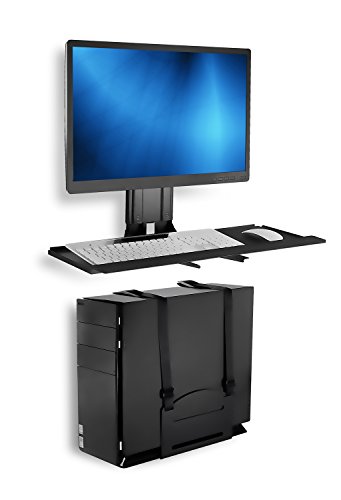
- Moves the monitor, keyboard, mouse, and PC tower off the desk
- 25-inch adjustable tray with wrist pad and cable management
- Supports up to 32-inch screens and includes a 22-pound CPU holder
Best For: Complete wall-mounted sit-stand workstations
Best Dual-Monitor Flexibility
HUANUO Dual Monitor Wall Mount

- Holds two monitors up to 32 inches and 17.6 pounds per arm
- Provides swivel, tilt, and 360-degree rotation
- Supports wood studs, concrete, and brick installation
Best For: Dual-screen standing desk setups
Best Low-Profile Single Mount
VIVO Single Monitor Wall Mount

- Fits 17- to 32-inch monitors up to 17.6 pounds
- Offers sliding height adjustment and 360-degree rotation
- Projects only 5.1 centimeters from the wall
Best For: Compact single-monitor standing workstations
Flexible Space Saver
MOUNTUP Single Monitor Wall Mount

- Fits monitors up to 32 inches and 19.8 pounds
- 360-degree rotation with tilt, swivel, and height adjustment
- For wood studs, brick, or concrete—not drywall alone
Best For: Compatible single-monitor standing desks needing more desktop space
Long-Reach Stand-Up Setup
PUTORSEN Extra-Long Monitor Arm

- Reaches 30.28 inches for deep or corner desks
- Gas spring offers 11.2 inches of height adjustment
- Supports 17- to 32-inch monitors up to 19.8 pounds
Best For: Deep desks and sit-stand workstations needing extended monitor reach
Wide-Range Adjustability
MOUNT PRO Full-Motion Monitor Arm

- Fits 13- to 32-inch monitors up to 19.8 pounds
- 360-degree rotation plus tilt and swivel adjustments
- Includes detachable cable management and labeled hardware
Best For: Flexible single-monitor standing desks with standard curved or flat screens
Best Complete Workstation – Sit-Stand Monitor Wall Mount
For monitor wall mounts for standing desks, the Mount-It! MI-7905 is a complete wall-mounted workstation rather than just a display arm. Its height-adjustable monitor arm, folding keyboard tray, CPU holder, and cable routing help create a clean sit-stand setup in offices, labs, and shared work areas.
Best For: Shared workstations and buyers who want a monitor, keyboard, and desktop tower mounted together.
Pros:
- Gas-spring arm provides 19.9 inches of height adjustment, 360-degree rotation, 180-degree swivel at two points, and 15-degree tilt.
- Includes a 26-inch keyboard tray with flat or 10-degree back-tilt positions.
- Integrated CPU holder fits towers from 4.8 to 8.3 inches wide, while cable routing keeps cords organized.
- Supports VESA 75x75mm or 100x100mm monitors weighing 4.4 to 17.6 pounds and includes a lifetime warranty.
Cons:
- Requires installation into a wood stud or solid concrete wall; it is not intended for drywall alone.
- The system weighs 28.9 pounds, so installation may take more effort than a basic monitor arm.
This is the most comprehensive option here for a dedicated wall-mounted workstation. Choose it when the keyboard tray and CPU holder are as important as monitor adjustability.
Best Large-Screen Value – WALI Single Monitor Wall Mount
The WALI GSWM001 is a straightforward choice among monitor wall mounts for standing desks when you need full motion for one larger screen. It supports monitors up to 34 inches and combines height adjustment with tilt, swivel, and portrait-orientation rotation.
Best For: Single-monitor standing desks using screens from 17 to 34 inches.
Pros:
- Supports monitors up to 34 inches and 22 pounds with 75x75mm or 100x100mm VESA patterns.
- Arm extends up to 19.3 inches and offers +70/-45-degree tilt, 180-degree swivel, and 360-degree rotation.
- Detachable VESA plate and included mounting hardware simplify installation.
- Comes with a 10-year warranty and US-based customer support available seven days a week.
Cons:
- It is a single-monitor arm without an integrated keyboard tray or CPU holder.
- The supplied notes specify brick- or wood-wall compatibility, so wall construction should be checked before installation.
The GSWM001 keeps the feature set focused on one display while offering broad screen-size compatibility. It is a practical pick if you want a flexible large-monitor arm without a full workstation attachment.
Best Heavy-Duty Tray Setup – PUTUOSEN Wall Mount Monitor Arm
The PUTUOSEN wall mount pairs a heavy-duty monitor arm with a generously sized keyboard tray, making it useful for monitor wall mounts for standing desks in compact offices, classrooms, and apartments. Its 35-inch pole supports smooth height changes while cable clips help keep transitions tidy.
Best For: Users who need a substantial keyboard-and-mouse tray alongside a monitor arm.
Pros:
- Supports 17- to 32-inch monitors weighing up to 26.4 pounds.
- 25.7-by-9.5-inch tray supports up to 19.8 pounds and provides room for a keyboard and mouse.
- Monitor adjusts through -35 to +35 degrees of tilt, 180-degree swivel, and 360-degree rotation.
- Quick-release VESA plate, 35-inch steel pole, and built-in cable clips support convenient setup and adjustment.
Cons:
- Its 17- to 32-inch monitor range does not cover screens larger than 32 inches.
- The warranty is three years, shorter than the coverage listed for some alternatives.
This model stands out for combining higher monitor capacity with a particularly strong keyboard tray. It makes sense when desk space is limited and the tray needs to carry more than a lightweight keyboard.
Best Dual-Monitor Alternative – VIVO Flush-Setup Monitor Mount
Although the VIVO STAND-V002E is a desk mount rather than a true wall mount, it is worth considering alongside monitor wall mounts for standing desks when two screens are required. Its telescoping arms create a flush-to-wall arrangement while the desk-mounted base preserves a dual-monitor workspace.
Best For: Dual-monitor standing desks where a desk-mounted, flush-to-wall setup is acceptable.
Pros:
- Holds two 21- to 32-inch monitors weighing up to 22 pounds each.
- Telescoping arms span 20 to 30.5 inches and are designed not to extend past the back edge of the desk.
- Provides +90/-90-degree tilt, 180-degree swivel, 360-degree rotation, and height adjustment.
- Includes detachable VESA brackets and supports either a C-clamp or optional grommet mount.
Cons:
- It mounts to a tabletop, not directly to the wall.
- It requires a desk up to 3.25 inches thick and does not include a keyboard tray or CPU holder.
Choose this only if dual-screen support matters more than a true wall installation. Its flush arm design can deliver a wall-adjacent look while retaining the simpler flexibility of a desk clamp or grommet base.
Best Full-Station Wall Mount – Mount-It! Monitor and Keyboard Wall Mount
If you need monitor wall mounts for standing desks but also want to clear the keyboard, mouse, and PC tower, the Mount-It! MI-7919 takes a whole-workstation approach. Its adjustable tray and separate CPU holder can turn a wall into a compact sit-stand work area.
Best For: Small offices, shared workstations, and anyone who wants to move the entire computer setup off the desk.
Pros:
- Supports 13- to 32-inch monitors with 75×75 or 100×100 VESA patterns.
- 25-inch tray fits a keyboard and mouse side by side, with a wrist pad and cable management.
- Keyboard height adjusts across 19.7 inches and tilts from +10° to -15°.
- Mounts to wood studs, brick, or concrete and includes a 22-pound CPU holder.
Cons:
- The combined monitor-and-keyboard capacity is limited to 60 pounds.
- Its larger workstation tray requires more wall space than a monitor-only arm.
This is the most complete option of the three for creating a wall-mounted standing station. Choose it when reclaiming the whole desktop matters more than keeping the mount minimal.
Best Dual-Monitor Flexibility – HUANUO Dual Monitor Wall Mount
For a two-screen standing desk setup, the HUANUO dual monitor wall mount combines broad adjustment with wall-mounted stability. It supports two monitors up to 32 inches and lets you position each display for sitting, standing, landscape, or portrait use.
Best For: Dual-monitor home offices, gaming setups, and standing workstations that need wide viewing-angle adjustment.
Pros:
- Holds two 17- to 32-inch monitors weighing up to 17.6 pounds per arm.
- Offers ±90° swivel, ±35° tilt, and 360° rotation for flexible positioning.
- Compatible with 75×75 and 100×100 VESA patterns.
- Includes cable management and hardware for wood studs, solid concrete, and brick.
Cons:
- Each arm is limited to 17.6 pounds, so heavier displays may not be suitable.
- Dual-arm hardware takes more space and requires more positioning than a single-monitor mount.
This is the strongest fit when two adjustable screens are central to your workflow. Its generous articulation is particularly useful if you alternate between seated and standing positions.
Best Low-Profile Single Mount – VIVO Single Monitor Wall Mount
The VIVO MOUNT-VW01A is a straightforward choice among monitor wall mounts for standing desks when you need one screen and a compact footprint. Its sliding height adjustment and low-profile design keep the display close to the wall while still allowing basic ergonomic positioning.
Best For: Single-monitor standing workstations where wall clearance and simple height adjustment are priorities.
Pros:
- Fits 17- to 32-inch monitors weighing up to 17.6 pounds.
- Provides 16 centimeters of height adjustment, plus tilt, swivel, and 360° rotation.
- Sits only 5.1 centimeters from the wall for a space-saving installation.
- Supports 75×75 and 100×100 VESA patterns and includes a three-year warranty.
Cons:
- Hardware for monitors with curved or recessed backs is not included.
- Its 20° swivel range is more limited than the HUANUO dual-monitor mount.
- It is designed for one monitor rather than a complete workstation.
Choose the VIVO when you want a clean, close-to-wall installation without the bulk of a dual-arm or keyboard-tray system. It is a practical single-screen option for compact standing setups.
Flexible Space Saver – MOUNTUP Single Monitor Wall Mount
This MOUNTUP model is a practical choice among monitor wall mounts for standing desks when you want to clear desk space while retaining flexible screen positioning. It supports most flat or curved monitors up to 32 inches and includes a full-motion arm for ergonomic adjustment.
Best For: Home offices and standing-desk users with compatible monitors and wood-stud, brick, or concrete walls.
Pros:
- Supports 4.4-19.8-pound monitors up to 32 inches with 75x75mm or 100x100mm VESA patterns.
- Tilts, swivels, adjusts in height, and rotates 360 degrees between landscape and portrait orientation.
- Includes mounting hardware, clear instructions, and a detachable VESA plate.
- Aluminum construction and a premium spring are designed for stable, smoother movement.
Cons:
- Not intended for drywall-only installation.
- Compatibility depends on the monitor fitting the listed weight and VESA limits.
With broad movement and a space-saving wall installation, this is a straightforward option for a compatible single-monitor standing desk setup. Confirm the wall structure and monitor specifications before installation.
Long-Reach Stand-Up Setup – PUTORSEN Extra-Long Monitor Arm
For deep work surfaces and standing desks, this PUTORSEN arm stands out among monitor wall mounts for standing desks with its 30.28-inch reach. The gas-spring design lets you pull the screen forward for close work or retract it toward the wall when you need more clearance.
Best For: Deep desks, corner workstations, and sit-stand setups using a 17- to 32-inch monitor.
Pros:
- Extends up to 30.28 inches and retracts to 3.6 inches from the wall.
- Provides 11.2 inches of height adjustment through its gas-spring arm.
- Supports up to 19.8 pounds and uses 75x75mm or 100x100mm VESA compatibility.
- Offers ±90-degree swivel, ±35-degree tilt, and 180-degree rotation.
Cons:
- Requires a wood-stud, concrete, or brick installation; it is not for drywall alone.
- The long extension may require careful positioning for maximum stability.
This is the most versatile choice here for users who need substantial forward reach from a wall-mounted monitor. Its steel construction and long warranty add reassurance, but installation planning is especially important when the arm is fully extended.
Wide-Range Adjustability – MOUNT PRO Full-Motion Monitor Arm
This MOUNT PRO wall arm combines broad movement with a relatively wide 13- to 32-inch monitor range, making it a flexible option among monitor wall mounts for standing desks. Its arm extends up to 21.6 inches and supports switching between portrait and landscape views.
Best For: Remote workers, gamers, developers, and other users who want a movable single-monitor setup with organized cabling.
Pros:
- Supports 13- to 32-inch monitors weighing 4.4-19.8 pounds with 75x75mm or 100x100mm VESA patterns.
- Offers +90 to -45 degrees of tilt, 180-degree swivel, and 360-degree rotation.
- Extends up to 21.6 inches and includes detachable cable management.
- Designed for wood-stud or solid-concrete installation and includes labeled parts and instructions.
Cons:
- Not compatible with 1000R, 1500R, or 1800R curved screens.
- Must be adjusted for the monitor’s weight before use.
- Drywall anchors should not be used for installation.
Choose this model if range of motion and cable organization matter more than compatibility with strongly curved displays. Its broad adjustment range suits changing positions at a standing desk, provided the wall and monitor meet the installation requirements.
How We Picked the Best Monitor Wall Mounts for Standing Desks
We focused on mounts that work well with changing desk heights and standing positions. Each option was evaluated for supported screen size and weight, VESA compatibility, range of motion, adjustment convenience, and the type of wall installation required. We also considered whether the design suits a single-monitor, dual-monitor, gaming, or complete workstation setup.
Because wall construction varies, we treated mounting requirements as a key factor. A heavy display or extended arm creates more leverage than a monitor positioned close to the wall, so buyers should verify that the included hardware matches a suitable stud or masonry surface.
Quick Comparison
- Best for a complete workstation: Choose a model with a keyboard tray and CPU holder, such as the Mount-It! or PUTUOSEN options.
- Best for two screens: The VIVO dual-monitor mount and HUANUO gaming mount are designed for dual-display setups.
- Best for a straightforward single screen: VIVO, WALI, MOUNTUP, and MOUNT PRO offer simpler configurations.
- Best for extra reach: The 30.28-inch extended-arm model is useful when the monitor must sit farther from the wall.
Key Buying Factors for Monitor Wall Mounts for Standing Desks
Screen Size, Weight, and VESA Pattern
Check your monitor’s actual weight without its original stand and compare it with the mount’s per-arm capacity. Most products here support common VESA 75 x 75mm or 100 x 100mm patterns, but confirmation is still important before ordering. Larger screens may also need a stronger arm and a wider adjustment range.
Movement and Height Adjustment
For a standing desk, look for height adjustment that lets the screen remain near eye level while seated or standing. Tilt and swivel help reduce glare, while a full-motion arm makes it easier to reposition the display. Gas-spring mechanisms can simplify frequent adjustments, but fixed or shorter arms may offer better stability.
Wall Type and Installation Depth
Mounting into a wall stud or properly rated masonry is generally more secure than relying on unsupported drywall. Measure the available depth behind the desk and consider cable routing, arm extension, and whether the screen can fold close to the wall when not in use.
Single Versus Dual-Monitor Layouts
Dual arms can improve multitasking, but they require more wall width and careful balancing. Confirm the combined weight limit and check that both screens can be aligned at your preferred height. A single arm is usually easier to install and gives more flexibility in compact spaces.
Who Should Buy Which Monitor Wall Mounts for Standing Desks?
Choose a keyboard-tray model if you want a wall-mounted alternative to a conventional sit-stand workstation or need to clear the desktop completely. Pick a dual-monitor mount if you regularly work across multiple applications and have enough wall space for side-by-side screens.
For a simple home office, a single-arm mount is usually the most practical and economical choice. Gamers and creators should prioritize weight capacity, smooth positioning, and reach. If your desk sits unusually far from the wall, select an extended arm and confirm that its maximum reach does not compromise stability.