Traveling with a laptop often means working in shared offices, hotel rooms, trains, airports, and conference venues where a few minutes of unattended time can create a serious security risk. The right cable lock adds a visible physical barrier without adding much weight to your bag.
This roundup compares 10 laptop locking cables for travel, covering standard and Nano security slots, keyed and combination designs, adhesive-anchor systems, and compact cable options. Use the guide below to match the lock style, attachment method, and portability you need.
Best 10 Laptop Locking Cables for Travel Picks for 2026
Best Standard-Slot Protection
Kensington T-Bar Combination Lock

- Six-foot cut-resistant carbon steel cable
- Resettable four-digit code with 10,000 combinations
- Push-button attachment for Kensington standard slots
Best For: Travelers with laptops using a Kensington standard security slot
Best Adhesive-Mount Kit
AboveTEK Universal Laptop Cable Lock

- Includes two adhesive anchor-plate sets
- Six-foot galvanized steel cable
- Works with laptops, tablets, phones, and notebooks
Best For: Travelers securing devices without built-in lock slots
Best for Thin Laptops
Kensington Nano-Slot Combination Lock

- Slim head supports compatible thin laptops
- Five-foot carbon steel cable
- Pivoting head and rotating anchor improve positioning
Best For: Thin laptops with nano-sized security slots
Portable Keyed Pick
Retractable 6.2-Foot Laptop Cable Lock
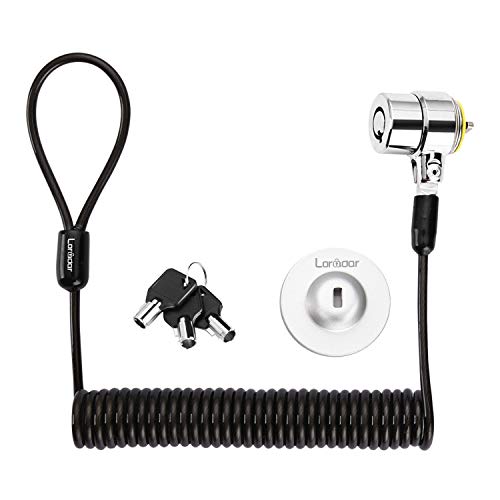
- Retractable cable extends to about 6 feet
- Includes three traceable keys
- Supports standard slots and adhesive anchoring
Best For: Travelers wanting a compact keyed lock for varied electronics
Universal Combination Pick

- Fits standard, nano, and wedge-shaped slots
- Resettable four-number combination
- Includes a six-foot carbon steel cable
Best For: Slot-equipped laptops and mixed-device environments
Slot-Free Device Pick
6.7-Foot Adhesive-Anchor Cable Lock

- Works with or without a security slot
- Includes a 6.7-foot cut-resistant cable
- Comes with three traceable keys
Best For: Slot-free MacBooks, tablets, and slim laptops
Best Dell-Fit Pick
Kensington N17 Dell Laptop Lock

- Fits Dell and Alienware wedge slots
- Four-wheel, 10,000-code combination lock
- Six-foot cut-resistant carbon-steel cable
Best For: Compatible Dell and Alienware laptops
Most Versatile Setup

- Supports standard laptop slots
- Includes an adhesive anchor plate
- 6.5-foot PVC-coated steel cable
Best For: Mixed laptops, tablets, phones, and other devices
Simple Combination Option

- Six-foot cable for fixed-object anchoring
- Four-dial lock with 10,000 combinations
- Designed for standard Kensington slots
Best For: Compatible notebooks and laptops in schools, libraries, and travel workspaces
Best Standard-Slot Protection – Kensington T-Bar Combination Lock
For laptops with a Kensington standard-size security slot, this six-foot combination cable is a practical choice among laptop locking cables for travel. Its resettable four-digit code, push-button engagement, and cut-resistant carbon steel cable make it convenient for securing a compatible device to a desk, table, or other fixed structure.
Best For: Travelers using laptops or other electronics with a Kensington standard security slot.
Pros:
- Six-foot carbon steel cable offers useful reach around desks and tables.
- Resettable four-wheel combination provides 10,000 possible codes.
- Push-button design supports one-handed attachment.
- Also works with compatible monitors, desktops, TVs, projectors, and docking stations.
Cons:
- Not compatible with Dell and Alienware devices using Noble lock slots.
- May not fit some 2016-and-newer Dell laptops and tablets.
Choose this model when your device clearly has a Kensington standard slot. Dell owners should verify the slot type before buying, since compatibility is the main limitation.
Best Adhesive-Mount Kit – AboveTEK Universal Laptop Cable Lock
This AboveTEK kit is a flexible option among laptop locking cables for travel because it includes adhesive anchor plates for devices that lack a built-in security slot. The six-foot galvanized steel cable and two-key lock can secure laptops, tablets, phones, and other flat-surface electronics in cafes, libraries, retail spaces, and other public settings.
Best For: Travelers securing laptops, tablets, or phones without a compatible built-in lock slot.
Pros:
- Includes two adhesive sticker and anchor-plate sets for multiple devices.
- Industrial-grade 3M adhesive is designed for most flat surfaces.
- Six-foot cut-resistant galvanized steel cable allows movement while secured.
- Key operation is simple and quick to install.
Cons:
- Adhesive mounting depends on proper application to a suitable flat surface.
- Uses keys rather than a resettable combination.
This is a useful solution for mixed-device travel kits, especially when a laptop or tablet has no standard security slot. Consider where the anchor plate will be placed before relying on it in a public setting.
Best for Luggage and Zippers – ZHEGE TSA Retractable Cable Lock
The ZHEGE TSA cable lock is designed for bags rather than laptop security slots, making it a compact companion for travel luggage, backpacks, and briefcases. Its 26-inch retractable steel cable, four-digit combination, and TSA-approved design help secure zipper pulls while allowing inspection without damaging the lock.
Best For: Travelers securing luggage, backpacks, briefcases, and other bags that have compatible zipper holes.
Pros:
- TSA-approved design permits security inspection without damaging the lock.
- Four-digit combination offers 10,000 resettable code combinations.
- Retractable 26-inch cable stores compactly and can secure two or three pieces of luggage.
- Weather-resistant body is suitable for indoor and outdoor use.
Cons:
- It is intended for luggage and bags, not laptops with security slots.
- Shorter cable is less suitable for anchoring a device to furniture.
- Fits standard zipper holes, so compatibility depends on the bag.
Use this as a bag-security add-on when traveling with a laptop, rather than as a direct laptop lock. Its small size and retractable cable make it convenient for carry-ons, backpacks, and train travel.
Best for Thin Laptops – Kensington Nano-Slot Combination Lock
This Kensington model is one of the more specialized laptop locking cables for travel, with a slim lock head designed for laptops using nano-sized security slots. Its five-foot carbon steel cable, resettable four-digit code, and pivoting head suit thin laptops used in cafes, shared spaces, and other travel environments.
Best For: Owners of thin laptops with compatible nano-sized security slots.
Pros:
- Slim lock head helps compatible thin laptops lie flat and stable.
- Five-foot carbon steel cable resists cutting attempts and anchors to fixed points.
- Resettable four-wheel code provides 10,000 possible combinations.
- Pivoting head and rotating cable improve access around the lock slot and nearby ports.
Cons:
- Compatibility is limited to devices with nano-sized security slots.
- Five-foot cable is shorter than some standard six-foot options.
- Not suitable for laptops without a compatible security slot unless used with another mounting solution.
Verify that your laptop uses a nano-sized slot before choosing this lock. For compatible thin models, the low-profile head and swiveling design are practical advantages when working at a cafe or shared workspace.
Portable Keyed Pick – Retractable 6.2-Foot Laptop Cable Lock
For shoppers comparing laptop locking cables for travel, this compact keyed kit offers a retractable cable, three traceable keys, and flexible compatibility. It can connect directly to devices with a standard 3×7mm security slot or use the included adhesive anchor plate with compatible slot-free electronics.
Best For: Travelers who prefer a keyed lock and need a compact cable for laptops, tablets, monitors, or other electronics.
Pros:
- Retractable cable extends to about 6 feet for easier packing and setup.
- Works with standard 3×7mm security slots and includes an adhesive anchor plate for compatible devices without one.
- Includes three keys with traceable codes for replacement support.
- Cut-resistant twisted steel cable has a TPU coating and a 360-degree rotating lock head.
Cons:
- Compatibility varies by device; several newer Dell, HP, Acer, Apple, and Lenovo models require the anchor plate or may not be compatible.
- The adhesive anchor requires careful cleaning and curing time before reaching maximum holding strength.
This is a practical travel option when compact storage and keyed access matter, but check your laptop’s slot type and model compatibility before relying on the direct-lock method.
Universal Combination Pick – Kensington 3-in-1 Laptop Lock
Among laptop locking cables for travel, the Kensington K62316WW stands out for its universal approach. Interchangeable tips fit standard, nano, and wedge-shaped laptop security slots, while the resettable four-number combination removes the need to carry a key.
Best For: Travelers, offices, and shared workspaces with laptops that use different security-slot formats.
Pros:
- Includes adapters for standard, nano, and wedge-shaped security slots.
- Resettable four-number dial provides 10,000 possible combinations.
- Six-foot carbon steel cable is designed for cut and theft resistance.
- Combination retrieval is supported through Kensington’s Register & Retrieve program.
Cons:
- Requires a compatible built-in security slot; no adhesive anchor option is listed.
- A combination lock may be less convenient than a keyed design for users who prefer physical keys.
This is the most adaptable choice of the three for slot-equipped laptops, especially when devices vary between generations or brands. Confirm that your laptop uses one of the supported slot shapes before purchasing.
Slot-Free Device Pick – 6.7-Foot Adhesive-Anchor Cable Lock
For laptop locking cables for travel when a device lacks a security slot, this 6.7-foot keyed lock includes an adhesive anchor plate. It also works directly with standard 3×7mm keyholes, making it suitable for MacBooks, tablets, Surface devices, and other electronics when installed according to the instructions.
Best For: MacBook, tablet, and slim-laptop users who need an adhesive anchoring option for cafes, libraries, or coworking spaces.
Pros:
- Works with or without a standard 3×7mm security slot.
- Long 6.7-foot cable provides flexibility around fixed objects.
- Includes a 3.0mm steel-core braided cable and a stated 1800N joint pulling-force rating.
- Comes with three traceable keys, with removal guidance for the adhesive anchor.
Cons:
- The adhesive anchor needs 24–48 hours to fully cure before maximum holding strength.
- Anchor installation requires a suitable flat surface and careful preparation.
- As a keyed lock, it requires carrying and protecting the included keys.
This is a strong fit for modern devices without built-in locking slots, provided you can install the anchor in advance and allow it to cure. Its longer cable also helps when the available fixed object is not immediately beside your workspace.
Best Dell-Fit Pick – Kensington N17 Dell Laptop Lock
Kensington N17 Dell Laptop Computer Lock, Combination Security Locking Cable (K68008WW) Black
Check Price On AmazonFor travelers with a Dell or Alienware laptop, the Kensington N17 is a purpose-built option among laptop locking cables for travel. Its wedge-style lock fits compatible Dell slots, while the six-foot carbon-steel cable loops around a desk, table, or other fixed structure.
Best For: Dell and Alienware laptops with wedge-type security slots.
Pros:
- Four-wheel combination lock offers 10,000 possible codes.
- Push-button design supports one-handed attachment.
- Six-foot cut-resistant carbon-steel cable anchors to fixed objects.
- Independently tested for torque, pull, corrosion, lifecycle, and other conditions.
Cons:
- Designed specifically for Dell and Alienware wedge slots, so compatibility must be checked.
- Combination lock does not offer keyed access.
This is the most targeted choice in the group for compatible Dell hardware. Its dedicated wedge engagement and tested construction make it practical for securing a laptop in shared workspaces during travel.
Most Versatile Setup – Universal Laptop Cable Lock
This cable lock is a flexible option for laptop locking cables for travel because it supports standard laptop slots and includes an adhesive anchor plate for devices without one. The 6.5-foot PVC-coated steel cable provides extra reach around fixed objects.
Best For: Travelers securing laptops, tablets, phones, monitors, or projectors with either a compatible slot or adhesive anchor plate.
Pros:
- Works with most laptops that use standard security slots.
- Anchor plate expands compatibility to many tablets and phones.
- 6.5-foot cut-resistant twisted-steel cable offers useful reach.
- Stainless-steel lock head rotates 360 degrees.
Cons:
- Some devices require the included adhesive security plate.
- Using the anchor plate means attaching adhesive hardware to the device.
- Compatibility should be confirmed before relying on it for a specific model.
The main advantage is adaptability: it can handle devices that lack a standard slot, provided the anchor-plate setup is suitable. It is a practical travel choice for people carrying multiple types of electronics.
Simple Combination Option – Sendt Notebook Laptop Lock
The Sendt Black Notebook/Laptop Combination Lock is a straightforward choice among laptop locking cables for travel when your computer has a standard Kensington security slot. Its six-foot cable and four-dial lock provide a simple way to secure a compatible notebook to a fixed object.
Best For: Notebooks and laptops with a standard Kensington security slot, including school, college, and library use.
Pros:
- Four-dial combination provides up to 10,000 user-settable combinations.
- Six-foot cable supports common desk and table setups.
- Designed to help prevent accidental combination resets.
- Zinc-alloy construction keeps the design compact and light.
Cons:
- Does not fit Dell laptops, Kensington Nano slots, or Noble wedge slots.
- Requires a compatible Kensington security slot.
- One-year limited warranty is shorter than some competing options.
This lock suits travelers who want a basic combination system without keys, but its slot compatibility is restrictive. Verify the laptop’s security-slot type before purchasing.
How We Picked the Best Laptop Locking Cables for Travel
We focused on practical travel requirements: compatibility with common laptop security slots, cable length and portability, locking method, attachment flexibility, and everyday ease of use. The selection includes established Kensington models alongside keyed, combination, TSA-style, retractable, and adhesive-anchor designs.
A cable lock is a deterrent rather than an absolute guarantee against theft. We prioritized products that can secure a computer to a fixed object and considered whether their design suits hotel desks, coworking spaces, classrooms, offices, trains, and other temporary work areas.
Quick Comparison
| Lock type | Best suited to | Key consideration |
|---|---|---|
| Combination lock | Frequent travelers who want key-free access | Choose a memorable code and check slot compatibility |
| Keyed lock | Users who prefer a straightforward locking mechanism | Keep a spare key in a separate secure location |
| Adhesive-anchor system | Laptops or tablets without a built-in security slot | Allow the adhesive to bond fully before use |
| TSA-style cable lock | Luggage and short-term travel securing | Verify that it is intended for your device and anchor setup |
| Retractable cable | Compact packing and quick deployment | Shorter cables may limit anchoring options |
Key Buying Factors for Laptop Locking Cables for Travel
Security-Slot Compatibility
Check whether your laptop has a standard T-Bar slot, a Nano slot, or no built-in slot at all. Some locks are designed for one slot type, while universal models support multiple formats. If you use a MacBook, tablet, monitor, or thin laptop, an adhesive anchor may be necessary.
Cable Length and Portability
A six-foot cable offers more flexibility around a desk leg or fixed railing, but it takes more room to pack. Shorter or retractable designs are easier to carry and may be sufficient for airport counters or compact hotel desks. Look for a balance between reach and manageable weight.
Combination Versus Keyed Access
Combination locks remove the need to carry a key, which is useful when moving between locations. Keyed locks can be quick and familiar, but losing the key can be inconvenient. For shared equipment, consider who needs access and whether a resettable combination is practical.
Anchor Strength and Setup
The cable must wrap around a genuinely fixed object. For adhesive-anchor products, clean the surface carefully and follow the curing instructions before relying on the attachment. No cable lock can compensate for a weak desk, loose fixture, or poorly bonded anchor.
Who Should Buy Which Laptop Locking Cables for Travel?
Frequent business travelers: Choose a resettable combination lock with a suitable Kensington slot and a cable long enough for hotel and coworking desks.
Users with newer slim laptops: Look for a Nano-compatible or universal 3-in-1 model after confirming the exact slot on the computer.
MacBook, tablet, and slot-free device owners: Select an adhesive-anchor kit designed for your device and give the anchor adequate time to set.
Travelers securing luggage or making short stops: A compact TSA-style or retractable cable can be convenient, provided its security level and attachment method match the situation.
Shared-office and classroom users: A keyed lock with spare keys or a simple combination model can make repeated daily use easier. Whichever design you choose, test it at home before your trip and store the combination or spare key securely.