Replacing a laptop’s hard drive or expanding its storage can deliver a noticeable improvement in startup times, application launches, file transfers, and overall responsiveness. The right choice depends on more than advertised speed: your laptop’s drive bay, interface, physical size, and available capacity all matter.
This roundup compares 10 internal SSDs for laptops across SATA and NVMe formats, from inexpensive replacement drives to high-performance PCIe 4.0 models. Use the guide below to narrow your options by compatibility, workload, capacity, and budget.
Best 10 Internal Ssds for Laptops Picks for 2026
Best Budget SATA Upgrade

- 2.5-inch 7mm SATA form factor
- Up to 540MB/s read speed
- Three-year limited warranty
Best For: Budget laptop and desktop SATA upgrades
Best High-Performance NVMe

- Up to 7,450MB/s reads
- PCIe 4.0 M.2 2280 design
- Five-year manufacturer warranty
Best For: Demanding laptop workloads and gaming
Best Midrange SATA Capacity

- 512GB 2.5-inch SATA SSD
- Up to 550MB/s reads
- Shock- and vibration-resistant
Best For: Everyday SATA laptop upgrades with extra capacity
Best Value Gen 4 NVMe

- Up to 6,000MB/s reads
- 1TB M.2 2280 NVMe storage
- Includes Acronis cloning software
Best For: Fast laptop upgrades with easy drive migration
Best for Easy Setup

- 2.5-inch SATA III format
- Up to 500MB/s read speed
- 3D NAND TLC and TRIM support
Best For: Basic laptop upgrades with a 2.5-inch SATA bay
High-Speed NVMe Pick

- M.2 2280 PCIe 4.0 x4
- Up to 6,600MB/s listed read speed
- Power-efficient design with five-year warranty
Best For: Performance-oriented laptops with a compatible NVMe slot
Reliable High-Capacity SATA

- 1TB 2.5-inch SATA III capacity
- Up to 560MB/s read speed
- Samsung Magician management software
Best For: Large-capacity upgrades for laptops with 2.5-inch SATA bays
Best Budget NVMe Upgrade

- Up to 3000MB/s read speed
- M.2 PCIe Gen 3x4 interface
- Includes screws and screwdriver
Best For: Affordable OS and everyday-computing upgrades
Best SATA Replacement

- Up to 535MB/s read speed
- 2.5-inch SATA 6Gb/s interface
- Low-power HDD replacement
Best For: Older laptops with a 2.5-inch SATA drive bay
Best High-Speed Gen 4 Pick
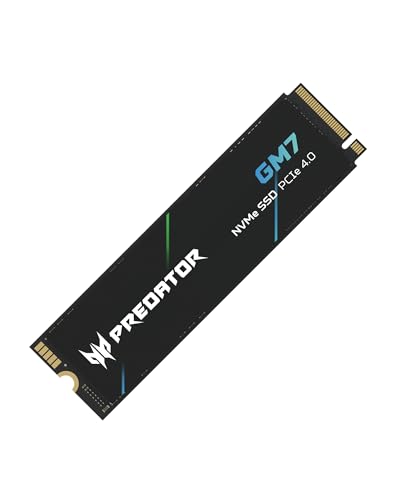
- Up to 7400MB/s read speed
- 1TB M.2 PCIe 4.0 capacity
- Thermal control and five-year warranty
Best For: Gaming, content creation, and large-file workloads
Best Budget SATA Upgrade – Crucial BX500 240GB
The Crucial BX500 is a practical choice for laptops that accept a 2.5-inch, 7mm SATA drive. It provides up to 540MB/s read speeds, making it a straightforward way to improve startup times, file loading, and everyday responsiveness over a traditional hard drive.
Best For: Budget-conscious laptop and desktop owners needing a compact SATA replacement for everyday computing.
Pros:
- Compatible with desktops and laptops using 2.5-inch 7mm SATA drives.
- Up to 540MB/s read speed and 500MB/s media speed.
- 240GB capacity in a lightweight 2.5-inch design.
- Backed by a three-year limited warranty.
Cons:
- 240GB offers less storage than the other drives in this roundup.
- Uses SATA rather than the faster PCIe NVMe interface.
The BX500 is best suited to older or budget laptops with a 2.5-inch SATA bay. Confirm the drive size and interface before buying, especially if your laptop requires an M.2 SSD.
Best High-Performance NVMe – Samsung 990 PRO 1TB
The Samsung 990 PRO is a high-performance option for compatible laptops with an M.2 2280 PCIe 4.0 slot. Its sequential read and write speeds reach up to 7,450MB/s and 6,900MB/s, while its 1TB capacity suits demanding applications, gaming, and large file workloads.
Best For: Users seeking maximum PCIe 4.0 performance for gaming, demanding software, and fast file transfers.
Pros:
- Up to 7,450MB/s sequential read speed and 6,900MB/s write speed.
- 1TB capacity in a compact M.2 2280 format.
- Designed for laptops and desktops meeting the PCI-SIG D8 standard.
- Includes thermal control, AES 256-bit encryption, and Samsung Magician software.
Cons:
- Requires a compatible PCIe 4.0 M.2 slot.
- High-end performance may exceed the needs of basic laptop use.
The 990 PRO is a strong premium pick when a laptop can take advantage of PCIe 4.0 bandwidth. Check your system’s M.2 compatibility and physical clearance before installation.
Best Midrange SATA Capacity – Lexar NS100 512GB
The Lexar NS100 offers a larger 512GB capacity in the familiar 2.5-inch SATA format. With sequential read speeds up to 550MB/s, it is a practical internal SSD for laptops and desktops that need faster startups, application loading, and data transfers without moving to an M.2 drive.
Best For: Everyday laptop upgrades where 512GB of storage and broad 2.5-inch SATA compatibility matter.
Pros:
- 512GB capacity provides more working space than entry-level 240GB drives.
- Up to 550MB/s sequential read speed.
- Compatible with desktop and laptop systems using SATA 6.0Gb/s.
- Shock- and vibration-resistant design with no moving parts.
Cons:
- Uses the slower SATA interface rather than PCIe NVMe.
- Requires a compatible 2.5-inch drive bay.
The NS100 balances useful capacity and straightforward installation for older laptops. Verify that your system supports a 2.5-inch SATA drive and allow for a backup before replacing the existing storage.
Best Value Gen 4 NVMe – Kingston NV3 1TB
Kingston NV3 1TB M.2 2280 NVMe SSD | PCIe 4.0 Gen 4x4 | Up to 6000 MB/s | SNV3S/1000G
Check Price On AmazonThe Kingston NV3 is a 1TB M.2 2280 NVMe SSD for laptops and desktops with a PCIe 4.0 x4 slot. It delivers up to 6,000MB/s read and 4,000MB/s write speeds, along with a low-power design and included Acronis cloning software.
Best For: Laptop owners wanting high-speed 1TB NVMe storage and a useful cloning tool for migration.
Pros:
- Up to 6,000MB/s read and 4,000MB/s write speeds.
- 1TB capacity in a compact M.2 2280 form factor.
- PCIe 4.0 x4 performance with backward compatibility.
- Includes Acronis cloning software and a limited warranty.
Cons:
- Requires an M.2 NVMe-compatible laptop slot.
- Listed warranty duration is three years, shorter than some competing options.
The NV3 is a sensible middle ground between basic SATA storage and premium NVMe drives. Its backward compatibility can broaden system support, but confirm your laptop’s slot type and supported PCIe generation first.
Best for Easy Setup – fanxiang S101 128GB
For older laptops with a standard 2.5-inch drive bay, the fanxiang S101 is a compact, low-cost way to move from a hard disk to solid-state storage. It offers listed sequential read speeds up to 500MB/s and write speeds up to 350MB/s, making it a practical entry-level choice among internal ssds for laptops.
Best For: Basic laptop upgrades, everyday computing, and systems that need a small 2.5-inch SATA drive.
Pros:
- 2.5-inch SATA III design supports compatible laptops, desktops, and all-in-one PCs.
- 3D NAND TLC storage is designed for greater write longevity than QLC.
- TRIM support and a listed three-year quality assurance add useful maintenance and coverage features.
- Compact 128GB capacity suits an operating-system or secondary-drive upgrade.
Cons:
- 128GB provides considerably less workspace than the larger drives in this roundup.
- SATA performance is much lower than PCIe 4.0 NVMe storage.
- Compatibility depends on the laptop having a standard 2.5-inch SATA bay.
The S101 makes the most sense when affordability and broad SATA compatibility matter more than capacity or maximum speed. Confirm your laptop’s drive format before buying.
High-Speed NVMe Pick – SANDISK Optimus 5100 500GB
The SANDISK Optimus 5100 is designed for laptops with an M.2 2280 PCIe 4.0 slot. Its NVMe interface and listed read speeds up to 6,600MB/s make it the performance-focused option among these internal ssds for laptops, while its power-efficient design is intended to support mobile use.
Best For: Compatible laptops used for gaming, business workloads, creative applications, and fast file access.
Pros:
- PCIe 4.0 x4 NVMe interface enables substantially faster throughput than SATA SSDs.
- 500GB capacity provides more working space than the 128GB option.
- Power-efficient architecture is suited to portable systems.
- Five-year limited warranty and SANDISK Dashboard monitoring support add ownership value.
Cons:
- Requires an M.2 2280 PCIe-compatible slot, so it will not replace a standard 2.5-inch SATA drive.
- Listed peak speeds may vary by capacity and system configuration.
- 500GB is smaller than the 1TB Samsung option.
This is the strongest fit for a newer laptop that supports PCIe 4.0 NVMe storage. Check the laptop manual for M.2 size and PCIe compatibility before installation.
Reliable High-Capacity SATA – Samsung 870 EVO 1TB
The Samsung 870 EVO is a strong all-purpose choice for laptops with a 2.5-inch SATA bay. It combines 1TB of capacity with listed sequential speeds up to 560MB/s read and 530MB/s write, making it a dependable upgrade for everyday work, gaming, and larger files.
Best For: Laptop owners who want substantial SATA storage, broad device compatibility, and established management software.
Pros:
- 1TB capacity offers ample room for applications, games, and personal files.
- 2.5-inch SATA III format supports compatible laptops, PCs, and Macs.
- Up to 560MB/s read and 530MB/s write speeds approach the practical limits of SATA.
- Samsung Magician software supports health monitoring, updates, and performance management.
Cons:
- Requires a compatible 2.5-inch SATA connection.
- Cannot match the peak throughput of PCIe 4.0 NVMe storage.
- Supplied notes list a three-year manufacturer warranty, despite the product description referencing five-year coverage.
Choose the 870 EVO when you need more capacity than a budget boot drive can provide without changing to an NVMe platform. Its mature SATA format and software tools make it a straightforward laptop upgrade.
Best Budget NVMe Upgrade – fanxiang S500 Pro 256GB
For shoppers seeking affordable internal ssds for laptops, the fanxiang S500 Pro is a compact M.2 PCIe 3.0 option designed to improve boot times, application launches, and file transfers. Its 256GB capacity suits an operating-system drive or a modest everyday setup.
Best For: Laptop or desktop users with an M.2 slot who want a low-cost NVMe upgrade for general computing.
Pros:
- Up to 3000MB/s read speed with intelligent SLC caching.
- M.2 2280 PCIe Gen 3×4 design works with compatible laptops, desktops, and all-in-one computers.
- 3D NAND TLC, graphite heat-dissipation stickers, and up to 160TBW endurance rating.
- Includes mounting screws and a screwdriver, plus a three-year quality assurance service.
Cons:
- 256GB provides limited room for large game libraries or extensive media collections.
- Requires an available M.2 interface and formatting before first use.
- PCIe 3.0 performance is below newer Gen 4 NVMe drives.
The S500 Pro is a practical entry-level NVMe choice when capacity needs are modest and the host system supports M.2 PCIe 3.0. Check your laptop’s slot and compatibility before buying.
Best SATA Replacement – PNY CS900 250GB
The PNY CS900 is a straightforward 2.5-inch SATA option among internal ssds for laptops. It is suited to replacing a traditional hard drive in a compatible laptop or desktop, bringing faster startup and application loading with low power consumption.
Best For: Older laptops and desktops with a 2.5-inch SATA drive bay.
Pros:
- Sequential read speeds up to 535MB/s and write speeds up to 500MB/s.
- 2.5-inch SATA 6Gb/s design is backward compatible with SATA II 3Gb/s.
- Uses less power than a traditional hard drive.
- Suitable for business, personal, multimedia, and gaming workloads.
Cons:
- 250GB capacity may be restrictive for large files and game libraries.
- SATA performance is substantially lower than NVMe SSD performance.
- Requires a compatible 2.5-inch SATA bay rather than an M.2 slot.
Choose the CS900 when your laptop uses a standard 2.5-inch SATA drive and you want a simple, economical way to replace an HDD. It is not the right fit for systems designed only for M.2 storage.
Best High-Speed Gen 4 Pick – Acer Predator GM7 1TB
For demanding users comparing internal ssds for laptops, the Acer Predator GM7 offers high-end PCIe 4.0 NVMe performance and a roomy 1TB capacity. It is aimed at fast game loading, large file transfers, and content-creation workloads on compatible systems.
Best For: Enthusiasts with a PCIe 4.0 M.2 slot who need high throughput for gaming, productivity, or creative work.
Pros:
- Up to 7400MB/s read and 6500MB/s write speeds through PCIe 4.0 and NVMe 2.0.
- 1TB capacity provides substantially more working space than the smaller drives in this roundup.
- HMB and SLC cache support faster game loads and file transfers.
- Thermal throttling and power management help control temperatures; includes a five-year warranty.
Cons:
- Requires a compatible M.2 PCIe 4.0 system to reach its rated performance.
- Older PCIe generations may limit achievable speeds.
- High-end performance may be unnecessary for basic office and browsing workloads.
The GM7 is the strongest performance choice here for a compatible laptop, desktop, or PS5. Confirm the device supports M.2 PCIe 4.0 and has adequate clearance before installation.
How We Picked the Best Internal Ssds for Laptops
We selected drives that represent the main upgrade paths available for laptops: 2.5-inch SATA SSDs for older systems and M.2 NVMe SSDs for newer machines. We compared published sequential read speeds, capacities, interface generations, form factors, and intended use cases. Because real-world performance depends on the laptop, workload, thermals, and available PCIe lanes, rated speeds should be treated as a useful reference rather than a guarantee.
Reliability, compatibility, and value also matter. A premium Gen 4 drive is not automatically the best choice for a laptop limited to SATA or PCIe 3.0, while a modest SATA model can still be a major upgrade over a mechanical hard drive.
Quick Comparison
| Drive type | Typical interface | Best suited for | Main advantage |
|---|---|---|---|
| 2.5-inch SATA | SATA III | Older laptops and hard-drive replacements | Broad compatibility and low cost |
| M.2 NVMe Gen 3 | PCIe 3.0 x4 | Compatible mainstream laptops | Much faster than SATA without requiring Gen 4 hardware |
| M.2 NVMe Gen 4 | PCIe 4.0 x4 | Modern laptops and demanding workloads | High transfer speeds and strong application performance |
Key Buying Factors for Internal Ssds for Laptops
Check the Form Factor and Interface
A 2.5-inch SATA drive will not fit an M.2 slot, and an M.2 SSD may use SATA or NVMe. Confirm your laptop’s service manual or existing drive specifications before buying. For M.2 models, check that the system supports the 2280 length, which is the common 22-by-80-millimeter size.
Match Performance to the Laptop
PCIe 4.0 NVMe drives can be excellent choices for newer systems, but they generally operate at the laptop’s supported limit. Installing a Gen 4 SSD in a PCIe 3.0 system may work while delivering Gen 3-level performance. SATA SSDs are capped far below NVMe speeds, yet they remain fast enough for everyday computing and are often the simplest upgrade.
Choose Enough Capacity
For a basic operating-system replacement, 240GB to 512GB can be adequate, but 1TB provides considerably more room for applications, games, photos, and updates. Avoid filling an SSD completely; leaving some free space can help maintain performance and simplify future use.
Consider Sustained Workloads and Thermals
Sequential read speed is only one metric. Large file copies, video work, and repeated writes can expose differences in cache behavior and thermal throttling. Thin laptops may benefit from an SSD that performs well without requiring a large heatsink, and you should verify that any included or separately purchased thermal solution fits.
Who Should Buy Which Internal Ssds for Laptops?
- Owners of older laptops: Choose a 2.5-inch SATA model if the system uses a conventional hard-drive bay.
- Everyday users: A 500GB to 1TB SATA or mainstream NVMe SSD offers a practical balance of speed, capacity, and price.
- Budget-conscious upgraders: Smaller SATA drives can provide a dramatic improvement over a hard drive, especially for basic office, browsing, and school workloads.
- Power users and creators: Select a 1TB PCIe 4.0 NVMe drive when the laptop supports it and you regularly move large files or run demanding applications.
- Gamers: Prioritize at least 1TB, confirm laptop compatibility, and compare sustained performance rather than relying only on peak sequential ratings.
Before installation, back up important files, confirm whether the laptop requires a mounting bracket or cloning adapter, and check whether replacing the original drive affects warranty coverage. After installing the SSD, a fresh operating-system installation or properly verified clone can help ensure the upgrade delivers its full benefit.