The best hard drive duplicators for backups make it easier to copy, replace, and preserve data without relying on a computer’s internal drive bays. The right model can simplify routine backups, disk upgrades, and recovery workflows.
This roundup covers standalone cloners, multi-bay docking stations, and versatile SATA or NVMe-compatible options. Compare drive support, cloning speed, capacity, and controls to find the best fit for your backup routine.
Best 10 Hard Drive Duplicators for Backups Picks for 2026
Best Multi-Drive Workstation
StarTech 4-Bay 1:3 HDD/SSD Duplicator

- Four-bay SATA docking and cloning station
- Standalone 1:3 cloning and secure erase
- Includes adapters for 2.5- and 3.5-inch IDE drives
Best For: IT users managing multiple drives and sanitization tasks
Best for Image-Based Backups
StarTech 1:1 SATA Duplicator with Image Manager

- Stores multiple disk images on a library drive
- Four duplication modes for backup and restore
- Up to 6 GB/min SATA III copying
Best For: System imaging, PC deployment, and repeatable restores
Best Budget Dual-Bay Dock
SABRENT USB 3.0 Dual-Bay HDD Cloner

- Dual-bay support for 2.5- and 3.5-inch SATA drives
- Offline cloning without drivers or a computer
- USB 3.0 connectivity and support for drives up to 10 TB
Best For: Simple home backups and occasional drive cloning
Best for Fast Sector Cloning
StarTech Dual-Bay SATA Duplicator Dock

- Standalone sector-by-sector cloning up to 28 GB/min
- Supports 2.5- and 3.5-inch SATA drives
- USB 3.2 Gen 2 dock mode with 4Kn support
Best For: Fast full-drive copies, upgrades, and recovery work
Best All-in-One Pick
Rosewill Triple-Bay NVMe/SATA Cloner Dock

- Supports M.2 NVMe, SATA SSD, and 2.5/3.5-inch HDDs
- Offline cloning without a host computer
- USB 3.2 Gen 2x1 speeds up to 10Gbps
Best For: Mixed-drive backup and cloning tasks
Best for Standalone Duplication

- No computer or software required
- Handles 2.5- and 3.5-inch SATA drives without an adapter
- Duplicates and erases drives, including DoD 5220.22-M sanitization
Best For: Repeated SATA duplication and drive sanitization
Best Value Dual-Bay Dock
ORICO Offline Clone Docking Station

- Supports 2.5/3.5-inch SATA drives up to 44TB total
- One-button offline cloning without a computer
- USB 3.0, UASP, and TRIM up to 5Gbps
Best For: Simple home SATA backup and drive-swapping workflows
Best High-Capacity Pick

- Five SATA bays for simultaneous drive access
- Offline cloning with 0%-100% progress display
- Up to 120TB expansion and 5Gbps USB performance
Best For: High-capacity backups and multi-drive workflows
Best for SAS Drives
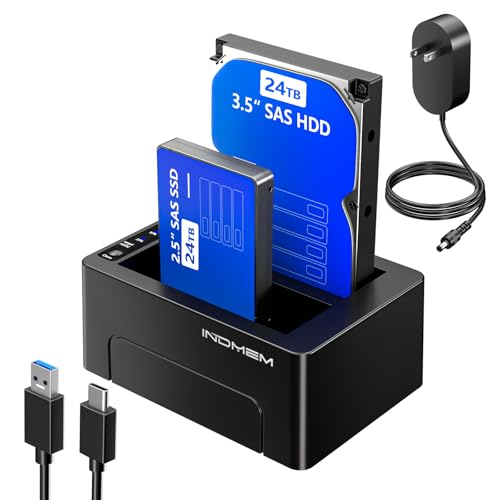
- Supports both SAS and SATA drives
- Copies one source to two targets simultaneously
- 48TB total capacity with progress LEDs
Best For: SAS-compatible backups and dual-copy workflows
Best Value Hub Option

- Offline cloning for 2.5-inch and 3.5-inch SATA drives
- 48TB total capacity with 5Gbps USB 3.0
- Three USB-A hub ports, including 2.4A charging
Best For: Compact SATA backups with added USB connectivity
Best Multi-Drive Workstation – StarTech 4-Bay 1:3 HDD/SSD Duplicator
For backups, drive migration, and secure disposal, this StarTech unit combines a four-bay docking station with standalone duplication and erasure functions. It supports 2.5- and 3.5-inch SATA drives, includes IDE adapters, and works without an operating system.
Best For: IT professionals and users who need to clone, erase, or access several SATA and IDE drives from one workstation.
Pros:
- Supports standalone 1:3 sector-by-sector cloning at up to 4.2 GB/min.
- Four bays accommodate multiple 2.5- and 3.5-inch drives.
- Includes Quick Erase and NIST SP 800-88 Rev. 1 Purge Secure Erase modes.
- USB 3.2 Gen 1 and eSATA connections support use as a drive dock.
Cons:
- Target drives must be equal to or larger than the source.
- IDE adapters are included, but the unit is primarily designed around SATA drive access.
This is the most versatile option here for a small IT bench or anyone handling several drives. Its cloning, docking, and sanitizing features make it more capable than a basic backup dock, though its standalone duplication speed is lower than the fastest StarTech option in this roundup.
Best for Image-Based Backups – StarTech 1:1 SATA Duplicator with Image Manager
This standalone StarTech duplicator is a strong choice among hard drive duplicators for backups because it can store multiple host-drive images on a single library drive. Its four copy modes also support system deployments, restores, and full sector-by-sector duplication without a computer.
Best For: IT specialists, system integrators, and users who need repeatable PC or server image backup and restore workflows.
Pros:
- Built-in image library manager stores and restores multiple drive images.
- Offers System and File, All Partitions, Percentage Copy, and Sector-by-Sector modes.
- Copies at up to 6 GB/min over SATA III.
- LCD controls and LED indicators provide standalone operation and status information.
Cons:
- Provides a one-to-one duplication setup rather than multiple simultaneous target bays.
- Adapters for eSATA, mSATA, IDE, and M.2 SATA are sold separately.
The image library is the defining advantage here. Instead of carrying or maintaining a separate source drive for every deployment, IT users can keep several images on one library drive and restore them as needed. It is less suited to high-volume multi-target cloning than a multi-bay duplicator.
Best Budget Dual-Bay Dock – SABRENT USB 3.0 Dual-Bay HDD Cloner
The SABRENT EC-HD2B is a straightforward dual-bay dock for accessing and cloning 2.5- or 3.5-inch SATA hard drives and SSDs. It supports offline cloning without drivers and connects to a computer over USB 3.0 when you need a simple backup or drive-reading station.
Best For: Home users who want an uncomplicated two-drive dock for occasional offline cloning and USB file access.
Pros:
- Supports both 2.5- and 3.5-inch SATA HDDs and SSDs.
- Offline cloning works without a computer or drivers.
- USB 3.0 transfer speeds reach up to 5 Gbps.
- Supports drives up to 10 TB and includes a power supply and USB 3.0 cable.
Cons:
- Offline cloning speed is listed at up to 60 Mbps.
- It has fewer advanced backup and erasure features than the StarTech duplicators.
This is the practical, lower-complexity pick for occasional drive duplication and access. It does not offer image-library management or secure erase modes, but its dual-bay design and plug-and-play USB connection cover basic backup and upgrade tasks.
Best for Fast Sector Cloning – StarTech Dual-Bay SATA Duplicator Dock
For users who prioritize fast, whole-drive duplication, this StarTech dual-bay dock performs standalone sector-by-sector cloning at speeds up to 28 GB/min. It also functions as a USB-connected SATA dock and supports 2.5- and 3.5-inch drives, including 4Kn-compatible storage.
Best For: Fast drive upgrades, recovery workflows, and backups where full sector-by-sector copying is required.
Pros:
- Standalone cloning requires no computer.
- Rated duplication speed reaches up to 28 GB/min.
- Supports 2.5- and 3.5-inch SATA HDDs and SSDs of any capacity.
- Includes USB-C-to-B and USB-A-to-B cables for use as a drive dock.
Cons:
- Sector-by-sector cloning copies empty sectors as well as used data.
- The target drive must be equal to or larger than the source.
- An IDE adapter is sold separately.
This is the speed-focused choice for direct drive-to-drive copies. Its trayless dual-bay design is easy to use, while USB 3.2 Gen 2 provides a fast computer-connected dock mode. Choose another model if you need image-library storage, multi-target cloning, or built-in drive erasure.
Best All-in-One Pick – Rosewill Triple-Bay NVMe/SATA Cloner Dock
For shoppers comparing hard drive duplicators for backups, the Rosewill RS-N2S-CL stands out for its broad drive support and flexible design. It handles M.2 NVMe and SATA SSDs plus 2.5- and 3.5-inch HDDs, and it can clone drives offline without a host computer.
Best For: Users who need one compact dock for cloning, drive reading, and mixed SSD/HDD backup tasks.
Pros:
- Supports up to three devices and multiple M.2, SATA, 2.5-inch, and 3.5-inch drive types.
- Offline cloning works without a computer.
- USB 3.2 Gen 2×1 provides transfer speeds up to 10Gbps.
- Tool-free installation and compact, portable construction simplify setup.
Cons:
- The enclosure is made from plastic.
- Its extensive compatibility may be more than needed for a basic single-drive backup setup.
The Rosewill is the most versatile option here, especially if your backup collection includes both M.2 and conventional SATA drives. Its 10Gbps interface and offline cloning add convenience for frequent drive-management work.
Best for Standalone Duplication – Systor 1:1 HDD/SSD Duplicator
The Systor SYS101HS-DP is a dedicated choice among hard drive duplicators for backups when you want a standalone workflow. It copies HDDs or SSDs without a computer or software and also includes drive-erasing functionality for sanitization tasks.
Best For: Businesses and experienced users who need standalone SATA duplication, hot swapping, and drive erasure.
Pros:
- Operates without a computer or software.
- Accepts both 2.5- and 3.5-inch SATA drives without an adapter.
- Copies at up to 90MB per second, with the stated speed maintained as load quantity increases.
- Supports whole-drive or data-only duplication and DoD 5220.22-M-compliant erasure.
Cons:
- Compatibility is focused on SATA HDDs and SSDs.
- The 90MB-per-second transfer rate is slower than the Rosewill’s stated 10Gbps USB interface.
Choose the Systor when dependable standalone duplication and sanitization matter more than broad interface support. Its metal enclosure, hot-swap design, and extended support coverage suit repeated operational use.
Best Value Dual-Bay Dock – ORICO Offline Clone Docking Station
The ORICO dual-bay dock offers a straightforward approach to hard drive duplicators for backups. Its offline clone button copies one 2.5- or 3.5-inch SATA drive to another without a computer, while USB 3.0 connectivity also supports file transfers and drive access.
Best For: Home users who want an easy dual-bay SATA dock for backups, cloning, and occasional drive swapping.
Pros:
- Supports 2.5- and 3.5-inch SATA I/II/III HDDs and SSDs up to 44TB across two 22TB drives.
- Offline cloning starts with a dedicated button and does not require a computer.
- USB 3.0 with UASP and TRIM supports transfer speeds up to 5Gbps.
- Includes a 36W power supply, tool-free swapping, and automatic sleep after 10 minutes of inactivity.
Cons:
- The target disk must be larger than the source disk for offline cloning.
- It does not support M.2 drives.
- The dock will not power on without a hard drive inserted.
The ORICO is a practical, uncomplicated option for SATA-based backup routines. Its capacity support and simple clone control are appealing, though users with M.2 drives or more advanced duplication needs should consider another model.
Best High-Capacity Pick – 5-Bay MAIWO Offline Cloner
For buyers comparing hard drive duplicators for backups, the MAIWO 5-Bay Docking Station stands out when you need to handle several SATA drives at once. It supports offline cloning without a computer, simultaneous reading and writing, and up to five 2.5-inch or 3.5-inch SATA HDDs or SSDs.
Best For: High-capacity backups, IT data processing, and users who need multiple drive bays.
Pros:
- Offline cloning works without a computer, with a digital 0%-100% progress display.
- Supports up to five SATA drives and up to 120TB of total capacity expansion.
- USB 3.1 connectivity, UASP support, and transfer speeds up to 5Gbps.
- Tool-free open design supports installation and heat dissipation.
Cons:
- Its five-bay design takes up more space than a dual-bay duplicator.
- Designed for SATA drives rather than SAS drives.
The MAIWO is the most expandable option in this group. Its capacity and five-bay layout suit demanding backup workflows, while the progress indicator and audible completion alert make unattended cloning easier to monitor.
Best for SAS Drives – INDMEM Dual-Bay Duplicator
The INDMEM Dual-Bay Hard Drive Duplicator is a practical choice for hard drive duplicators for backups when your setup includes SAS drives. It supports both SAS and SATA 2.5-inch or 3.5-inch HDDs and SSDs, and its offline cloner can create copies without a connected PC.
Best For: SAS-compatible backup workflows, drive migration, and creating two copies at once.
Pros:
- Supports both SAS and SATA 2.5-inch and 3.5-inch drives.
- Offline cloning operates independently of a computer.
- Can read one source drive and write to two target drives simultaneously.
- LED indicators show 25%, 50%, 75%, and 100% cloning progress.
Cons:
- Its total supported capacity is 48TB, lower than the five-bay MAIWO.
- The product does not include SAS drives.
- USB connectivity is listed as USB 3.0 rather than USB 3.1.
This model is especially useful when SAS compatibility matters or when you want two duplicate target drives from one source. Its independent power supply and status LEDs add straightforward operational feedback for backup tasks.
Best Value Hub Option – MAIWO Dual-Bay SATA Cloner
For a compact backup setup, the MAIWO Dual-Bay SATA Cloner combines offline drive duplication with a USB 3.0 hub. It accepts 2.5-inch and 3.5-inch SATA HDDs or SSDs, supports up to 48TB across two bays, and works without drivers or a computer during offline cloning.
Best For: Home and small-office backups that also benefit from extra USB-A ports.
Pros:
- Offline cloning supports direct source-to-target backups without a computer.
- Two SATA bays support drives up to 24TB each, for 48TB total.
- USB 3.0 provides up to 5Gbps bandwidth and backward compatibility with USB 2.0 and 1.1.
- Three USB 3.0 Type-A hub ports add connectivity for peripherals or flash drives.
Cons:
- Supports SATA drives, not SAS drives.
- Two bays provide less expansion than the five-bay model.
- Clone progress is shown in four LED stages rather than a continuous digital percentage display.
This MAIWO offers a useful balance of duplication and everyday connectivity. It is a sensible pick if you need a dual-bay SATA cloner and would use the integrated USB hub for flash drives or other accessories.
How We Picked the Best Hard Drive Duplicators for Backups
We compared these models by looking at the features that matter most during standalone drive-to-drive copying and everyday backup work. Key considerations included supported drive types and sizes, offline cloning capability, bay count, advertised transfer speed, connection standards, erasing functions, and ease of use.
We also considered flexibility. Some duplicators are designed for straightforward 1:1 copying, while others support several drives, image management, mixed SATA and NVMe media, or use as a computer-connected dock. Because advertised speeds depend on the drives, source data, and file conditions, treat them as performance indicators rather than guarantees.
Quick Comparison
| Best For | Look For |
|---|---|
| Simple home backups | Dual-bay SATA dock with offline cloning |
| Frequent drive upgrades | Fast cloning, clear controls, and broad drive support |
| Multiple simultaneous copies | Four- or five-bay duplicator with independent drive control |
| Mixed modern storage | SATA and M.2 NVMe compatibility |
| IT and repair workflows | Image management, erasing, and status displays |
| SAS-based environments | A dock specifically rated for SAS drives |
Key Buying Factors for Hard Drive Duplicators for Backups
Drive Compatibility
Confirm whether the unit accepts 2.5-inch drives, 3.5-inch drives, SATA SSDs, M.2 NVMe SSDs, or SAS media. A SATA-only dock is not automatically compatible with NVMe drives, even if both are sold as SSDs.
Cloning Method and Capacity
Offline cloners copy directly between inserted drives, which is convenient for a complete disk migration. Check whether the destination must match or exceed the source capacity and whether the device supports sector-by-sector copying, larger destination drives, or image-based workflows.
Speed and Connectivity
Higher advertised copy rates can shorten large backups, but real-world performance is limited by the slowest drive and interface. USB 3.x, eSATA, and 10Gbps connections are useful when the dock is also used for computer-based transfers.
Controls, Safety, and Erasing
Look for clear progress indicators, independent power controls, stable drive seating, and protection against accidentally selecting the wrong source. Secure erase features are valuable when retiring or repurposing drives, but verify the supported erase modes before relying on them.
Who Should Buy Which Hard Drive Duplicators for Backups?
Choose a compact dual-bay SATA model if you want an affordable tool for occasional home backups or drive upgrades. A faster dual-bay unit makes more sense for frequent cloning and larger SSDs. Users managing several drives should consider a four- or five-bay station, while technicians may benefit from image management, drive erasing, and clearer status information.
If your storage includes both M.2 NVMe and traditional SATA drives, choose a hybrid dock rather than adding adapters later. For servers or professional storage systems, verify SAS support specifically. Whichever model you choose, keep at least one additional backup copy in a separate location; a duplicator simplifies copying, but it does not replace a complete backup strategy.