Compact sublimation printers make it easier to create customized shirts, mugs, bags, stickers, and other gifts without committing to a large production setup. The products in this roundup range from dedicated dye-sublimation models to bundled starter systems and portable thermal printers.
Use the guide below to compare print format, included supplies, workflow, and long-term value before choosing a printer for home crafting, side-business orders, or occasional personalized projects.
Best 10 Compact Sublimation Printers Picks for 2026
Best Overall
Epson SureColor F170 Compact Sublimation Printer

- PrecisionCore printhead for detailed color output
- 150-sheet enclosed auto-feed tray
- Genuine Epson ink and manufacturer support included
Best For: Hobbyists, crafters, and small businesses
Best Starter Bundle
Epson SureColor F170 Sublimation Kit

- Includes ink, two paper sizes, tape, and starter blanks
- 150-sheet enclosed auto-feed tray
- Compact Epson printer with PrecisionCore output
Best For: Beginners who want supplies included
Best Budget Bundle
Generic Sublimation Printer Starter Kit

- Includes 100 sublimation paper sheets
- Cleaning kit and heat-transfer tape included
- Supports shirts, mugs, mousepads, and phone cases
Best For: Beginners testing small personalization projects
Best All-in-One Sticker Maker
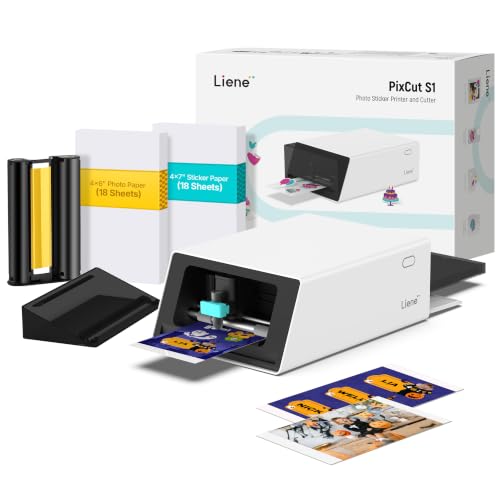
- Prints and cuts stickers in one device
- AI-assisted image extraction and precision cutting
- 300 dpi prints with laminated durability
Best For: DIY stickers, labels, photos, and personalized gifts
Best for Everyday Use
Brother SP-1 Sublimation Printer

- Includes ink, paper, blanks, tape, and design resources
- Supports Wi-Fi, Ethernet, Windows, Mac, and app use
- Handles paper up to 8.5 x 14 inches
Best For: Beginners and small businesses starting apparel and gift projects
Best for Growing Home Businesses
Sawgrass SG500 Sublimation Printer

- Produces 1200 x 1200 dpi color prints
- Includes SubliJet UHD CMYK inks and paper
- Supports standard and extended prints via bypass tray
Best For: Home businesses and small-scale custom-product production
Best Compact 4x6 Photo Printer

- Vibrant 4x6 thermal dye-sublimation photos
- Built-in Wi-Fi supports up to five devices
- Includes 20 sheets and one cartridge
Best For: Home users printing 4x6 photos from phones and computers
Best All-in-One Sublimation Setup

- Refillable tanks include sublimation ink
- Prints, scans, and copies wirelessly
- Supports varied paper sizes and long media
Best For: Heat-transfer crafters needing high ink capacity and multifunction features
Best Mini Sticker Sublimation Printer

- Portable 2x3-inch sticker photo printing
- Includes 50 adhesive sheets and five cartridges
- Bluetooth and creative app features
Best For: On-the-go smartphone sticker photos, journaling, and parties
Best Overall – Epson SureColor F170 Compact Sublimation Printer
For shoppers comparing compact sublimation printers, the Epson SureColor F170 is a space-saving option with a 150-sheet enclosed feed tray, PrecisionCore printhead, and genuine Epson ink included. It supports Windows and macOS through wireless, USB, or Ethernet connections, but not mobile devices.
Best For: Hobbyists, crafters, and small businesses that want a supported Epson workflow for apparel, mugs, mousepads, and similar projects.
Pros:
- Compact 13.7 x 14.8 x 7.4-inch design with a 150-sheet auto-feed tray
- PrecisionCore printhead with Precision Droplet Control for detailed output
- Includes genuine Epson sublimation ink and full manufacturer support
- Wireless, USB, and Ethernet connectivity
Cons:
- Mobile-device connection is not supported
- Maximum media width is 8.5 inches
The F170 is a practical all-around pick when print quality, enclosed paper handling, and manufacturer backing matter more than mobile printing.
Best for App-Based Crafting – Brother SP-1 Sublimation Printer
The Brother SP-1 stands out among compact sublimation printers for its Artspira integration. You can import and save designs, access more than 100 sublimation designs, and send projects over Wi-Fi before heat pressing them onto suitable items.
Best For: Crafters who want app-assisted design creation and a straightforward route from digital artwork to shirts, mugs, bags, hats, and tumblers.
Pros:
- Works with the Artspira app for importing, saving, and creating designs
- Includes Brother genuine black, cyan, magenta, and yellow sublimation ink
- Comes with a sublimation paper starter pack
- Two-year limited warranty and Wi-Fi connectivity
Cons:
- A heat press is required and sold separately
- Intended for sale and use only in the U.S. at 120 volts
- 8.5 x 11-inch maximum paper size limits larger transfers
Choose the SP-1 if its Artspira workflow fits how you design; it is especially convenient for users who prefer creating projects from an iOS-connected setup.
Best Starter Bundle – Epson SureColor F170 Sublimation Kit
This Epson SureColor F170 bundle is a strong option for shoppers seeking compact sublimation printers with supplies included. Along with the printer and full Epson ink set, it adds 8.5 x 11-inch and 8.5 x 14-inch paper, thermal tape, and a sublimation starter kit.
Best For: New sublimation users and home crafters who want essential transfer supplies bundled with a compact, manufacturer-supported printer.
Pros:
- Includes paper in two sizes, thermal tape, starter blanks, and genuine Epson ink
- 150-sheet dust-resistant enclosed paper tray
- PrecisionCore printhead with Precision Droplet Control
- Wireless, USB, and Ethernet connectivity for Windows and macOS
Cons:
- Mobile devices are not supported
- Maximum media width is 8.5 inches
The added paper and transfer accessories make this version easier to start with than a printer-only package, while retaining the F170’s compact footprint and Epson support.
Best Budget Bundle – Generic Sublimation Printer Starter Kit
This generic bundle offers a lower-barrier way to explore compact sublimation printers and heat-transfer projects. It includes a new printer, 100 sublimation paper sheets, a printhead cleaning kit, and heat-transfer tape, with applications ranging from light-colored polyester shirts to coated mugs and phone cases.
Best For: Budget-conscious beginners testing small apparel and personalized-gift projects before investing in a more established printer platform.
Pros:
- Includes 100 sheets of sublimation paper for initial projects
- Printhead cleaning kit and heat-transfer tape are included
- Suitable for light polyester fabrics and polyester-coated items
- Can be used for shirts, mugs, mousepads, and phone cases
Cons:
- OEM inks are not included, despite the bundle description mentioning starter supplies
- Best suited to light-colored polyester or polyester-coated items with no more than 30% cotton
- Supplied details provide limited information about connectivity and print resolution
This package may suit experimentation, but confirm the ink contents and printer specifications before buying if dependable long-term production is important.
Best All-in-One Sticker Maker – Liene PixCut S1
For shoppers seeking compact sublimation printers with creative cutting capabilities, the Liene PixCut S1 combines thermal dye-sublimation photo printing and die cutting in one desktop-friendly device. Its Bluetooth app workflow is designed for stickers, labels, photos, and small DIY projects rather than traditional apparel transfers.
Best For: DIY crafters, custom sticker makers, label projects, and personalized gifts.
Pros:
- Prints and cuts in one streamlined workflow using the Liene app.
- AI image extraction helps create precise sticker outlines automatically.
- 300 dpi, 16.7-million-color thermal dye-sublimation printing.
- Four-layer printing automatically laminates stickers for waterproof and scratch-resistant durability.
Cons:
- Its listed maximum dimensions and features are focused on stickers, labels, and photos rather than larger transfer projects.
- At 6.2 pounds, it is portable but not an ultra-light printer.
The PixCut S1 is a specialized choice for users who value convenience and automated cutting. Choose it when sticker creation is the priority and you want an integrated app-based workflow.
Best for Everyday Use – Brother SP-1 Sublimation Printer
The Brother SP-1 is one of the more practical compact sublimation printers for getting started with apparel and hard-substrate projects. This bundle adds CMYK ink, sublimation paper, blanks, heat-resistant tape, designs, and software, reducing the need to source basic supplies separately.
Best For: Beginners, hobbyists, and small creative businesses making shirts, totes, mugs, tumblers, coasters, and similar items.
Pros:
- Includes a full CMYK ink set, 160 sublimation sheets, 50 blanks, and heat-resistant tape.
- Supports media up to legal size, including 8.5 x 14-inch paper.
- Offers Wi-Fi and Ethernet connectivity with Windows, Mac, and app compatibility.
- Includes Artspira software, design resources, and a quick reference guide.
Cons:
- The printer is simplex only, so it does not support automatic duplex printing.
- The supplied bundle focuses on getting started; a separate heat press is still needed for transfers.
With its included consumables and blanks, the SP-1 Starter Bundle is a convenient entry point for sublimation crafting. It offers broader project flexibility than a sticker-focused printer while remaining sized for desktop use.
Best for Growing Home Businesses – Sawgrass SG500 Sublimation Printer
The Sawgrass SG500 is a compact sublimation printer aimed at users who want professional-grade color in a desktop format. It prints up to 8.5 x 14 inches, supports Wi-Fi, and includes SubliJet UHD CMYK inks and paper for projects such as shirts, drinkware, signage, and promotional products.
Best For: Home-based entrepreneurs, hobbyists, and small businesses producing recurring custom-product orders.
Pros:
- Uses SubliJet UHD CMYK inks for vivid, consistent color on hard and soft substrates.
- Offers 1200 x 1200 dpi color resolution and media support up to 8.5 x 14 inches.
- Bypass tray accommodates longer prints up to 8.5 x 51 inches.
- Includes Wi-Fi, auto-maintenance, and MySawgrass design and print software.
Cons:
- Its standard media size is limited to 8.5 x 14 inches, so larger projects require the bypass tray.
- The printer is designed for 110/120V US and North American electrical outlets.
The SG500 is a strong fit when color quality, software support, and a path toward repeat production matter more than the smallest footprint. Its longer-print bypass option also gives it extra flexibility for selected projects.
Best Compact 4×6 Photo Printer – Liene M100
The Liene M100 is a practical choice among compact sublimation printers for shoppers who want larger 4×6-inch color photos at home. Its thermal dye-sublimation process produces vibrant, borderless prints with a protective layer, while built-in Wi-Fi makes direct smartphone printing straightforward.
Best For: Home users printing 4×6 photos from iPhone, Android devices, laptops, or PCs.
Pros:
- Produces vibrant 4×6-inch thermal dye-sublimation prints.
- Protective finish helps resist water, scratches, and fading.
- Built-in Wi-Fi hotspot supports up to five connected devices.
- Includes 20 sheets of photo paper and one cartridge.
Cons:
- Limited to photo printing rather than all-in-one functions.
- Uses dedicated glossy 4×6 photo paper and cartridges.
Choose the M100 if convenient, phone-friendly 4×6 printing matters more than broad media support. The companion app also adds frames, filters, ID-photo options, and printing-status guidance.
Best All-in-One Sublimation Setup – Pinckney Super-Tank Printer
The Pinckney Super-Tank is a more capable option for shoppers comparing compact sublimation printers for heat-transfer projects. Built around an ET-2800 or ET-2803 all-in-one, it combines wireless printing with scanning and copying, plus high-capacity refillable tanks and included sublimation ink.
Best For: Crafters who need a refillable sublimation printer with scanning and copying for heat-transfer work.
Pros:
- Includes high-capacity sublimation ink tanks with 127 mL of black and 85 mL of each color.
- Cartridge-free design uses an auto-fill nozzle without a syringe.
- Supports multiple paper sizes, including letter, A4, 4×6, and media up to 8.5×47.2 inches.
- Offers wireless connectivity, scanning, and copying.
Cons:
- At 15.3 pounds, it is substantially less portable than photo-focused models.
- Sublimation output appears dull on paper until transferred with heat.
- Nozzle checks and head alignment may be needed for quality issues.
This is the stronger fit for a home craft workspace where ink capacity and multifunction features are priorities. Its 5760 x 1440 dpi resolution and included ink bundle add value, but the larger footprint makes it less suitable for truly mobile use.
Best Mini Sticker Sublimation Printer – Liene Pearl N200 Pro
The Liene Pearl N200 Pro is one of the most portable compact sublimation printers for small sticker photos. It uses Bluetooth, 2×3-inch adhesive paper, and thermal dye-sublimation technology to create colorful prints from a smartphone, making it well suited to parties, journaling, and on-the-go use.
Best For: Smartphone users who want portable 2×3-inch sticker photos and creative app features.
Pros:
- Compact 340-gram design measures about 5.69 by 3.44 by 1.16 inches.
- Prints colorful 2×3-inch adhesive photos over Bluetooth.
- Includes 50 sheets of adhesive paper and five cartridges.
- App supports frames, stickers, timestamps, watermarks, and AI-enhanced effects.
Cons:
- Maximum media size is limited to 2×3 inches.
- Battery supports printing up to 27 stickers per full charge.
- Designed for smartphone use rather than computers or larger-format projects.
The N200 Pro makes the most sense when portability and sticker output outweigh print size. Its built-in camera mode, quick Bluetooth pairing, and creative app tools add flexibility for casual printing at gatherings.
How We Picked the Best Compact Sublimation Printers
We compared these Compact Sublimation Printers by looking at their intended use, print size, ink or cartridge system, connectivity, included accessories, and overall setup requirements. We also considered whether each option is best suited to heat-transfer projects, portable photo printing, sticker making, or a broader home crafting workflow.
Because product bundles can vary, check the current listing carefully for included ink, transfer paper, blanks, heat-resistant tape, software, and warranty coverage. A low upfront price may be less attractive if essential supplies must be purchased separately.
Quick Comparison
- Dedicated sublimation printers: Epson SureColor, Brother SP-1, Sawgrass, and compatible tank-based systems are designed for producing transfers for compatible polyester items and coated blanks.
- Starter bundles: Bundled printers can be convenient for beginners because they may include ink, paper, blanks, and tape.
- Portable thermal printers: Liene photo and sticker printers are compact and convenient, but they are not general-purpose substitutes for a dedicated sublimation transfer printer.
- Heat-transfer bundles: Generic packages may offer broad accessories, but confirm print quality, consumable availability, and compatibility before buying.
Key Buying Factors for Compact Sublimation Printers
Print Size and Project Type
Most compact models are aimed at small-format work, commonly up to letter-size or similar dimensions. That is suitable for shirt graphics, mugs, tote bags, and small décor, but large apparel designs may require tiling or a wider printer.
Ink Compatibility and Running Cost
Sublimation requires dedicated dye-sublimation ink and compatible transfer paper. Compare the price and availability of replacement ink, paper, and maintenance supplies—not just the printer price. Cartridge-free or refillable systems may reduce ongoing costs, while proprietary cartridges can simplify operation.
Included Accessories
A useful bundle may include a full ink set, transfer sheets, blanks, and heat-resistant tape. These extras can shorten setup time, but verify quantities and sizes. A printer bundle generally does not replace a heat press, which is also required to apply transfers to most finished products.
Connectivity and Software
USB is dependable for desktop workflows, while Wi-Fi and mobile compatibility can make casual printing easier. Check operating-system support, color-management options, and whether the printer works smoothly with the design software you already use.
Space and Reliability
Measure your available workspace and leave room for paper handling and ventilation. For frequent orders, prioritize a supported brand, accessible replacement supplies, clear maintenance instructions, and a warranty over the smallest footprint alone.
Who Should Buy Which Compact Sublimation Printers?
Choose a dedicated Epson, Brother, or Sawgrass model if you want predictable transfer printing for apparel, mugs, and other sublimation blanks. These are the strongest choices for repeat use and small-business projects.
Choose a starter bundle if you are new to sublimation and want paper, blanks, or tape included with the printer. Confirm that the bundle contains enough consumables for your first projects.
Choose a tank-based system if keeping ink costs manageable matters and you are comfortable with a little more setup and maintenance.
Choose a Liene photo or sticker printer for portable snapshots, labels, and craft stickers rather than traditional heat-transfer sublimation. These products are convenient for lightweight creative projects but serve a different purpose from full sublimation printers.