The best 3D printers for hobbyists make it easier to turn digital designs into useful parts, display pieces, toys, and functional prototypes. Today’s ready-to-use models offer automatic calibration, fast printing, and increasingly capable multicolor systems.
We compared 10 popular FDM printers across setup, print speed, material support, reliability, and value to help you choose the right machine for your workspace, experience level, and creative goals.
Best 10 3d Printers for Hobbyists Picks for 2026
Easy-Start Pick

- Automatic calibration simplifies setup
- Fast, quiet FDM printing
- Multicolor-ready with optional AMS lite
Best For: Beginners, kids, and hands-off hobby printing
Enclosed Multicolor Pick

- 500mm/s high-speed printing
- Enclosed body supports advanced filaments
- Optional AMS enables up to 16 colors
Best For: Fast, expandable hobby printing with an enclosure
Monitoring-Focused Pick
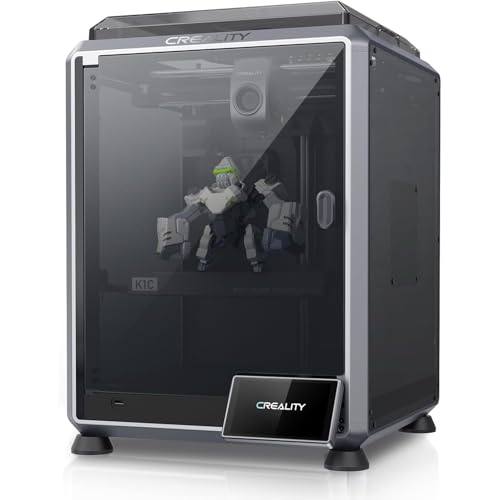
- 600mm/s CoreXY performance
- AI camera monitors prints in real time
- Tri-metal nozzle supports carbon-fiber filament
Best For: Fast, monitored printing with advanced materials
Premium Multicolor Pick

- Up to 600 mm/s printing with active flowrate compensation
- AMS 2 Pro enables multicolor and multimaterial printing
- Automatic calibration and AI failure detection simplify use
Best For: Hobbyists seeking fast, polished multicolor prints
Beginner-Friendly Value

- Prints up to 250 mm/s for efficient everyday projects
- CR Touch auto-leveling simplifies first-layer setup
- Direct-drive extrusion supports PLA, PETG, and TPU
Best For: Beginners and everyday hobby projects
Multicolor Innovation Pick

- Native four-color printing expands to up to 19 colors
- 600 mm/s speed with reduced filament and travel paths
- 49-point auto-leveling and remote app monitoring
Best For: Multicolor hobbyists wanting expansion and connectivity
Best High-Speed Starter

- Automatic leveling reduces setup work
- CoreXY design supports up to 600mm/s travel speed
- Quick-swap nozzle and remote monitoring add convenience
Best For: Hobbyists seeking fast, straightforward printing
Best for Multicolor Projects
FLASHFORGE AD5X Multicolor Printer
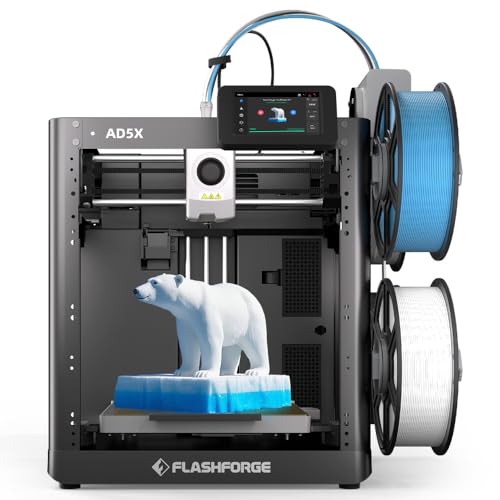
- IFS supports up to four colors
- 300°C nozzle works with several filament types
- Automatic leveling and 600mm/s speed streamline projects
Best For: Hobbyists creating colorful, varied-material models
Best for Easy Maintenance
FLASHFORGE AD5M Easy-Setup Printer

- One-click automatic calibration simplifies setup
- Tool-free nozzles change in as little as 3 seconds
- Power-loss recovery and remote monitoring support longer prints
Best For: Beginners and hobbyists prioritizing convenience
Easy-Start Pick – Bambu Lab A1
For hobbyists who want a straightforward entry into 3d printers for hobbyists, the Bambu Lab A1 emphasizes ready-to-use operation, automatic calibration, and quiet performance. Its 10,000 mm/s² acceleration and active flow rate compensation support fast, consistent printing without extensive manual setup.
Best For: Beginners, kids, and hobbyists who value simple setup and optional multicolor printing.
Pros:
- Automatic bed leveling, Z-offset, and other calibration processes reduce setup work.
- 10,000 mm/s² acceleration supports fast, precise FDM printing.
- Quiet operation, a simplified touchscreen, and a quick-swap nozzle make daily use approachable.
- Supports multicolor printing when paired with the AMS lite.
Cons:
- The AMS lite is required for multicolor printing and may need to be purchased separately.
- The supplied notes do not specify an enclosed design for advanced filament use.
The A1 is a practical choice for hobbyists who want to spend more time designing and less time calibrating. Choose the A1 Combo or add the AMS lite if multicolor projects are a priority.
Fast Materials Pick – Creality K1C
The Creality K1C is aimed at hobbyists who want high-speed printing and broader material flexibility. Its CoreXY platform reaches up to 600mm/s, while the enclosed chamber, hardened steel nozzle tip, and carbon-fiber filament support make it suitable for more demanding projects.
Best For: Speed-focused hobbyists printing PLA-CF, PETG-CF, TPU, ASA, and other supported materials.
Pros:
- CoreXY motion system supports speeds up to 600mm/s and acceleration up to 20,000mm/s².
- Hardened steel nozzle tip and enclosed chamber support carbon-fiber filaments.
- AI camera can monitor prints, create time-lapses, and alert you to errors.
- Silent mode operates at 45dB or less, with activated-carbon filtration for compounds and particles.
Cons:
- The feature set may be more than beginners need for basic PLA projects.
- Carbon-fiber printing still requires suitable filament and the printer’s supported settings.
With speed, monitoring, filtration, and composite-material capability in one enclosed machine, the K1C is a strong fit for hobbyists moving beyond basic prints. Its quick-swap nozzle also helps simplify maintenance.
Enclosed Multicolor Pick – Bambu Lab P1S
The Bambu Lab P1S gives hobbyists a ready-to-use enclosed platform with high-speed printing and automatic bed leveling. It is a versatile option for projects using common filaments and advanced materials, while an optional Bambu Lab AMS system enables multicolor or multi-material printing.
Best For: Hobbyists who want an enclosed, fast printer with room to expand into multicolor projects.
Pros:
- 500mm/s printing speed and 20,000mm/s² acceleration support rapid production.
- Fully enclosed construction improves performance with advanced filaments.
- Automatic bed leveling helps produce consistent prints with less manual adjustment.
- Setup takes about 15 minutes, and the AMS can enable printing with up to 16 colors.
Cons:
- A Bambu Lab AMS is required for multicolor or multi-material printing.
- Carbon- and glass-fiber-reinforced polymers are not recommended.
- It is heavier and larger than some open-frame hobby printers.
The P1S balances speed, enclosure benefits, and accessible setup. It is especially appealing if you want to begin with PLA or PETG and add multicolor capability later, while staying within the listed filament recommendations.
Monitoring-Focused Pick – Creality K1C AI
This Creality K1C configuration is a strong contender among 3d printers for hobbyists who want speed plus active print oversight. It combines a 600mm/s CoreXY system with one-tap calibration, a direct extruder, a tri-metal nozzle, and an AI camera for real-time monitoring.
Best For: Hobbyists who prioritize rapid printing, carbon-fiber compatibility, and camera-based monitoring.
Pros:
- CoreXY mechanics deliver up to 600mm/s printing and 20,000mm/s² acceleration.
- Direct extrusion and a tri-metal Unicorn nozzle support high-temperature and carbon-fiber filaments.
- One-tap auto calibration and vibration reduction help limit ringing or ghosting.
- AI monitoring can detect foreign objects or malfunctions, while silent mode runs at 45dB or less.
Cons:
- The printer’s advanced speed and monitoring features may be unnecessary for simple starter projects.
- Carbon-fiber printing requires compatible filament and appropriate print settings.
The K1C stands out for combining fast output with practical safeguards and material flexibility. It suits hobbyists who want to monitor longer prints and experiment with stronger filament types without giving up automatic calibration.
Premium Multicolor Pick – Bambu Lab P2S Combo
For hobbyists who want a streamlined, high-performance setup, the Bambu Lab P2S Combo combines fast FDM printing with the AMS 2 Pro for multicolor and multimaterial projects. Automatic calibration, AI failure detection, and quick-swap nozzles make it a practical choice for users who want to spend less time tuning and more time designing.
Best For: Hobbyists seeking fast, polished multicolor prints with an integrated workflow.
Pros:
- Prints at speeds up to 600 mm/s with active flowrate compensation for sharp, consistent layers.
- AMS 2 Pro supports multicolor and multimaterial printing with filament drying up to 65 °C.
- Automatic calibration, AI failure detection, and quick-swap nozzles simplify setup and maintenance.
- Adaptive airflow supports both overhang quality and heat retention for engineering materials.
Cons:
- The multicolor capability requires the Combo version with the AMS 2 Pro.
- At 47.5 pounds, it is a substantial desktop printer.
The P2S Combo is a strong fit for hobbyists who value convenience, speed, and color variety in one package. Its automated features make it approachable, while the airflow and material-handling systems leave room for more advanced projects.
Beginner-Friendly Value – Creality Ender 3 V3 SE
The Creality Ender 3 V3 SE is a practical entry point for hobbyists who want useful automation without a complicated setup. Its CR Touch auto-leveling, direct-drive Sprite extruder, flexible build plate, and power-loss recovery support everyday projects with PLA, PETG, and TPU.
Best For: Beginners and everyday hobbyists printing prototypes, models, and home projects.
Pros:
- Maximum print speed of up to 250 mm/s helps shorten project times.
- CR Touch auto-leveling reduces manual bed-calibration work.
- Sprite direct-drive extruder supports PLA, PETG, and TPU with controlled filament feeding.
- Power-loss recovery, automatic filament loading, and a flexible build plate add convenience.
Cons:
- Its 250 mm/s maximum speed is lower than the faster printers in this roundup.
- The supplied notes do not mention multicolor printing capability.
For hobbyists prioritizing straightforward operation and dependable core features, the Ender 3 V3 SE offers a balanced starting point. It is especially appealing when auto-leveling and easy material changes matter more than advanced multicolor workflows.
Multicolor Innovation Pick – Anycubic Kobra X
The Anycubic Kobra X is designed for hobbyists who want native four-color printing and the option to expand their palette. With a 260 mm cube build volume, 600 mm/s maximum speed, automatic leveling, and remote monitoring, it brings a broad feature set to creative home, school, and makerspace projects.
Best For: Multicolor-focused hobbyists who want expansion options and remote monitoring.
Pros:
- Native four-color printing can expand to up to 19 colors with four ACE 2 Pro units.
- Up to 600 mm/s printing and an 81.25% reduction in filament and travel paths can improve workflow efficiency.
- LeviQ 3.0 uses 49-point calibration for automated bed leveling.
- Supports PLA, PETG, TPU, PVA, and ASA with a 300 °C nozzle and 260 × 260 × 260 mm build volume.
Cons:
- Filament is not included and must be purchased separately.
- Expansion requires additional ACE 2 Pro units, and ACE 2 Pro is incompatible with ACE Pro.
- Its 23 × 13 × 22-inch footprint may require considerable desk space.
The Kobra X stands out for hobbyists who want color flexibility without giving up speed or material range. Its multicolor expansion path, AI monitoring, and remote connectivity make it particularly suitable for decorative models and shared creative workspaces.
Best High-Speed Starter – FLASHFORGE Adventurer 5M
For hobbyists who want fast, low-fuss printing, the FLASHFORGE Adventurer 5M combines automatic leveling, a CoreXY all-metal structure, and a 220 x 220 x 220mm build volume. Its direct-drive extruder and quick-swap nozzle make it a practical choice for everyday projects and rapid prototypes.
Best For: Hobbyists prioritizing speed, easy setup, and convenient maintenance.
Pros:
- Fully automatic bed leveling simplifies first-layer setup.
- Up to 600mm/s travel speed and 20,000mm²/s acceleration support rapid printing.
- Quick 3-second nozzle changes and a dual-sided PEI platform improve convenience.
- Remote monitoring and print adjustments are available through Flash Studio.
Cons:
- The standard nozzle is 0.4mm; other nozzle sizes are optional.
- The 220mm cubed build volume may limit especially large models.
The Adventurer 5M is a well-rounded option for 3d printers for hobbyists, especially if automatic calibration and high-speed operation matter more than an unusually large build area.
Best for Multicolor Projects – FLASHFORGE AD5X Multicolor Printer
The FLASHFORGE AD5X stands out among 3d printers for hobbyists who want multicolor capability without giving up speed. Its IFS technology supports up to four colors, while automatic leveling, a 300°C nozzle, and a 220 x 220 x 220mm build volume broaden its project range.
Best For: Hobbyists making colorful models, decorative pieces, and varied-material projects.
Pros:
- IFS technology supports printing with up to four colors.
- Automatic leveling helps deliver consistent first layers.
- Up to 600mm/s printing speed supports faster project turnaround.
- The 300°C nozzle accommodates materials including PLA, ABS, and PETG.
Cons:
- The printer weighs 30.9 pounds, making it less convenient to move.
- Its 220mm cubed build volume is not designed for very large models.
If multicolor output is central to your hobby, the AD5X offers a more specialized feature set than a basic single-color printer while retaining automatic setup and high-speed operation.
Best for Easy Maintenance – FLASHFORGE AD5M Easy-Setup Printer
The FLASHFORGE AD5M is one of the more approachable 3d printers for hobbyists who want automated calibration and simple upkeep. It pairs one-click leveling with a CoreXY all-metal structure, quick-release nozzles, a flexible double-sided PEI plate, and a 220 x 220 x 220mm print area.
Best For: Beginners and experienced hobbyists who value simple calibration, nozzle changes, and print recovery.
Pros:
- One-click automatic leveling removes the need for manual calibration tools.
- Tool-free nozzle changes take as little as 3 seconds, with multiple diameters available.
- Power-loss recovery can resume a print from the saved layer.
- Remote monitoring and network controls are supported through the Flash Maker app and Orca-Flashforge slicer.
Cons:
- The 220mm cubed build volume may not suit oversized projects.
- Optional nozzle diameters must be obtained separately from the included setup.
Choose the AD5M if maintenance and repeatable setup are your priorities. Its recovery and remote-control features are particularly useful for hobbyists who regularly run longer prints.
How We Picked the Best 3d Printers for Hobbyists
We focused on the features that matter most in everyday home printing rather than headline specifications alone. Our evaluation considered setup difficulty, automatic bed leveling, extrusion design, print-speed potential, build volume, enclosure style, software usability, material compatibility, maintenance, and overall value.
The selection includes accessible starter printers, enclosed CoreXY machines, dependable workhorses, and multicolor options. Because hobbyists have different priorities, no single model is ideal for everyone.
Quick Comparison
| Type | Best For | What to Look For |
|---|---|---|
| Open-frame starter printer | Beginners and families | Simple controls, automatic leveling, and affordable filament |
| High-speed CoreXY printer | Frequent printing | Rigid construction, input shaping, and reliable cooling |
| Enclosed printer | Advanced materials and quieter operation | Temperature control, filtration, and consistent chamber conditions |
| Multicolor printer | Decorative models and detailed projects | Color-management system, filament switching, and waste handling |
Key Buying Factors for 3d Printers for Hobbyists
Ease of Setup and Calibration
Automatic bed leveling, assisted calibration, and a dependable first-layer process can make a larger difference than maximum speed. Beginners should prioritize a printer that gets from unboxing to a successful print with minimal manual adjustment.
Speed and Print Quality
High advertised speeds are useful only when the printer can maintain accurate motion, stable extrusion, and adequate cooling. Look for a rigid frame and features such as vibration compensation or input shaping if you plan to print frequently.
Materials and Temperature Capability
PLA and PETG cover many hobby projects, while ABS, ASA, nylon, and other engineering filaments may require a heated enclosure, higher nozzle temperatures, and better ventilation. Check the hot-end and build-surface specifications before buying specialty filament.
Build Volume and Workspace
A larger build area accommodates bigger models, but it also increases the printer’s footprint and can raise heating and maintenance demands. Measure your desk, allow room for filament and cable access, and confirm that the printer fits comfortably.
Multicolor Printing
Multicolor systems add creative flexibility but typically increase print time, filament usage, and purge waste. They are worthwhile for figures, signs, and presentation models; for functional parts, a single-color printer is often simpler and more efficient.
Who Should Buy Which 3d Printers for Hobbyists?
Choose a beginner-oriented open-frame model if you are learning the basics, printing mostly PLA, or shopping for a family-friendly machine. A faster enclosed CoreXY printer is a better fit for experienced users who value throughput and want broader material support.
Choose a multicolor system if color changes are central to your projects and you accept the added setup and material overhead. If you want dependable general-purpose printing at a lower cost, prioritize automatic calibration, a direct-drive extruder, and a strong community of users over the highest claimed speed.