Remote work makes laptops easier to carry—and easier to leave exposed in shared homes, coworking spaces, hotels, and temporary offices. A laptop locking cable adds a practical layer of physical security when you need to step away.
These 10 picks cover common lock-slot standards, universal designs, keyed and combination mechanisms, and adhesive mounting options. Use the guide below to match cable compatibility and convenience to your work setup.
Best 10 Laptop Locking Cables for Remote Work Picks for 2026
Reliable Combination Security
Kensington T-Bar Standard Combination Cable Lock

- Resettable four-digit lock with 10,000 combinations
- Six-foot cut-resistant carbon-steel cable
- Works with standard Kensington slots, not Noble slots
Best For: Standard-slot laptops and office equipment when you want keyless security
Broad Slot Compatibility
StarTech 3-in-1 Universal Laptop Cable Lock

- Includes K-Slot, Nano, and Wedge lock tips
- Resettable four-digit combination
- 6.6-foot cable with rotating ball-joint head
Best For: Mixed-device households and teams needing one lock for several slot types
Keyed Everyday Protection
Kensington T-Bar Standard Keyed Laptop Lock

- Six-foot carbon-steel cable with plastic sheath
- Pivoting 10 mm lock head for thin devices
- Tubular keyed lock with hidden-pin technology
Best For: Standard-slot laptops for users who prefer a physical key
Adhesive-Plate Flexibility
Universal Laptop and Tablet Cable Lock

- Anchor plate supports slotless tablets and phones
- Standard lock fits many compatible laptops
- 6.5-foot PVC-coated twisted-steel cable
Best For: Mixed laptop, tablet, and phone setups needing flexible anchoring
Most Versatile
Kensington Universal 3-in-1 Combination Laptop Lock

- Fits standard, nano, and wedge-shaped slots
- Resettable four-digit dial with 10,000 combinations
- Six-foot carbon steel cable with protective sheath
Best For: Multi-device home offices and mixed laptop fleets
Best Keyed Portable Option
LORADAR Retractable Cable Lock Kit
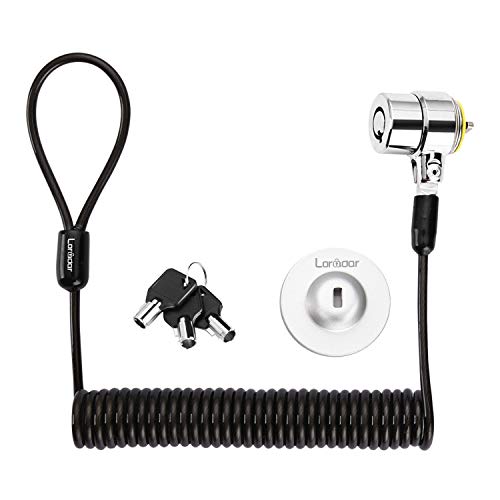
- Includes three keys and a six-foot retractable cable
- Supports compatible 3×7 mm security holes
- Adhesive anchor plate helps secure devices without a slot
Best For: Travelers who prefer a compact keyed lock
Best Smooth-Adjusting Design
AboveTEK 3-in-1 Universal Laptop Cable Lock

- Supports K-Slot, nano, and wedge slots
- Resettable four-digit combination with 10,000 codes
- 360-degree rotating head improves positioning
Best For: Mobile workers using laptops across multiple workspaces
Everyday Slot Security

- Six-foot cable with four-dial combination lock
- Up to 10,000 user-settable combinations
- Fits standard Kensington slots, not Nano or Noble wedge slots
Best For: Standard-slot laptops in home offices, libraries, and schools
Ultra-Thin Laptop Fit
Kensington NanoSaver Combination Lock

- Slim lockhead keeps ports accessible and laptops stable
- Six-foot carbon steel cable with resettable four-wheel code
- Made for select Nano-slot laptops and Kensington docks
Best For: Compatible ultra-thin HP, Lenovo, Asus laptops, and docks
Adhesive Anchor Flexibility

- Two adhesive anchor plates support multiple devices
- Six-foot galvanized steel cable with keyed operation
- Works with laptops, tablets, phones, and monitors
Best For: Devices without compatible built-in slots or shared multi-device setups
Reliable Combination Security – Kensington T-Bar Standard Combination Cable Lock
For laptop locking cables for remote work, this Kensington model offers a familiar T-Bar connection, a resettable four-digit combination, and a six-foot carbon-steel cable. It is designed for laptops and other equipment with a standard Kensington security slot, making it practical for desks, home offices, and shared workspaces.
Best For: Users with HP, Lenovo, Acer, Asus, or other devices using a standard Kensington slot who prefer a keyless combination lock.
Pros:
- Resettable four-wheel combination provides up to 10,000 possible codes.
- Push-button design supports one-handed engagement.
- Six-foot cut-resistant carbon-steel cable anchors to desks, tables, or other fixed structures.
- Can secure compatible laptops, monitors, docking stations, projectors, and other devices.
Cons:
- Not compatible with Dell or Alienware devices using a Noble lock slot.
- Some 2016-and-newer Dell laptops and tablets may require a different Kensington lock.
This is a straightforward choice for standard-slot equipment, but check your laptop’s lock-slot type before buying—especially with newer Dell models.
Broad Slot Compatibility – StarTech 3-in-1 Universal Laptop Cable Lock
This StarTech cable lock is a versatile option among laptop locking cables for remote work because it includes interchangeable tips for Kensington K-Slot, Nano, and Noble Wedge slots. Its resettable combination and 6.6-foot cable suit home offices, travel, and shared work areas where device compatibility matters.
Best For: Households or teams securing a mix of standard-slot, Nano-slot, and Dell Wedge-slot laptops.
Pros:
- Three interchangeable lock tips cover K-Slot, Nano, and Noble Wedge connections.
- Resettable four-digit combination supports up to 10,000 combinations.
- 6.6-foot vinyl-coated steel cable is tested to 88 pounds of force.
- Rotating ball-joint lock head helps with alignment and positioning on thin devices.
Cons:
- The 4.4 mm cable is narrower than some heavier-duty cable designs.
- Users must select and install the appropriate interchangeable tip for their device.
Its interchangeable heads make this one of the more adaptable picks, particularly if your remote-work setup includes laptops with different security-slot formats.
Keyed Everyday Protection – Kensington T-Bar Standard Keyed Laptop Lock
For remote workers who prefer a physical key, this Kensington keyed lock combines T-Bar technology with a six-foot carbon-steel cable. It is intended for laptops and other devices with a standard Kensington security slot, providing a familiar way to anchor equipment to a desk or other fixed structure.
Best For: Users who want keyed access and have a compatible standard Kensington slot on their laptop or equipment.
Pros:
- Pivoting 10 mm lock head is designed for access on thin laptops and devices.
- Hidden-pin tubular lock supports resistance to picking.
- Six-foot carbon-steel cable with plastic sheath helps resist cutting attempts.
- Hinged design helps reduce awkward locking and unlocking angles.
Cons:
- Does not work with newer Dell devices using a Wedge lock slot.
- Some HP EliteBook, X2 tablet, and Chromebook models use a Nano Saver slot instead.
- Requires a key rather than a combination code.
This is a solid fit for standard-slot devices when you value keyed operation, but verify the laptop’s slot specification before ordering.
Adhesive-Plate Flexibility – Universal Laptop and Tablet Cable Lock
This cable lock takes a flexible approach to laptop locking cables for remote work. It can connect directly to many laptops with standard slots, while the included adhesive anchor plate is intended for devices such as MacBooks, tablets, phones, monitors, and other equipment without a built-in lock slot.
Best For: Users securing a mix of standard-slot laptops and slotless tablets or other electronics.
Pros:
- Adhesive anchor plate extends compatibility to many slotless devices.
- Standard lock head fits most laptops with compatible standard slots.
- Six-and-a-half-foot PVC-coated twisted-steel cable supports flexible anchoring.
- 360-degree-rotating stainless-steel lock head improves positioning.
Cons:
- Slotless devices require applying the adhesive anchor plate to a hard surface.
- The notes advise some models may need an I3C adhesive security plate.
- Using the anchor plate may not suit users who do not want adhesive attached to their device.
The included plate makes this option unusually versatile, though buyers should confirm the plate requirements and consider whether adhesive attachment is acceptable for their equipment.
Most Versatile – Kensington Universal 3-in-1 Combination Laptop Lock
For shoppers comparing laptop locking cables for remote work, the Kensington Universal 3-in-1 stands out for compatibility. Its interchangeable lock tips fit standard, nano, and wedge-shaped security slots, making it useful across different laptops and devices.
Best For: Households, home offices, or teams using laptops with different security-slot types.
Pros:
- One lock supports standard, nano, and wedge-shaped slots.
- Resettable four-number dial provides 10,000 possible combinations.
- Six-foot carbon steel cable has a protective plastic sheath.
- Register & Retrieve can help recover a forgotten combination.
Cons:
- Combination lock may be less convenient than a keyed design for some users.
- Its universal adapters add components to keep track of.
With a five-year manufacturer warranty and broad slot compatibility, this is a strong choice when flexibility matters more than having the simplest possible setup.
Best Keyed Portable Option – LORADAR Retractable Cable Lock Kit
This LORADAR kit is a practical option among laptop locking cables for remote work if you prefer keys and need a compact cable for travel. It works directly with compatible 3×7 mm security holes and includes an adhesive anchor plate for devices without that opening.
Best For: Key-preferring users securing compatible laptops, monitors, tablets, or other electronics at desks and while traveling.
Pros:
- Includes three keys and a traceable number for the lock and keys.
- Retractable cable extends to about six feet and compresses for storage.
- Cut-resistant twisted steel cable has a TPU coating.
- Adhesive anchor plate expands compatibility with devices lacking a security slot.
Cons:
- Compatibility is limited for some newer Dell, HP, Acer, Lenovo, and Apple models.
- Adhesive anchor installation requires a clean surface and 48 hours for maximum stated pressure.
- Newer MacBooks are not supported according to the supplied notes.
Its retractable design and keyed operation are convenient, but check your device’s security-hole dimensions and model compatibility before ordering.
Best Smooth-Adjusting Design – AboveTEK 3-in-1 Universal Laptop Cable Lock
The AboveTEK 3-in-1 is a flexible choice for laptop locking cables for remote work, supporting K-Slot, nano, and wedge security slots. Its resettable combination and rotating head are designed for straightforward setup in offices, campuses, and travel locations.
Best For: Users who want universal slot support with a rotating lock head and customizable combination.
Pros:
- Compatible with K-Slot, nano, and wedge security slots.
- Four-digit resettable combination offers 10,000 possible codes.
- 360-degree rotating ball joint helps with positioning.
- Galvanized steel cable and zinc alloy lock head are covered by a vinyl coating.
Cons:
- Users must verify their laptop’s slot type before purchase.
- The 12-month warranty is shorter than some competing options.
This model combines broad compatibility with convenient positioning, making it a sensible pick for people who regularly move a secured laptop between workspaces.
Everyday Slot Security – Sendt Combination Lock Cable
The Sendt combination cable is a straightforward option for remote workers whose laptops have a standard Kensington security slot. Its six-foot zinc alloy cable and four-dial lock provide keyless protection with up to 10,000 user-settable combinations.
Best For: Home offices, libraries, schools, and other workspaces using laptops with standard Kensington slots.
Pros:
- Six-foot cable offers flexible attachment options.
- Four-dial combination lock supports up to 10,000 combinations.
- Design helps prevent accidental combination resets.
Cons:
- Does not fit Dell laptops, Kensington Nano slots, or Noble wedge slots.
- Requires a compatible Kensington security slot.
This is a practical, budget-oriented choice among laptop locking cables for remote work, provided your device has the required standard slot.
Ultra-Thin Laptop Fit – Kensington NanoSaver Combination Lock
The Kensington NanoSaver is designed for select ultra-thin laptops and docking stations with a Nano-sized security slot. Its slim lockhead stays flat, while the six-foot carbon steel cable and resettable four-wheel code suit flexible remote-work setups.
Best For: Select HP, Lenovo, and Asus laptops, plus compatible Kensington docking stations with Nano security slots.
Pros:
- Slim lockhead helps keep the laptop stable and leaves ports accessible.
- Four-wheel combination lock offers 10,000 possible codes.
- Pivoting, rotating cable head supports one-handed attachment and movement.
- Includes code registration support, a two-year warranty, and lifetime technical support.
Cons:
- Compatibility is limited to devices with a Nano-sized lock slot.
- Designed primarily for select HP, Lenovo, Asus devices, and Kensington docking stations.
For compatible thin laptops, this is one of the more purpose-built laptop locking cables for remote work, combining a low-profile head with convenient combination access.
Adhesive Anchor Flexibility – AboveTEK Keyed Security Cable
The AboveTEK kit is a key-operated alternative for securing laptops, tablets, phones, and monitors without relying on a built-in lock slot. It includes two adhesive anchor plates and a six-foot galvanized steel cable for flexible use in home offices, cafes, retail spaces, and other public areas.
Best For: Multiple flat-surface devices that need adhesive anchors, including laptops, tablets, smartphones, and monitors.
Pros:
- Includes two adhesive sticker and anchor-plate sets for multiple devices.
- Industrial-grade 3M adhesive is intended for most flat surfaces.
- Six-foot cut-resistant galvanized steel cable allows movement while secured.
- Key operation is designed for quick installation.
Cons:
- Adhesive anchors require a suitable flat surface and proper installation.
- Uses keys rather than a resettable combination.
- Unlike slot-based locks, it relies on attached adhesive anchor plates.
This kit stands out among laptop locking cables for remote work when device compatibility is uncertain or when you want one security system for several mobile devices.
How We Picked the Best Laptop Locking Cables for Remote Work
We focused on practical security for home offices and mobile workstations: compatibility with common laptop slots, cable length, lock type, portability, construction, and installation requirements. The selection includes Kensington T-Bar, Nano, and wedge-compatible models, along with universal locks and adhesive-anchor kits for devices without a built-in slot.
A cable lock is a theft deterrent rather than an impenetrable barrier. It works best when attached to a sturdy, fixed object and used alongside screen locks, strong passwords, device tracking, and sensible workspace habits.
Quick Comparison
| Best for | Look for | Typical advantage |
|---|---|---|
| Everyday home-office use | Resettable combination lock | No key to store or carry |
| Consistent workplace security | Keyed lock with spare keys | Simple, familiar operation |
| Mixed laptop models | 3-in-1 universal compatibility | Works across common slot styles |
| Thin laptops | Nano-compatible lock | Designed for smaller security slots |
| Tablets or slotless devices | Adhesive anchor or hardware kit | Adds a connection point where needed |
Key Buying Factors for Laptop Locking Cables for Remote Work
Check the Security-Slot Fit
Compatibility is the first priority. Standard T-Bar slots are common on many business laptops, while Nano and wedge slots appear on thinner or newer models. A universal 3-in-1 lock can be a useful choice if several people use the cable or you frequently change devices, but verify the manufacturer’s compatibility details before buying.
Choose Keyed or Combination Access
Combination locks eliminate lost-key concerns and make sharing easier, provided you can remember the code. Keyed models are often quicker to operate and may suit a dedicated desk. If you choose a keyed lock, keep a spare key in a secure location rather than attached to the laptop bag.
Consider Cable Length and Construction
A 6-foot cable is a practical middle ground for desks, tables, and shared workspaces. Measure the distance to your intended anchor point before ordering. Steel cables provide a visible physical deterrent, but no cable should be treated as a substitute for supervision or secure storage.
Account for Adhesive Anchors
Adhesive-anchor kits can secure tablets, MacBooks, monitors, and other devices without a built-in slot. They require a clean, compatible surface and careful installation. Check whether the anchor is intended to be permanent, and avoid placing it where it could interfere with ports, ventilation, or device handling.
Who Should Buy Which Laptop Locking Cables for Remote Work?
Choose a combination lock if you want convenient daily protection without carrying a key. Choose a keyed Kensington-style lock for a dedicated laptop and a straightforward routine. Choose a 3-in-1 universal model for mixed-device households, flexible desks, or shared equipment. Choose a Nano-compatible cable when your ultrathin laptop lacks a standard T-Bar slot. Choose an adhesive-anchor kit for slotless tablets, monitors, or laptops, especially when you need one locking approach across several device types.