A dependable laptop lock can add an important layer of protection in offices, classrooms, libraries, coworking spaces, and busy travel environments. The best combination laptop locking cables balance strong physical security with simple, key-free access.
We selected 10 options covering standard T-Bar, Nano, wedge-shaped, and multi-slot designs, plus different cable lengths, code systems, and use cases. Use the guide below to narrow the list to the lock that fits your device and workspace.
Best 10 Combination Laptop Locking Cables Picks for 2026
Most Versatile
AboveTEK 3-in-1 Universal Laptop Cable Lock

- Supports K-Slot, Nano, and Wedge slots
- Resettable four-digit combination
- Rotating head and six included spacers
Best For: Mixed-device workplaces, campuses, and travel
Best Simple K-Slot Pick
Sendt Black Laptop Combination Lock

- Six-foot cable for desks and fixed structures
- Four-dial resettable combination
- Not compatible with Dell, Nano, or Wedge slots
Best For: Standard Kensington K-Slot laptops in schools and offices
Best Established Design
Kensington T-Bar Combination Cable Lock

- Six-foot carbon steel cable
- Push-button engagement and four-wheel resettable code
- Works with standard Kensington slots
Best For: Standard K-Slot laptops and compatible office electronics
Best Universal Travel Option
StarTech 3-in-1 Laptop Cable Lock

- Interchangeable K-Slot, Nano, and Wedge tips
- 6.6-foot cable with resettable four-digit code
- Rotating head and hook-and-loop strap
Best For: Travelers and mixed-device laptop fleets
Slim Standard-Slot Security
Kensington Slim T-Bar Combination Lock

- Low-profile head keeps thin laptops flat
- Resettable four-wheel code with 10,000 combinations
- Six-foot cut-resistant carbon steel cable
Best For: Thin laptops with standard Kensington lock slots
Flexible Device Coverage

- Supports standard-slot laptops and many electronics
- Anchor plate covers tablets and phones without slots
- Long 6.5-foot twisted steel cable
Best For: Mixed-device setups needing broad compatibility
Nano-Slot Protection
Kensington Four-Digit Combination Lock

- Made for Nano-sized laptop security slots
- Slim head supports a flat laptop setup
- Resettable code and five-foot carbon steel cable
Best For: Thin laptops with Kensington Nano slots
Best Value Two-Pack
AOMGD 6-Foot Combination Laptop Locks
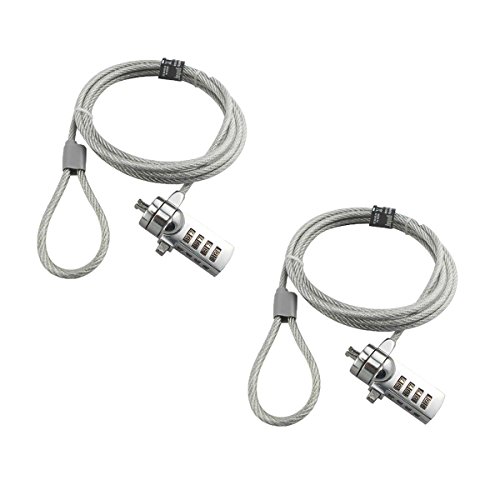
- Two locks included
- Resettable four-digit code
- 6-foot cut-resistant cable
Best For: Securing two compatible laptops on a budget
Best for Nano Slots
Kensington NanoSaver Combination Lock

- Slim, port-friendly lockhead
- 10,000 resettable codes
- Two-year warranty and support
Best For: Compatible ultra-thin laptops with nano slots
Most Versatile Fit
Kensington Universal 3-in-1 Laptop Lock

- Fits three slot types
- Rotating head supports easy locking
- 6-foot carbon-steel cable
Best For: Mixed-device offices with different security slots
Most Versatile – AboveTEK 3-in-1 Universal Laptop Cable Lock
The AboveTEK is a flexible choice among combination laptop locking cables because it supports K-Slot, Nano, and Wedge security slots. Its resettable four-digit lock, rotating head, and included spacers make it practical for mixed-device workplaces, campuses, and travel.
Best For: Users securing laptops with different types of security slots.
Pros:
- Works with K-Slot, Nano, and Wedge slots.
- Resettable four-digit combination with up to 10,000 codes.
- 360-degree rotating ball joint and six secure spacers improve positioning flexibility.
- Includes a 12-month warranty.
Cons:
- You should confirm your laptop’s slot type before purchasing.
- Its universal design may be more than needed for a single standard K-Slot device.
Choose this model when broad compatibility matters more than a basic, single-slot design. The galvanized steel cable, zinc alloy head, and vinyl coating provide a durable everyday security setup.
Best Simple K-Slot Pick – Sendt Black Laptop Combination Lock
The Sendt Black Notebook/Laptop Combination Lock is a straightforward option for devices with a Kensington security slot. Among combination laptop locking cables, it stands out for its six-foot length, four-dial resettable code, and design intended to help prevent accidental combination changes.
Best For: Students, library users, and office users with standard Kensington K-Slot laptops.
Pros:
- Six-foot cable can anchor to a desk or other fixed structure.
- Four-dial lock offers up to 10,000 user-settable combinations.
- Zinc alloy construction and a one-year limited warranty.
Cons:
- Does not fit Dell laptops, Kensington Nano slots, or Noble Wedge slots.
- Compatibility is limited to devices with a Kensington security slot.
This is a sensible budget-style choice when your laptop has a standard Kensington slot and you want a longer cable without keys. Check the slot specification carefully, especially for Dell systems.
Best Established Design – Kensington T-Bar Combination Cable Lock
The Kensington K64673AM is a traditional T-Bar option for standard Kensington security slots. This combination laptop locking cable pairs a six-foot carbon steel cable with a resettable four-wheel code and push-button engagement for quick, one-handed attachment.
Best For: Users with standard Kensington-slot laptops and other compatible electronics.
Pros:
- Six-foot cut-resistant carbon steel cable anchors to fixed structures.
- Resettable four-wheel combination provides up to 10,000 codes.
- Push-button design supports one-handed engagement.
- Can secure laptops, monitors, projectors, docking stations, and other devices with a standard Kensington slot.
Cons:
- Not compatible with Dell or Alienware systems that use different slots.
- May not work with some 2016-and-newer Dell laptops and tablets using Noble slots.
The K64673AM is a strong fit if you specifically need a standard T-Bar lock from Kensington. Verify the device slot before ordering, particularly for Dell, Alienware, and newer ultrathin systems.
Best Universal Travel Option – StarTech 3-in-1 Laptop Cable Lock
The StarTech LTULOCK4D is one of the more adaptable combination laptop locking cables for users who move between devices. Its interchangeable tips support K-Slot, Nano, and Noble Wedge slots, while the 6.6-foot vinyl-coated steel cable and rotating lock head suit desks, travel, and varied setups.
Best For: Travelers and IT users securing laptops with different slot standards.
Pros:
- Includes K-Slot, Nano, and Wedge lock tips.
- Resettable four-digit combination supports up to 10,000 codes.
- 6.6-foot, 4.4 mm vinyl-coated steel cable tested to 88 pounds of force.
- 360-degree ball joint and included hook-and-loop strap aid positioning and cable management.
Cons:
- Interchangeable tips require selecting the correct head for each device.
- The product is intended for indoor and outdoor use but is still a physical deterrent rather than a guarantee against theft.
This model is especially useful for mixed fleets and mobile workstations. Its broad slot compatibility and 2-meter cable offer practical flexibility, while the two-year warranty adds support for regular use.
Slim Standard-Slot Security – Kensington Slim T-Bar Combination Lock
For thin-and-light laptops with a standard Kensington slot, this combination laptop locking cable offers a low-profile way to secure your device in offices, cafés, and other shared spaces. Its slim head helps the laptop remain flat while the six-foot carbon steel cable anchors to a fixed object.
Best For: Thin HP, Lenovo, Acer, Asus, and other laptops with a standard Kensington lock slot.
Pros:
- Resettable four-wheel code provides 10,000 possible combinations.
- Slim lock head helps ultra-thin and 2-in-1 laptops lie flat.
- Pivoting head and rotating cable support flexible positioning.
- Six-foot cut-resistant carbon steel cable anchors to desks and tables.
Cons:
- Not compatible with Dell or Alienware devices noted for the K68008WW model.
- Not intended for Kensington Nano-sized slots; a different model is specified.
This is a strong choice when your laptop has the standard T-Bar slot and you want combination access instead of carrying keys. Confirm the slot type before purchasing.
Flexible Device Coverage – Universal Laptop Cable Lock
This combination laptop locking cables alternative is designed for devices with standard lock slots and tablets or phones that need an adhesive anchor plate. The 6.5-foot twisted steel cable can loop around a fixed object, while the rotating stainless-steel lock head supports flexible positioning.
Best For: Users securing a mix of standard-slot laptops and devices without built-in security slots.
Pros:
- Works with many standard-slot laptops, monitors, projectors, and other electronics.
- Anchor plate extends compatibility to tablets, phones, and devices without standard slots.
- 6.5-foot cut-resistant twisted steel cable provides extra reach.
- 360-degree rotating lock head supports easier attachment.
Cons:
- Devices without a standard slot require use of the adhesive anchor plate.
- The supplied notes do not specify a resettable combination mechanism, so this may not suit buyers specifically seeking a number-code lock.
- Adhesive plate compatibility should be considered before purchase.
This option stands out for mixed-device environments because its anchor-plate approach can cover tablets and phones as well as standard-slot laptops. Review the installation requirements carefully if you prefer not to attach an adhesive plate.
Nano-Slot Protection – Kensington Four-Digit Combination Lock
Designed for thin laptops with Nano-sized security slots, this combination laptop locking cable pairs a slim lock head with a five-foot carbon steel cable. Its resettable four-digit code and pivoting design make it practical for shared workspaces, cafés, and travel.
Best For: Thin laptops that use a Kensington Nano-sized security slot.
Pros:
- Slim head helps compatible laptops lie flat and stable.
- Resettable four-wheel code offers 10,000 possible combinations.
- Five-foot carbon steel cable resists cutting attempts and anchors to fixed points.
- Pivoting head and rotating anchor improve access near the lock slot.
Cons:
- Compatible with Nano-sized slots rather than standard Kensington slots.
- Five-foot cable is shorter than some six-foot-plus alternatives.
- Designed for compatible laptops and does not list phone compatibility.
Choose this model when slot dimensions are the deciding factor. Its low-profile head and combination access suit thin Nano-slot laptops, but verify your device uses the Nano format before ordering.
Best Value Two-Pack – AOMGD 6-Foot Combination Laptop Locks
If you need combination laptop locking cables for more than one computer, the AOMGD two-pack offers two keyless locks with resettable four-digit codes. Each 6-foot cable is designed for compatible 3×7mm keyholes, so confirm your laptop’s slot before buying.
Best For: Households, classrooms, or offices securing two compatible laptops.
Pros:
- Two locks are included in one pack.
- Four-digit resettable combinations provide 10,000 possible codes without keys.
- Six-foot galvanized steel and hardened stainless-steel construction offers cut resistance.
Cons:
- Compatibility is limited, and several Lenovo, Acer, Dell, and Apple models are specifically excluded.
- The combination cannot be reset after the new code is saved, so it must be recorded carefully.
This is a practical budget-oriented choice when you need two locks and your devices use the supported 3×7mm keyhole. Its broad compatibility exclusions make checking the laptop port especially important.
Best for Nano Slots – Kensington NanoSaver Combination Lock
Among combination laptop locking cables, the Kensington NanoSaver is tailored to select ultra-thin HP, Lenovo, and Asus laptops with a nano-sized security slot. Its slim lockhead is designed to keep the laptop flat while leaving ports accessible.
Best For: Users with a compatible nano lock slot who want a slim, port-friendly Kensington lock.
Pros:
- Resettable four-wheel combination offers 10,000 possible codes.
- Slim lockhead helps preserve a stable, flat laptop position and avoids blocking ports.
- Six-foot carbon-steel cable, code registration, a two-year warranty, and lifetime technical support add convenience.
Cons:
- It is compatible only with select laptops and Kensington docking stations that have a nano-sized slot.
- The package includes one lock rather than a multi-pack.
The NanoSaver makes the most sense for compatible thin laptops where a bulky lockhead could interfere with ports or stability. Verify the device specification for a nano slot before purchasing.
Most Versatile Fit – Kensington Universal 3-in-1 Laptop Lock
For shoppers comparing combination laptop locking cables across different computers, Kensington’s universal 3-in-1 design is built to fit standard T-bar, nano, and wedge-shaped security slots. Its interchangeable-style tip approach can simplify use across supported Dell, HP, and Lenovo devices.
Best For: Offices or households securing laptops with different security-slot formats.
Pros:
- One lock tip supports standard, nano, and wedge-shaped security slots.
- 360-degree rotatable head enables one-handed locking from different angles without blocking ports.
- Six-foot cut-resistant carbon-steel cable and resettable four-digit dial provide keyless security.
Cons:
- Device fit should still be confirmed because slot compatibility varies by laptop.
- It is a single-lock package and weighs more than the NanoSaver listed here.
This is the most flexible option of the three when multiple slot standards are involved. The universal tip and rotating head are particularly useful in shared workspaces, while code registration helps with forgotten combinations.
How We Picked the Best Combination Laptop Locking Cables
We focused on the practical details that determine whether a laptop lock will work reliably in daily use. Our comparison considers security-slot compatibility, cable construction, locking mechanism, resettable combination features, cable length, portability, and compatibility with laptops, monitors, tablets, and other valuable equipment.
Universal models receive particular attention because many newer laptops use Nano or wedge-shaped slots rather than the traditional T-Bar design. We also included straightforward single-slot locks and multipacks for buyers securing several devices.
Quick Comparison
| What to Compare | Best For |
|---|---|
| 3-in-1 compatibility | Mixed fleets or devices with different security slots |
| Standard T-Bar fit | Many business laptops, monitors, and docking equipment |
| Nano or wedge fit | Thin modern laptops and select ultraportables |
| Resettable combination | Shared offices and key-free access |
| Longer cable | Large desks, fixed furniture, and flexible positioning |
| Multipack | Classrooms, labs, and multi-device deployments |
Key Buying Factors for Combination Laptop Locking Cables
Check the Security Slot First
Slot compatibility is the most important consideration. A lock designed for a standard T-Bar opening may not fit a Nano or wedge slot. Inspect the laptop’s specifications or the physical port before ordering. A 3-in-1 lock is often the safest choice when the device model is unknown or several laptop types are involved.
Choose the Right Cable Length and Build
A six-foot cable is a common middle ground: it can reach a desk leg or other fixed anchor without creating excessive slack. Shorter cables are easier to carry, while longer ones offer more positioning flexibility. Look for a coated steel cable that resists cutting and protects nearby surfaces from scratches.
Consider the Combination System
Four-digit resettable combinations eliminate the need to carry a separate key and make it easier to manage shared equipment. Choose a lock with clear, smooth-moving dials and store the selected code securely. Combination locks deter opportunistic theft, but they work best when attached to a substantial, immovable anchor.
Think Beyond the Laptop
Some locks can secure monitors, tablets, docking stations, or other equipment with compatible slots. If you are protecting a mixed workstation, universal compatibility may be more valuable than the lowest purchase price.
Who Should Buy Which Combination Laptop Locking Cables?
- Choose a universal 3-in-1 model if you manage multiple laptop brands or are unsure which slot your device uses.
- Choose a standard T-Bar lock for conventional business laptops, desktop monitors, and established office setups.
- Choose a Nano or wedge-compatible lock for thin laptops that lack a traditional security slot.
- Choose a multipack for classrooms, libraries, training rooms, and offices securing several computers.
- Choose a compact, portable cable if you frequently work in cafes, shared offices, or temporary workspaces.
Whichever combination laptop locking cable you select, confirm the slot type, set a memorable code, and anchor the cable to a fixed object that cannot be easily moved.