A laptop mount can free valuable surface area while raising your screen to a more comfortable viewing height. For compact workstations, the right arm-and-tray design turns unused desk-edge space into a flexible, ergonomic setup.
We selected 10 laptop mounts for small desks that balance footprint, adjustability, weight capacity, and compatibility with common laptops and monitors. Use the guide below to narrow the choices by desk type, device size, and daily workflow.
Best 10 Laptop Mounts for Small Desks Picks for 2026
Best 2-in-1 Desk Space Saver
Adjustable Laptop and Monitor Arm

- Ventilated 14-by-12-inch laptop tray
- Supports 13- to 32-inch VESA monitors
- C-clamp and grommet mounting options
Best For: Small workstations that switch between laptop and monitor setups
Best for Larger Laptops
WALI Adjustable Laptop Desk Mount

- Fits laptops up to 17 inches and 22 pounds
- Ventilated 14-by-11-inch tray
- C-clamp and grommet installation options
Best For: Large-laptop users seeking adjustable, drill-free mounting
Best Cooling Design
HUANUO 2-in-1 Laptop Desk Mount

- Tray has 240 ventilation holes
- Removable tray supports compatible monitors
- Includes cable clips and dual mounting options
Best For: Compact desks where cooling and device flexibility matter
Best Articulation Range

- Wide tilt, swivel, and rotation adjustment
- Fits laptops up to 17 inches and 22 pounds
- C-clamp and grommet mounts included
Best For: Users who need extensive positioning flexibility on a small desk
Best Heavy-Duty Pick
WALI 2-in-1 Laptop and Monitor Mount

- Supports laptops up to 17 inches and monitors up to 34 inches
- Offers full-motion adjustment with up to 17.3 inches of height
- Clamp and grommet mounting suit desks up to 2.76 inches thick
Best For: Small desks needing a sturdy laptop-or-monitor mount
Best Secure Tray Design
MOUNT PRO 2-in-1 Laptop Arm Mount

- Ventilated tray fits laptops up to 17 inches
- Anti-slip pads and Velcro straps help secure the laptop
- Switches to monitors up to 32 inches when the tray is removed
Best For: Small desks needing a stable, upgradeable laptop mount
Flexible Space Saver
Suptek Single Laptop Desk Mount

- Detachable ventilated tray for laptops up to 15.6 inches
- Also supports compatible 13-27-inch VESA monitors
- C-clamp and grommet mounting options
Best For: Small desks needing a laptop-or-monitor mount
Large-Screen Flexibility

- Fits laptops up to 17 inches
- Supports compatible monitors up to 34 inches
- Secure ventilated tray with anti-slip pads and straps
Best For: Multitaskers wanting laptop and large-monitor flexibility
Quick-Swap Workstation
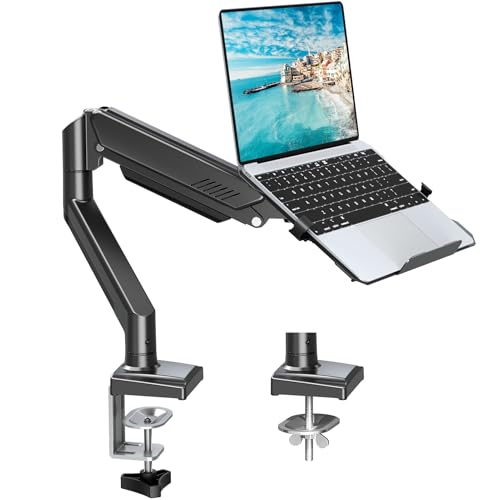
- Snap-in tray with locking tab for quick laptop changes
- Supports 14-17-inch laptops and monitors up to 32 inches
- Wide adjustment range with clamp or grommet mounting
Best For: Users who frequently switch between laptop and monitor modes
Best 2-in-1 Desk Space Saver – Adjustable Laptop and Monitor Arm
For small desks that need to support both a laptop and an external display, this HUANUO mount combines a ventilated laptop tray with a VESA-compatible monitor arm. Its adjustable design lifts equipment off the desktop while retaining flexible positioning.
Best For: Small workstations that alternate between laptop and monitor use.
Pros:
- Supports laptops on a 14-by-12-inch ventilated tray and monitors from 13 to 32 inches.
- Offers tilt, swivel, rotation, height adjustment, and an arm extension up to 16 inches.
- Includes C-clamp and grommet mounting options plus integrated cable management.
Cons:
- Mounting hardware is intended for wooden desks.
- Installation requires careful screw tightening and following the included instructions.
This is a versatile choice when a small desk needs one mount for two device types. Check your monitor’s VESA pattern, size, and weight before buying.
Best for Larger Laptops – WALI Adjustable Laptop Desk Mount
This WALI mount is a practical option among laptop mounts for small desks, supporting laptops up to 17 inches while freeing the surface below for accessories. The tray is ventilated, and the arm provides several positioning adjustments for a more comfortable setup.
Best For: Users with larger laptops who want a height-adjustable, drill-free desk mount.
Pros:
- Supports laptops or notebooks up to 17 inches and 22 pounds.
- Includes venting holes, a 14-by-11-inch tray, and a raised front lip.
- Provides C-clamp and grommet mounting, with up to 16 inches of height adjustment.
Cons:
- Its tilt range is limited to plus or minus 15 degrees.
- The grommet mount fits desks up to 2.2 inches thick, less than the C-clamp’s 4-inch limit.
With broad laptop compatibility and dual mounting options, this model suits compact desks where installation flexibility matters. Its detachable plates also allow use with a compatible monitor.
Best Cooling Design – HUANUO 2-in-1 Laptop Desk Mount
For compact work areas where airflow and cable control are priorities, this HUANUO mount uses a 240-hole ventilated tray and a space-saving articulated arm. The tray can also be removed for use with a compatible monitor.
Best For: Small desks that need a laptop mount with enhanced ventilation and monitor flexibility.
Pros:
- Fits laptops up to 17 inches and supports up to 22 pounds.
- Removable tray converts the mount for 15- to 32-inch VESA monitors.
- Provides tilt, swivel, rotation, cable clips, and C-clamp or grommet installation.
Cons:
- Both mounting options are specified for wood desks.
- Monitor compatibility requires a 75-by-75mm or 100-by-100mm VESA pattern.
The highly ventilated tray makes this a strong fit for users concerned about laptop airflow, while the removable design adds useful longevity. Confirm your desk material and device dimensions before installation.
Best Articulation Range – VIVO Single Laptop Desk Mount
The VIVO STAND-V001L is a flexible choice for laptop mounts for small desks, combining a ventilated tray with a long center pole and articulating arm. It mounts without drilling and can also support a compatible monitor when your setup changes.
Best For: Users who want extensive tilt, height, and rotation adjustments on a compact desk.
Pros:
- Fits laptops up to 17 inches and supports up to 22 pounds.
- Offers plus or minus 90-degree tilt, 180-degree swivel, and 360-degree rotation.
- Includes C-clamp and grommet mounting, cable clips, and a 17-inch center pole.
Cons:
- The grommet mount is limited to desks up to 3 inches thick.
- Monitor use requires a compatible monitor and mounting arrangement.
This model stands out for its broad articulation range and generous height adjustment, making it useful when several viewing positions are needed. Its ventilated tray and drill-free mounting keep the small-desk setup practical.
Best Heavy-Duty Pick – WALI 2-in-1 Laptop and Monitor Mount
For shoppers comparing laptop mounts for small desks, the WALI stands out when you want one arm that can handle either a laptop or a larger monitor. It supports notebooks up to 17 inches and monitors up to 34 inches, while the clamp or grommet base helps free valuable desktop space.
Best For: Small-desk users who want a higher-capacity mount that can switch between laptop and monitor setups.
Pros:
- Supports laptops up to 22 pounds and monitors up to 26.4 pounds.
- Full-motion adjustment includes tilt, swivel, rotation, and up to 17.3 inches of height adjustment.
- Ventilated, detachable tray helps promote airflow around the laptop.
- Includes clamp and grommet mounting options for desks from 0.39 to 2.76 inches thick.
Cons:
- Its higher weight capacity and 6.4-pound construction may be more than needed for a lightweight laptop-only setup.
- Monitor compatibility starts at 17 inches, so it is less suited to smaller displays.
The WALI is a strong choice when stability and versatility matter more than having the smallest possible arm. Its broad adjustment range and high capacity make it especially useful for a laptop-plus-monitor workspace.
Best Cable-Managed Option – UPGRAVITY Adjustable Laptop Desk Mount
The UPGRAVITY is a practical option for laptop mounts for small desks where tidy cables and flexible positioning are priorities. Its vented tray supports notebooks up to 17 inches, and the articulated arm can be adjusted along the center pole to position the laptop where you need it.
Best For: Compact workstations that need organized cables and a flexible laptop-only mounting setup.
Pros:
- Supports laptops up to 17 inches and monitors up to 32 inches with VESA 75×75 or 100×100 mounting.
- Three-joint arm provides tilt, swivel, and 360-degree rotation.
- Detachable cable clips help route wires along the arm and center pole.
- Offers clamp and grommet installation options with included mounting hardware.
Cons:
- Its 17.6-pound weight limit is lower than the WALI model’s capacity.
- The clamp is specified for desks up to 1.97 inches thick, while the grommet hole supports up to 2.36 inches.
Choose the UPGRAVITY if cable organization is a major part of your small-desk setup. It provides useful positioning flexibility and a ventilated tray without taking up the footprint of a traditional laptop stand.
Best Secure Tray Design – MOUNT PRO 2-in-1 Laptop Arm Mount
For laptop mounts for small desks, the MOUNT PRO combines a space-saving arm with a ventilated tray designed to keep a notebook in place. The tray supports laptops up to 17 inches, while removing it creates room for a 13- to 32-inch VESA monitor.
Best For: Users who want a secure, ventilated laptop tray and the option to switch to a monitor later.
Pros:
- Supports laptops up to 17 inches and monitors up to 32 inches.
- Tray includes four anti-slip pads and Velcro straps for added laptop stability.
- Full-motion arm offers -45 to +90 degrees of tilt, 180-degree swivel, and 360-degree rotation.
- Built-in cable guides and clamp or grommet mounting help maintain a tidy desk.
Cons:
- Maximum monitor support is 19.8 pounds, depending on the display and setup.
- The product notes caution against rotating the laptop tray to a vertical position.
The MOUNT PRO is a well-rounded pick for users who value tray security and cooling airflow. Its removable tray also gives the mount useful long-term flexibility for a small desk that may eventually use a monitor.
Flexible Space Saver – Suptek Single Laptop Desk Mount
For shoppers comparing laptop mounts for small desks, the Suptek Single Laptop Desk Mount combines a detachable laptop tray with a fully adjustable arm. Its C-clamp or grommet installation can help elevate a notebook while keeping more of the desktop available for other essentials.
Best For: Small workspaces that need a flexible laptop-or-monitor mounting option.
Pros:
- Detachable 400 x 300mm tray supports notebooks up to 15.6 inches and includes ventilation holes and a retaining lip.
- Can hold a compatible 13-27-inch VESA monitor when the tray is removed.
- Offers 180-degree arm swiveling, 360-degree screen rotation, ±90-degree tilt, and 400mm height adjustment.
- Includes both C-clamp and grommet mounting options for desks 10-80mm thick.
Cons:
- The laptop tray is specified for notebooks up to 15.6 inches, rather than the full 17-inch range mentioned for the arm.
- Monitor use requires a compatible VESA 75x75mm or 100x100mm display.
This is a practical choice when you want one mount that can switch between a laptop and monitor. Its broad adjustment range and two mounting methods add flexibility, while the tray’s size makes it best suited to smaller notebooks.
Large-Screen Flexibility – HUANUO 2-in-1 Laptop Mount
The HUANUO 2-in-1 is a strong contender among laptop mounts for small desks because it raises either a notebook or a monitor and leaves the work surface less crowded. Its tray is sized for laptops up to 17 inches, while removing the tray makes room for compatible monitors up to 34 inches.
Best For: Multitaskers who want a larger monitor-capable mount with a secure laptop tray.
Pros:
- Supports laptops up to 17 inches or VESA monitors from 13 to 34 inches, depending on the configuration.
- Ventilated 11.8 x 10.4-inch tray includes six anti-slip pads, a widened bottom guard, and Velcro straps.
- Provides ±45-degree tilt, ±90-degree swivel, 360-degree rotation, and an arm extension up to 18.1 inches.
- Comes with C-clamp and grommet mounting options and a two-year manufacturer warranty.
Cons:
- Its larger monitor range may be more capability than needed for a simple laptop-only setup.
- Monitor weight capacity varies by supported screen size, from 4.85 to 19.8 pounds.
Choose this model if you want room to grow from a laptop setup to a larger external display. The secure, ventilated tray is particularly useful for a 17-inch notebook, and the pre-assembled mounting components are designed to simplify setup.
Quick-Swap Workstation – MOUNTUP 2-in-1 Laptop Stand
The MOUNTUP 2-in-1 stand is designed for people comparing laptop mounts for small desks who frequently move between laptop and monitor modes. Its snap-in tray, locking tab, broad movement range, and cable management help create a cleaner setup without drilling.
Best For: Busy users who want quick laptop removal and frequent position adjustments.
Pros:
- Tray design makes it easy to snap a laptop in or out, while the locking tab helps keep it stable.
- Supports 14-17-inch laptops or monitors up to 32 inches with a stated 2.2-22-pound capacity.
- Offers +90/-45-degree tilt, ±90-degree swivel, ±180-degree rotation, and up to 21.2 inches of extension.
- Uses either a C-clamp or grommet mount for desks 0.39-2.76 inches thick and includes cable management.
Cons:
- The supplied specifications do not state the maximum height adjustment amount.
- Its listed laptop range begins at 14 inches, so smaller notebooks may not be the intended fit.
This mount stands out for a quick-swap workflow rather than simply holding a laptop in place. It is a good fit for compact desks where you want to reclaim space, change viewing angles often, and keep cables more organized.
How We Picked the Best Laptop Mounts for Small Desks
We focused on mounts that attach directly to a desk with a C-clamp or similar space-saving hardware. Each option was compared for laptop and monitor compatibility, stated weight capacity, arm adjustability, tray dimensions, and the amount of desk space required. We also considered whether a mount supports a laptop alone, a monitor alone, or both devices through a 2-in-1 design.
Because compact desks leave little room for trial and error, stability and installation flexibility matter as much as maximum height. A mount is only useful if your desk can support its clamp, the tray fits your laptop, and the arm can move without hitting a wall, shelf, or nearby monitor.
Quick Comparison
- Best for broad compatibility: Choose a 2-in-1 arm rated for both a laptop and a VESA monitor.
- Best for very limited space: Look for a compact single-arm C-clamp with a foldable or removable tray.
- Best for larger laptops: Prioritize a tray rated for 17-inch notebooks and verify the actual tray dimensions.
- Best for heavier equipment: Select a model with a higher stated load limit and a reinforced desk clamp.
- Best for frequent repositioning: Choose a full-motion arm with tilt, swivel, height, and extension adjustment.
Key Buying Factors for Laptop Mounts for Small Desks
Desk Thickness and Clamp Clearance
Measure the thickness of your desktop and check the mount’s clamp range before ordering. Leave clearance behind the desk for tightening the clamp and moving the arm. Some desks have a rear lip, cable tray, or wall that can prevent a secure installation.
Device Size and Weight
Screen size alone does not guarantee fit. Compare your laptop’s width, depth, and weight with the tray’s usable surface and load rating. If you plan to mount a monitor, confirm its VESA pattern and include the monitor’s weight without exceeding the arm’s capacity.
Range of Motion
Height adjustment helps bring the display closer to eye level, while tilt controls reduce glare. Swivel and extension range are especially valuable on small desks because they let you push the laptop aside when writing, drawing, or using another screen.
Stability and Cable Management
Heavier laptops and extended arms create more leverage against the desk. A broad clamp, sturdy joints, and sensible positioning improve stability. Built-in cable channels can also prevent charging and display cables from pulling against the arm.
Who Should Buy Which Laptop Mounts for Small Desks?
Choose a basic single-laptop mount if you mainly want to lift one notebook and reclaim desk space. It is usually the simplest and most affordable solution for study areas, bedrooms, and narrow home-office desks.
Choose a 2-in-1 laptop-and-monitor mount if you want a dual-screen setup without using two separate desk stands. Check total load capacity carefully, especially when both devices are mounted at full extension.
Choose a highly adjustable arm if multiple people use the workstation or you regularly switch between typing, video calls, and standing or seated work. For fixed setups, a shorter, sturdier arm may be preferable to maximum articulation.
Before buying, measure the desk, laptop, and available rear clearance. Those three checks will usually determine which of these Laptop Mounts for Small Desks offers the best balance of usable movement, stability, and saved workspace.