A fixed monitor wall mount can free up valuable desk space, reduce cable clutter, and give a workstation, RV, or entertainment area a cleaner appearance. The right choice depends on more than screen size: VESA compatibility, wall construction, weight capacity, and installation clearance all matter.
We compared 10 fixed and low-profile monitor wall mounts across compact screens, larger monitors, small TVs, and space-constrained setups. Use the guide below to narrow the list by fit, adjustability, and installation needs.
Best 10 Fixed Monitor Wall Mounts Picks for 2026
Best Ultra-Slim Fixed Mount
Compact 14–42-Inch Wall Bracket
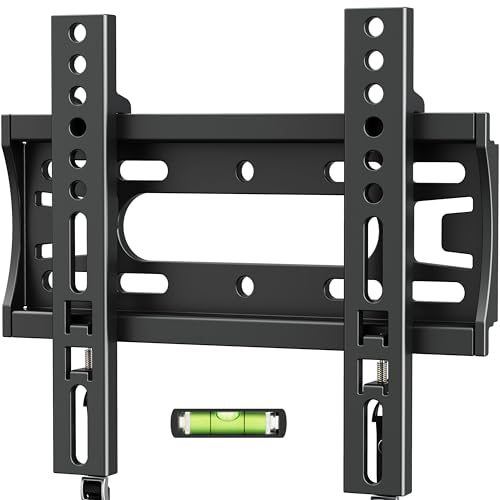
- 0.6-inch low-profile design
- Supports up to 66 pounds
- Includes level and installation hardware
Best For: Small rooms, RVs, bedrooms, and kitchens
Best Flexible Wall Mount
WALI 13–32-Inch Articulating Mount

- Tilts, swivels, and rotates
- Extends 15 inches from the wall
- Supports up to 33 pounds
Best For: Adjustable office, bedroom, and gaming setups
Best Adjustable Monitor Mount
VIVO 17–32-Inch Single-Monitor Bracket

- Includes height adjustment
- Rotates between portrait and landscape
- Supports up to 17.6 pounds
Best For: Single-monitor ergonomic workstations
Most Adjustable Monitor Arm
MOUNT PRO Single Monitor Wall Mount

- Full-motion adjustment and 21.6-inch extension
- Supports 13- to 32-inch monitors
- Includes cable management and lifetime support
Best For: Flexible home-office, gaming, and productivity setups
Wide-Compatibility Value Pick

- Fits 14- to 42-inch displays
- Supports VESA up to 200x200mm
- 0.6-inch low-profile steel design
Best For: Wide-ranging small TV and monitor installations
Best Ultra-Slim RV Monitor Mount
Nuyoah 14–27-Inch Fixed Wall Mount

- Fits 14–27-inch screens up to 33 pounds
- 0.39-inch low-profile design
- Supports 75x75mm and 100x100mm VESA
Best For: Small monitors and TVs in RVs, offices, and classrooms
Best Versatile Small-Screen Mount
Amazon Basics 12–40-Inch Fixed TV Wall Mount
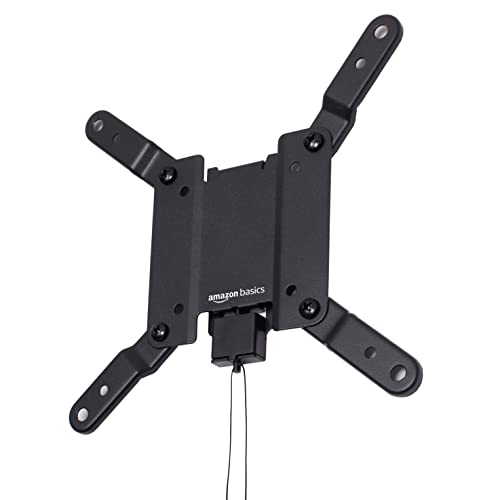
- Fits 12–40-inch displays up to 40 pounds
- Supports VESA 75x75mm through 200x200mm
- Includes template and mounting hardware
Best For: Small TVs or monitors with varied VESA patterns
Best Compact RV Mount
TETVIK 14–24-Inch Fixed Monitor Wall Mount

- Fits 14–24-inch displays up to 30 pounds
- Slim 0.5-inch wall profile
- Supports 75x75mm and 100x100mm VESA
Best For: Small displays in RVs, corners, and offices
Best Ultra-Slim Fixed Mount – Compact 14–42-Inch Wall Bracket
For shoppers comparing fixed monitor wall mounts for a small room, RV, bedroom, or kitchen, the IWORBOARD offers a notably slim installation. It supports 14- to 42-inch screens up to 66 pounds, with VESA compatibility up to 200x200mm.
Best For: Small spaces and fixed TV or monitor installations where a nearly flush profile matters.
Pros:
- Holds the screen just 0.6 inches from the wall.
- Supports screens from 14 to 42 inches and up to 66 pounds.
- Includes a bubble level, mounting hardware, and coded instructions.
- Backed by 10-year replacement support and US-based customer service.
Cons:
- Fixed design does not allow tilting, swiveling, or repositioning.
- Wood-stud installation requires direct fastening with wood screws rather than anchors.
This is a practical choice when the screen position is already decided and a low-profile appearance is the priority. Confirm the VESA pattern and wall structure before installation.
Best Flexible Wall Mount – WALI 13–32-Inch Articulating Mount
Although it is not a fixed bracket, the WALI 1330LM is worth considering when comparing fixed monitor wall mounts and deciding whether adjustable positioning is more useful. It fits 13- to 32-inch displays up to 33 pounds and supports 75x75mm and 100x100mm VESA patterns.
Best For: Offices, bedrooms, or gaming spaces where viewing-angle adjustment is more important than a permanently fixed position.
Pros:
- Offers ±15° tilt, 180° swivel, and 360° rotation.
- Extends up to 15 inches and retracts to 2 inches from the wall.
- Supports wood studs, brick, and concrete walls.
- Includes mounting hardware and a 10-year warranty.
Cons:
- Supports up to 33 pounds, less than several fixed heavy-duty options.
- Drywall alone is not supported.
- Articulating arms are less flush than a fixed mount.
Choose this model when the display needs to move between seating positions or orientations. If the screen will never move, a true fixed mount will generally provide a simpler, lower-profile setup.
Best Heavy-Duty Fixed Mount – Mount-It! 13–50-Inch Low-Profile Bracket
The Mount-It! MI-203XL is a strong option among fixed monitor wall mounts for larger screens or heavier installations. It supports most 13- to 50-inch TVs and monitors up to 66 pounds, with VESA patterns from 75x75mm through 200x200mm.
Best For: Bedrooms, home offices, kitchens, and other spaces needing a stable, low-profile mount for a fixed viewing position.
Pros:
- Holds the screen 0.94 inches from the wall.
- Supports displays up to 50 inches and 66 pounds.
- Works with single wood studs, brick, or concrete.
- Includes a detachable VESA plate and lifetime warranty.
Cons:
- Not compatible with curved screens.
- Not intended for drywall-only installation.
- Fixed construction provides no viewing-angle adjustment.
This bracket suits buyers who want a clean appearance and substantial capacity without an articulating arm. Check the wall material, screen weight, and VESA pattern before purchasing.
Best Adjustable Monitor Mount – VIVO 17–32-Inch Single-Monitor Bracket
For a computer-focused alternative to fixed monitor wall mounts, the VIVO MOUNT-VW01A adds ergonomic adjustment while keeping the display relatively close to the wall. It fits 17- to 32-inch monitors up to 17.6 pounds with 75x75mm or 100x100mm VESA patterns.
Best For: Single-monitor workstations where height adjustment, portrait orientation, and viewing-angle control are useful.
Pros:
- Provides ±10° tilt, 20° swivel, and 360° rotation.
- Offers 16cm of height adjustment and portrait or landscape positioning.
- Sits 5.1cm from the wall for a relatively compact setup.
- Mounts to wood studs or drywall and includes a three-year warranty.
Cons:
- Maximum capacity is 17.6 pounds.
- Limited to 17- to 32-inch screens and 75x75mm or 100x100mm VESA patterns.
- Hardware for curved or recessed monitor backs is not included.
This is a better fit than a fixed bracket when desk ergonomics and screen repositioning matter. Verify the monitor’s rear mounting clearance and included-hardware requirements before installation.
Ultra-Slim Fixed Pick – Mount-It! MI-203 Fixed Wall Mount
If you want fixed monitor wall mounts with a nearly flush appearance, the Mount-It! MI-203 is designed for a permanent, straight-on viewing position. It supports 19- to 32-inch screens up to 60 pounds, provided the display uses a 75x75mm or 100x100mm VESA pattern.
Best For: A small TV or monitor mounted at a fixed viewing height where a slim, built-in look matters.
Pros:
- Extremely slim 0.55-inch wall profile.
- Supports up to 60 pounds and includes a built-in bubble level.
- Works with wood or metal studs, concrete, brick, and block when properly anchored.
- Includes hardware and tools plus a lifetime manufacturer warranty.
Cons:
- Does not tilt, swivel, or extend after installation.
- Requires confirming both the VESA pattern and wall support before buying.
- Fixed positioning offers limited access for cable changes.
The MI-203 is a straightforward choice when you prioritize a low-profile installation and sturdy capacity over adjustability. Its integrated level is especially useful because the fixed design provides no post-installation angle correction.
Most Adjustable Monitor Arm – MOUNT PRO Single Monitor Wall Mount
Although many fixed monitor wall mounts are chosen for simplicity, this MOUNT PRO model is built for users who need frequent repositioning. Its articulating arm fits 13- to 32-inch monitors weighing 4.4 to 19.8 pounds and uses 75x75mm or 100x100mm VESA mounting.
Best For: Home offices, gaming stations, and workspaces where the monitor needs regular height, angle, or orientation changes.
Pros:
- Offers tilt, swivel, rotation, and extension up to 21.6 inches.
- Supports portrait or landscape orientation with 360-degree rotation.
- Includes detachable cable management and fits wood studs or solid concrete.
- Height-adjustment system passed a 20,000-cycle test and includes lifetime technical support.
Cons:
- Not a fixed mount, so it may not suit users seeking a flush, permanent position.
- Maximum supported weight is 19.8 pounds.
- Not compatible with 1000R, 1500R, or 1800R curved screens.
This is the more flexible option for a single computer display, especially when switching between portrait and landscape layouts. Carefully adjust the arm tension for the monitor’s weight and anchor it to a stud or solid concrete rather than drywall alone.
Wide-Compatibility Value Pick – GLWIXY Fixed TV Wall Mount
For shoppers comparing fixed monitor wall mounts across a wider range of screen sizes, this GLWIXY bracket supports 14- to 42-inch TVs and monitors up to 55 pounds. It accommodates VESA patterns from 75x75mm through 200x200mm and retracts about 0.6 inches from the wall.
Best For: Budget-conscious installations that need broad VESA compatibility for a small TV or larger monitor.
Pros:
- Fits displays from 14 to 42 inches and supports up to 55 pounds.
- Accepts VESA patterns up to 200x200mm.
- Low-profile steel design sits approximately 0.6 inches from the wall.
- Includes security locking screws, mounting hardware, and instructions.
Cons:
- Fixed design provides no tilt, swivel, or extension.
- VESA, screen size, weight, and wall compatibility must be verified before purchase.
- The supplied notes do not specify a warranty.
The GLWIXY stands out for accommodating more screen sizes and VESA patterns than the smaller MI-203. Its slim fixed profile works well when the display can remain in one viewing position, but measure carefully before installation.
Best Ultra-Slim RV Monitor Mount – Nuyoah 14–27-Inch Fixed Wall Mount
For shoppers comparing fixed monitor wall mounts, the Nuyoah is a compact option for 14- to 27-inch monitors or TVs. Its two-piece sliding installation, 0.39-inch wall profile, and support for 75x75mm or 100x100mm VESA patterns suit clean installations in homes, offices, classrooms, and RVs.
Best For: Small monitors and TVs in RVs, offices, classrooms, or other space-conscious setups.
Pros:
- Supports screens from 14 to 27 inches and up to 33 pounds.
- Ultra-slim 0.39-inch fixed profile keeps the display close to the wall.
- Two-piece sliding design and included mounting hardware simplify installation.
- Can be mounted to a single wood stud, brick, or concrete wall.
Cons:
- Limited to 75x75mm and 100x100mm VESA patterns.
- Fixed design provides no tilt or swivel adjustment.
Its reinforced steel construction and compact profile make this a practical choice when you want a sturdy, nearly flush installation without the bulk of an articulating arm.
Best Versatile Small-Screen Mount – Amazon Basics 12–40-Inch Fixed TV Wall Mount
The Amazon Basics AM20F is a straightforward choice among fixed monitor wall mounts, covering a broad 12- to 40-inch screen range. It supports VESA patterns from 75x75mm through 200x200mm and places the display 0.7 inches from the wall.
Best For: Buyers who need one fixed mount for small TVs or monitors with varied VESA patterns.
Pros:
- Compatible with 12- to 40-inch displays weighing up to 40 pounds.
- Supports VESA sizes from 75x75mm to 200x200mm.
- Includes mounting hardware, an installation template, and a user manual.
- Designed for concrete, brick, and single-stud wood walls.
Cons:
- Its 0.7-inch profile is not as close to the wall as some ultra-slim mounts.
- Designed for televisions rather than specifically identified computer monitors.
Choose this model if compatibility range matters more than the thinnest possible profile. Its included template and broad VESA support make it a flexible fixed-mount option.
Best Compact RV Mount – TETVIK 14–24-Inch Fixed Monitor Wall Mount
The TETVIK is a compact option for fixed monitor wall mounts when your screen falls in the 14- to 24-inch range. Its 0.5-inch low-profile design, 30-pound capacity, and support for 75x75mm or 100x100mm VESA patterns make it suitable for small displays in RVs, offices, corners, and other tight spaces.
Best For: Small monitors or TVs installed in RVs, corners, offices, and space-limited rooms.
Pros:
- Supports most 14- to 24-inch flat or curved displays up to 30 pounds.
- 0.5-inch profile helps keep the screen close to the wall.
- Includes the mounting screw pack and hardware needed for assembly.
- Works with common 75x75mm and 100x100mm VESA patterns.
Cons:
- Does not support displays with larger VESA patterns.
- Fixed design offers no tilt, swivel, or extension adjustment.
This mount is a good fit for lightweight small screens where a simple, close-to-wall installation is the priority. Check both screen size and VESA spacing before ordering.
How We Picked These Fixed Monitor Wall Mounts
We focused on mounts designed for fixed, low-profile, or wall-mounted monitor installations rather than desk clamps or freestanding stands. The selected models cover common screen sizes from roughly 12 to 50 inches and include options for standard computer monitors, small televisions, RVs, and multipurpose rooms.
Our comparison emphasizes stated screen-size ranges, VESA patterns, supported weight, mounting style, profile depth, and useful installation features. Because wall structure varies, buyers should verify the manufacturer’s specifications and confirm that the included hardware suits the installation surface.
Quick Comparison
| What to Compare | Why It Matters |
|---|---|
| Screen-size range | Confirms the mount is designed for your display’s dimensions and weight distribution. |
| VESA compatibility | Matches the hole pattern on the back of the monitor or TV. |
| Weight capacity | Provides a safe margin for the complete display, not just the panel size. |
| Mounting profile | Determines how closely the screen sits against the wall and how much cable space remains. |
| Adjustment style | Separates truly fixed brackets from full-motion or height-adjustable arms. |
Key Buying Factors for Fixed Monitor Wall Mounts
VESA Pattern and Display Weight
Check the mounting-hole spacing on your monitor before ordering. Common patterns include 75x75mm, 100x100mm, and larger layouts such as 200x200mm. The mount must support the display’s actual weight, including any attached accessories, with a reasonable safety margin.
Wall Type and Hardware
Stud-mounted installation is generally the most secure approach for heavier displays. Drywall, masonry, concrete, and RV walls require different anchors or fasteners. Do not assume the included hardware is appropriate for every surface, and use a stud finder or suitable masonry tools where necessary.
Low-Profile Clearance
A slim bracket creates the cleanest look, but it may leave less room for HDMI cables, power plugs, and rear-mounted devices. Measure the connector depth behind your monitor and consider angled cables if the screen will sit very close to the wall.
Fixed Versus Adjustable Designs
Choose a fixed mount when the viewing position is predictable and you want maximum simplicity. A tilt, swivel, or height-adjustable model is more useful when glare, seating position, or ergonomic alignment changes throughout the day. Some listings use “wall mount” broadly, so verify the movement range before buying.
Who Should Buy Which Fixed Monitor Wall Mounts?
For the cleanest, closest-to-wall installation: Choose an ultra-low-profile fixed bracket, provided your cables and wall surface allow enough clearance.
For a home office monitor: Look for a model that supports your monitor’s exact VESA pattern and provides enough vertical or lateral adjustment to place the screen at a comfortable eye level.
For a small TV or RV: Prioritize compact dimensions, secure locking hardware, low wall clearance, and compatibility with the vehicle or room’s mounting surface.
For a larger display: Favor a bracket with a higher weight rating and broader VESA support. Measure the television or monitor first rather than relying only on the advertised screen-size range.
Before installation, confirm the mount’s current specifications, locate suitable structural support, and test cable routing. A few minutes of measuring can prevent an incompatible purchase or an uncomfortable viewing angle.