Choosing the right NAS enclosure for video editing means balancing throughput, capacity, drive flexibility, networking, and workflow features. The best option depends on whether you need direct-attached scratch storage, a shared studio library, or a scalable server for multiple editors.
This roundup compares 10 four- to 12-bay enclosures, including traditional NAS systems, USB-C direct-attached storage, and creator-focused models with faster networking and expansion options.
Best 10 Nas Enclosure for Video Editing Picks for 2026
Best All-Around NAS

- Four SATA bays and four M.2 NVMe slots
- Dual 2.5GbE networking
- Quad-core Intel CPU with 4GB DDR4
Best For: Creators wanting flexible networked storage and SSD expansion
Best DAS for Direct Editing
QNAP TR-004 USB-C RAID Enclosure

- Four-bay hardware RAID enclosure
- USB Type-C direct-attached storage
- Supports RAID 0, 1, 5, JBOD, and single disks
Best For: Editors needing local storage for one computer
Best High-Speed Creator NAS

- Dual 10GbE networking
- Expandable RAM up to 64GB
- SATA, M.2, U.2, and SD card support
Best For: High-bandwidth creator workflows and small teams
Best USB-C Expansion Enclosure
WAVLINK RapidFire H4 4-Bay Enclosure

- Four SATA bays for 3.5- or 2.5-inch drives
- 10Gbps USB-C connectivity
- Temperature-controlled cooling fans
Best For: Workstations needing flexible local media expansion
Creator-Ready Hybrid NAS
ASUSTOR Lockerstor 4 Gen2+ AS6704T v2
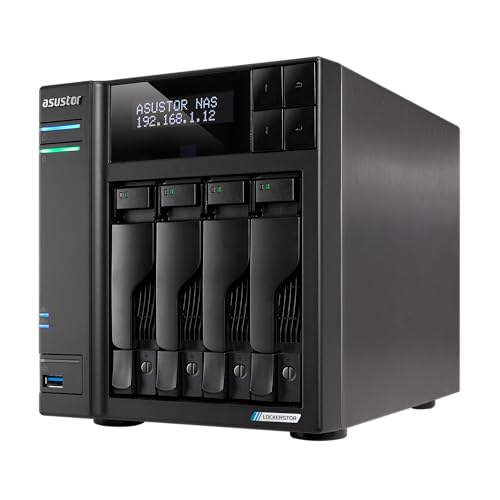
- Dual 5GbE ports for faster network transfers
- Four M.2 NVMe slots for caching or tiered storage
- Four bays with RAID and 16GB memory support
Best For: Creators and small teams building flexible shared storage
Production-Focused 5-Bay NAS
Synology DS1525+ for Video Production

- Designed for shared 4K and 8K editing workflows
- 10GbE-ready for high-resolution team projects
- Scales from 100TB to 300TB with expansion units
Best For: Post-production teams with growing shared media libraries
High-Capacity Direct-Attached Storage
CENMATE 12-Bay USB Drive Enclosure

- Supports up to twelve SATA HDDs or SSDs
- USB 3.0 connectivity with USB-A and USB-C cables
- DAS design with hot-swappable, tool-free bays
Best For: Editors needing many local drives without NAS features
Enterprise Pick
Synology DS1825+ for Video Production

- Supports 50+ concurrent 4K/8K editing users
- Scales up to 360TB with expansion units
- Optional 10GbE or 25GbE networking
Best For: Professional post-production teams and growing media archives
Flexible Home Lab

- Four bays support RAID 0, 1, or 5
- Dual 2.5GbE and 4K HDMI connectivity
- Supports Docker and compatible third-party OS options
Best For: Home editors, media libraries, and small-office storage
Compact Team Hub

- Supports 10+ concurrent users at up to 278 MB/s
- Four bays for shared files and media
- Includes RAID, backups, and snapshots
Best For: Small creative teams and office media repositories
Best All-Around NAS – Asustor AS5404T
The Asustor AS5404T is a capable nas enclosure for video editing when you want networked storage with room for both hard drives and NVMe SSDs. Its quad-core Intel processor, dual 2.5GbE ports, and four M.2 slots support fast file access, media libraries, and creator-focused workflows.
Best For: Video editors and photographers who want a four-bay NAS with NVMe expansion and HDMI output.
Pros:
- Four bays plus four M.2 NVMe SSD slots provide flexible storage options.
- Dual 2.5GbE ports support faster network transfers than standard Gigabit Ethernet.
- Includes 4GB DDR4 memory and a quad-core Intel Celeron N5105 processor.
- Three USB 3.2 Gen 2 ports offer up to 10Gbps connectivity.
Cons:
- Drives are not specified as included, so storage costs extra.
- HDMI and integrated graphics capabilities may not replace a dedicated editing workstation.
Choose this model if you want a traditional NAS platform with strong SSD expansion potential. Its combination of 2.5GbE networking, NVMe support, and four drive bays makes it a flexible foundation for shared media storage.
Best DAS for Direct Editing – QNAP TR-004 USB-C RAID Enclosure
QNAP TR-004 4 Bay USB Type-C Direct Attached Storage (DAS) with hardware RAID (Diskless)
Check Price On AmazonThe QNAP TR-004 is a direct-attached alternative to a nas enclosure for video editing. It connects to Windows, macOS, or Linux over USB Type-C and provides four drive bays with hardware RAID, making it useful for editors who work primarily from one computer.
Best For: Single-computer editing setups that need expandable storage or a straightforward RAID enclosure.
Pros:
- Four 3.5-inch SATA bays support RAID 0, 1, 5, JBOD, and individual disks.
- USB Type-C connectivity works with Windows, macOS, and Linux systems.
- Can serve as external storage, a NAS backup target, or a capacity expansion unit.
- Lockable drive bays add physical handling security.
Cons:
- It is a DAS, not a standalone network-attached server.
- Diskless configuration requires separate drive purchases.
- QNAP notes compatibility and migration limitations with certain NAS models and volumes.
The TR-004 makes sense when direct USB storage is more important than multi-user network access. It is simpler than a full NAS, but its RAID modes and four bays can provide useful working or backup capacity for an editor’s desk.
Best High-Speed Creator NAS – UGREEN DXP4800 GT 4-Bay NAS
The UGREEN DXP4800 GT is a high-performance nas enclosure for video editing built around fast networking and expandable memory. Its Ryzen Embedded processor, 8GB of RAM, dual 10GbE ports, NVMe support, and creator-friendly SD card slot are suited to demanding media storage and transfer workflows.
Best For: Creators and small teams handling large video projects, 4K/8K media, backups, and multi-user workloads.
Pros:
- Dual 10GbE ports are designed for high-speed network transfers and link aggregation.
- AMD Ryzen Embedded R2514 processor has four cores and eight threads.
- 8GB DDR4 RAM can be expanded to 64GB.
- Supports four drive bays, M.2 SSDs, U.2 NVMe options, and SD card imports.
Cons:
- Drives are not included.
- Real-world editing speeds depend on compatible network equipment, drives, and client systems.
- Its broader Docker, virtual machine, and surveillance features may be more than a basic storage setup requires.
This is the most performance-oriented option in the group for users with a 10GbE network and large media files. The expandable memory and SSD options also give it more headroom for multitasking than a basic four-bay enclosure.
Best USB-C Expansion Enclosure – WAVLINK RapidFire H4 4-Bay Enclosure
The WAVLINK RapidFire H4 is a compact alternative to a nas enclosure for video editing when you need direct USB-C storage expansion. It accepts four 3.5-inch or 2.5-inch SATA drives, supports up to 10Gbps transfers, and adds controlled cooling for sustained storage workloads.
Best For: Editors who want a flexible, locally connected four-drive enclosure with USB-C and optional HDMI connectivity.
Pros:
- Four SATA 6Gbps bays support 3.5-inch and 2.5-inch drives.
- USB 3.2 Type-C provides up to 10Gbps data transfer.
- Temperature-controlled fans activate at 48°C to help cool the drives.
- Independent bay power switches support convenient drive management.
Cons:
- It is a direct-attached enclosure rather than a standalone NAS.
- 2.5-inch drives require separate 2.5-to-3.5-inch mounting brackets.
- HDMI output requires a host USB-C port that supports video output and the appropriate USB-C cable.
The RapidFire H4 is a practical choice for expanding a workstation without building a network storage system. Its aluminum construction, fan control, and four-bay design suit large local media libraries, while the HDMI feature adds flexibility for compatible hosts.
Creator-Ready Hybrid NAS – ASUSTOR Lockerstor 4 Gen2+ AS6704T v2
The ASUSTOR Lockerstor 4 Gen2+ is a flexible nas enclosure for video editing when you need shared storage, fast transfers, and room for both capacity and caching. Its four drive bays, dual 5GbE ports, and four M.2 NVMe slots make it well suited to creator workflows that benefit from faster local network access and responsive project storage.
Best For: Content creators and small teams needing hybrid HDD/SSD storage, network sharing, and expandable performance.
Pros:
- Dual 5GbE connectivity can provide faster transfers than standard Gigabit networking.
- Four M.2 NVMe slots support cache acceleration or tiered storage.
- Supports RAID 0/1/5/6/JBOD and memory expansion up to 16GB.
- HDMI output and hardware 4K transcoding support media playback.
Cons:
- The four-bay design offers less raw drive capacity than larger enclosures.
- Fast network performance depends on compatible networking equipment.
Choose this model if you want a creator-focused NAS with several ways to tune performance. Its combination of 5GbE, NVMe support, and RAID flexibility provides a practical balance between speed, capacity, and data protection.
Production-Focused 5-Bay NAS – Synology DS1525+ for Video Production
The Synology DS1525+ is a nas enclosure for video editing aimed at shared production environments. It is designed for direct 4K and 8K editing over a network, supports 10GbE upgrades, and can scale from an initial 100TB setup to as much as 300TB with DX525 expansion units.
Best For: Post-production teams managing large shared video libraries and multi-user editing workflows.
Pros:
- Designed for simultaneous 4K and 8K editing workflows over a network.
- Supports 10GbE upgrades for high-resolution shared projects.
- Five bays and DX525 expansion support provide substantial growth potential.
- Includes media organization features such as AI tagging and project version control.
Cons:
- It is diskless, so drives must be purchased separately.
- 10GbE capability requires an upgrade rather than being ready as supplied.
- Expansion to the stated maximum requires additional DX525 units.
This is the stronger fit for teams planning a structured production server rather than a basic personal file store. Its expansion path and workflow-oriented features make it appealing for growing libraries, provided you budget for drives, networking upgrades, and expansion hardware.
High-Capacity Direct-Attached Storage – CENMATE 12-Bay USB Drive Enclosure
The CENMATE 12-bay enclosure is a direct-attached alternative to a nas enclosure for video editing. It connects to a computer over USB 3.0, supports up to twelve 2.5- or 3.5-inch SATA drives, and provides a high-capacity way to keep video media connected to a Windows, Mac, or Linux workstation.
Best For: Editors who need many directly attached drives and do not require built-in NAS or RAID functions.
Pros:
- Holds up to twelve 2.5- or 3.5-inch SATA HDDs or SSDs.
- USB 3.0 provides transfer rates up to 5Gbps with USB-A and USB-C connectivity.
- Tool-free, hot-swappable bays simplify drive access and replacement.
- Three fans and an aluminum-alloy enclosure support cooling for a large drive load.
Cons:
- This is DAS, not a NAS, and it does not provide RAID.
- Fan noise is rated around 40–50 decibels.
- The supplied notes warn that drives should be installed and tested one at a time.
Consider this enclosure when direct USB storage is more important than network sharing or built-in data protection. Its twelve bays offer considerable expansion, but RAID, backup, and broader media access must be handled by the connected computer or another solution.
Enterprise Pick – Synology DS1825+ for Video Production
For teams seeking a serious nas enclosure for video editing, the Synology DS1825+ is built around high-throughput collaborative production. It supports 50+ concurrent users editing 4K and 8K projects, with reported speeds up to 2,239 MB/s and optional 10GbE or 25GbE networking.
Best For: Professional video teams, post-production facilities, broadcast workflows, and growing media archives.
Pros:
- Supports 50+ concurrent 4K/8K editing users.
- Scales from 160TB to 360TB with expansion units.
- Offers optional 10GbE and 25GbE networking upgrades.
- Includes high-availability clustering, automated failover, and backup features.
Cons:
- Diskless design requires a separate drive investment.
- Enterprise-grade features may be more than a small team needs.
- High-speed networking requires compatible upgrade cards and infrastructure.
The DS1825+ is the strongest choice here for demanding shared editing workloads. Its expansion capacity and reliability features make it particularly suitable when downtime or storage limits could disrupt production.
Flexible Home Lab – Yxk Zero1 Pro 4-Bay NAS
The Yxk Zero1 Pro is a versatile nas enclosure for video editing at home or in a small office, especially when the priority is shared media storage rather than intensive multi-user production. Its four SATA bays, dual 2.5GbE ports, 4K HDMI output, and Intel N100 platform support home media and file-sharing projects.
Best For: Home editors, families, small offices, media libraries, and customizable homelab setups.
Pros:
- Four bays support RAID 0, 1, or 5 and up to 144TB raw capacity.
- Dual 2.5GbE ports can support link aggregation.
- 4K HDMI output is useful for compatible TV or monitor playback.
- Supports compatible Docker apps and optional third-party NAS operating systems.
Cons:
- Not positioned for large professional teams or high-end 4K/8K collaboration.
- Drives are not included.
- Third-party operating-system compatibility and features can vary.
This enclosure offers a practical balance of capacity, connectivity, and flexibility for personal video workflows. It is best suited to editors who value home media features and customization over enterprise production tools.
Compact Team Hub – Synology DS425+ Media Server
Synology DS425+ Private Cloud Media Server - Stream, Back Up & Share Files (4-Bay Diskless NAS)
Check Price On AmazonThe Synology DS425+ is a compact nas enclosure for video editing when a small team needs centralized files, media sharing, and backup protection. It provides four drive bays, reported speeds up to 278 MB/s, and support for concurrent access by 10+ users.
Best For: Small creative teams, offices, client-file repositories, and shared media libraries.
Pros:
- Supports shared large files and media access for 10+ users.
- Centralizes documents, client files, and media assets with granular access controls.
- Combines RAID redundancy, automated backups, and snapshots.
- Supports up to 30 IP cameras for a combined office or home system.
Cons:
- Its 278 MB/s performance is less suited to large-scale collaborative 4K/8K editing.
- Four bays provide less expansion room than the DS1825+.
- Diskless design requires separately purchased drives.
The DS425+ is a sensible middle ground for small teams that need organized shared storage and strong data-protection features. Choose it for office collaboration and media access rather than the highest-throughput editing environment.
How We Picked the Best Nas Enclosure for Video Editing
We selected models that cover the main storage approaches used in video production: network-attached storage for shared projects, direct-attached storage for a dedicated workstation, and larger enclosures for expanding media libraries. We also considered bay count, drive compatibility, RAID support, network or USB interface speed, memory, upgrade potential, cooling, and ease of management.
Because video workloads vary widely, this list includes compact four-bay systems for individual creators as well as five-, eight-, and 12-bay options for studios and production teams. Diskless designs are included so buyers can choose drives suited to capacity, endurance, and budget.
Quick Comparison
| Best For | Recommended Direction | Why It Matters |
|---|---|---|
| Single-editor workstation | USB-C DAS | Direct connection can provide simple, predictable access without network configuration. |
| Small creative team | Four- or five-bay NAS | Centralized file sharing, backups, user accounts, and room to expand. |
| Growing studio | Eight- or 12-bay enclosure | More usable capacity, stronger RAID flexibility, and longer-term scalability. |
| High-speed shared editing | 10GbE- or faster-ready NAS | Better support for multiple users moving large media files concurrently. |
Key Buying Factors for a Nas Enclosure for Video Editing
Interface and Real-World Throughput
Look beyond the advertised port speed. A 10GbE connection can be valuable for shared editing, but the NAS must also have adequate processors, memory, storage configuration, and network infrastructure. For a single computer, USB 3.2 may be simpler and faster to deploy than a network system.
Bay Count, RAID, and Capacity
More bays provide greater capacity and flexibility, but they also increase cost and power use. RAID can protect against a drive failure, yet it is not a backup. Keep a separate copy of important footage, project files, and finished masters. Consider whether the enclosure supports expansion units or larger replacement drives before buying.
Editing Workflow Features
Creators should check support for SMB or other required file-sharing protocols, snapshots, versioned backups, user permissions, remote access, and media-serving applications. Hardware transcoding and HDMI output may help certain monitoring or playback workflows, but they do not replace fast storage for high-bitrate editing.
Drive Compatibility and Cooling
Use NAS-rated hard drives or SSDs when the enclosure will run continuously or serve multiple users. SSDs can improve responsiveness and scrubbing, while hard drives generally deliver better cost per terabyte. Effective fans, temperature monitoring, and tool-free trays are practical advantages in a busy studio.
Who Should Buy Which Nas Enclosure for Video Editing?
Choose a USB-C DAS if one editor needs fast local storage with minimal setup. A four-bay NAS is a practical fit for freelancers, photographers, and small teams that need shared folders and automated backups. Five-bay systems offer a useful middle ground when capacity and redundancy matter more than a compact footprint.
Choose an eight-bay or 12-bay enclosure when your media library is growing, several users need access, or you want more flexibility to combine performance and capacity tiers. For demanding multi-user production, prioritize 10GbE or faster networking, compatible switches and adapters, and enough memory to support the NAS services you plan to run.