The right monitor arm can clear valuable desk space, improve screen positioning, and make long work or gaming sessions more comfortable. This roundup compares 10 adjustable monitor arms across single-monitor, dual-monitor, and ultrawide setups.
Before choosing, check your monitor’s size, weight, VESA pattern, and desk compatibility. The best mount for you will balance adjustment range, stability, installation convenience, and price.
Best 10 Adjustable Monitor Arms Picks for 2026
Best Dual-Monitor Stability
HUANUO FlowLift Dual Monitor Stand

- Supports two 13- to 32-inch monitors up to 19.8 pounds each
- Full-motion adjustment with up to 15.75 inches of height range
- Dual C-clamp and grommet mounting options
Best For: Stable dual-monitor office, gaming, or coding setups
Best for Ultrawide Screens
WALI Ultrawide Single Monitor Arm

- Handles flat or 1800R curved screens up to 49 inches
- Supports up to 33 pounds with 21.14 inches of extension
- Full motion with cable management and 20,000+ cycle testing
Best For: Large ultrawide monitors and curved gaming displays
Best Dual-Monitor Value
VIVO STAND-V002O Dual Monitor Stand

- Supports two 17- to 32-inch monitors up to 19.8 pounds each
- Mechanical spring adjustment enables toolless positioning
- Includes C-clamp and optional bolt-through grommet mounting
Best For: Standard dual-monitor home-office and gaming setups
Best Flexible Single-Monitor Pick
WALI Adjustable Single Monitor Arm

- Supports screens up to 34 inches with separate flat and curved weight limits
- Extends 19.3 inches and raises the display up to 17.3 inches
- Includes C-clamp and grommet mounting plus a 10-year warranty
Best For: Flexible single-monitor home-office or gaming setups
Best Value Ergonomics
HUANUO FlowLift Single Monitor Arm

- Fits 13–32-inch monitors up to 19.8 pounds
- Wide tilt, swivel, and rotation adjustment
- Includes clamp and grommet bases
Best For: Home-office users seeking a flexible single-monitor mount
Best for Large Screens
Acer Fully Adjustable Single Monitor Arm

- Supports 17–34-inch screens up to 19.8 pounds
- Offers -60° to +90° tilt and 360° rotation
- Includes clamp or grommet mounting
Best For: Large-monitor workstations needing broad adjustment
Best Dual-Monitor Setup
ErGear Full-Adjustable Monitor Arm

- Holds two 13–32-inch monitors
- Provides independent full-motion adjustment
- Includes tool-free VESA mounting and cable clips
Best For: Dual-screen workstations and multitasking setups
Best Heavy-Duty Pick
VIVO STAND-V001 Single Monitor Arm

- Supports up to 22 pounds and ultrawides up to 38 inches.
- Provides 16 inches of height adjustment and full rotation.
- Includes C-clamp, grommet base, and cable management.
Best For: Large or ultrawide monitors
Best Extended-Range Pick
ErGear EGDMA71B Single Monitor Arm
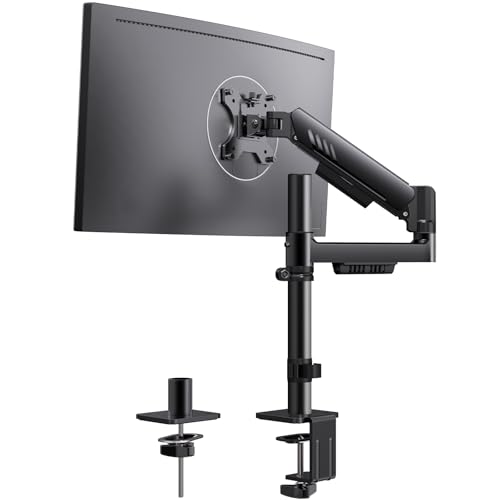
- Raises monitors up to 22.6 inches and extends 20.6 inches.
- Supports 17- to 34-inch VESA-compatible screens.
- Features a padded integrated C-clamp and wide VESA plate.
Best For: High or far-reaching monitor positioning
Best Precision-Adjustment Pick
HUANUO FlowLift Pro Monitor Arm

- Supports 13- to 32-inch monitors weighing 4.4 to 15.4 pounds.
- Uses a MechaSpring arm with visible tension feedback.
- Includes tool-free VESA mounting and C-clamp or grommet bases.
Best For: Lightweight monitors and frequent adjustments
Best Dual-Monitor Stability – HUANUO FlowLift Dual Monitor Stand
The HUANUO FlowLift is one of the more versatile adjustable monitor arms for a two-screen workstation. It supports 13- to 32-inch monitors weighing 4.4 to 19.8 pounds per arm, with full-motion positioning and both C-clamp and grommet installation options.
Best For: Dual-monitor office, gaming, and coding setups that need a secure desk mount and broad positioning range.
Pros:
- Supports two 13- to 32-inch monitors up to 19.8 pounds each.
- Offers tilt, swivel, rotation, and up to 15.75 inches of height adjustment.
- Dual C-clamp design, optional grommet mounting, and integrated cable management help keep the setup stable and organized.
Cons:
- Requires monitors with 75×75 or 100×100 VESA mounting holes.
- Recommended for wooden desks 0.59 to 3.54 inches thick; glass and plastic desks are not suitable.
- Underside crossbeams or panels can interfere with installation.
Choose this model when stability and a flexible two-monitor layout matter most. Its compatibility requirements are specific, so measure both the monitors and desk before ordering.
Best for Ultrawide Screens – WALI Ultrawide Single Monitor Arm
The WALI Ultrawide is a heavy-duty choice among adjustable monitor arms, supporting flat or 1800R curved displays up to 49 inches and 33 pounds. Its long extension and broad motion range suit large screens that need flexible positioning.
Best For: Large ultrawide monitors, including curved displays, in work or gaming setups.
Pros:
- Supports monitors from 17 to 49 inches and up to 33 pounds.
- Extends up to 21.14 inches and raises the screen up to 20.59 inches above the desk.
- Features 360-degree rotation, cable management, and a core tested through more than 20,000 adjustment cycles.
Cons:
- Requires a 75×75 or 100×100 VESA pattern.
- Recommended for wooden desks 0.39 to 1.96 inches thick without an obstructing crossbeam.
- The large-screen design may be more than needed for standard-size monitors.
This arm is a strong fit for users who want to lift a very large display off the desk while retaining substantial reach and adjustment freedom. Confirm the screen’s weight, VESA pattern, and desk construction first.
Best Dual-Monitor Value – VIVO STAND-V002O Dual Monitor Stand
The VIVO STAND-V002O is a practical option for dual-screen users seeking adjustable monitor arms with mechanical spring adjustment. It fits most 17- to 32-inch flat or curved monitors and uses a heavy-duty C-clamp or optional bolt-through grommet mount.
Best For: Home-office and gaming users who want tool-free positioning for two standard-size monitors.
Pros:
- Supports two 17- to 32-inch monitors weighing 4.4 to 19.8 pounds each.
- Mechanical spring arms provide toolless counterbalance adjustment.
- Offers 90-degree tilt, 180-degree swivel, 360-degree rotation, and slide-on VESA plates.
Cons:
- The rear of the arms extends past the edge of the desk.
- Requires 75×75 or 100×100 VESA mounting patterns.
- Its C-clamp fits desks up to 3.1 inches, while the optional grommet mount fits tops up to 1.9 inches.
This VIVO stand makes sense when you want straightforward dual-monitor articulation and easy installation. Plan for the arm extension behind the desk and verify the mounting limits before assembly.
Best Flexible Single-Monitor Pick – WALI Adjustable Single Monitor Arm
The WALI GSMP001N is a flexible single-screen option among adjustable monitor arms, supporting displays up to 34 inches. It combines a wide reach and substantial height range with C-clamp and grommet mounting for a tidy, ergonomic workstation.
Best For: Single-monitor users who want broad positioning flexibility for work, gaming, or mixed-use desks.
Pros:
- Supports screens from 13 to 34 inches, with capacity up to 26.4 pounds for flat screens and 19.8 pounds for curved screens.
- Extends up to 19.3 inches and raises the monitor up to 17.3 inches above the desk.
- Provides 360-degree rotation, cable management, and a 10-year warranty.
Cons:
- Requires a 75×75 or 100×100 VESA mounting pattern.
- Weight capacity differs between flat and curved monitors.
- Recommended for wooden desks 0.39 to 2.76 inches thick without an obstructing crossbeam.
This is a well-rounded single-monitor arm for users who value reach, height adjustment, and installation flexibility. Check the display type and weight carefully, especially when mounting a curved screen.
Best Value Ergonomics – HUANUO FlowLift Single Monitor Arm
If you want adjustable monitor arms for a standard home-office display, the HUANUO FlowLift combines broad movement with two mounting options. It supports 13- to 32-inch monitors weighing 4.4 to 19.8 pounds and uses 75x75mm or 100x100mm VESA patterns.
Best For: Home-office users who want a sturdy, flexible single-monitor setup with clamp and grommet mounting options.
Pros:
- Offers -50° to +85° tilt, ±90° swivel, and 360° rotation.
- Supports one-hand height adjustment up to 39.6cm from the desktop.
- Includes both C-clamp and grommet mounting options.
- Uses automotive-grade components and passed 20,000 motion tests.
Cons:
- Limited to one monitor.
- Wood desktops are recommended, and the underside must have clearance for installation.
The FlowLift is a practical choice when stable positioning and flexible installation matter more than multi-monitor capacity. Its wide tilt range and tested construction make it well suited to everyday desk work.
Best for Large Screens – Acer Fully Adjustable Single Monitor Arm
Among adjustable monitor arms for larger displays, this Acer model supports screens from 17 to 34 inches and weights from 4.4 to 19.8 pounds. Its gas-spring design provides broad positioning flexibility for seated or standing work.
Best For: Users with larger monitors who want full-motion adjustment and a choice of clamp or grommet installation.
Pros:
- Supports monitors up to 34 inches with 75x75mm or 100x100mm VESA compatibility.
- Provides -60° to +90° tilt, ±90° swivel, and 360° rotation.
- Raises the monitor up to 18.1 inches from the desk.
- Includes a tension screw for balancing the gas spring.
Cons:
- Has a 1-year manufacturer warranty.
- Desk thickness support is limited to 0.59–3.15 inches.
The Acer arm stands out for its larger 34-inch screen rating and generous tilt range. It is a strong fit for workstations that need a high monitor position, although buyers should confirm desk thickness and monitor weight first.
Best Dual-Monitor Setup – ErGear Full-Adjustable Monitor Arm
For a two-screen workspace, the ErGear dual mount is one of the more versatile adjustable monitor arms in this lineup. It supports two 13- to 32-inch flat or curved monitors, with each monitor supported up to 19.8 pounds and compatible with 75x75mm or 100x100mm VESA patterns.
Best For: Multitaskers who need independent positioning for two monitors while keeping cables and desk space organized.
Pros:
- Supports two monitors with independent positioning.
- Provides height adjustment up to 17.5 inches and extension up to 18.1 inches.
- Offers +80°/-50° tilt, ±90° swivel, and 360° rotation.
- Includes tool-free VESA mounting and easy-open cable clips.
Cons:
- Supports screens only up to 32 inches.
- Installation is recommended on a wooden desk with no obstructing crossbeam underneath.
- Desk thickness limits vary by mount: 0.39–2.56 inches for the clamp and 0.39–2.95 inches for the grommet.
The ErGear is the natural choice when a dual-screen layout is the priority. Its independent adjustments and cable clips help create a cleaner workspace, while the included mounting options add installation flexibility.
Best Heavy-Duty Pick – VIVO STAND-V001 Single Monitor Arm
If you need adjustable monitor arms for a larger display or ultrawide, the VIVO STAND-V001 offers a strong 22-pound capacity and broad positioning range. It supports VESA 75x75mm and 100x100mm screens, with both C-clamp and grommet mounting options.
Best For: Ultrawide monitors and users who want a sturdy, highly adjustable single-arm mount.
Pros:
- Supports monitors up to 22 pounds, including ultrawides up to 38 inches.
- Offers tilt, swivel, rotation, and up to 16 inches of height adjustment.
- Includes C-clamp and grommet bases plus detachable cable clips.
- Detachable VESA plate simplifies monitor installation.
Cons:
- VESA compatibility must be verified before purchase.
- The included C-clamp fits desks up to 3.25 inches thick.
With its higher weight capacity and support for large ultrawide screens, this VIVO arm is a practical choice for substantial displays. Its multiple mounting options and full rotation also make it flexible for portrait or landscape setups.
Best Extended-Range Pick – ErGear EGDMA71B Single Monitor Arm
Among adjustable monitor arms, the ErGear EGDMA71B stands out for its extended height and reach. It supports VESA-compatible monitors from 17 to 34 inches and combines a reinforced VESA plate with an integrated, padded C-clamp for a steadier setup.
Best For: Users who need extra vertical lift and horizontal reach for a standard-size monitor.
Pros:
- Adjusts up to 22.6 inches high and extends horizontally up to 20.6 inches.
- Supports tilt, swivel, and 360-degree rotation for portrait or landscape viewing.
- Integrated C-clamp uses anti-slip silicone padding for added stability.
- Tool-free cable clips and hand-tightened installation simplify setup.
Cons:
- Maximum supported weight is 19.8 pounds.
- Its listed screen range is 17 to 34 inches despite the product title mentioning 13 inches.
The ErGear arm is especially useful when a monitor needs to sit higher or farther back than a typical desk mount allows. Its stability-focused clamp and wider VESA plate are helpful for reducing wobble during everyday adjustments.
Best Precision-Adjustment Pick – HUANUO FlowLift Pro Monitor Arm
For users who frequently fine-tune their setup, the HUANUO FlowLift Pro is one of the more precision-focused adjustable monitor arms. Its MechaSpring arm, visible tension indicator, tool-free VESA plate, and C-clamp or grommet base are designed for smooth positioning and straightforward installation.
Best For: Lightweight monitors and users who regularly adjust viewing height or angle.
Pros:
- Supports 13- to 32-inch monitors weighing 4.4 to 15.4 pounds.
- Provides tilt, swivel, and rotation adjustments for ergonomic positioning.
- PrecisionView window makes tension calibration easier to judge.
- Tool-free InstaMount VESA plate enables quick monitor attachment.
Cons:
- Its 15.4-pound capacity is lower than the other arms in this roundup.
- The manufacturer recommends installation only on wood desks from 0.59 to 3.54 inches thick.
- Monitor weight and VESA compatibility must meet all specified requirements.
The FlowLift Pro is a strong fit for a lighter display and a workspace where adjustments happen often. Its visible tension feedback and quick-release VESA design help reduce guesswork during setup and repositioning.
How We Picked the Best Adjustable Monitor Arms
We selected these monitor arms based on the specifications that matter most in everyday use: supported screen sizes and weights, VESA compatibility, adjustment range, mounting method, and suitability for gaming or office work. The list includes single and dual mounts, options for standard displays and ultrawide screens, and models with different capacity levels.
We also considered practical installation details, including clamp and grommet bases, tool-free VESA attachment, cable management, and the ability to tilt, swivel, rotate, or reposition a monitor without excessive effort.
Quick Comparison
- Best for two standard monitors: Look at the HUANUO, VIVO, and ErGear dual-monitor mounts.
- Best for ultrawide displays: Consider the WALI 17–49-inch arm or VIVO’s 13–38-inch ultrawide model.
- Best for heavier screens: Prioritize the WALI ultrawide arm, which supports up to 33 pounds.
- Best for compact setups: Single-monitor arms for 13–32-inch screens typically use less desk space.
- Best for easy installation: Models with tool-free VESA systems or fast-install hardware can simplify setup.
Key Buying Factors for Adjustable Monitor Arms
Monitor Size, Weight, and VESA Pattern
Confirm that the arm supports your display’s diagonal size and weight, including the stand if the manufacturer specifies it that way. Most products here support common VESA 75x75mm or 100x100mm patterns, but larger ultrawide monitors may require extra capacity and a wider adjustment range.
Single, Dual, or Ultrawide Configuration
A single arm is usually the simplest choice for one standard monitor. Dual arms work well for side-by-side productivity or streaming setups, while an ultrawide-specific arm is preferable when one large curved screen needs additional support.
Range of Movement
Look for height adjustment, tilt, swivel, and screen rotation if you frequently change between sitting, standing, portrait, or shared viewing positions. Gas-spring or mechanical-spring designs may make repositioning smoother, though tension adjustment is important for preventing drift.
Desk Mounting and Stability
Measure your desk thickness and check for clearance behind it. Clamp bases are convenient for most desks, while grommet mounting can provide a cleaner or more secure installation when your desk has a suitable hole. A sturdy base and reinforced joints matter especially for heavy or extended displays.
Who Should Buy Which Adjustable Monitor Arms?
Choose a dual-monitor arm if you regularly work across two screens, compare documents, monitor dashboards, or want a gaming and streaming layout. Choose a single arm if you want more desk space without adding unnecessary hardware. Choose an ultrawide arm when your display is curved, unusually wide, or heavier than a typical 27-inch monitor.
For frequent repositioning, prioritize smooth spring-assisted movement and strong cable management. For a fixed office setup, a simpler adjustable mount may offer better value. Always verify the final monitor weight, VESA pattern, desk dimensions, and included hardware before purchasing.