Accurate color starts with a properly calibrated display. The best monitor calibrators help photographers, video editors, designers, and creators see more dependable color from capture through final delivery.
This roundup compares 10 monitor calibrators, from straightforward entry-level tools to advanced solutions for HDR, OLED, photography, and video workflows.
Best 10 Monitor Calibrators Picks for 2026
Hybrid Studio Choice
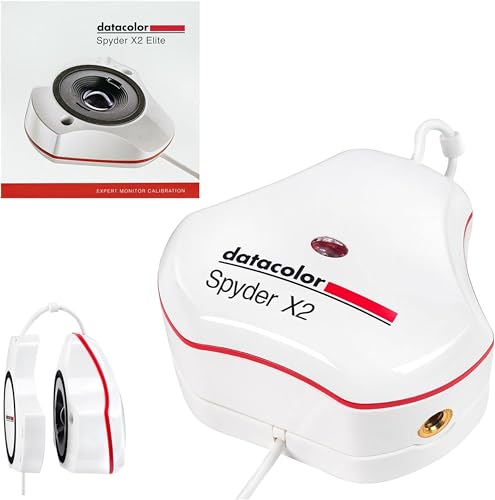
- Supports photo, video, and digital design work
- Includes Rec. 709 and Rec. 2020 targets
- Offers Studio Match and soft proofing
Best For: Hybrid photo/video creators and multi-monitor studios
Proven Calibration Essential
Calibrite ColorChecker Display Pro

- Designed for repeatable display profiling
- Supports monitor and projector calibration
- Includes diffuser arm and tripod mount
Best For: Monitor users who also profile projectors
Professional Capture-to-Display Kit

- Profiles displays up to 10,000 nits
- Includes ColorChecker Passport Video 2
- Supports photo and video color workflows
Best For: Creators using high-brightness displays and camera matching
Recorder-Focused Calibration Tool
Atomos Spyder Color Calibrator

- Calibrates Atomos recorders
- Includes USB connection cable
- Includes LANC-to-serial adapter cable
Best For: Users calibrating compatible Atomos recording equipment
Versatile Display Calibration
Datacolor Spyder4Elite Colorimeter

- Calibrates several display technologies
- Supports laptops and front projectors
- Includes automated recalibration assistance
Best For: Users with mixed displays needing repeat calibration
Best Beginner Pick

- Guided single-click calibration
- Room-light monitoring and profile changing
- Supports multiple laptop and desktop monitors
Best For: First-time photographers and creators
Best Simple Dual-Display Option

- Easy 1-2-3 software workflow
- Calibrates up to two displays
- USB-C connection with before-and-after check
Best For: Creators with a two-monitor setup
Best Complete Photo Workflow
Calibrite Photo Kit with Display Pro HL

- Combines display and camera profiling
- Supports mini LED, OLED, and Apple XDR
- Includes ColorChecker Passport Photo 2
Best For: RAW photographers building a consistent capture-to-edit workflow
High-Luminance Pro – Calibrite Display Pro HL
The Calibrite Display Pro HL is one of the more capable monitor calibrators for modern high-brightness screens. Its high-luminance sensor measures up to 3000 nits and supports LCD, mini-LED, OLED, Apple XDR displays, and compatible projectors, making it a strong option for demanding photo, design, and HDR workflows.
Best For: Creative professionals who need detailed control and consistent profiles across bright, modern displays.
Pros:
- Measures displays up to 3000 nits, including high-brightness and HDR panels.
- PROFILER software supports custom white point, luminance, gamma, and contrast settings.
- Includes validation, uniformity, flare-correction, and multi-monitor workflow tools.
- USB-C connectivity includes a USB-A adapter and a travel storage pouch.
Cons:
- Its advanced controls may be more than casual users need.
- Custom profiling features may require additional time to configure.
Choose this model when display brightness, HDR compatibility, and repeatable multi-screen color are priorities. It offers the broadest feature set here for users who want measurement and verification tools alongside basic calibration.
Hybrid Studio Choice – Datacolor Spyder X2 Elite
The Datacolor Spyder X2 Elite is a flexible choice among monitor calibrators for photographers, videographers, and digital designers. It combines guided presets with advanced controls, while its video and cinema targets make it especially useful for hybrid photo and video work.
Best For: Photo and video creators who want both guided calibration and professional customization.
Pros:
- Includes Rec. 709 and Rec. 2020 video and cinema targets.
- Offers unlimited calibration settings, soft proofing, and display analysis.
- Studio Match supports calibration across multiple monitors.
- Native USB-C connection includes a USB-A adapter.
Cons:
- Its advanced feature set may feel extensive for simple monitor calibration.
- Software activation requires the included unique serial number.
The X2 Elite is a practical fit for creators who move between still images and video. It gives beginners a starting point through presets while leaving room for detailed control as their workflow develops.
Proven Calibration Essential – Calibrite ColorChecker Display Pro
The Calibrite ColorChecker Display Pro is a straightforward option for shoppers comparing monitor calibrators for display and projector work. Its optical design emphasizes repeatable results across display types, while the diffuser arm adds support for ambient-light measurement and tabletop projector profiling.
Best For: Users who need repeatable monitor calibration with occasional projector profiling.
Pros:
- Optical design supports repeatable profiling on the same and different display types.
- Rotatable diffuser arm works as a stand, optics cover, and ambient-light tool.
- Integrated tripod mount supports projector profiling in larger venues.
- Works with ccProfiler or i1Profiler software.
Cons:
- The supplied notes do not specify support for newer high-brightness HDR displays.
- Software options may require choosing between ccProfiler and i1Profiler.
This model makes sense for buyers who value repeatability and projector flexibility over the newest high-luminance features. Its physical design is particularly useful when calibration extends beyond a single desktop monitor.
Everyday Color Confidence – Datacolor Spyder Monitor Calibrator
The Datacolor Spyder is an accessible pick among monitor calibrators for everyday photo and content workflows. Its software offers a fast calibration process, preset guidance for beginners, and customizable settings for experienced users, with support for OLED, mini-LED, and Apple Liquid Retina XDR displays.
Best For: Beginners and content creators who want quick, repeatable screen calibration.
Pros:
- Calibration takes about 90 seconds according to the supplied product notes.
- Supports laptop and desktop displays, including OLED and mini-LED screens.
- Preset calibration helps novices get started quickly.
- Ambient-light sensing can guide brightness and contrast adjustments.
Cons:
- DevicePreview is identified as a beta feature.
- Requires a nonstandard battery according to the listed specifications.
- The supplied notes provide fewer advanced profiling details than some competing models.
This Spyder is a sensible starting point when ease and speed matter more than extensive calibration controls. Ambient-light tracking is a useful addition for workspaces where room lighting changes throughout the day.
Professional Capture-to-Display Kit – Calibrite Video Photo Kit
For creators comparing monitor calibrators, this Calibrite kit combines a high-luminance colorimeter with a camera reference system. It is designed to support accurate display profiling, white balance, exposure control, and camera matching across photo and video workflows.
Best For: Photographers and videographers working with bright mini-LED, OLED, or Apple XDR displays who also need dependable on-set color references.
Pros:
- Display Plus HL supports calibration of displays up to 10,000 nits.
- Includes ColorChecker Passport Video 2 with video, grayscale, white balance, and 24-color targets.
- Supports a consistent workflow from capture through editing and final delivery.
- Works with Windows and macOS through Calibrite PROFILER software.
Cons:
- Its broader camera-reference features may be more than needed for basic display calibration.
- Software access requires a download.
This is the most complete option here for professionals who need both display calibration and camera-reference tools. Its 10,000-nit capability makes it especially suitable for modern high-brightness panels.
Recorder-Focused Calibration Tool – Atomos Spyder Color Calibrator
Among monitor calibrators, the Atomos Spyder Color Calibrator is a focused option for users of compatible Atomos recorders. It connects to a PC by USB and is intended to enable color calibration of Atomos recording equipment.
Best For: Atomos recorder users who want a dedicated calibration accessory with the required connection cables included.
Pros:
- Designed specifically for color calibration of Atomos recorders.
- Includes a USB cable for connecting to a PC.
- Includes a LANC-to-serial adapter cable with USB-to-2.5 mm jack connectivity.
Cons:
- Its stated use is centered on Atomos recorders rather than broad display compatibility.
- The notes do not specify support for modern computer monitor technologies or operating systems.
This model makes the most sense when Atomos recorder calibration is the priority. Buyers seeking a general-purpose monitor calibrator should verify compatibility before choosing it.
Versatile Display Calibration – Datacolor Spyder4Elite Colorimeter
The Datacolor Spyder4Elite is a traditional colorimeter for shoppers comparing monitor calibrators across different display types. Its full-spectrum sensor is designed to calibrate LED, OLED, LCD, and CRT displays, as well as laptops and front projectors.
Best For: Users who need broad display coverage and a faster way to recalibrate screens as their color and brightness change over time.
Pros:
- Supports LED, OLED, LCD, and CRT displays, plus laptops and front projectors.
- Uses a full-spectrum color sensor.
- Includes an automated color and brightness calibration process.
- ReCAL helps speed up repeat calibration.
Cons:
- It is an older Spyder4 model, so buyers should confirm current software and system compatibility.
- The supplied details do not specify compatibility with displays rated for extreme brightness.
The Spyder4Elite remains appealing for mixed display environments and routine recalibration. Its broad stated device support is useful, but shoppers with newer high-luminance panels should compare specifications carefully.
Best Beginner Pick – Datacolor Spyder X Pro
The Datacolor Spyder X Pro is one of the most approachable monitor calibrators for photographers and creators who want more reliable color without a steep learning curve. Its lens-based color engine, guided workflow, and quick calibration process make it practical for both laptop and desktop displays.
Best For: First-time users, photographers, and people calibrating multiple laptop or desktop monitors.
Pros:
- Single-click calibration and a wizard workflow simplify setup.
- Room-light monitoring, automatic profile changing, and 12 calibration targets support more precise results.
- SpyderProof provides an easy before-and-after comparison using your own images.
- Software supports calibration for multiple laptops and desktop monitors.
Cons:
- The supplied notes do not indicate phone compatibility.
- Advanced users may prefer more customizable workflow controls than the beginner-focused interface provides.
Choose the Spyder X Pro if ease of use and fast setup matter most. It offers useful accuracy features while keeping monitor calibration straightforward for newcomers.
Best Simple Dual-Display Option – Calibrite Display 123
The Calibrite Display 123 is a compact monitor calibrator designed around an easy 1-2-3 software workflow. It is a sensible choice for creators who want more consistent color and brightness across a two-monitor workspace without navigating complicated settings.
Best For: Photographers and creators using up to two displays who want guided setup and a clear before-and-after check.
Pros:
- Guided software workflow makes calibration approachable.
- Supports calibration for up to two displays.
- USB-C connection and compact body suit streamlined workspaces.
- Built-in before-and-after comparison helps verify the change.
Cons:
- Support is limited to two displays according to the supplied specifications.
- The notes do not describe broader advanced customization beyond brightness target selection and the Easy 1-2-3 workflow.
The Display 123 stands out for simplicity and multi-monitor support. It is a practical fit when you want consistent viewing across two screens with minimal setup friction.
Best Complete Photo Workflow – Calibrite Photo Kit with Display Pro HL
The Calibrite Photo Kit combines monitor calibration with camera profiling tools, making it more than a standalone display solution. It is aimed at photographers who want a consistent capture-to-edit workflow for RAW images, including work on mini LED, OLED, and Apple XDR displays.
Best For: Photographers seeking a combined monitor calibration, camera profiling, white-balance, and RAW editing workflow.
Pros:
- Includes the Display Pro HL colorimeter and ColorChecker Passport Photo 2.
- Supports modern mini LED, OLED, and Apple XDR displays.
- Enables custom camera profiles for RAW workflows and more consistent white balance and exposure references.
- Calibrite PROFILER offers presets and adjustable targets such as white point and gamma.
Cons:
- Its broader photo workflow may be more equipment than users seeking only monitor calibration need.
- The supplied notes do not specify support for a particular number of displays.
This kit is the strongest choice for photographers who need consistency from capture through editing. The included camera target and customizable profiling software add value beyond a monitor-only calibrator.
How We Picked the Best Monitor Calibrators
We selected these models based on calibration accuracy, supported display types, software usability, workflow features, and the needs of different creative users. The list includes current Calibrite and Datacolor options alongside specialized and older models that may still appeal to buyers seeking a particular feature or lower price.
We also considered whether each device is better suited to standard office monitors, wide-gamut displays, OLED or Mini LED panels, HDR production, photography, or video work. Compatibility with modern USB connections and the quality of the included software were additional factors.
Quick Comparison
| Best For | What to Look For |
|---|---|
| Everyday color accuracy | Simple software and reliable support for standard LCD displays |
| Photography and design | Accurate profiling, wide-gamut support, and repeatable results |
| Video and HDR | High-brightness measurement and support for OLED, Mini LED, or HDR workflows |
| Camera-to-screen workflows | A colorimeter bundled with a camera color target or passport |
| Budget-conscious buyers | Core calibration features without advanced HDR controls |
Key Buying Factors for Monitor Calibrators
Display Type and Brightness
Check that the calibrator supports your panel technology and intended brightness range. Standard LCD users may need only basic calibration, while HDR, OLED, and Mini LED owners should prioritize a device designed for high-luminance displays.
Software and Presets
Calibration software determines how easily you can create profiles, set white point and luminance targets, and switch between workflows. Look for guided controls if you are new to calibration, or advanced customization if you manage color-critical production.
Color Workflow
A monitor calibrator corrects the display, but it does not automatically make every device in a workflow consistent. Photographers and filmmakers may benefit from bundles that include a ColorChecker or video color target for profiling cameras and maintaining more predictable results from capture to edit.
Connectivity and Compatibility
Confirm operating-system support, connector requirements, and whether an adapter is needed for your computer. USB-C compatibility can be especially useful with modern laptops, while older devices may require legacy software or connections.
Who Should Buy Which Monitor Calibrators?
Choose a basic Calibrite Display 123 or standard Spyder model if you want an accessible way to improve color accuracy for photo editing, design, or general viewing.
Choose a Calibrite Display Pro HL, Display Plus HL, or Spyder X2 Elite for serious photography, professional design, wide-gamut screens, or brighter HDR-capable displays.
Choose a Photo Kit or Video Photo Kit if you need both display calibration and a camera color target. These bundles make more sense for creators who want a complete capture-to-edit color workflow.
Consider older Spyder4 or Atomos hardware only when compatibility and condition are confirmed. Older models can be useful bargains, but software support, operating-system compatibility, connector requirements, and display support may be more limited than with current devices.