A well-chosen monitor arm can free up desk space, improve screen positioning, and make long work sessions more comfortable. The right choice depends on your monitor’s size, weight, VESA pattern, and your desk’s construction.
We compared 10 monitor arms for home offices across single- and dual-screen setups, adjustment range, mounting options, and compatibility with standard and ultrawide displays.
Best 10 Monitor Arms for Home Offices Picks for 2026
Best Dual-Screen Stability
HUANUO FlowLift Dual Monitor Stand

- Supports two 13–32-inch monitors
- Dual C-clamp and grommet mounting
- Full-motion adjustment with cable management
Best For: Dual-monitor wooden desks needing secure mounting
Best Single-Arm Range
WALI Adjustable Single Monitor Arm

- Fits compatible screens up to 34 inches
- Extends 19.3 inches from the desk
- Supports C-clamp or grommet installation
Best For: Single-monitor setups needing reach and height
Best Value Dual Mount
VIVO STAND-V002 Dual Monitor Desk Mount

- Holds two screens up to 30 inches
- Supports up to 22 pounds per monitor
- Steel design with C-clamp and grommet option
Best For: Standard dual-monitor workstations
Best Premium Single Arm
Ergotron LX Tall Pole Monitor Arm
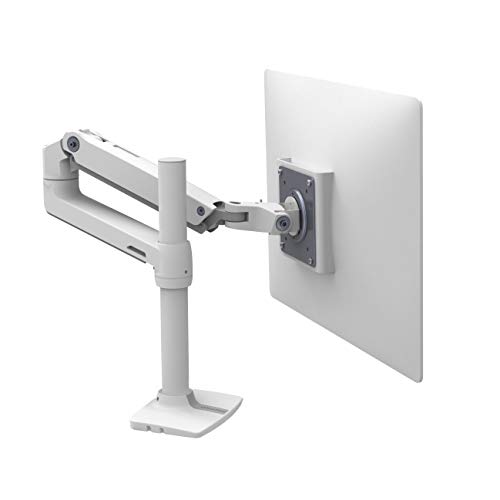
- Supports screens up to 34 inches and 25 pounds
- Provides 13 inches of lift
- Backed by a 10-year warranty
Best For: Elevated single-monitor workstations
Heavy-Duty Dual-Screen Pick
HUANUO HNDS7 Dual Monitor Stand

- Supports up to 26.4 lb per arm
- Fits screens up to 40 inches
- Includes USB ports and dual mounting options
Best For: Large, heavy dual-monitor home office setups
Classic Dual-Desk Mount
VIVO STAND-V002O Monitor Stand

- Holds two monitors up to 19.8 lb each
- Fits 17- to 32-inch flat or curved screens
- Offers clamp or grommet installation
Best For: Standard dual-monitor office and gaming setups
Easy-Setup Single Monitor Pick

- Supports 13- to 32-inch monitors
- Offers one-handed height adjustment
- Installs with clamp or grommet mounting
Best For: Single-monitor home offices prioritizing quick setup
Premium Ultrawide Support
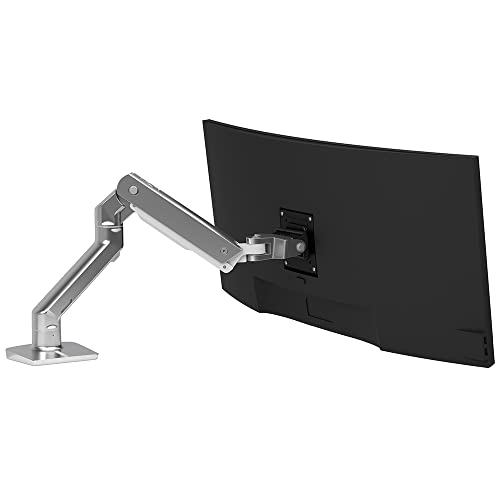
- Supports single screens up to 49 inches and 42 pounds
- Provides broad height, tilt, and rotation adjustment
- Includes clamp and grommet mounting options
Best For: Large ultrawide monitors and heavy single-screen workstations
Precision Everyday Adjustments

- Supports 13- to 32-inch monitors up to 15.4 pounds
- Uses a MechaSpring arm with visible tension guidance
- Offers tool-free VESA mounting and clamp or grommet bases
Best For: Lightweight monitors and users who adjust screens often
Flexible Two-Screen Setup

- Supports two monitors up to 32 inches and 19.8 pounds each
- Offers full motion with portrait or landscape rotation
- Uses clamp or grommet mounting with concealed cable management
Best For: Dual-screen home offices and multitasking workstations
Best Dual-Screen Stability – HUANUO FlowLift Dual Monitor Stand
For home offices using two screens, the HUANUO FlowLift is a full-motion option with dual C-clamp or grommet mounting. It supports 13- to 32-inch monitors weighing 4.4 to 19.8 pounds per arm, provided they use 75x75mm or 100x100mm VESA mounting holes.
Best For: Dual-monitor home offices that prioritize firm desk attachment, broad positioning, and a cleaner desktop.
Pros:
- Supports two monitors up to 32 inches and 19.8 pounds each.
- Offers tilt, swivel, rotation, and up to 15.75 inches of height adjustment.
- Includes dual C-clamp and grommet mounting options plus cable management.
Cons:
- Designed for wooden desks; plastic and glass desks are not recommended.
- Requires a desk 0.59 to 3.54 inches thick without obstructing crossbeams or panels.
- Each monitor must weigh at least 4.4 pounds.
The FlowLift is a practical pick when two-screen stability and flexible positioning matter most. Check your desk construction, thickness, monitor weight, and VESA pattern before ordering.
Best Single-Arm Range – WALI Adjustable Single Monitor Arm
The WALI Adjustable Single Monitor Arm is a flexible choice for monitor arms for home offices, supporting compatible flat or curved displays up to 34 inches. It offers extensive reach and positioning while using either a C-clamp or grommet base.
Best For: Single-monitor users who want generous reach, high lift, and compatibility with heavier flat screens.
Pros:
- Supports flat screens up to 34 inches and 26.4 pounds, or curved screens up to 19.8 pounds.
- Extends up to 19.3 inches and raises the monitor up to 17.3 inches above the desk.
- Provides 360-degree rotation, wide swivel, tilt adjustment, and built-in cable management.
- Includes C-clamp and grommet mounting options with a 10-year warranty.
Cons:
- Installation is recommended for wooden desks without an underside crossbeam.
- Desk thickness must be between 0.39 and 2.76 inches.
- Monitor size, weight, and VESA pattern must be checked before purchase.
With its high load rating for flat displays and substantial extension range, this WALI arm suits changing work positions. Confirm the separate weight limits for flat and curved monitors before buying.
Best Value Dual Mount – VIVO STAND-V002 Dual Monitor Desk Mount
The VIVO STAND-V002 is a straightforward dual monitor mount for home offices, supporting two 13- to 30-inch screens up to 22 pounds each. Its steel construction, C-clamp, and optional grommet mounting provide a solid foundation for a two-screen workstation.
Best For: Dual-monitor users seeking a sturdy steel stand with simple installation and broad adjustment.
Pros:
- Supports two monitors up to 30 inches and 22 pounds each.
- Allows tilt, swivel, rotation, height adjustment, and portrait or landscape positioning.
- Uses a heavy-duty C-clamp for desks up to 3.25 inches thick, with an optional grommet mount.
- Includes detachable VESA plates, cable clips, and a three-year warranty.
Cons:
- Monitor compatibility is limited to 75x75mm or 100x100mm VESA patterns.
- Maximum supported screen size is 30 inches.
- Grommet mounting is listed as an option rather than the primary included setup.
This VIVO mount emphasizes sturdy construction and useful two-screen adjustment without overcomplicating installation. It is a sensible fit for standard-sized monitors and thicker desks.
Best Premium Single Arm – Ergotron LX Tall Pole Monitor Arm
The Ergotron LX Tall Pole is a premium single monitor arm for home offices that need extra vertical range. It supports compatible flat, curved, or ultrawide displays up to 34 inches and 25 pounds, with a tall pole that raises the monitor high above the worksurface.
Best For: Single-monitor setups needing elevated positioning, a clean white finish, and long-term support.
Pros:
- Supports compatible screens up to 34 inches and 25 pounds.
- Provides 13 inches of monitor lift and rises 22.1 inches from the worksurface.
- Offers 360-degree rotation and 75 degrees of tilt, and folds back to reclaim desk space.
- Includes a two-piece clamp and a 10-year warranty with technical support.
Cons:
- The included clamp fits desk edges 0.63 to 2.6 inches thick.
- Grommet mounting requires a separate accessory.
- Dual-monitor expansion requires the separately sold LX Arm, Extension and Collar Kit.
The tall-pole LX stands out when monitor height and adjustability are more important than an included grommet base. Its upgrade path and 10-year warranty add flexibility for a long-term workstation.
Heavy-Duty Dual-Screen Pick – HUANUO HNDS7 Dual Monitor Stand
For home offices with two larger or heavier displays, the HUANUO HNDS7 is one of the more robust monitor arms for home offices. Its aluminum arms support up to 26.4 pounds per arm, while the larger base and dual C-clamp design add stability. Clamp and grommet mounting provide flexibility for different desk layouts.
Best For: Users running two 13- to 40-inch monitors who want extensive positioning range, a sturdy mount, and built-in USB charging.
Pros:
- Supports up to 26.4 pounds per arm and VESA 75x75mm or 100x100mm screens.
- Offers swivel, tilt, 360-degree rotation, and height adjustment up to 21.1 inches.
- Includes clamp and grommet mounting, cable management, and two USB ports.
Cons:
- The larger arms may extend up to 25.59 inches, so desk depth and rear clearance matter.
- Its heavy-duty design may be more than needed for lightweight, compact monitors.
The HNDS7 stands out when stability and adjustability take priority over a smaller footprint. Check your desk thickness, mounting clearance, and monitor weight before installation.
Classic Dual-Desk Mount – VIVO STAND-V002O Monitor Stand
The VIVO STAND-V002O is a straightforward option for shoppers comparing monitor arms for home offices with two standard-size screens. Its mechanical spring arms support most 17- to 32-inch flat or curved monitors, and the C-clamp or optional grommet mount helps reclaim desk space.
Best For: Office or gaming setups using two monitors up to 19.8 pounds each and needing broad tilt, swivel, and rotation adjustment.
Pros:
- Supports compatible 17- to 32-inch monitors weighing 4.4 to 19.8 pounds each.
- Provides 90-degree tilt, 180-degree swivel, and 360-degree rotation.
- Open-top VESA plates and included hardware simplify monitor installation.
Cons:
- The rear portions of the arms extend past the desk edge.
- The grommet mount supports desks up to 1.9 inches thick, less than the C-clamp’s 3.1-inch limit.
This VIVO mount is a practical dual-screen choice when your monitors fit its size and weight limits. Measure rear clearance and confirm your desk can accommodate the selected mounting method.
Easy-Setup Single Monitor Pick – HUANUO FlowLift Monitor Arm
For a single-screen workspace, the HUANUO FlowLift is a compact choice among monitor arms for home offices. Its one-piece design is intended for quick installation, while clamp and grommet bases accommodate compatible desks. The arm also provides one-handed height adjustment and a broad range of screen positioning.
Best For: Home office users with one 13- to 32-inch monitor who want a simple setup and flexible ergonomic adjustment.
Pros:
- Supports 4.4- to 19.8-pound monitors with VESA 75x75mm or 100x100mm patterns.
- Offers -50 to +85 degrees of tilt, 180-degree swivel, and 360-degree rotation.
- Includes clamp and grommet mounting, with installation designed to take about three minutes.
Cons:
- It is designed for one monitor rather than a dual-screen setup.
- Desk compatibility depends on suitable underside clearance and a thickness range of 0.59 to 3.54 inches.
The FlowLift is a sensible fit when you want to elevate one monitor and adjust it without a complicated assembly process. Verify the monitor’s weight, VESA pattern, and desk construction before buying.
Premium Ultrawide Support – Ergotron HX Heavy Duty
For demanding home offices built around a large display, the Ergotron HX is a heavy-duty choice among monitor arms for home offices. It supports single flat or slightly curved screens up to 49 inches and 42 pounds, with broad adjustment and sturdy mounting options.
Best For: Large ultrawide monitors, including demanding single-screen workstation setups.
Pros:
- Supports screens up to 49 inches and 42 pounds, with multiple VESA patterns.
- Offers 11.5 inches of lift, 360-degree rotation, and up to 75 degrees of tilt.
- Includes both C-clamp and grommet mounting options plus cable management.
- Backed by a 10-year warranty and technical support.
Cons:
- The Samsung 49-inch Odyssey G9 requires a separate heavy-duty tilt pivot accessory or bundled solution.
- Larger VESA patterns require a separate adaptor kit.
- Its heavy-duty design is more than needed for smaller, lighter monitors.
The HX stands out when screen size and weight are the main buying concerns. It offers smooth positioning and a polished aluminum finish, though buyers should verify VESA requirements and accessory needs before ordering.
Precision Everyday Adjustments – HUANUO FlowLift Pro
The HUANUO FlowLift Pro is a practical option for lighter displays and frequent repositioning. Its MechaSpring arm, visible tension indicator, and tool-free VESA plate make it an appealing pick among monitor arms for home offices.
Best For: Lightweight 13- to 32-inch monitors used for focused work, gaming, meetings, or occasional adjustment.
Pros:
- Supports compatible monitors weighing 4.4 to 15.4 pounds with 75x75mm or 100x100mm VESA patterns.
- MechaSpring construction is designed for consistent support and long service life.
- PrecisionView provides a visual reference for tension adjustment.
- Tool-free quick-release VESA mounting can simplify installation.
Cons:
- It is limited to monitors from 13 to 32 inches and 15.4 pounds.
- The manufacturer recommends installation only on wood desks 0.59 to 3.54 inches thick.
- Irregular desk edges may make this arm a less suitable choice.
With a focus on easy setup and stable adjustments, the FlowLift Pro suits streamlined home-office setups. Confirm the monitor’s size, weight, VESA pattern, and desk construction before buying.
Flexible Two-Screen Setup – MOUNTUP Freelift Dual Stand
The MOUNTUP Freelift is designed to turn a single desk into a flexible two-screen workstation. With full-motion arms, height adjustment, and concealed cable routing, it is a strong value-oriented choice among monitor arms for home offices.
Best For: Home-office users who want two compatible monitors for multitasking, productivity, or gaming.
Pros:
- Holds two 22- to 32-inch monitors weighing 4.4 to 19.8 pounds each.
- Supports tilt, swivel, and 360-degree rotation for landscape or portrait positioning.
- Arms extend up to 19.5 inches and rise up to 16.9 inches.
- Includes C-clamp and grommet installation options with cable management.
Cons:
- Compatibility is limited to 75x75mm and 100x100mm VESA patterns.
- Each monitor must remain within the specified size and weight range.
- Grommet installation requires a suitable desk hole within the stated dimensions.
The Freelift makes sense when two screens are more useful than one and desk space is limited. Its adjustment range is generous, but checking both monitors’ specifications and the desk thickness is essential.
How We Picked the Best Monitor Arms for Home Offices
We focused on the specifications that matter most in everyday home-office use: supported screen size and weight, VESA compatibility, adjustment range, mounting method, and whether the arm suits one or two monitors. We also included a range of designs, from straightforward budget mounts to premium arms for heavier ultrawide screens.
Because desk setups vary widely, the selection includes clamp and grommet mounting options, gas- or mechanical-spring adjustment systems, and models designed for standard monitors as well as large curved displays.
Quick Comparison
- Single-monitor setups: Choose a single arm for a cleaner desk and simpler installation.
- Dual-monitor setups: Dual arms consolidate two displays onto one mounting point, but require more desk depth and careful weight balancing.
- Large or ultrawide screens: Check the arm’s maximum weight and diagonal-size limits carefully; premium heavy-duty models are often the safer choice.
- Flexible positioning: Look for height, tilt, swivel, and rotation adjustments if you frequently change between sitting, standing, or collaborative viewing.
Key Buying Factors for Monitor Arms for Home Offices
Monitor Compatibility
Confirm that each screen falls within the arm’s supported size and weight range. Weight limits generally exclude the monitor stand, but verify the manufacturer’s specifications. Most models use VESA 75 x 75 mm or 100 x 100 mm mounting patterns.
Desk and Mounting Requirements
A C-clamp works well on many desks, while a grommet mount can provide a more secure, less intrusive installation when your desktop has a suitable cable hole. Measure desk thickness and check for adequate clearance behind the desk before buying.
Adjustment and Stability
Gas-spring or mechanical-spring arms make repositioning easier, but they must be tensioned for your monitor’s weight. For dual screens, independent arm adjustment helps align displays of different sizes. A sturdy base and rigid desk are essential for minimizing movement.
Cable Management and Desk Space
Integrated cable channels keep power and display cables organized. Also consider the arm’s footprint, especially if your workspace is shallow or positioned against a wall.
Who Should Buy Which Monitor Arms for Home Offices?
Choose a single standard arm if you use one 13- to 32-inch monitor and want the simplest way to reclaim desk space. Choose a dual arm for multitasking, research, spreadsheets, or streaming across two displays. Choose a heavy-duty arm for a large curved or ultrawide monitor, particularly when the display approaches the upper end of the weight range. If you change posture throughout the day, prioritize broad height and tilt adjustment over a basic fixed-position mount.