A document scanner with a 100 sheet feeder can process larger batches with fewer interruptions, making it a practical upgrade for busy offices, home businesses, and records-heavy workflows.
These 10 scanners range from compact wireless desktop models to enterprise-ready network scanners. Compare speed, connectivity, software, media handling, and daily-duty features to find the right fit.
Best 10 Document Scanner with 100 Sheet Feeder Picks for 2026
Enterprise Speed Pick
fi-8190 High-Speed Network Scanner

- 90 ppm simplex and 180 ipm duplex scanning
- 100-sheet feeder handles mixed media and cards
- Ethernet, USB, OCR, and 13,000-sheet duty cycle
Best For: High-volume departmental and enterprise scanning
Best Wireless Workflow

- 100-sheet ADF with duplex scanning
- Wireless and computer-free cloud or USB workflows
- 35 ppm speed with OCR and automatic image cleanup
Best For: Convenient home-office and small-business scanning
Balanced Production Choice

- 50 ppm and 100 ipm duplex scanning
- 100-sheet feeder supports cards, passports, and long pages
- USB, Gigabit Ethernet, and 8,000-page daily volume
Best For: Regular office batches and back-file conversion
Best Managed Network Option
Epson DS-800WN Network Scanner

- 50 ppm and 100 ipm duplex scanning
- LAN, Wi-Fi, USB, and 100-sheet ADF
- Touchscreen, ScanWay, OCR, and three-year warranty
Best For: Shared office networks and managed scanning workflows
Top Wireless Pick

- 45-ppm duplex scanning
- 100-sheet feeder with jam protection
- Wi-Fi 6, USB-C, and touchscreen profiles
Best For: Fast, customizable wireless or USB document scanning
Best Flatbed Combo

- 100-page duplex ADF
- 8.5-by-11.7-inch flatbed
- Supports documents up to 8.5 by 40 inches
Best For: Offices scanning both standard and irregular documents
Best Networked Office Option
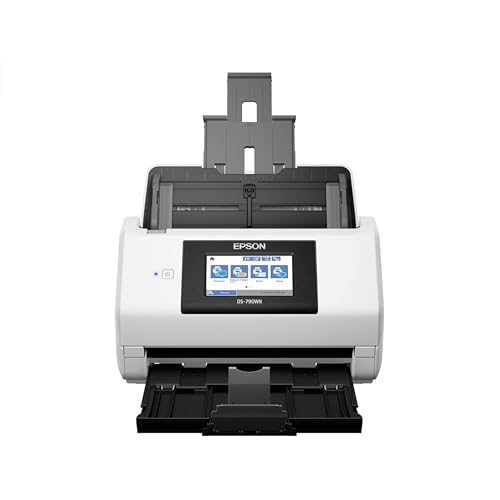
- 100-sheet feeder
- Ethernet and USB connectivity
- Handles paper, cards, and plastic cards
Best For: Connected offices scanning documents and cards
Best High-Volume Choice

- 100-page ADF with up to 45 ppm/90 ipm duplex scanning
- TWAIN and ISIS drivers for office workflow integration
- Supports long pages, folded documents, and ID cards
Best For: Offices scanning large daily batches
Best Everyday Office Value

- 50-sheet ADF for routine document stacks
- ScanSmart software supports cloud sharing and file naming
- OCR creates searchable PDFs and editable files
Best For: Home offices and small workgroups
Best Wireless Receipt Scanner

- 100-sheet ADF with up to 45 ppm duplex scanning
- Wi-Fi, USB, and 4.3-inch color touchscreen
- AI-ready receipt data extraction and financial integrations
Best For: Receipt, invoice, and document digitization
Enterprise Speed Pick – fi-8190 High-Speed Network Scanner
If you need a document scanner with 100 sheet feeder for a busy department, the fi-8190 emphasizes speed, capacity, and flexible media handling. It scans up to 90 pages per minute simplex or 180 images per minute duplex at up to 600 dpi, while its network connectivity supports shared workgroup use.
Best For: Enterprise departments processing large daily batches, mixed media, and shared network workflows.
Pros:
- Fast 90 ppm simplex and 180 ipm duplex performance.
- 100-sheet ADF handles receipts, documents, ID cards, and embossed cards.
- Gigabit Ethernet, USB 3.2, and PC-less scanning support workgroup deployment.
- Paper protection, multifeed detection, and a 13,000-sheet daily duty cycle support heavy use.
Cons:
- Its enterprise-oriented features may be more than occasional users need.
- At 8.8 pounds, it is less portable than compact desktop scanners.
The fi-8190 is a strong choice when throughput and document variety matter more than simplicity. PaperStream software, OCR support, and image enhancement add useful workflow capabilities for professional environments.
Best Wireless Workflow – Epson ES-580W Duplex Scanner
The Epson ES-580W is a practical document scanner with 100 sheet feeder for offices that value wireless convenience. Its 100-sheet ADF, duplex scanning, touchscreen, and direct-to-cloud options make it easy to digitize documents without keeping a computer beside the scanner.
Best For: Home offices and small businesses that want wireless, computer-free scanning.
Pros:
- 100-sheet ADF supports various paper types and sizes.
- Scans at up to 35 pages per minute with one-pass duplex capture.
- Can scan directly to USB, email, and supported cloud services without a computer.
- OCR, blank-page removal, background removal, and skew correction simplify file cleanup.
Cons:
- Its 35 ppm speed is lower than the high-speed models in this roundup.
- Wireless and cloud features depend on compatible network and service setups.
Choose the ES-580W when ease of use and flexible destinations are priorities. The 4.3-inch touchscreen and image-processing tools make it especially approachable for routine office paperwork.
Balanced Production Choice – fi-8150 50 ppm Scanner
The fi-8150 is a document scanner with 100 sheet feeder designed for consistent batch work without taking up much desk space. It combines 50 ppm duplex performance with USB and Gigabit Ethernet, while supporting paper, cards, passports, receipts, and long pages.
Best For: Offices converting back files or processing regular batches of varied document types.
Pros:
- 100-sheet ADF scans up to 50 pages or 100 images per minute at 300 dpi.
- Handles media from 20 to 465 g/m², including cards and long pages.
- Ultrasonic multifeed detection helps prevent missed pages and batch errors.
- USB 3.2 and Gigabit Ethernet allow individual or shared use.
Cons:
- The supplied minimum system requirement lists Windows 10, limiting stated platform guidance.
- It lacks the wireless and touchscreen workflow features offered by some alternatives.
For users who need production-oriented handling in a desktop footprint, the fi-8150 offers a useful middle ground. Its 8,000-page expected daily volume and broad media support suit demanding office intake without moving to a larger departmental unit.
Best Managed Network Option – Epson DS-800WN Network Scanner
The Epson DS-800WN is a document scanner with 100 sheet feeder built for connected workgroups. It combines 50 ppm and 100 ipm duplex scanning with LAN, Wi-Fi, and USB connectivity, plus a touchscreen and computer-free ScanWay workflows.
Best For: Networked offices that need shared scanning, centralized management, and flexible destinations.
Pros:
- 100-sheet ADF delivers up to 50 ppm or 100 ipm one-pass duplex scanning.
- LAN, Wi-Fi, and USB 3.2 support flexible workgroup sharing.
- Scan to USB, network folders, email, or supported cloud services without a computer.
- Three-year limited warranty and up to 8,000-page peak daily duty cycle support business use.
Cons:
- Some document-management integrations require supported third-party solutions.
- Optional fleet-management software may be needed for advanced centralized administration.
The DS-800WN stands out for offices that want more than basic USB scanning. Its customizable touchscreen, broad connectivity, OCR-capable software, and fleet-oriented options make it well suited to shared departmental workflows.
Top Wireless Pick – ScanSnap iX2500
The ScanSnap iX2500 is a versatile document scanner with 100 sheet feeder capacity for home offices and busy workspaces. It combines 45-ppm double-sided scanning with Wi-Fi 6, USB-C, touchscreen profiles, and automatic file optimization.
Best For: Users who want fast, customizable wireless or USB scanning with cloud and mobile support.
Pros:
- Fast 45-ppm double-sided scanning
- 100-sheet feeder with multi-feed and skew detection
- Wi-Fi 6, USB-C, touchscreen profiles, and cloud support
- Automatically optimizes, names, and sorts scanned files
Cons:
- Limited to a 1-year manufacturer warranty
- Requires relatively current operating systems
The iX2500 stands out when convenience and workflow flexibility matter as much as feeder capacity. Its wireless connectivity and touchscreen controls make it especially practical for shared scanning stations.
Best Flatbed Combo – Epson WorkForce DS-6500
The Epson WorkForce DS-6500 is a document scanner with 100 sheet feeder capacity plus an 8.5-by-11.7-inch flatbed. Its 25-ppm or 50-ipm duplex scanning, 1200-dpi resolution, and support for long documents make it a flexible choice for mixed scanning jobs.
Best For: Offices that need both automatic feeder scanning and flatbed handling for varied documents.
Pros:
- 100-page ADF with automatic duplex scanning
- Flatbed supports documents up to 8.5 by 11.7 inches
- Scans documents up to 8.5 by 40 inches
- Includes Document Capture Pro software and cloud scanning
Cons:
- USB connectivity only without the optional network module
- Larger and heavier than the other listed models
- Limited to a 1-year warranty
The DS-6500 is a strong fit when a feeder alone is not enough. Its flatbed and long-document support broaden its capabilities, though its larger footprint and wired setup may suit a dedicated office location best.
Best Networked Office Option – Epson DS-790WN
The Epson DS-790WN is a document scanner with 100 sheet feeder capacity designed for connected office environments. Ethernet and USB provide wired flexibility, while the scanner handles plain paper, business cards, ID cards, and plastic cards.
Best For: Offices that need network-ready scanning and support for cards alongside standard documents.
Pros:
- 100-sheet standard feeder capacity
- Ethernet and USB connectivity
- Supports business cards, ID cards, plastic cards, and plain paper
- Backed by a 3-year limited warranty
Cons:
- Supplied notes do not specify scanning speed
- No Wi-Fi connectivity is listed
- Minimum system requirements list Windows 7
The DS-790WN is a practical choice for offices prioritizing Ethernet connectivity and media flexibility. Its longer warranty adds reassurance, but buyers seeking wireless operation or a stated high speed may prefer another model.
Best High-Volume Choice – Epson DS-530X
If you need a document scanner with 100 sheet feeder capacity for regular office batches, the Epson DS-530X combines a 100-page ADF with single-pass duplex scanning at up to 45 ppm/90 ipm. Its USB connection, TWAIN and ISIS drivers, and document-protection features make it a practical fit for established office workflows.
Best For: Offices scanning large daily batches and integrating with document-management systems.
Pros:
- 100-page ADF and peak daily duty cycle of up to 7,000 sheets.
- Fast single-pass duplex scanning at up to 45 ppm/90 ipm.
- TWAIN and ISIS drivers support broad software integration.
- Handles extra-long pages, folded documents up to 11 x 17 inches, and ID cards.
Cons:
- USB connectivity only; no wireless option is listed.
- Its feature set may be more than needed for occasional home scanning.
The DS-530X is a strong choice when feeder capacity, speed, and workflow compatibility matter most. Ultrasonic double-feed detection and blank-page removal add useful automation for demanding scanning routines.
Best Everyday Office Value – Epson WorkForce ES-400 II
The Epson WorkForce ES-400 II is worth considering if you want efficient desktop scanning but do not require a document scanner with 100 sheet feeder capacity. Its 50-sheet ADF, duplex scanning, ScanSmart software, OCR, and cloud-sharing tools suit everyday home and office tasks.
Best For: Home offices and small workgroups scanning routine documents to searchable files or cloud storage.
Pros:
- 50-sheet ADF helps process small document stacks.
- ScanSmart software supports previews, email, cloud uploads, and automatic file naming.
- OCR can create searchable PDFs and editable Word or Excel files.
- Ultrasonic double-feed detection and dynamic skew correction help improve feeding reliability.
Cons:
- Its 50-sheet feeder falls short of the 100-sheet capacity in the target category.
- Only USB connectivity is listed.
Although it is not a 100-sheet model, the ES-400 II offers useful software automation and file-management features for typical document loads. It is a sensible option when convenience and everyday productivity outweigh maximum feeder capacity.
Best Wireless Receipt Scanner – Epson RapidReceipt RR-620W
For buyers seeking a document scanner with 100 sheet feeder capacity plus wireless convenience, the Epson RapidReceipt RR-620W stands out. It combines a 100-sheet ADF, up to 45 ppm double-sided scanning, Wi-Fi, a color touchscreen, and receipt-focused data extraction for financial workflows.
Best For: Small businesses and professionals digitizing receipts, invoices, and documents with wireless or computer-free options.
Pros:
- 100-sheet ADF and single-pass duplex scanning at up to 45 ppm.
- Wi-Fi and USB connectivity provide flexible setup options.
- 4.3-inch color touchscreen supports scanning to email, cloud storage, or USB drives without a computer.
- AI PRO Technology extracts receipt and document data for integrations such as QuickBooks, TurboTax, and Excel.
Cons:
- Its receipt and financial features may be unnecessary for basic paper archiving.
- The supplied minimum system requirements specify Windows, with no Mac requirement listed.
The RR-620W is the most specialized option here, pairing 100-sheet capacity with wireless operation and receipt-oriented automation. Choose it when touchscreen control, cloud access, and financial-data extraction are priorities.
How We Picked the Best Document Scanner with 100 Sheet Feeder
We selected models based on the features that matter most in high-volume document capture: automatic document feeder capacity, duplex scanning, real-world speed, image quality, connectivity, software compatibility, and workflow flexibility. The list includes scanners designed for home offices, departments, shared workgroups, and specialized receipt or records processing.
Not every model has the same feeder capacity or network features, so check the specifications carefully if a true 100-sheet feeder is essential. Some scanners are included as practical alternatives for buyers who prioritize wireless access, compact size, or lower purchase cost.
Quick Comparison
| What to Compare | Why It Matters |
|---|---|
| Feeder capacity | Determines how many pages can be loaded at once and how often batches need attention. |
| Duplex speed | Captures both sides in one pass, reducing handling for two-sided documents. |
| Connectivity | USB, Ethernet, Wi-Fi, and network scanning support different office setups. |
| Software and drivers | Influence searchable PDFs, cloud workflows, OCR, document naming, and compatibility. |
| Duty cycle | Indicates whether the scanner is suited to occasional use or sustained daily workloads. |
Key Buying Factors for a Document Scanner with 100 Sheet Feeder
Speed and Batch Handling
Look at both simplex and duplex speeds, usually listed in pages per minute or images per minute. A fast scanner saves time only when its feeder reliably handles mixed batches, long documents, and frequent page turns. For departments, a robust separation system and accessible rollers can be as important as headline speed.
Connectivity and Workflow
USB is simple and dependable for one workstation. Ethernet is better for shared office access, while Wi-Fi supports flexible placement and direct scanning from multiple devices. Confirm whether the scanner supports your preferred operating systems, TWAIN or ISIS drivers, network authentication, and cloud destinations.
Image Quality and Paper Support
Automatic color detection, background removal, blank-page removal, and reliable skew correction can reduce editing time. If you scan receipts, forms, cards, or fragile originals, verify supported paper sizes, thicknesses, long-document handling, and carrier-sheet compatibility.
Software, OCR, and Maintenance
Bundled OCR and PDF tools can turn scans into searchable files and streamline naming or routing. Also consider replacement rollers, cleaning requirements, warranty coverage, and the manufacturer’s support reputation. These recurring details affect total ownership cost.
Who Should Buy Which Document Scanner with 100 Sheet Feeder?
Choose an enterprise network scanner if several users need centralized access, dependable Ethernet connectivity, and high daily volume. Choose a wireless desktop scanner for a small office or home workspace that needs flexible placement and straightforward cloud workflows.
Choose a compact USB model when one user scans modest batches and wants a simpler, lower-cost setup. Choose a receipt-focused scanner if expense reports, invoices, and accounting integrations are central to your workflow. For the best match, prioritize your average batch size and software needs over maximum advertised speed alone.