A laptop desk converter can make it easier to alternate between sitting and standing without replacing your entire workstation. The right model should fit your laptop, monitor setup, keyboard, and available desk space while providing stable, comfortable height adjustment.
We selected 10 desk converters for laptops ranging from compact risers to wide standing platforms. Use the comparison and buying advice below to find the best match for your workspace, posture preferences, and daily routine.
Best 10 Desk Converters for Laptops Picks for 2026
Compact Choice
VIVO 26 in Single Top Standing Desk Converter

- Compact surface for laptop and single-monitor setups
- Five lockable height settings
- Pre-assembled steel frame supports 17.6 pounds
Best For: Small desks and single-monitor workstations
Most Flexible
Urmust 360° Rotating Laptop Stand
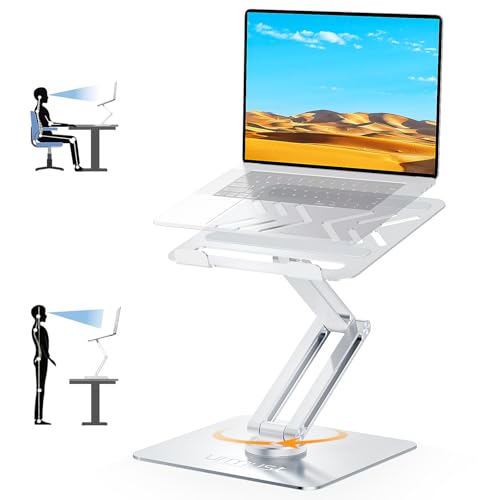
- Fits 10- to 17-inch laptops
- 360-degree rotation for screen sharing
- Supports up to 22 pounds with dual pivot joints
Best For: Shared desks, meetings, and adjustable laptop positioning
Dual-Monitor Pick
VIVO Black 32 in Standing Desk Converter

- 31.5-inch surface supports dual monitors
- Synchronized wide keyboard tray included
- 33-pound lift assist adjusts to standing height
Best For: Larger dual-monitor and laptop workstations
Portable Small-Space Pick
SAIJI Metal Small Laptop Desk Converter
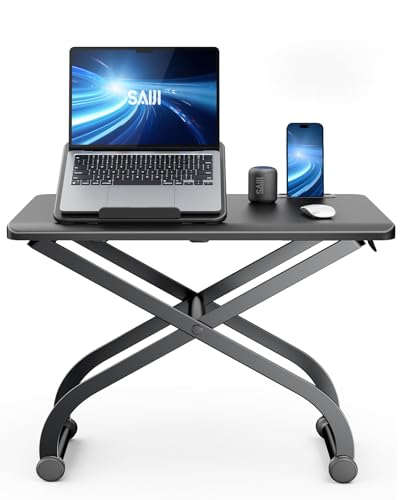
- Built-in laptop stand for elevated viewing
- Adjusts from 4.7 to 16.5 inches
- Pre-assembled metal design supports a listed 88-pound load
Best For: Single-laptop users and portable workspaces
Best for Easy Setup
VIVO 32-Inch Single-Top Converter

- Slim 31.5-by-18.5-inch work surface
- Five lockable heights up to 15.9 inches
- Pre-assembled steel frame supports 17.6 pounds
Best For: Small workspaces and single-monitor laptop setups
High-Capacity Pick
Adjustable 23.6-Inch Standing Converter
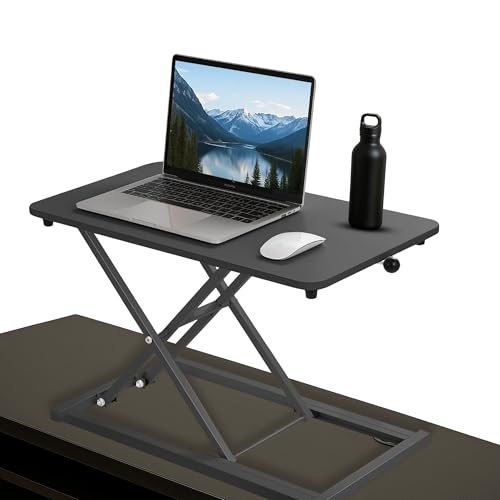
- Height adjusts from 2.4 to 15.7 inches
- Steel frame rated for up to 88 pounds
- Arrives assembled with mat and cable tie
Best For: Laptop-and-monitor setups needing broad adjustment and high capacity
Large-Workstation Pick
VIVO 36-Inch Converter with Keyboard Tray

- 36-inch surface fits dual monitors and a laptop
- Synchronized keyboard tray included
- Raises from 4.5 to 20 inches with lift assist
Best For: Wide dual-monitor and laptop workstations
Flexible Home Office Riser
Adjustable Height Standing Desk Converter

- 23.6-inch work surface for laptops and peripherals
- Adjusts from 2.3 to 16 inches
- No assembly; works on desks, tables, or beds
Best For: Versatile laptop workstations used across the home
Wide Dual-Monitor Workstation
VIVO 36-Inch Standing Desk Converter

- 36-inch surface for laptop or dual-monitor setups
- Synchronized keyboard tray included
- Pneumatic lift with 17-to-43-cm adjustment range
Best For: Large, equipment-heavy office workstations
Compact Everyday Riser
VIVO 29-Inch Single-Top Converter

- 29.3-by-17.8-inch space-saving surface
- 1.8-to-16.2-inch height adjustment
- Preassembled with a 22-pound capacity
Best For: Small desks and straightforward laptop setups
Compact Choice – VIVO 26 in Single Top Standing Desk Converter
For shoppers comparing desk converters for laptops in a smaller workspace, the VIVO 26-inch riser offers a compact single-surface setup. Its ultra-slim platform fits a laptop, monitor, and full-size keyboard while providing five height settings for sit-stand use.
Best For: Small desks and single-monitor or laptop workstations.
Pros:
- Compact 26.4-by-18.5-inch work surface helps conserve desk space.
- Five lockable height settings range from 8.5 to 15.9 inches above the desk.
- Pre-assembled design supports up to 17.6 pounds.
Cons:
- The single top may be limiting for larger multi-monitor setups.
- Its 17.6-pound capacity is lower than some larger converters.
This is a practical pick when footprint and simple setup matter most. The squeeze-handle adjustment and low 1.8-inch resting height make it easy to add standing work without replacing your existing desk.
Most Flexible – Urmust 360° Rotating Laptop Stand
Among desk converters for laptops, the Urmust stand stands out for its rotating, adjustable design. It accommodates 10- to 17-inch laptops, raises the screen for standing use, and lets you turn the device toward others without moving the base.
Best For: Shared workspaces, presentations, and users who want adjustable laptop positioning.
Pros:
- 360-degree rotation makes screen sharing and collaboration easier.
- Dual pivot joints and a metal base support up to 22 pounds.
- Multiple height and angle settings help position the screen at eye level.
- Vent openings and all-metal construction promote airflow.
Cons:
- The laptop should be removed before height or angle adjustments.
- Its stand-style design provides less general desktop surface than a broad riser.
This model is a strong choice for flexible laptop positioning rather than a full workstation surface. Its broad compatibility and rotation feature are especially useful when your setup includes meetings or frequent screen sharing.
Dual-Monitor Pick – VIVO Black 32 in Standing Desk Converter
For buyers seeking desk converters for laptops with room for more equipment, the VIVO DESK-V000K provides a 31.5-inch-wide work surface and a synchronized keyboard tray. Its lift-assist mechanism raises the workstation from sitting height to standing height with a manual adjustment.
Best For: Dual-monitor setups that also need a laptop or full keyboard workspace.
Pros:
- 31.5-by-15.7-inch surface is designed to accommodate dual monitors.
- Wide keyboard tray raises with the main surface for a coordinated setup.
- 33-pound lift-assist mechanism adjusts from roughly 4.5 to 20 inches.
- Steel construction includes a three-year manufacturer warranty.
Cons:
- The larger footprint requires substantial desk space.
- Some minimal assembly is needed to attach the keyboard tray.
This converter is better suited to a full workstation than a simple laptop riser. Choose it when monitor capacity and a dedicated keyboard tray are more important than portability or a minimal footprint.
Portable Small-Space Pick – SAIJI Metal Small Laptop Desk Converter
The SAIJI is a compact option for shoppers comparing desk converters for laptops in tight spaces. Its built-in laptop stand and 22.4-by-11-inch surface are sized for a single laptop and mouse, while the simple-touch mechanism adjusts the platform between sitting and standing heights.
Best For: Single-laptop users who need a compact, portable sit-stand workstation.
Pros:
- Built-in laptop stand helps raise the screen toward eye level.
- Height adjusts from 4.7 to 16.5 inches.
- Pre-assembled design needs no tools or installation.
- Metal construction supports a listed maximum load of 88 pounds.
Cons:
- The 22.4-by-11-inch surface is intended for a laptop and mouse, not a broad multi-device setup.
- It does not include a separate keyboard tray.
With its narrow footprint and built-in laptop support, the SAIJI is aimed at focused single-device work. It is a sensible fit when you move between desks or want an uncomplicated riser that can switch between sitting and standing.
Best for Easy Setup – VIVO 32-Inch Single-Top Converter
For shoppers comparing desk converters for laptops in a smaller workspace, the VIVO DESK-V032J offers a slim, single-level platform with several preset height options. It arrives assembled and provides space for a laptop, monitor, and full-size keyboard.
Best For: Compact home offices and laptop users who want straightforward sit-stand adjustment.
Pros:
- 31.5-by-18.5-inch surface supports laptop and single-monitor setups.
- Five lockable height settings range from 1.8 to 15.9 inches.
- Pre-assembled steel-frame design supports up to 17.6 pounds.
Cons:
- Uses preset height levels rather than continuous adjustment.
- Its 17.6-pound capacity is lower than some larger converters.
This is a practical pick when desk space is limited and you prefer quick, manual height changes without assembly. Its single-top layout is best suited to a laptop or single-monitor workstation rather than a broad multi-monitor setup.
High-Capacity Pick – Adjustable 23.6-Inch Standing Converter
This adjustable converter is a strong option among desk converters for laptops when you want a broad height range and a high stated weight capacity. Its freestanding platform is designed for laptops, monitors, keyboards, and accessories, and it includes a mat and cable tie.
Best For: Users who need flexible sit-stand positioning and substantial support for a mixed laptop-and-monitor setup.
Pros:
- Adjusts from 2.4 to 15.7 inches for sitting or standing.
- Steel frame has a stated maximum weight recommendation of 88 pounds.
- Fully assembled and includes a mat and cable tie.
- 23.6-by-13.4-inch platform accommodates laptops, monitors, and keyboards.
Cons:
- The supplied dimensions contain conflicting platform measurements, so verify the listing before purchase.
- Its density-board top may feel less premium than an all-metal surface.
With its wide adjustment range and unusually high stated capacity, this model is suited to heavier equipment configurations. Confirm the exact dimensions and available desk space before ordering, especially if your workspace is compact.
Large-Workstation Pick – VIVO 36-Inch Converter with Keyboard Tray
For shoppers seeking desk converters for laptops with room for more equipment, the VIVO DESK-V036KB provides a 36-inch surface and a synchronized keyboard tray. Its lift-assist design raises the workstation from 4.5 to 20 inches for seated or standing use.
Best For: Dual-monitor and laptop workstations that need a wide surface and dedicated keyboard space.
Pros:
- 36-by-15.7-inch top provides room for dual monitors and a laptop.
- Keyboard tray raises with the desktop and supports up to 4.4 pounds.
- Height adjusts from 4.5 to 20 inches using a lift-assist mechanism.
- Desktop supports up to 33 pounds and includes a three-year warranty.
Cons:
- At 28.3 pounds, it is substantially heavier than compact risers.
- Partial assembly is required for the keyboard tray.
- The wide 36-inch footprint needs a suitably deep and spacious desk.
This converter makes the most sense for a permanent, equipment-heavy workstation rather than a portable laptop setup. Choose it when surface area and a synchronized keyboard tray matter more than minimizing weight or desk footprint.
Flexible Home Office Riser – Adjustable Height Standing Desk Converter
If you want desk converters for laptops that can move between work surfaces, this manually adjustable riser offers a broad 23.6-by-13.3-inch platform. It raises from 2.3 to 16 inches, making it suitable for switching between sitting and standing at a desk, table, or even a bed.
Best For: Laptop users who want a versatile, no-assembly converter for home, office, or occasional use as a study or snack table.
Pros:
- Offers space for a laptop, monitor, keyboard, and office essentials.
- Adjusts from 2.3 to 16 inches for flexible working positions.
- Requires no assembly and uses a stable metal-and-wood structure.
- Can also serve as a bedroom table, TV tray, or study table.
Cons:
- Height adjustment is manual rather than pneumatic-assisted.
- The supplied notes do not specify a weight capacity.
- Its 13.4-inch depth may limit larger workstation layouts.
This is a practical choice when flexibility matters more than specialized features. Its wide height range and portable, multipurpose design make it useful for laptop work across different rooms and surfaces.
Wide Dual-Monitor Workstation – VIVO 36-Inch Standing Desk Converter
For shoppers comparing desk converters for laptops and larger setups, this VIVO riser provides a spacious 36-by-22-inch workstation. Its dual-tier design includes a keyboard tray that rises with the main surface, while pneumatic lift assistance supports smooth sit-to-stand transitions.
Best For: Users who need room for a laptop, one or two monitors, and a full-sized keyboard.
Pros:
- Spacious surface accommodates single- and dual-monitor or laptop setups.
- Integrated keyboard tray raises in sync with the desktop.
- Dual pneumatic springs provide assisted height adjustment from 17 to 43 cm.
- Steel construction is backed by a 3-year manufacturer warranty.
Cons:
- Its 36-inch width and 33-pound weight require substantial desk space.
- Supports up to 33 pounds, so the combined equipment load must be considered.
- Some minimal assembly is required for the keyboard tray and feet.
This model emphasizes workspace capacity and ergonomic organization. It is a strong fit for a permanent office setup, especially if you want a synchronized keyboard tray and space for multiple displays.
Compact Everyday Riser – VIVO 29-Inch Single-Top Converter
This compact option stands out among desk converters for laptops when desk space is limited. Its 29.3-by-17.8-inch single-level surface supports a laptop, monitor, or full-sized keyboard, and the straight-up height adjustment helps keep the riser stable during transitions.
Best For: Laptop users seeking a low-profile, ready-to-use converter for smaller desks.
Pros:
- Compact footprint fits a variety of desk layouts.
- Adjusts from 1.8 to 16.2 inches with a simple touch locking mechanism.
- Supports up to 22 pounds.
- Arrives fully assembled and ready to use.
Cons:
- Single-top design provides less organization than a dual-tier model.
- Its 22-pound capacity is lower than the larger VIVO converter in this roundup.
- The supplied notes do not mention a separate keyboard tray.
With its smaller footprint and no-assembly setup, this converter is well suited to everyday laptop work. Choose it when you want sit-stand flexibility without committing much desk space.
How We Picked the Best Desk Converters for Laptops
We focused on the features that matter most in everyday laptop work: usable surface area, height range, stability, footprint, portability, and compatibility with common desk setups. The lineup includes compact laptop risers, single-level converters, keyboard-friendly platforms, and wider models suited to a laptop plus external monitor.
Because desk layouts vary, no single converter is ideal for everyone. A small riser may be best for limited space, while a wide standing platform can provide a more complete workstation. We also considered whether each design appears practical for frequent height changes and cable management.
Quick Comparison
| Type | Best For | What to Look For |
|---|---|---|
| Compact laptop riser | Small desks and occasional standing | Low footprint, portability, and sufficient height |
| Single-top converter | Laptop-only setups | Stable surface, usable depth, and easy adjustment |
| Keyboard-riser model | Laptop plus separate keyboard | Dedicated keyboard space and comfortable tiering |
| Wide standing converter | Laptop, monitor, and accessories | Platform width, weight capacity, and desk clearance |
Key Buying Factors for Desk Converters for Laptops
Surface Size and Device Layout
Measure your laptop and any accessories before choosing a converter. If you use an external keyboard, mouse, monitor, or speakers, a narrow platform may feel cramped. A wider 29- to 36-inch model generally offers more flexibility, while a compact stand is easier to fit on a crowded desk.
Height Range and Ergonomics
Your screen should sit near eye level when standing, with your elbows relaxed and close to your sides. Check the converter’s minimum and maximum heights against your desk and your own standing position. Laptop users may also need a separate keyboard because raising the screen can otherwise force the wrists into an uncomfortable angle.
Stability, Weight, and Desk Clearance
A sturdy steel frame or broad base can reduce wobble, especially at maximum height. Confirm the supported weight for your laptop and monitor combination, and check that the converter will not collide with shelves, wall panels, or desk accessories as it rises.
Adjustment and Everyday Convenience
Consider how often you will change positions. A model that is simple to lift, lower, or reposition is more likely to become part of your routine. Also allow room for charging cables and verify that the platform’s edges will not obstruct ports.
Who Should Buy Which Desk Converters for Laptops?
Choose a Compact Riser If You Have Limited Space
Small laptop stands and narrow converters suit dorm rooms, compact home offices, and desks that cannot accommodate a large platform. They are also convenient if you only stand for short periods.
Choose a Mid-Size Single-Top Model for Laptop-Only Work
A 26- to 29-inch single-surface converter is a practical middle ground for a laptop, mouse, and a few accessories without taking over the desk.
Choose a Keyboard-Friendly Converter for Better Laptop Ergonomics
If you plan to raise the laptop screen regularly, look for a design with room for an external keyboard and mouse. This helps keep the display elevated while allowing a more neutral typing position.
Choose a Wide Converter for a Complete Workstation
A 32- to 36-inch platform is better suited to a laptop alongside a monitor or larger accessory setup. Before buying, confirm your desk depth, available clearance, and the converter’s load capacity.