Adding a standing option to a dual-monitor setup does not require replacing your entire desk. The right converter can raise your screens and keyboard together, helping you alternate between sitting and standing while keeping your existing workspace.
These 10 desk converters for dual monitors include wide manual risers, monitor-mount designs, and electric models. Compare their size, adjustment style, weight capacity, and cable-management needs to find the best fit for your desk.
Best 10 Desk Converters for Dual Monitors Picks for 2026
Best Overall
VIVO 42 in Standing Desk Converter

- Spacious 42-inch surface for dual monitors
- 33-pound desktop weight capacity
- 4.5–20-inch straight-up height adjustment
Best For: Users who need the most room for a dual-monitor workstation
Best Space-Efficient Pick
VIVO 32 in Standing Desk Riser

- Compact 31.5-inch-wide work surface
- 26-pound desktop load capacity
- 4.9–19.7-inch pneumatic height range
Best For: Dual-monitor setups on smaller desks
Best Value Features
TechOrbits 32 in Standing Desk Converter

- Integrated dual-monitor stand and keyboard tray
- 33-pound desktop load capacity
- 4.3–19.7-inch pneumatic adjustment range
Best For: Compact home-office or gaming workstations
Best Spring-Lift Design
FLEXISPOT 36 in Desk Converter

- 36-inch surface fits dual monitors and accessories
- Mechanical spring lift for stable adjustment
- 33-pound desktop capacity with reinforced steel frame
Best For: Daily dual-monitor use with a mid-size workstation
Best Value Manual Riser
VIVO Black 36 in Standing Desk Converter

- Wide 36-inch surface for dual monitors
- Manual 6.5- to 17-inch height adjustment
- Synchronized keyboard tray and three-year warranty
Best For: Spacious, no-fuss dual-monitor workstations
Best Electric Dual-Monitor Setup
Mount-It! Electric Standing Desk Converter

- Electric 1.4- to 21.1-inch height range
- Arms fit two monitors up to 32 inches
- Independent tilt, swivel, and rotation
Best For: Power users needing convenient two-screen adjustment
Best Integrated Monitor Stand
VIVO 32 in Standing Desk Converter

- Integrated mount for two 13- to 30-inch monitors
- 4.5- to 20-inch manual height range
- Full-motion arms with 360-degree rotation
Best For: Compact dual-monitor setups with built-in screen mounting
Best with Extra Features
Mount-It! 36-Inch Dual Monitor Converter
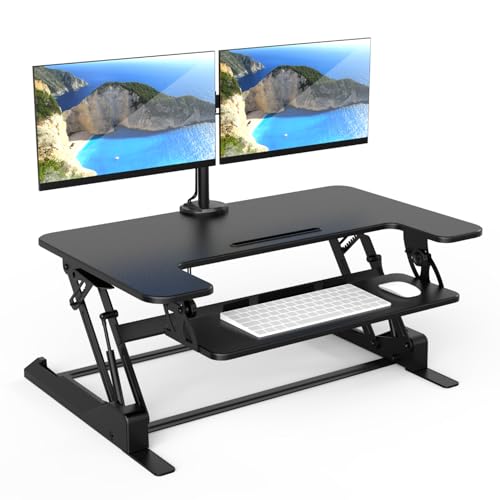
- 36-inch work surface for dual screens and accessories
- Gas-spring height range of 6.5 to 16.3 inches
- Integrated adjustable mounts and cable management
Best For: Spacious, organized dual-monitor workstations
Best Compact Option
Mount-It! Dual Monitor Desk Riser

- Compact 23.6-by-15.7-inch top platform
- Supports two monitors up to 32 inches
- Large keyboard tray with gel wrist pad
Best For: Smaller desks needing dual-monitor sit-stand capability
Best for Large Workspaces
Mount-It! 47-Inch Dual Monitor Converter

- Extra-wide 47.2-inch surface
- Height range of 5.9 to 19.3 inches
- Adjustable arms and built-in device channel
Best For: Large desks and expansive dual-monitor setups
Best Overall – VIVO 42 in Standing Desk Converter
For shoppers comparing desk converters for dual monitors, the VIVO DESK-V042KB stands out with a spacious 42-inch work surface and a generous height range. Its two-tier design accommodates monitors, a keyboard, and a laptop or accessories while lifting straight upward.
Best For: Dual-monitor users who want maximum desktop space and a sturdy manual lift system.
Pros:
- 42 x 15.7-inch surface provides ample room for dual monitors.
- 33-pound desktop capacity supports monitors and other equipment.
- Adjusts from 4.5 to 20 inches with a simple touch height lock.
- Includes a wide keyboard tray that raises with the desktop.
Cons:
- The keyboard tray is rated for 4.4 pounds.
- Its 42-inch width requires a suitably deep and wide existing desk.
This is the strongest all-around choice when workspace and monitor capacity matter most. It arrives nearly assembled, although the keyboard tray still needs to be attached.
Best Space-Efficient Pick – VIVO 32 in Standing Desk Riser
The VIVO 32-inch riser is a practical option for desk converters for dual monitors when you want a smaller footprint. Its 31.5 x 15.8-inch surface is designed for screen setups, while the synchronized keyboard tray and pneumatic lift support quick sit-to-stand changes.
Best For: Smaller home-office desks and users who want a compact dual-monitor riser.
Pros:
- Compact 32-inch design helps conserve desk space.
- Supports up to 26 pounds on the desktop.
- Height adjusts from 4.9 to 19.7 inches.
- Minimal assembly and a three-year warranty are included.
Cons:
- Offers less surface area and lower capacity than the 42-inch VIVO model.
- The supplied notes do not specify the keyboard tray’s weight capacity.
This model balances dual-monitor compatibility with a more manageable size. Choose it when your desk cannot comfortably accommodate a wider converter.
Best Value Features – TechOrbits 32 in Standing Desk Converter
The TechOrbits OF-S05-1 combines a 32-inch surface with a dedicated dual-monitor stand and keyboard tray. For shoppers seeking desk converters for dual monitors, its pneumatic lift and 4.3-to-19.7-inch range provide flexible sit-to-stand positioning without taking up the space of a full standing desk.
Best For: Home offices, study rooms, and gaming setups needing an integrated dual-monitor workstation.
Pros:
- 32-inch-wide work area accommodates monitors, keyboard, mouse, and accessories.
- Includes a dual-monitor stand and keyboard tray.
- Supports up to 33 pounds on the desktop.
- Mostly assembled with only the keyboard tray requiring setup.
Cons:
- The particle-board construction may be less premium than a fully metal or wood design.
- Height adjustment requires squeezing the handle and using your weight.
Its integrated monitor stand makes this a convenient package for users who want fewer separate components. It is especially appealing when a compact footprint and accessory organization are priorities.
Best Spring-Lift Design – FLEXISPOT 36 in Desk Converter
The FLEXISPOT 36-inch riser is a versatile choice among desk converters for dual monitors, offering room for two screens plus accessories without the footprint of the largest models. Its mechanical spring lift is designed for smooth, stable adjustment, and the reinforced steel frame supports a 33-pound desktop load.
Best For: Users who want a mid-size dual-monitor converter with a mechanical spring adjustment system.
Pros:
- 36-inch surface provides room for dual monitors and accessories.
- Mechanical spring system is designed to avoid gas-spring air leakage.
- Reinforced steel frame supports up to 33 pounds.
- Nearly assembled and includes a keyboard tray.
Cons:
- The supplied notes do not state the height-adjustment range.
- The keyboard tray is rated for 4.4 pounds.
- At 34.5 pounds, the converter itself is relatively heavy.
This is a sensible middle ground between compact 32-inch risers and oversized 42-inch models. Its spring-based mechanism and reinforced frame make it a strong fit for daily dual-monitor use.
Best Value Manual Riser – VIVO Black 36 in Standing Desk Converter
If you want desk converters for dual monitors without adding a full standing desk, the VIVO DESK-V000V offers a broad, manually adjustable workstation. Its 36-inch surface accommodates dual monitors or a monitor-and-laptop setup, while the synchronized keyboard tray helps maintain a more consistent working position.
Best For: Buyers who want a spacious, straightforward dual-monitor desk riser with minimal assembly and no electrical controls.
Pros:
- Large 36 x 22-inch desktop supports dual-monitor or laptop arrangements.
- Dual pneumatic spring assistance and touch-lock height adjustment provide a smooth 6.5- to 17-inch range.
- Keyboard tray raises with the desktop and the steel frame includes a three-year warranty.
Cons:
- Manual adjustment requires lifting rather than one-touch electric control.
- The 33-pound unit is substantial for a desktop accessory.
This is a practical choice when surface area matters more than advanced monitor positioning. It suits users who already have monitor stands and want an uncomplicated sit-stand upgrade.
Best Electric Dual-Monitor Setup – Mount-It! Electric Standing Desk Converter
For users comparing desk converters for dual monitors, the Mount-It! MI-7952 stands out for its integrated electric lift and included monitor arms. It supports two screens up to 32 inches each and provides independent positioning controls, making it suited to workflows that depend on multiple displays.
Best For: Multitaskers, coders, traders, and home-office users who want one-touch height adjustment and built-in dual-monitor mounting.
Pros:
- Included VESA 75×75 and 100×100 arms support two monitors up to 32 inches each.
- Electric adjustment moves the platform from 1.4 to 21.1 inches at the push of a button.
- Monitors can tilt, swivel, and rotate, while cable channels help reduce desk clutter.
- Steel construction supports up to 55 pounds total according to the supplied product notes.
Cons:
- The 28.3 x 18.9-inch base may still occupy considerable desk space.
- Partial assembly is required.
The MI-7952 is the most feature-rich option here for a true dual-screen command center. Choose it when powered height changes and monitor articulation are worth prioritizing over a simpler, lighter riser.
Best Integrated Monitor Stand – VIVO 32 in Standing Desk Converter
The VIVO DESK-V000K-M2 combines a manual sit-stand desktop with an integrated dual-monitor mount, making it a focused option among desk converters for dual monitors. Its arms fit two 13- to 30-inch VESA-compatible screens and allow portrait or landscape positioning.
Best For: Users who want an integrated, space-conscious dual-monitor riser with adjustable screen angles and a wide keyboard tray.
Pros:
- Dual monitor mount supports two 13- to 30-inch displays weighing up to 17.6 pounds each.
- Height adjusts from 4.5 to 20 inches using the manual height-lock mechanism.
- Monitor arms offer tilt, swivel, and 360-degree rotation for portrait or landscape use.
- Steel construction and underside padding help protect equipment and the desktop.
Cons:
- Manual adjustment is less convenient than an electric converter.
- The integrated mount requires VESA-compatible monitors.
This model is a balanced middle ground: more integrated than a basic riser, but simpler than an electric workstation. It is especially appealing if you want monitor mounting and ergonomic positioning in one desktop unit.
Best with Extra Features – Mount-It! 36-Inch Dual Monitor Converter
For shoppers comparing desk converters for dual monitors, this 36-inch Mount-It! model combines integrated screen mounts with a spacious work surface. Its gas-spring lift adjusts from 6.5 to 16.3 inches, making it practical for alternating between sitting and standing.
Best For: Users who want a wide, integrated dual-monitor workstation with room for a laptop and accessories.
Pros:
- Supports two monitors up to 32 inches, with tilt, swivel, and rotation adjustments.
- 36-inch surface and large keyboard tray provide generous workspace.
- Supports up to 33 pounds on the desktop and 17.6 pounds per monitor arm.
- Includes cable management and nonskid pads.
Cons:
- At 46.1 pounds, it is relatively heavy to reposition.
- The 36-inch width requires substantial desk space.
This is a strong all-around choice when stability and workspace matter more than a compact footprint. The integrated mounts help keep a dual-screen setup organized without requiring separate monitor stands.
Best Compact Option – Mount-It! Dual Monitor Desk Riser
This Mount-It! riser is a practical option for anyone seeking desk converters for dual monitors without taking over the desk. Its 23.6-by-15.7-inch top platform, dual-monitor mount, and gas-spring adjustment create a flexible sit-stand setup in a smaller footprint.
Best For: Office users who need dual-monitor support and a broad keyboard tray while conserving desktop space.
Pros:
- Supports two monitors up to 32 inches and 22 pounds each.
- Adjusts from 5.7 to 17.1 inches for sitting or standing.
- 26.7-inch keyboard tray includes a soft gel wrist pad.
- VESA compatibility supports 75×75 and 100×100 mounting patterns.
Cons:
- The top platform is smaller than the other listed models.
- The unit weighs 47 pounds despite its space-saving design.
Choose this model when you want the functionality of a dual-monitor converter but have limited room for a large top surface. The keyboard tray helps preserve the available platform for other essentials.
Best for Large Workspaces – Mount-It! 47-Inch Dual Monitor Converter
Among desk converters for dual monitors, this 47-inch Mount-It! model is designed for users who want maximum surface area. Its extra-wide platform accommodates two monitors up to 32 inches, while the gas-spring lift adjusts from 5.9 to 19.3 inches.
Best For: Multi-monitor users who need an extra-large surface for screens, a keyboard, and additional devices.
Pros:
- 47.2-inch-wide surface offers substantial room for a dual-screen setup.
- Adjustable monitor arms provide tilt, swivel, and rotation.
- Height adjusts from 5.9 to 19.3 inches.
- Built-in device channel holds a tablet or smartphone.
Cons:
- Its 33-inch depth and 63-pound weight demand significant space.
- The listed maximum load is 33 pounds, so equipment weight should be checked carefully.
This is the most suitable pick for a spacious workstation where a compact converter would feel restrictive. Its broad surface and higher maximum position offer flexibility, but measure the desk before buying.
How We Picked the Best Desk Converters for Dual Monitors
We focused on converters that can realistically support two-screen workstations, either through a broad upper platform or built-in dual-monitor mounts. We also considered height-adjustment range, stability, available work surface, keyboard space, installation requirements, and the practicality of each design for everyday home-office use.
Because desks and monitor setups vary widely, no single model is ideal for everyone. A 32-inch riser may suit two compact monitors, while a 42- or 47-inch model offers more room for larger displays, speakers, and accessories.
Quick Comparison
- Best for maximum surface area: Extra-wide 42- and 47-inch converters.
- Best for compact desks: 32-inch risers with integrated or compatible monitor support.
- Best for easy height changes: Electric standing converters.
- Best for clean screen positioning: Models with dual monitor arms or mounts.
- Best for a simple setup: Broad platforms that hold the monitors directly without arm installation.
Key Buying Factors for Desk Converters for Dual Monitors
Width and Usable Depth
Measure your monitors, stands, keyboard, and mouse before choosing a converter. The listed width is not always the same as usable workspace, particularly when monitor arms or raised shelves occupy part of the platform. Leave room for comfortable mouse movement and avoid placing screens so close together that their bezels or stands interfere.
Platform Capacity and Stability
Check the total weight rating for the converter and compare it with both monitors plus accessories. A wide, heavy-duty base generally provides better stability, but your existing desk must also support the combined load. Look for a broad footprint and a platform that does not wobble at its highest setting.
Adjustment Method and Range
Manual converters are usually simpler and less expensive, while electric models make frequent transitions easier. Confirm that the lowest position works with your seated posture and that the highest position allows standing without hunching. If multiple people will share the workstation, prioritize a broad adjustment range.
Monitor Mounting and Ergonomics
Integrated arms can free platform space and make screen alignment easier, but they require compatible monitor mounting points and careful installation. If monitors sit directly on the platform, verify their height and use monitor stands or arms if necessary so the top of each screen is near eye level.
Desk Compatibility and Cable Management
Measure the desk depth, check for rear obstructions, and account for the converter’s base or lift mechanism. Route power and video cables with enough slack for full-height adjustment. A tidy cable path prevents strain and keeps the workstation easier to move.
Who Should Buy Which Desk Converters for Dual Monitors?
Choose a wide platform if you want the simplest dual-monitor arrangement or need space for a keyboard, laptop, and accessories. Choose a monitor-mount model if you value screen alignment, a cleaner surface, or additional room beneath the displays. An electric converter is the better choice for frequent sit-stand changes or users who prefer push-button adjustment. For smaller desks, a compact 32-inch model can work well, provided your monitor widths and stands fit comfortably.