Choosing a 3D scanner for sculpture means balancing fine-detail capture with the practical demands of working around large, irregular, reflective, or dark forms. Accuracy matters, but so do tracking, scan speed, software, portability, and the ability to capture color without excessive preparation.
We’ve selected 10 scanners covering detailed blue-laser systems, versatile handheld models, wireless options, and more accessible scanners for artists, makers, educators, and small studios.
Best 10 3d Scanners for Sculpture Picks for 2026
Best Hybrid Scanner
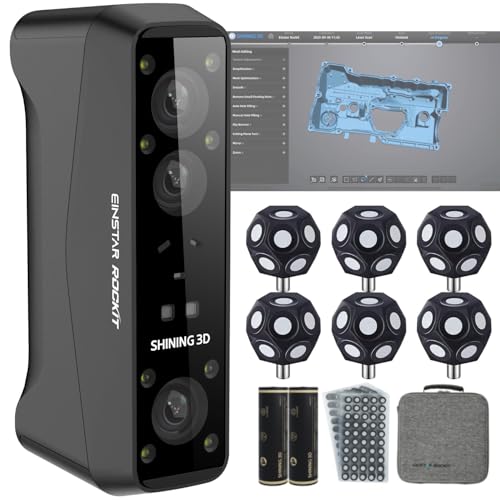
- Blue laser and infrared modes
- Scans dark and reflective surfaces
- Wireless operation with color capture
Best For: Outdoor statues and mixed-material sculptures
Best Lightweight Premium Pick

- 190 g portable design
- Dual scanning modules with optical zoom
- AI-assisted cleanup and retopology
Best For: Mobile sculpting and detailed 3D-printing workflows
Best for Fine Accuracy

- Up to 0.02 mm accuracy
- Blue laser and NIR modes
- Scans objects up to 2,000 mm
Best For: Detailed sculpture capture and precision modeling
Best Computer-Free Workflow

- Scans, edits, and fuses without a computer
- Up to 0.03 mm accuracy
- Large field of view for life-size work
Best For: Intuitive workflows from figurines to life-size sculptures
Precision Pick

- Up to 0.01 mm resolution and 0.02 mm accuracy
- Three blue-laser scanning modes
- No spray required for dark or shiny surfaces
Best For: Precision-focused sculpture, reverse engineering, and 3D printing
Versatile Color Choice

- 0.05 mm accuracy with 30 fps scanning
- Scans objects from 0.8 to 78 inches
- 24-bit color capture with no spray for dark or metallic surfaces
Best For: Colorful sculpture, figurines, artwork, and varied object sizes
Advanced Workflow Pick
Revopoint MetroY Pro 3D Scanner

- Five scanning modes for complex capture tasks
- Up to 0.01 mm precision and 2,000,000 points per second
- Marker-free mode and one-click auto-turntable scanning
Best For: Professional studios handling complex, repeatable sculpture scans
Beginner-Friendly Pick

- 0.05mm precision with 10FPS scanning
- AI tracking, anti-shake, and automatic model repair
- Marker-free scanning with Android, iOS, Windows, and macOS support
Best For: Beginners seeking a guided, marker-free sculpture scanning workflow
Wireless Speed Pick

- 30FPS scanning with up to 0.1mm accuracy
- WiFi 6 wireless transmission and anti-shake tracking
- Exports OBJ, STL, and PLY files
Best For: Sculptors needing fast, mobile, and wireless scanning
Portable Value Pick

- Dual modes for wide-range and high-accuracy scanning
- 30FPS capture with 0.1mm precision and 0.16mm resolution
- Full-color scanning and power-bank support
Best For: Android or PC users wanting portable, versatile sculpture scanning
Best Hybrid Scanner – Einstar Rockit Wireless
For artists comparing 3d scanners for sculpture, the Einstar Rockit stands out as a versatile wireless option with blue-laser and infrared scanning modes. Its outdoor performance, color capture, and support for black or reflective surfaces make it suitable for both studio and field work.
Best For: Sculptors scanning medium-to-large works, outdoor statues, and mixed-material surfaces.
Pros:
- Blue laser mode offers 38 crossed lines plus 7 parallel lines for detailed capture.
- Infrared scanning can capture face-to-feet subjects quickly and works in bright environments.
- Wireless PC synchronization, a swappable battery, and up to three hours of runtime support mobile scanning.
- Built-in 5 MP color capture adds vivid textures to digital models.
Cons:
- Requires a Windows 7-or-newer computer according to the supplied specifications.
- Multiple scanning modes and software features may require a learning curve.
The Rockit is a strong all-around choice when a sculpture workflow needs portability, material flexibility, texture capture, and reliable performance in changing light.
Best Lightweight Premium Pick – Revopoint INSPIRE 2
The Revopoint INSPIRE 2 is a lightweight option for artists seeking portable 3d scanners for sculpture. Its dual scanning modules, optical zoom, outdoor capability, and AI-assisted cleanup make it adaptable for detailed modeling and 3D-printing workflows.
Best For: Mobile sculptors and makers who want lightweight scanning with advanced software features.
Pros:
- Infrared structured light and multi-line laser modes handle varied materials and object sizes.
- Up to 0.05 mm accuracy and 0.03 mm precision support detailed models.
- At 190 g, it is easy to carry for on-location scanning.
- AI segmentation, background filtering, and photo-grade retopology can streamline post-processing.
Cons:
- Revo Design for scan-to-CAD workflows is sold separately.
- Outdoor scanning is specified for conditions up to 20,000 lux, which may limit use in stronger sunlight.
- Its recommended computer configuration calls for 16 GB of RAM and a capable processor and GPU.
With its compact design and included calibration and scanning accessories, the INSPIRE 2 offers a flexible package for sculptors who value portability and a modern digital workflow.
Best for Fine Accuracy – Creality CR-Scan Raptor
Creality’s CR-Scan Raptor is a precision-focused choice among 3d scanners for sculpture. Its blue-light system reaches up to 0.02 mm accuracy, while the NIR mode provides a marker-free option for faces, bodies, and artifacts.
Best For: Sculptors prioritizing fine edges, high scanning speed, and a broad object-size range.
Pros:
- Seven parallel blue laser lines and narrow blue light help capture sharp edges.
- Blue-light scanning reaches up to 60 fps, while NIR scanning reaches up to 20 fps.
- Supports objects from 5 mm to 2,000 mm in each dimension.
- NIR mode enables marker-free scanning for people and artifacts.
Cons:
- Requires a high-performance computer with 16 GB of RAM and a dedicated or Apple M-series graphics-capable system.
- Blue-light scanning may require markers depending on the subject and workflow.
- The scanner is specified for Windows and macOS rather than mobile operation.
The Raptor is a compelling fit for detailed sculpture digitization when accuracy and speed matter more than a lightweight, computer-independent setup.
Best Computer-Free Workflow – 3DMakerpro Toucan
The 3DMakerpro Toucan offers a streamlined approach to 3d scanners for sculpture by combining scanning, editing, and model fusion inside the device. Its large field of view and gap-filling capability are designed for everything from small figurines to life-size sculptures.
Best For: Sculptors who want an intuitive, self-contained workflow for objects of varied sizes.
Pros:
- Works without a computer for scanning, editing, and fusing complete 3D models.
- Offers up to 0.03 mm accuracy and a field of view up to 1000 × 750 mm.
- Recognizes different object orientations and helps fill gaps around undersides and internal structures.
- Camera-like controls are intended to feel natural and intuitive.
Cons:
- The supplied notes do not specify wireless connectivity, battery runtime, or supported software exports.
- The relatively heavy listed package weight may be worth considering for extended handheld sessions.
Toucan is especially appealing for artists who want to reduce computer dependence and move quickly from scanning to a complete model across a wide range of sculpture sizes.
Precision Pick – Revopoint MetroY 3D Scanner
If you need 3d scanners for sculpture that prioritize fine surface capture and measurement accuracy, the Revopoint MetroY is a strong professional option. Its blue-laser system offers up to 0.01 mm resolution and up to 0.02 mm accuracy, while multiple scanning modes help handle detailed surfaces and deep openings.
Best For: Sculptors, fabricators, and makers who need highly precise scans for 3D printing, reverse engineering, or metrology.
Pros:
- Blue lasers provide up to 0.01 mm resolution and up to 0.02 mm accuracy.
- Three modes support fast surface capture, detailed scanning, and deep-hole scanning.
- Scans dark and shiny surfaces without scanning spray, with speeds up to 1,500,000 points per second.
- Wi-Fi 6 and real-time streaming make positioning and monitoring more flexible.
Cons:
- Revo Design and Revo Measure are paid software sold separately.
- Those professional software tools support Windows only.
- Its highly specialized accuracy may be more than casual sculptors need.
The MetroY is best suited to users who value dependable dimensional accuracy over a simpler beginner workflow. Its calibration board, temperature monitoring, and professional export options add confidence for repeatable studio or production work.
Versatile Color Choice – Creality Otter Lite Basic
For artists seeking 3d scanners for sculpture with broad size coverage and realistic color capture, the Creality Otter Lite Basic is a flexible handheld option. Its quad-camera design scans objects from 0.8 to 78 inches, while the RGB camera records 24-bit color textures for presentation-ready models.
Best For: Sculptors scanning figurines, artwork, props, and larger objects who want color textures and mobile-device compatibility.
Pros:
- 0.05 mm accuracy and scanning speeds up to 30 frames per second.
- Quad cameras cover small objects through items up to 78 inches.
- Scans dark, shiny, and metallic surfaces without powder or spray.
- Captures 24-bit full-color textures and supports Windows, macOS, iOS, and Android.
Cons:
- The optional Scan Bridge handle costs extra.
- It offers less stated accuracy than the MetroY models.
- Color-textured scans may require additional processing for specific fabrication workflows.
The Otter Lite Basic stands out when versatility and visual presentation matter as much as dimensional capture. It is a practical choice for artists who want to scan varied object sizes, preserve surface color, and work across multiple operating systems.
Advanced Workflow Pick – Revopoint MetroY Pro 3D Scanner
The Revopoint MetroY Pro is designed for demanding 3d scanners for sculpture workflows where speed, repeatability, and flexible capture modes are important. It combines blue-laser scanning with five modes, marker-free structured-light scanning, and an auto-turntable feature for complex objects.
Best For: Professional sculptors, studios, and fabrication teams scanning complex forms for accurate digital production or 3D printing.
Pros:
- Offers up to 0.01 mm precision and up to 0.02 mm accuracy.
- Five modes cover fast surface capture, detailed lines, deep holes, full-field scanning, and auto-turntable work.
- Reaches up to 2,000,000 points per second, with marker-free scanning up to 7 million points per second in its full-field mode.
- Auto turntable scanning and Wi-Fi 6 support can streamline repeatable capture.
Cons:
- Its Windows workflow requires substantial hardware: at least 32 GB RAM and an RTX 3060-class GPU are specified.
- Revo Design and Revo Measure are paid separately and support Windows only.
- The advanced feature set may be excessive for occasional scanning.
The MetroY Pro is the most capable choice here for complex, repeatable scanning sessions. Its high-speed modes and auto-turntable support can reduce hands-on work, while the demanding system requirements make it better suited to an equipped studio than a casual home setup.
Beginner-Friendly Pick – 3DMakerpro Moose Lite Premium
For artists comparing 3d scanners for sculpture, the 3DMakerpro Moose Lite Premium emphasizes steady handheld scanning and simplified model preparation. Its AI visual tracking, optical anti-shake module, and marker-free workflow can make capturing sculptural forms less intimidating.
Best For: Beginners and sculptors who want a marker-free scanner with automated repair features.
Pros:
- 0.05mm precision and 10FPS scanning speed.
- AI visual tracking can help detect vulnerabilities and automatically repair 3D models.
- Optical anti-shake support and a re-scanning function help accommodate interrupted or unsteady scans.
- Compatible with Android, iOS, Windows, and macOS, with lifetime OTA software upgrades.
Cons:
- The listed 10FPS speed is lower than the 30FPS speed of the Creality options in this roundup.
- The package weighs 3.65 pounds, which may feel substantial during extended handheld sessions.
The Moose Lite Premium is a strong choice when ease of use and fine stated precision matter more than maximum scanning speed. Its software-assisted workflow is particularly appealing for artists who want help stabilizing and repairing scans.
Wireless Speed Pick – Creality CR-Scan Ferret Pro
The Creality CR-Scan Ferret Pro is a versatile option among 3d scanners for sculpture, combining 0.1mm accuracy with 30FPS capture and wireless transmission. Its anti-shake tracking and support for full-color scans suit artists working with larger or more complex forms.
Best For: Sculptors who want fast, wireless scanning across compatible phones, computers, and outdoor settings.
Pros:
- Up to 0.1mm accuracy, 0.16mm resolution, and 30FPS scanning speed.
- WiFi 6 transmission provides higher-bandwidth wireless data transfer than WiFi 5.
- Anti-shake tracking supports smoother capture during hand movement or quick object shifts.
- Exports OBJ, STL, and PLY files and can scan in outdoor light up to 30,000 lux.
Cons:
- Best results require avoiding highly reflective, transparent, or extremely dark surfaces.
- Wireless phone scanning requires the dedicated bridge and compatible devices, including iPhone 11 or newer for iOS.
The Ferret Pro balances speed, portability, and flexible file export. It is a practical fit for sculptors who need to move between studio and outdoor work, provided their materials are suitable for optical scanning and their devices meet the stated requirements.
Portable Value Pick – Creality CR-Scan Ferret
The Creality CR-Scan Ferret offers a portable approach to 3d scanners for sculpture, with dual scanning modes for broad forms and fine details. Its 30FPS point-cloud capture, full-color camera, and power-bank support make it suitable for flexible studio or on-the-go work.
Best For: Sculptors who want dual-mode scanning, color capture, and a lightweight setup for Android or PC use.
Pros:
- High-accuracy mode reaches 0.1mm precision with 0.16mm resolution.
- Wide-range mode supports coverage of up to 560 × 820mm per scan.
- Built-in RGB camera captures full-color textures for more realistic models.
- Can be powered by a 5V power bank or compatible Android device for portable scanning.
Cons:
- Mobile scanning support is for Android; iOS scanning requires the Ferret Pro.
- The supplied system requirements call for relatively capable hardware, including 8GB RAM and specified newer processors for computers.
The standard Ferret is compelling for artists who value flexibility and portability without giving up a high-accuracy mode. Choose it over the Pro when Android compatibility meets your needs and wireless iPhone scanning is not required.
How We Picked the Best 3d Scanners for Sculpture
We focused on scanners that can capture the geometry and surface character of sculptural work rather than only small, simple objects. Our comparison considers stated accuracy, resolution, scan speed, field of view, tracking stability, color capture, connectivity, software support, and the types of objects each model is designed to handle.
Because sculpture varies widely, we included both precision-focused blue-laser scanners and more flexible handheld systems. We also considered workflow: a scanner that is technically accurate but difficult to track, process, or export may be less useful than a slightly less precise model that fits an artist’s working habits.
Quick Comparison
| Priority | Look for | Best suited to |
|---|---|---|
| Fine surface detail | Blue-laser capture and high stated accuracy | Small to medium sculptures, molds, and detailed studies |
| Large forms | Wide field of view, stable tracking, and multiple scan modes | Statues, installations, and oversized pieces |
| Color and texture | Full-color capture and reliable lighting workflow | Painted, patinated, or highly textured artwork |
| Portability | Wireless operation, phone support, or compact hardware | Field work, galleries, classrooms, and shared studios |
Key Buying Factors for 3d Scanners for Sculpture
Accuracy and Resolution
Accuracy describes how closely measurements match the original, while resolution affects how finely surface features are recorded. For crisp edges, carved details, and small reliefs, prioritize the highest practical precision. For large organic forms, dependable tracking and complete coverage can matter more than the smallest published figure.
Tracking and Scan Range
Sculptures rarely provide simple, repetitive surfaces. Anti-shake tracking, marker support, multiple tracking modes, and a suitable object-size range help prevent gaps and alignment errors. Check whether the scanner works well on both the closest details and the full scale of your piece.
Surface, Color, and Lighting
Dark, glossy, transparent, or highly reflective surfaces can challenge optical scanners. Some pieces may need temporary scanning spray or markers. If color is important, choose a model with color capture, but remember that texture quality depends heavily on lighting and software processing.
Software and Export Options
Look for software that supports cleanup, hole filling, alignment, mesh editing, and common exports such as STL, OBJ, or PLY. Compatibility with Windows, macOS, Android, or iOS can be decisive if you work across devices. A straightforward workflow often saves more time than a minor specification advantage.
Ergonomics and Connectivity
Handheld scanning can take time, especially around large sculptures. Weight, cable length, wireless reliability, battery life, and preview feedback all affect comfort. Wired models may provide steadier data transfer, while wireless systems are easier to move around a piece.
Who Should Buy Which 3d Scanners for Sculpture?
Choose a high-precision blue-laser model if you regularly digitize detailed sculptures, create production files, or need clean geometry for restoration and reproduction. Choose a versatile midrange handheld scanner if your work includes mixed object sizes, occasional color capture, or frequent movement between studio and field.
For beginners, educators, and hobbyists, prioritize approachable software, broad compatibility, and stable tracking over headline accuracy. Artists scanning large installations should favor a generous field of view and dependable alignment. If portability is central to your workflow, a compact or wireless model may be the best fit even when a larger scanner offers higher theoretical precision.