Optical disc duplication is still useful for archival projects, training materials, media distribution, and organizations that need repeatable offline copies. The right tower can simplify batch production while reducing the time spent swapping discs or managing separate erase and copy tools.
This roundup compares 10 selected duplicators and related media-copying systems, including standalone CD/DVD towers, Blu-ray-capable models, USB flash duplicators, and devices with data-erasure functions. Use the guide below to match capacity, supported formats, speed, and workflow controls to your needs.
Best 10 Optical Disc Duplicators with Erase Functions Picks for 2026
Best High-Volume USB Sanitizer

- Copies up to 15 Type-A USB drives
- Includes three erase modes, including DoD 3-pass
- Standalone copy-and-compare operation
Best For: High-volume USB duplication and sanitization
Best for Disc Duplication

- Duplicates one master to seven discs
- Supports CD, DVD, dual-layer, and mini media
- Standalone operation with automatic master recognition
Best For: Multi-disc CD/DVD publishing
Best Secure Drive Eraser
1-to-2 SATA HDD/SSD Duplicator

- Clones SATA drives to two targets
- Offers Smart Copy, Raw Mode, and error skipping
- Includes DoD-style secure erase
Best For: Standalone SATA drive cloning and sanitization
Best Archival Disc Copier
1-to-1 CD/DVD and M-Disc Tower

- Standalone one-to-one disc duplication
- Supports M-Disc DVDs and common CD/DVD media
- Writes DVDs up to 24x and CD-R up to 52x
Best For: Single-copy optical publishing and M-Disc archiving
USB Drive Sanitizing Pick
StarTech 1:2 USB Duplicator Eraser

- Standalone USB duplication and erasing
- Quick, single-pass, and three-pass overwrite modes
- LCD monitoring with Copy & Compare verification
Best For: IT teams sanitizing and cloning USB drives
Compact Optical Disc Burner
Vinpower Digital 1:1 DVD/CD Duplicator

- Standalone CD/DVD duplication
- Up to 24x DVD and 52x CD-R writing
- Supports common CD formats and M-Disc DVD
Best For: Simple 1:1 CD and DVD duplication
Multimedia Backup Choice

- Copies across USB, memory cards, CD, DVD, and Blu-ray
- Supports media-to-disc and disc-to-media workflows
- Standalone operation with disc spanning
Best For: Mixed-media backup without a computer
Best M-Disc DVD Tower

- Standalone operation requires no PC
- Writes DVDs up to 24x and CDs up to 52x
- Supports M-Disc DVD archival media
Best For: CD/DVD duplication and long-term M-Disc archiving
Best High-Volume Blu-ray Tower
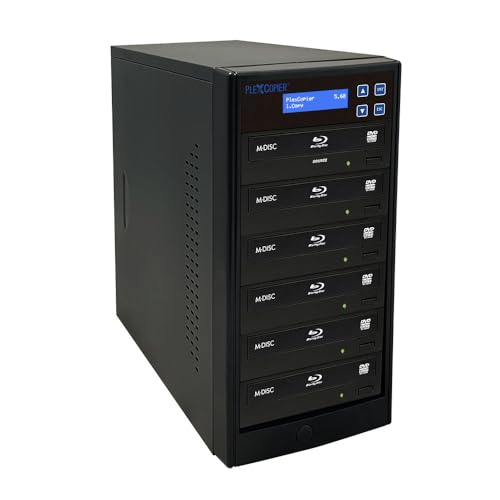
- Supports five target copies
- Works with Blu-ray, BDXL, DVD, CD, and M-Disc
- Lists 16x, 24x, and 52x media speeds
Best For: Higher-volume mixed-format disc duplication
Best Single-Target Blu-ray Tower
1-to-1 Blu-ray Disc Duplicator

- Standalone operation requires no PC
- Copies Blu-ray, DVD, and CD media
- Supports M-Disc and up to 16x BD-R writing
Best For: One-at-a-time mixed-format disc duplication
Best High-Volume USB Sanitizer – 15-Target USB 3.0 Duplicator
For buyers comparing optical disc duplicators with erase functions alongside USB media tools, this Acumen Disc tower is designed for high-volume Type-A flash-drive copying and sanitization. It supports up to 15 targets, operates without a computer, and includes quick, full, and DoD 3-pass erase modes.
Best For: Businesses and technicians duplicating or securely erasing multiple USB Type-A flash drives at once.
Pros:
- Copies to as many as 15 USB targets at up to 100MB/sec.
- Offers quick erase, full erase, and DoD 3-pass erase modes.
- Standalone operation includes copy-and-compare verification and a real-time LCD.
- Supports multiple USB generations and three formatting options.
Cons:
- Supports USB Standard Type-A media only; Type-C requires an adapter.
- Not compatible with hardware-encrypted or protected USB memory devices.
- Its 11-pound tower is less portable than compact duplicators.
This is a strong fit when throughput and repeatable USB sanitization matter more than optical-disc support. The USB-IF compatibility limitation is the main consideration before purchase.
Best for Disc Duplication – 1-to-7 CD/DVD Burner Tower
Produplicator 1 to 7 24X Burner CD DVD Duplicator - Standalone Copier Duplication Tower
Check Price On AmazonBuyers seeking optical disc duplicators with erase functions should note that this Produplicator is primarily a standalone CD/DVD copier rather than a data-erasure unit. It provides seven target burners, automatic master-disc recognition, adjustable burn speeds, and broad support for common recordable disc formats.
Best For: Disc publishers producing multiple CD or DVD copies without using a computer.
Pros:
- Duplicates one master disc to up to seven targets simultaneously.
- Works with DVD-R/RW, DVD+R/RW, dual-layer DVD media, CD-R/RW, and other listed formats.
- Automatic master-disc recognition simplifies setup.
- Standalone design requires no computer or software.
Cons:
- The supplied specifications do not list an erase or secure-sanitization function.
- Optical write speed is limited to 24x.
- Its feature set is focused on CD/DVD media, not USB or hard-drive duplication.
This tower makes sense for straightforward optical publishing, especially when several copies are needed at once. Choose a different model if verified erasure is a core requirement.
Best Secure Drive Eraser – 1-to-2 SATA HDD/SSD Duplicator
Although it is not an optical-disc unit, the Vinpower HDDMINI is relevant to buyers comparing duplicators with erase functions because it combines SATA drive cloning with DoD-level secure erasure. Its standalone design supports 2.5-inch and 3.5-inch HDDs and SSDs, including drives larger than 3TB.
Best For: Field technicians and IT users cloning SATA drives or sanitizing storage without a computer.
Pros:
- Copies one source drive to two targets in standalone mode.
- Supports Smart Copy, bit-for-bit Raw Mode, and read-error skipping.
- Performs a DoD 5220.22-M-style erase intended to remove previously stored data.
- Handles 2.5-inch and 3.5-inch SATA drives, including 3TB-plus capacities.
Cons:
- Designed for SATA HDDs and SSDs, not optical discs or USB flash drives.
- Read-error skipping can preserve recoverable data but does not repair failing drives.
- The supplied notes do not specify a warranty.
Choose this compact aluminum-bodied duplicator when drive cloning and secure disposal are more important than disc burning. Its raw-copy and error-skipping modes add useful flexibility for field recovery work.
Best Archival Disc Copier – 1-to-1 CD/DVD and M-Disc Tower
PlexCopier 24X 1 to 1 CD DVD M-Disc Supported Duplicator Copier Tower with Free Copy Protection
Check Price On AmazonFor shoppers evaluating optical disc duplicators with erase functions, this PlexCopier model is a disc-writing tower with copy-protection and archival-media features, not a listed erase tool. It provides standalone 1-to-1 duplication, supports M-Disc DVDs, and writes DVDs at up to 24x and CD-R media at up to 52x.
Best For: Businesses creating single-copy CD, DVD, or M-Disc archives without a computer.
Pros:
- Standalone operation requires no PC.
- Supports M-Disc DVD media for advertised archival applications.
- Offers up to 24x DVD and 52x CD-R write speeds.
- Can create copy-protected DVD video copies when used with OptoDisc MID media.
Cons:
- The supplied specifications do not list an erase or disc-sanitization mode.
- It will not copy encrypted discs.
- Only one target disc is supported.
This is a practical choice for simple optical duplication and M-Disc workflows, particularly when a computer-free setup is preferred. Buyers needing secure erasure should look to a model that explicitly provides that function.
USB Drive Sanitizing Pick – StarTech 1:2 USB Duplicator Eraser
For buyers searching for optical disc duplicators with erase functions, this StarTech unit is a specialized alternative for USB media rather than discs. It operates without a computer and combines USB duplication with quick erase, single-pass, and three-pass overwrite modes.
Best For: IT technicians and teams that need to clone, verify, or sanitize multiple USB drives.
Pros:
- Duplicates one USB drive to two targets without a computer.
- Supports USB 3.0 and USB 2.0 flash drives and external USB storage.
- Offers quick erase, single-pass, and three-pass overwrite options.
- LCD monitoring, error scanning, and Copy & Compare verification add control.
Cons:
- Designed for USB media, not CD, DVD, or Blu-ray discs.
- Asynchronous copying requires source content under 64 MB.
- Some external USB devices may require their own power source.
This is a practical choice when erase capability matters more than optical-disc support. Its standalone operation and verification features make it well suited to repeatable USB deployment and sanitizing workflows.
Compact Optical Disc Burner – Vinpower Digital 1:1 DVD/CD Duplicator
Vinpower Digital Standard 1 to 1 Target 24x DVD CD Disc Duplicator Tower SATA Optical Drives - Black
Check Price On AmazonThis standalone Vinpower tower is a straightforward optical-disc option for buyers comparing optical disc duplicators with erase functions. It focuses on 1:1 CD and DVD duplication, with no PC required, and supports common CD formats plus M-Disc DVD recording.
Best For: Users who need simple, standalone CD/DVD duplication at up to 24x DVD and 52x CD-R write speeds.
Pros:
- Operates standalone without requiring a computer.
- Supports up to 24x DVD and 52x CD-R write speeds.
- Recognizes common CD formats, including CD-TEXT, ISRC, and over-burned CD.
- Supports M-Disc DVD media for archival recording.
Cons:
- Provides one target drive, limiting throughput to 1:1 duplication.
- Does not copy encrypted discs.
- The supplied notes do not list an erase or disc-sanitizing function.
The Econ-S1T-DVD-BK is better viewed as a basic optical duplicator than an erase-capable sanitizer. Choose it for compatible, standalone CD/DVD burning, but look elsewhere if securely erasing rewritable media is essential.
Multimedia Backup Choice – EZ Dupe Media Mirror Plus
For buyers exploring optical disc duplicators with erase functions, the EZ Dupe Media Mirror Plus stands out for broad source and destination support rather than erasing. This standalone unit copies among USB drives, memory cards, CDs, DVDs, and Blu-ray discs, with disc spanning for larger flash-media sources.
Best For: Users backing up mixed flash-media and optical-disc content without software or a host computer.
Pros:
- Copies between USB, CF, SD, Micro SD, MS, and optical media.
- Supports disc-to-media, media-to-disc, and disc-to-disc workflows.
- Can copy one flash-memory type to two discs.
- Standalone operation and disc spanning improve workflow flexibility.
Cons:
- The supplied notes do not specify an erase or secure-wipe function.
- Optical writing is limited to DVD 16x and Blu-ray 8x.
- It is a 1:1 source-to-target media duplicator for direct disc copying.
This model is a versatile multimedia copier, especially when projects involve several card formats and Blu-ray alongside DVD and CD. However, buyers specifically needing erase functions should confirm that requirement separately, since the supplied specifications describe duplication and backup rather than sanitization.
Best M-Disc DVD Tower – 1-to-3 CD/DVD Duplicator
PlexCopier 24X 1 to 3 CD DVD M-Disc Supported Duplicator Copier Tower with Free Copy Protection
Check Price On AmazonThis standalone tower is a practical choice among optical disc duplicators with erase functions for users who need to copy CDs and DVDs without connecting a computer. It supports up to 24x DVD and 52x CD-R writing, along with M-Disc DVD recording for long-term archiving.
Best For: Standalone CD/DVD duplication, M-Disc archiving, and creating copy-protected DVD videos from compatible original media.
Pros:
- Operates without a PC.
- Supports up to three target copies from one master.
- Records to archival-grade M-Disc DVD media.
- Can create copy-protected DVD videos using compatible OptoDisc MID media.
Cons:
- Does not copy encrypted discs.
- Supports DVD and CD formats rather than Blu-ray.
- Its 14-pound tower design requires dedicated space.
Choose this model if fast CD/DVD throughput and M-Disc support matter more than Blu-ray compatibility. Its standalone design keeps routine duplication simple, while the stated media limitations are important to consider before buying.
Best High-Volume Blu-ray Tower – 1-to-5 Blu-ray Duplicator
PlexCopier 1 to 5 Blu-ray BD BDXL M-Disc CD DVD Duplicator Copier Tower with FREE Copy Protection
Check Price On AmazonFor buyers comparing optical disc duplicators with erase functions for larger duplication runs, this tower provides five target drives and supports Blu-ray, BDXL, M-Disc, DVD, and CD media. Its broad format coverage suits users who need a single duplication platform for mixed optical disc projects.
Best For: Higher-volume Blu-ray, BDXL, DVD, CD, and M-Disc duplication with compatible computers and optical drives.
Pros:
- Supports up to five simultaneous target copies.
- Handles Blu-ray, BDXL, M-Disc, DVD, and CD formats.
- Supports media speeds of 16x, 24x, and 52x.
- Works with Windows and macOS systems when used with compatible equipment.
Cons:
- The supplied notes do not confirm standalone, no-PC operation.
- Its 17-pound tower footprint may be substantial for small workspaces.
- Specific erase functionality is not stated in the supplied specifications.
This is the strongest fit in the group for batch-oriented Blu-ray work because of its five-target capacity and wide media support. Verify the intended host setup and workflow before purchase, especially if standalone operation or disc erasing is essential.
Best Single-Target Blu-ray Tower – 1-to-1 Blu-ray Disc Duplicator
PlexCopier 1 to 1 Blu-ray BD BDXL M-Disc CD DVD Duplicator Copier Tower with Free Copy Protection
Check Price On AmazonThis compact 1-to-1 tower is a flexible option among optical disc duplicators with erase functions when you need Blu-ray support without a multi-target production setup. It works with Blu-ray, DVD, and CD discs, operates standalone, and supports M-Disc media for archival projects.
Best For: One-at-a-time Blu-ray, DVD, and CD duplication, including standalone workflows and M-Disc recording.
Pros:
- Operates without a PC.
- Duplicates Blu-ray, DVD, and CD discs.
- Supports up to 16x BD-R, 24x DVD, and 52x CD-R writing.
- Can create copy-protected DVD videos using compatible OptoDisc MID media.
Cons:
- Handles only one target copy at a time.
- Does not copy encrypted discs.
- Specific erase functionality is not stated in the supplied notes.
This model balances format flexibility with a smaller single-target workflow, making it suitable for occasional or controlled duplication rather than high-volume production. Its standalone operation is a notable advantage, while encrypted-disc and erase-function limitations should be checked against your needs.
How We Picked These Optical Disc Duplicators with Erase Functions
We focused on systems that support practical duplication workflows and cover a range of media types, capacities, and operating environments. The selection includes standalone CD/DVD towers, Blu-ray and BDXL-compatible units, USB flash duplicators, hard-drive and SSD cloning equipment, and multimedia systems that copy between flash media and discs.
We also considered features that affect real-world usability: the number of target drives, rated writing speed, source compatibility, standalone operation, LCD or menu controls, M-Disc support, and whether the device can erase rewritable or other storage media. Because product capabilities vary considerably, verify the manufacturer’s supported formats and erase method before purchase.
Quick Comparison
| Best for | Look for | Relevant options in this roundup |
|---|---|---|
| High-volume disc runs | More target drives and fast duplication | 1-to-15, 1-to-7, and 1-to-5 towers |
| DVD and CD projects | Standalone operation and broad disc support | 1-to-1, 1-to-3, and 1-to-7 CD/DVD models |
| Blu-ray or archival media | BDXL, Blu-ray, and M-Disc compatibility | 1-to-1 and 1-to-5 Blu-ray towers |
| Flash-media workflows | USB support, LCD controls, and erase functions | StarTech and EZ Dupe systems |
| Drive migration or sanitization | HDD/SSD cloning and DOD-level erasure | Vinpower HDD/SSD duplicator |
Key Buying Factors for Optical Disc Duplicators with Erase Functions
Media Compatibility
Start with the formats you actually use. CD/DVD towers are appropriate for standard optical projects, while Blu-ray models are necessary for high-capacity discs. If long-term archival storage matters, check for M-Disc support. For USB, SD, CompactFlash, or other flash media, choose a dedicated or multimedia duplicator rather than assuming an optical tower will handle them.
Target Count and Throughput
A 1-to-1 unit is compact and cost-effective for occasional work, but it produces one copy per cycle. Larger towers can make several copies simultaneously and are better for recurring distribution runs. Compare the advertised speed with the media’s rated speed, since the slowest component determines actual throughput.
Erase Method and Data Control
“Erase” can mean clearing rewritable optical media, formatting flash storage, or applying a more defined overwrite or sanitization process to drives. Confirm which media the device can erase and whether it offers quick, full, or DOD-style erasure. For sensitive data, document the erase standard and verify it meets your organization’s requirements.
Standalone Operation and Controls
Standalone towers are useful where a computer-free workflow is preferred. Look for readable LCD menus, source-selection controls, verification options, copy-count settings, and error handling. These features reduce training time and make repeat jobs more consistent.
Who Should Buy Which Optical Disc Duplicators with Erase Functions?
Choose a high-capacity tower if you regularly produce many identical CD or DVD copies. Pick a Blu-ray or BDXL model for larger video, imaging, or archival files. A 1-to-1 unit suits occasional duplication and limited workspace, while a USB or multimedia duplicator is better for organizations working primarily with flash cards and drives. If secure drive disposal or migration is the priority, select a model specifically designed for HDD/SSD cloning and documented data erasure rather than a basic disc copier.