Standalone USB duplicators make it easier to clone, verify, and erase flash drives without connecting each device to a computer. They are useful for IT departments, installers, repair shops, educators, and organizations preparing media in volume.
This roundup compares 10 options across target capacity, transfer speed, supported media, and workflow features so you can choose a duplicator that matches your production needs.
Best 10 Standalone USB Duplicators Picks for 2026
Best Compact USB Copier

- Duplicates one USB drive to two targets
- Supports data-only and bit-for-bit copying
- Includes LCD controls and media tests
Best For: Portable small-batch USB duplication
Best High-Volume USB Duplicator

- Copies to up to 31 target drives
- Works without a computer or software
- Supports synchronous and asynchronous copying
Best For: Large-scale business USB distribution
Best 15-Target USB Duplicator

- Duplicates one master to 15 targets
- Requires no PC or software
- Provides LCD performance and status feedback
Best For: Mid-volume USB stick distribution
Best Touchscreen USB Duplicator

- Copies to up to 10 USB targets
- Adds compare, format, and erase tools
- Uses a simplified touchscreen interface
Best For: User-friendly daily USB preparation
High-Volume Pick
USB131SA 1-to-31 Standalone USB Duplicator
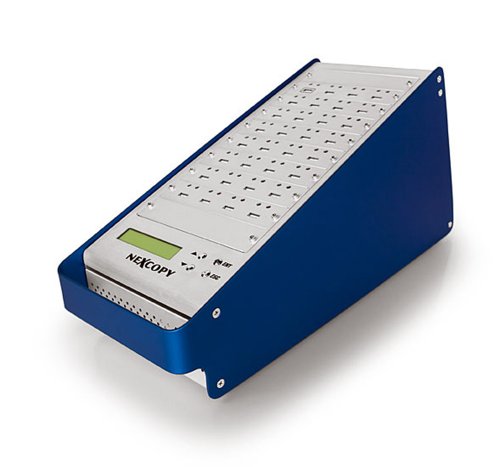
- No PC or software required
- One master supports 31 targets
- LCD status feedback and 1800MB/s-per-port speed
Best For: High-volume USB duplication
Most Versatile
EZ DUPE USB Cyclone 1-to-15 Duplicator

- Supports USB 1.0 through 3.1 devices
- Four copy and four erase modes
- Handles capacities above 2TB
Best For: Mixed USB cloning and secure erasure
Feature-Rich Choice
Vinpower USBShark 7-Target Duplicator

- Standalone operation with no PC
- Prescans sources for reading errors
- Includes Smart Copy and Secure Erase
Best For: Small-batch duplication with added safeguards
Versatile SATA/USB Workstation
1:1 Drive Duplicator and Eraser

- Copies SATA and USB drives
- Five erase modes, including DoD wipe
- LCD controls with Copy & Compare
Best For: Mixed SATA cloning and USB sanitization
High-Volume USB Production
15-Target Standalone Duplicator

- Copies to 15 USB targets
- Asynchronous duplication for batch work
- Smart Copy, Raw Mode, and secure erase
Best For: Large-scale USB production and deployment
Compact Business Tool

- Copies to three USB targets
- Smart and bit-by-bit Raw Copy modes
- DoD erasure and Read Error Skip
Best For: Small-batch USB duplication and secure reuse
Best Compact USB Copier – BestDuplicator UB300 1:2
The BestDuplicator UB300 is a practical choice for buyers comparing standalone USB duplicators for small-scale duplication. It copies one USB flash drive to two targets simultaneously, without a computer, and offers both data-only and bit-for-bit copying modes.
Best For: IT technicians, schools, small businesses, and field deployments that need a portable 1-to-2 USB duplicator.
Pros:
- Copies to two USB drives at the same time without Windows or Mac software
- Offers Quick Copy and Whole Media Copy modes
- Includes capacity checks, device information, speed tests, and erase functions
- Compact LCD-and-button interface with individual port status indicators
Cons:
- Limited to two target drives per duplication cycle
- Designed for USB 1.1 and USB 2.0 media, so it is not positioned as a high-throughput USB 3.x duplicator
- Memory-card duplication requires a compatible USB card reader sold separately
Choose the UB300 when portability, straightforward controls, and basic media testing matter more than high-volume production capacity. Its support for whole-media cloning also gives it added flexibility for exact-drive duplication.
Best High-Volume USB Duplicator – Systor 1 to 31 USB Duplicator
The Systor SYS-USBD-31 is built for buyers who need standalone USB duplicators with a large target count. It copies from one source to as many as 31 USB drives without a computer, while supporting synchronous and asynchronous duplication modes.
Best For: Businesses and production environments distributing software, media, or other USB-based content at scale.
Pros:
- Supports one source and up to 31 target USB drives
- Operates independently without a computer or software
- Offers bit-by-bit copying plus synchronous and asynchronous modes
- Rated for transfer speeds up to 2GB per minute, or 33MB per second
Cons:
- Its large 31-target configuration may be excessive for occasional or small-batch users
- USB Type-C drives require an adapter
- The supplied specifications identify a USB 1.1 hard-disk interface
The SYS-USBD-31 stands out when throughput and simultaneous output are the primary priorities. Its fixed high-capacity layout is less convenient for casual users, but it can reduce repeated duplication cycles in business workflows.
Best 15-Target USB Duplicator – Nexcopy USB115SA 1:15
The Nexcopy USB115SA is a dedicated option among standalone USB duplicators, using a one-master, 15-target configuration. It requires no PC or software and provides real-time performance feedback through its LCD.
Best For: Organizations that need simultaneous duplication to 15 USB sticks with status visibility during the copying process.
Pros:
- Duplicates one master drive to 15 targets
- Runs without a computer or software
- Supports asynchronous duplication for masters up to 256MBs
- Displays real-time performance and status information on an LCD
Cons:
- The supplied notes do not specify copying speed
- Its 15-target design may be more capacity than small projects require
- The listed asynchronous support is specified for masters up to 256MBs
The USB115SA is a focused choice for repeatable, multi-drive distribution where a 15-target bank is sufficient. Its LCD feedback and immediate USB-stick enumeration make the workflow easier to monitor.
Best Touchscreen USB Duplicator – EZ Dupe SOHO Touch 1:10
The EZ Dupe SOHO Touch is a user-friendly option for buyers comparing standalone USB duplicators with broader maintenance features. Its touchscreen menu supports copying, comparing, formatting, and erasing USB flash media, with duplication speeds listed at up to 35MB per second.
Best For: Offices, technicians, and daily-use workflows that value touchscreen control alongside copying and media-management functions.
Pros:
- Uses a touchscreen interface for simplified operation
- Copies to up to 10 USB targets at speeds up to 35MB per second
- Supports copy, compare, format, and one-touch erase functions
- Supports USB flash media across file formats, file sizes, and drive capacities
Cons:
- Its 10-target capacity is lower than larger production duplicators
- The supplied notes do not state that it operates independently of a computer
- No battery is included, so it requires external power
The SOHO Touch is compelling when ease of use and media-management tools are as important as duplication. Its touchscreen and comparison features can make recurring USB preparation tasks more approachable, while the 10-target layout suits moderate-volume work.
High-Volume Pick – USB131SA 1-to-31 Standalone USB Duplicator
For buyers comparing standalone USB duplicators for large production runs, the USB131SA offers a 1-to-31 configuration without requiring a computer or software. Its asynchronous operation and LCD status feedback are useful when copying to many targets at once.
Best For: High-volume USB duplication where 31 target ports and fast per-port copying are priorities.
Pros:
- Operates independently without a PC or software.
- Copies to 31 target devices from one master.
- Advertised copy speed exceeds 1800MB/s per port.
- LCD provides real-time performance and status feedback.
Cons:
- Its 18-pound weight makes it less portable.
- The 1-to-31 layout may be more capacity than small jobs require.
The USB131SA is the strongest fit here for organizations that need many simultaneous copies and clear operational feedback. Its large target count makes it less suited to occasional, low-volume duplication.
Most Versatile – EZ DUPE USB Cyclone 1-to-15 Duplicator
The EZ DUPE USB Cyclone is a flexible choice among standalone USB duplicators, supporting USB 1.0 through 3.1 flash drives and external HDDs. It combines copying, comparison, formatting, and four erase modes in a standalone unit.
Best For: Businesses and users who need both USB drive cloning and secure erase options across varied capacities and file types.
Pros:
- Supports flash drives and external USB HDDs, including capacities above 2TB.
- Offers four copy modes and four erase modes, including DoD 3-pass and 7-pass.
- Independent bandwidth design helps maintain speed across channels.
- Automatically alerts users about slow drives that could affect copying.
Cons:
- Its listed maximum speed is 45MB/s per USB slot.
- The 7-pound unit is less portable than a small drive accessory.
Choose the USB Cyclone when flexibility matters more than maximum throughput. Its broad device support and erase features make it practical for mixed-media workflows, while the 15-target layout suits moderate duplication volumes.
Feature-Rich Choice – Vinpower USBShark 7-Target Duplicator
Vinpower Digital USBShark Standalone USB Flash Drive Duplicator - 7 Targets (High Speed)
Check Price On AmazonThe Vinpower Digital USBShark is a compact option for standalone USB duplicators when seven target ports are sufficient. It adds smart copying, secure erase, and source-device prescanning while supporting USB 3.0, 2.0, and 1.0 devices.
Best For: Small-batch duplication projects that benefit from source-error scanning and data-erasure features.
Pros:
- Works without a PC.
- Smart Copy quickly copies accessible source content.
- Secure Erase is designed to prevent data recovery.
- USB Prescan checks the source for physical reading errors.
Cons:
- Seven targets provide less simultaneous capacity than larger duplicators.
- The supplied notes do not list a manufacturer warranty.
The USBShark is a sensible middle ground for users who want more than basic copying. Its prescan and secure-erase functions add useful safeguards, though high-volume operations may call for a model with more target ports.
Versatile SATA/USB Workstation – 1:1 Drive Duplicator and Eraser
For buyers comparing standalone usb duplicators, the StarTech.com SU2DUPERA11 is a flexible choice for copying and erasing 2.5- or 3.5-inch SATA drives and USB flash drives without a computer. Its LCD menu provides access to multiple duplication and sanitization modes.
Best For: IT teams and technicians who need one standalone unit for both SATA drive cloning and USB media erasure.
Pros:
- Supports SATA HDDs/SSDs and USB flash drives with cross-interface copying.
- Offers four copy modes and five erase modes, including a three-pass DoD 5220.22-M option.
- Copy & Compare can verify a completed clone, and the tool-free design simplifies drive handling.
Cons:
- Some interfaces, including IDE and M.2 SATA, require separately sold adapters.
- USB duplication is listed at up to 2.4GB/min, slower than its SATA rate.
This is the strongest all-around option here for mixed SATA and USB workflows, especially when secure erasure and post-copy verification matter as much as duplication.
High-Volume USB Production – 15-Target Standalone Duplicator
Among standalone usb duplicators, the Vinpower USBDBL stands out for producing up to 15 USB copies at once without a PC. Its asynchronous duplication system lets target drives copy independently, while Smart Copy and Raw Mode provide different approaches to accuracy and speed.
Best For: Organizations that regularly create large batches of USB drives for distribution, deployment, or other production workflows.
Pros:
- Provides 15 target USB slots for high-volume duplication.
- Operates standalone and supports asynchronous copying without sacrificing stated speed or quality.
- Smart Copy and Raw Mode accommodate accessible-file copying or bit-by-bit duplication.
- Can securely erase USB drives and supports alternative flash formats with add-on adapter modules.
Cons:
- At 11 pounds, it is substantially less portable than compact desktop duplicators.
- SD, microSD, and CompactFlash support requires corresponding Interface Adaptor Modules.
Choose this model when throughput and capacity take priority over portability. Its 15-target layout is better suited to batch work than occasional one-to-one copying.
Compact Business Tool – 1-to-3 USB Cloner and Eraser
This compact Vinpower unit is one of the more practical standalone usb duplicators for small-batch work. It copies to three USB targets without a PC, supports Smart and Raw Copy modes, and adds DoD-standard erasure for organizations that reuse or retire flash media.
Best For: Small offices, schools, agencies, and IT teams that need portable three-drive USB duplication with secure wiping.
Pros:
- Duplicates USB drives independently of a computer and supports up to three targets.
- Smart Copy handles accessible files, while Raw Copy performs bit-by-bit cloning.
- Includes DoD 5220.22-M erasure and Read Error Skip for damaged-sector recovery.
- Compact, lightweight design suits regular business or field use.
Cons:
- Its three-port capacity is much lower than the 15-target Vinpower model.
- It is designed for USB media rather than SATA hard drives or SSDs.
This is a sensible middle ground for recurring USB duplication without the size or capacity of a high-volume production tower. Read Error Skip is a useful extra when source media is aging or partially damaged.
How We Picked the Best Standalone USB Duplicators
We focused on dedicated hardware that can copy or erase USB media without relying on a host computer. The selected models cover compact one-to-one units, high-volume systems with as many as 31 targets, and versatile devices that also support hard drives or SSDs.
Our comparison emphasizes practical specifications: simultaneous target count, USB generation and compatibility, advertised transfer speed, verification functions, erase modes, interface design, and the type of work each unit is built to handle. Because real-world performance depends on the source drive, target media, file size, and data format, listed speeds should be treated as performance guidelines rather than guarantees.
Quick Comparison
- Small batches: One-to-one and one-to-three duplicators are easier to store and cost-effective for occasional jobs.
- Medium production: Five- to 15-target systems suit technicians, schools, software distributors, and service businesses.
- High-volume work: 31-target duplicators reduce handling time when many identical drives must be prepared at once.
- Mixed media workflows: Models supporting USB flash drives plus SATA hard drives or SSDs offer more flexibility than flash-only units.
- Sanitization: Look for dedicated erase and verification modes when securely reusing or retiring media is part of the workflow.
Key Buying Factors for Standalone USB Duplicators
Target Count and Throughput
The number of simultaneous targets is often the biggest productivity factor. A compact duplicator may be ideal for occasional cloning, while a larger bank of ports makes more sense for recurring batches. Choose based on your typical job size rather than the maximum number of ports alone.
USB Compatibility and Speed
Check whether the unit supports USB 2.0, USB 3.0, USB 3.1, or newer media. A faster duplicator cannot overcome a slow source or target drive, and mixed-generation devices may operate at the speed of the slower connection. Confirm compatibility with the capacities and formats you use most often.
Copy, Verify, and Erase Features
For reliable distribution, prefer systems with data comparison or verification after copying. For asset recovery and compliance workflows, review the available erase methods, including quick, full, or multi-pass options where offered. Make sure the interface clearly separates copying from destructive erase commands.
Form Factor and Controls
Touchscreen menus can simplify operation for staff, while physical controls may be preferable in a workshop environment. Consider ventilation, power requirements, port spacing, and whether the device is easy to transport or secure in a fixed workspace.
Who Should Buy Which Standalone USB Duplicators?
Home users and occasional technicians should favor a compact one-to-one or low-target model that minimizes cost and setup. Repair shops and IT departments will generally benefit from five- to 15-target systems with verification and erasure tools. Organizations producing large batches should consider 31-target units to reduce operator time and repeated handling. Users working with both flash media and storage drives should choose a hybrid duplicator that explicitly supports the required SATA and USB devices.
Before ordering, confirm target capacity limits, supported file systems, included cables or adapters, warranty coverage, and the manufacturer’s current compatibility documentation. The best Standalone USB Duplicators are the ones that match your media, batch size, and security requirements without adding unnecessary complexity.