Accurate color starts with a calibrated display. The right colorimeter can help photographers, video editors, designers, and everyday creators see more dependable colors and tones on screen.
We selected 10 colorimeters for monitors across beginner, enthusiast, professional, and studio workflows, including models designed for modern high-brightness, OLED, projector, printer, and scanner calibration.
Best 10 Colorimeters for Monitors Picks for 2026
Advanced Hybrid Choice
- Supports photo, video, and design workflows
- Includes Rec. 709 and Rec. 2020 targets
- Provides Studio Match and soft proofing
Best For: Advanced users working across photo, video, and multiple monitors
Versatile Pro Standard

- Provides repeatable display profiling
- Supports ccProfiler or i1Profiler
- Includes diffuser arm and tripod mount
Best For: Monitor users who also profile projectors or measure ambient light
Portable Precision
Calibrite ColorChecker Display
- Compact 4.9-ounce colorimeter
- Intuitive ccStudio software
- Supports monitors, projectors, and ambient-light measurement
Best For: Portable monitor and projector calibration
Easy First Calibration

- Guided wizard with 12 calibration targets
- One-click calibration takes about a minute or two
- Supports multiple laptops and desktop monitors
Best For: First-time display calibration and multi-monitor setups
Complete Color Workflow

- Profiles displays, projectors, printers, and scanners
- Includes camera profiling target
- Adaptive profiling and ambient-light measurement
Best For: End-to-end photography and print color management
Established Calibration Choice
Spyder4Pro Display Colorimeter

- Automated color and brightness calibration
- Supports multiple displays with one sensor
- Includes quick ReCAL assistance
Best For: Straightforward multi-display calibration
Simple Dual-Screen Workflow

- Guided 1 2 3 calibration workflow
- Supports up to two displays
- Offers before-and-after accuracy checks
Best For: Beginners and two-monitor creative setups
Complete Photo Color Workflow
Calibrite Display Pro HL Photo Kit

- Calibrates modern high-luminance displays
- Includes ColorChecker Passport Photo 2
- Supports custom RAW camera profiles
Best For: RAW photographers building a capture-to-edit workflow
High-Luminance Pro – Display Pro HL
The Calibrite Display Pro HL is one of the more capable colorimeters for monitors with bright LCD, mini-LED, OLED, and compatible projector workflows. Its high-luminance sensor measures up to 3000 nits, while PROFILER software provides both guided and advanced calibration controls for creative work.
Best For: Photographers, designers, and studios working with bright, HDR-capable, or mixed-display setups.
Pros:
- Measures displays up to 3000 nits, including modern high-brightness panels.
- Supports white point, luminance, contrast ratio, gamma, presets, and custom patch sets.
- Includes validation, uniformity, flare-correction, and multi-monitor workflow tools.
- USB-C connection includes a USB-A adapter and travel pouch.
Cons:
- Its advanced controls may be more than casual users need.
- Designed for USB-connected computer workflows rather than standalone operation.
Choose this model when accurate profiling across bright modern displays and multiple workstations matters. Its measurement range and verification tools make it particularly practical for professional photo, design, and HDR-oriented work.
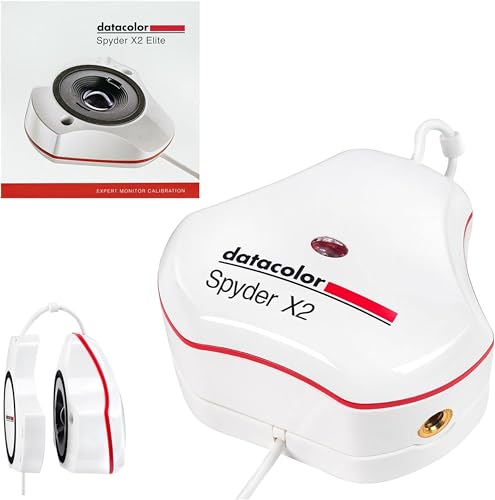
Advanced Hybrid Choice – Spyder X2 Elite
The Datacolor Spyder X2 Elite is a strong choice among colorimeters for monitors used across photography, video, and digital design. Its software adds video and cinema targets, soft proofing, display analysis, and Studio Match for users who need detailed control over calibration.
Best For: Hybrid photo/video creators, digital designers, and professionals matching several monitors.
Pros:
- Includes Rec. 709 and Rec. 2020 video and cinema targets.
- Offers unlimited calibration settings, soft proofing, and advanced display mapping.
- Studio Match supports calibration of multiple monitors.
- Native USB-C connectivity includes a USB-A adapter.
Cons:
- Its advanced feature set may be unnecessary for basic monitor calibration.
- Requires software activation and a USB-connected computer workflow.
The X2 Elite stands out when calibration needs extend beyond still photography. Its combination of customizable controls, video targets, and multi-monitor matching gives experienced users room to build a repeatable studio process.
Versatile Pro Standard – ColorChecker Display Pro
The Calibrite ColorChecker Display Pro is a practical option for buyers seeking dependable colorimeters for monitors without an overly complicated hardware setup. Its optical design emphasizes repeatable profiling across display types, and the diffuser arm adds flexibility for projector and ambient-light measurements.
Best For: Creatives who want repeatable monitor profiling with occasional projector or ambient-light work.
Pros:
- Designed for consistent results on the same display and across different display types.
- Works with ccProfiler or i1Profiler software.
- Rotatable diffuser arm supports tabletop projector profiling and ambient-light measurement.
- Integrated tripod mount helps with projector profiling in larger venues.
Cons:
- The supplied notes do not specify a maximum luminance measurement.
- Software choice may require additional setup depending on the workflow.
This model makes sense for users who value repeatability and hardware versatility. The diffuser and tripod features are especially useful if your work includes projectors in addition to standard monitor calibration.
Easy Everyday Calibration – Spyder Monitor Calibrator
The Datacolor Spyder Monitor Calibrator focuses on an approachable calibration process for current laptop and desktop displays. It supports OLED, mini-LED, and Apple Liquid Retina XDR screens, while its preset mode and roughly 90-second workflow make it accessible to users new to colorimeters for monitors.
Best For: Beginners and everyday photo editors who want quick, guided calibration with ambient-light support.
Pros:
- Calibrates a broad range of modern laptop and desktop displays.
- Preset calibration and intuitive software are suited to newcomers.
- DevicePreview Beta can simulate how photos may appear on other devices.
- Ambient-light sensing can guide or automate adjustments as room light changes.
Cons:
- Some listed features are identified as beta, including DevicePreview.
- Advanced professionals may prefer more extensive manual controls.
- Requires a nonstandard battery according to the supplied details.
This is a sensible starting point for users who want faster, less technical calibration. Its modern-display compatibility and light-sensing features add convenience, while customizable settings leave some room for more experienced users.
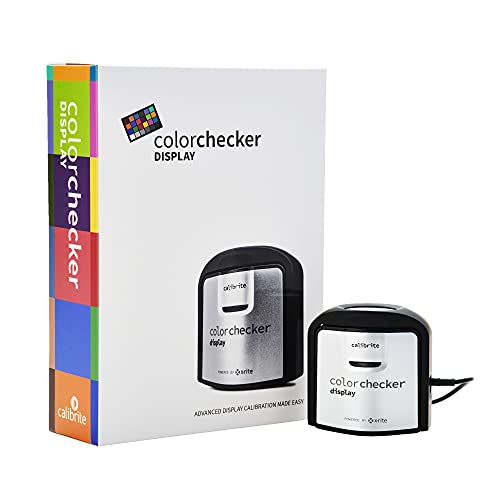
Portable Precision – Calibrite ColorChecker Display
The Calibrite ColorChecker Display is a compact option for shoppers comparing colorimeters for monitors. Its self-contained design, intuitive ccStudio software, and USB connection make it practical for routine monitor calibration, while its optical design is built for repeatable results across display types.
Best For: Photographers and creators who want a portable monitor and projector calibration tool.
Pros:
- Portable, self-contained design weighing 4.9 ounces.
- Intuitive ccStudio software supports straightforward calibration.
- Rotatable diffuser arm supports ambient-light measurement and projector profiling.
- Integrated tripod mount is useful for projector profiling in larger venues.
Cons:
- Its listed uses focus on monitor and projector calibration rather than broader printer or camera profiling.
- Requires a USB connection for hardware connectivity.
This is a sensible pick when portability and flexible projector support matter more than an all-in-one color-management workflow. The repeatability-focused optical design also suits users calibrating more than one display type.
Easy First Calibration – Datacolor Spyder X Pro
The Datacolor Spyder X Pro is designed for shoppers seeking approachable colorimeters for monitors. Its lens-based color engine, guided workflow, and one-click calibration make it a practical choice for first-time users who need more consistent color across laptop and desktop displays.
Best For: First-time users and photographers calibrating multiple laptops or desktop monitors.
Pros:
- Wizard workflow offers 12 predefined calibration targets.
- Single-click calibration is designed to take about a minute or two.
- Room-light monitoring and automatic profile changing support changing environments.
- SpyderProof provides before-and-after comparisons using personal images.
Cons:
- The supplied notes focus on display calibration rather than projector, printer, or scanner profiling.
- At 10.23 ounces, it is less lightweight than the compact Calibrite Display.
The Spyder X Pro stands out for ease of use and guided setup. It is a strong fit if you want a straightforward calibration process, room-light monitoring, and support for multiple computer displays without needing color-specialist expertise.
Complete Color Workflow – Calibrite ColorChecker Studio
The Calibrite ColorChecker Studio is a broader solution for shoppers comparing colorimeters for monitors and complete color-management tools. This spectrophotometer profiles displays and projectors while also supporting printers, paper, cameras, and scanners through Calibrite PROFILER software.
Best For: Photographers and print-focused creators managing color from camera capture through final output.
Pros:
- Supports monitor, laptop, and projector profiling.
- Also profiles printers, paper, cameras, and scanners.
- Adaptive iterative profiling optimizes results for each display.
- Ambient-light measurement helps match display luminance to printed proofs.
Cons:
- Its wider feature set may be more than users who only need monitor calibration require.
- At 14.5 ounces, it is the heaviest of these three supplied options.
- Camera profiling requires using the included ColorChecker Classic Mini target with the software.
This is the most versatile choice in the group for end-to-end color control. Choose it when printer, scanner, camera, and print-matching support are important alongside display and projector profiling.
Established Calibration Choice – Spyder4Pro Display Colorimeter
The Datacolor Spyder4Pro is a practical option among colorimeters for monitors, offering automated color and brightness calibration for displays. Its full-spectrum sensor can be used across multiple monitors, while the ReCAL feature simplifies repeat calibration when your screen changes over time.
Best For: Users who want automated calibration and a quick way to maintain display consistency across multiple screens.
Pros:
- Automates color and brightness calibration.
- One sensor calibrates multiple displays.
- Double-shielded filters improve accuracy and long-term stability.
- ReCAL makes periodic recalibration faster.
Cons:
- The product is an older Spyder4 model.
- Its listed language is German.
The Spyder4Pro stands out for its repeat-calibration workflow and multi-display flexibility. It is worth considering if straightforward automated calibration matters more than having the newest hardware platform.
Simple Dual-Screen Workflow – Calibrite Display 123
The Calibrite Display 123 is designed for approachable monitor calibration, pairing a guided 1 2 3 software workflow with USB-C connectivity. As colorimeters for monitors go, it is aimed at photographers and creators who want more reliable color without navigating complicated setup options.
Best For: Beginners and creative users calibrating one or two displays in a photo or video workspace.
Pros:
- Guided workflow makes setup approachable.
- Supports up to two monitors for more consistent viewing.
- Includes Native or Photo brightness targets.
- Built-in before-and-after comparison helps verify the result.
Cons:
- It is intended for up to two displays, not larger monitor arrays.
- The feature set is focused on easy setup rather than extensive customization.
Display 123 is a strong fit when ease of use is the priority. Its dual-display support and comparison view make the calibration process easier to understand and repeat.
Complete Photo Color Workflow – Calibrite Display Pro HL Photo Kit
The Calibrite Photo Kit combines a Display Pro HL monitor colorimeter with a ColorChecker Passport Photo 2. For photographers comparing colorimeters for monitors, this package adds camera profiling, white-balance references, and monitor calibration to create a more consistent capture-to-edit workflow.
Best For: Photographers working with RAW files who want display calibration and camera profiling in one kit.
Pros:
- Combines monitor calibration with camera profiling.
- Supports mini LED, OLED, and Apple XDR displays.
- ColorChecker Passport Photo 2 supports custom RAW profiles.
- PROFILER software offers presets and adjustable targets.
Cons:
- The kit is more specialized than a monitor-only colorimeter.
- Its broader workflow may be unnecessary for users who do not shoot RAW photos.
This kit is best viewed as a complete color-management package rather than a basic display calibrator. It makes the most sense for photographers who need both reliable screens and repeatable camera-to-edit results.
How We Picked the Best Colorimeters for Monitors
We compared the selected models by calibration accuracy, supported display technologies, software workflow, brightness range, connection options, and intended user. We also considered whether each device is suited to basic monitor profiling, advanced photographic or video work, or broader color-management tasks.
Because displays vary widely, there is no single best choice for everyone. A simple USB-C colorimeter may be ideal for a home photo editor, while a professional workflow may justify wider luminance support, more control over measurement settings, or a spectrophotometer that can profile additional devices.
Quick Comparison
- Best for modern high-brightness displays: Choose a current model with broad luminance support, such as the Display Pro HL.
- Best for advanced monitor calibration: Look for a Pro or Elite colorimeter with detailed software controls.
- Best for beginners: A model with guided or simplified software makes setup easier.
- Best for complete studio color management: Consider a spectrophotometer that supports displays, projectors, printers, and scanners.
- Best for budget-conscious buyers: Older or entry-level Spyder and ColorChecker models can provide useful basic profiling when compatible with your display and operating system.
Key Buying Factors for Colorimeters for Monitors
Display Compatibility
Check support for LCD, LED-backlit, Mini LED, OLED, wide-gamut, and high-brightness screens. Newer display technologies may require a sensor and software combination designed to measure their luminance and spectral characteristics correctly.
Brightness and Calibration Controls
Photographers and video editors should look for control over white point, luminance, gamma, and ambient-light settings. High-brightness HDR displays may need a device rated for substantially higher output than a basic office monitor.
Software and Operating-System Support
The sensor is only part of the experience. Review the included calibration software, supported operating systems, update policy, and whether the workflow offers guided presets or advanced manual controls.
Color-Management Range
A colorimeter is primarily intended for displays. If you also need to profile printers, projectors, or scanners, a spectrophotometer is the more versatile option. It generally costs more but can support a complete color-managed workflow.
Connectivity and Ease of Use
Confirm the connector works with your computer, especially if you use USB-C-only hardware. A straightforward mounting system and clear calibration instructions can matter as much as small differences in specifications.
Who Should Buy Which Colorimeters for Monitors?
For Casual Creators and First-Time Users
Choose an entry-level display colorimeter with guided software. It should provide a repeatable profile without requiring extensive knowledge of color science.
For Photographers and Designers
A midrange or professional monitor calibrator with adjustable white point and luminance is a strong fit. It helps make on-screen editing more consistent across different projects and viewing environments.
For Video Professionals and HDR Display Owners
Prioritize broad brightness support, modern panel compatibility, and software with more precise calibration controls. Verify that the device supports the specific HDR or OLED workflow you use.
For Studios and Print-Focused Professionals
Select a spectrophotometer if you need to profile more than a monitor. It can be the better long-term investment for workflows spanning screen proofing, projectors, printers, and scanners.