Large files can make ordinary drive-copying methods slow, inconvenient, and difficult to manage. The right hard drive duplicator can clone disks directly, reduce computer bottlenecks, and simplify upgrades, backups, and deployment work.
We selected 10 models ranging from compact dual-bay SATA docks to dedicated multi-drive duplicators. The best choice depends on your source and target drive types, required copy speed, number of simultaneous targets, and whether secure erasing matters as much as cloning.
Best 10 Hard Drive Duplicators for Large Files Picks for 2026
Best Versatile Dock
StarTech SDOCK2U33RE Dual-Bay Duplicator

- Standalone sector-by-sector cloning up to 22 GB/min
- Supports 2.5/3.5-inch SATA drives of any capacity
- Works as a USB or eSATA drive dock
Best For: Versatile drive cloning and everyday SATA access
Best High-Speed Option
StarTech SDOCK2U313R 28GB/min Duplicator

- Listed standalone cloning speed up to 28 GB/min
- Supports SATA HDDs and SSDs in both common sizes
- Adds USB 3.2 Gen 2, TRIM, and 4Kn support
Best For: Fast standalone cloning and USB drive docking
Best Simple Budget Dock
SABRENT EC-HD2B Dual-Bay Cloner

- Plug-and-play offline cloning without drivers
- Supports 2.5/3.5-inch SATA HDDs and SSDs
- Supports drives up to 10TB
Best For: Straightforward home cloning and drive access
Best for Data Recovery
Vinpower HDDMINI 1-to-3 Duplicator

- Standalone one-to-three HDD/SSD duplication
- Read Error Skip helps handle bad sectors
- Includes Raw mode and secure erasure
Best For: Portable recovery, multi-target copying, and erasure
High-Volume Standalone Workhorse

- Duplicates to multiple drives at up to 90MB/s
- Standalone operation needs no computer
- Supports 2.5-inch and 3.5-inch SATA drives
Best For: Batch drive duplication and sanitization
Flexible High-Capacity Dock

- Offline clones without a computer or drivers
- Supports up to 48TB across two bays
- Adds USB 3.0 ports and 5Gbps connectivity
Best For: High-capacity cloning and drive access
Compact Professional Cloning Station

- Standalone one-to-one drive duplication
- Supports 2.5-inch and 3.5-inch SATA drives
- Includes hot-swap and sanitization functions
Best For: Individual drive upgrades, backups, and erasure
Fast-Throughput Pick
Systor SYS307DP 1:7 HDD/SSD Duplicator

- Up to 300MB/s or 18GB/min
- Copies to multiple SATA drives simultaneously
- Supports duplication and DoD-compliant erasure
Best For: High-volume, speed-focused drive duplication
Compact Workstation Pick
Systor SYS103HS-DP 1:3 Duplicator
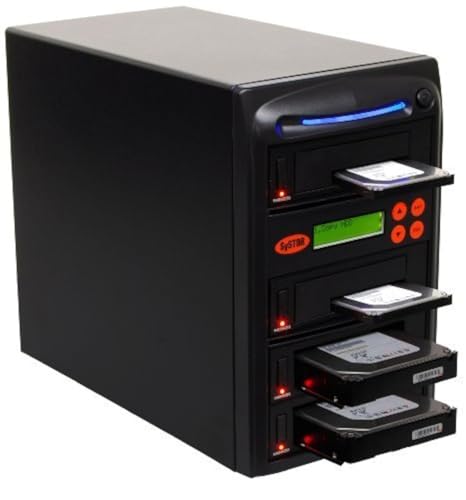
- Up to 90MB/s or 5.4GB/min
- Handles 2.5-inch and 3.5-inch drives
- Includes duplication and sanitization modes
Best For: Small-scale drive copying and repair work
High-Volume Capacity Pick
Systor SYS1011HS-DP 1:11 Duplicator

- Duplicates to up to 11 drives at once
- Rated for 90MB/s or 5.4GB/min
- Supports copying and DoD-compliant erasure
Best For: Large batches of simultaneous drive copies
Best Versatile Dock – StarTech SDOCK2U33RE Dual-Bay Duplicator
For hard drive duplicators for large files, the StarTech SDOCK2U33RE is a practical dual-bay option for cloning 2.5- and 3.5-inch SATA drives without a computer. Its sector-by-sector operation copies the entire source drive, including empty sectors, at speeds up to 22 GB/min.
Best For: Users who want one dock for standalone cloning, drive access, and USB or eSATA connectivity.
Pros:
- Copies drives independently of file format and operating system.
- Supports 2.5- and 3.5-inch SATA HDDs and SSDs of any capacity.
- Offers USB 3.0 or eSATA host connections and 4Kn compatibility.
- Includes cables, universal power adapter, drive doors, and eject buttons.
Cons:
- Target drive must be equal to or larger than the source.
- IDE drives require a separately sold adapter.
- Its listed cloning speed is lower than the faster StarTech model in this roundup.
This is a flexible choice when you need both a standalone copier and a reusable SATA docking station. The included eSATA connection and broad drive compatibility make it particularly useful for mixed desktop and laptop workflows.
Best High-Speed Option – StarTech SDOCK2U313R 28GB/min Duplicator
The SDOCK2U313R stands out among hard drive duplicators for large files with a listed standalone cloning speed of up to 28 GB/min. It copies drives sector by sector without a computer and doubles as a USB-to-SATA dock for drive access and recovery work.
Best For: Users prioritizing the fastest listed standalone duplication speed and USB 3.2 Gen 2 connectivity.
Pros:
- Clones entire drives, including empty sectors, at up to 28 GB/min.
- Supports 2.5- and 3.5-inch SATA HDDs and SSDs of any capacity.
- Includes 4Kn compatibility, TRIM support, and SATA III connectivity.
- Uses a tool-less, tray-less design with drive doors and eject buttons.
Cons:
- Target disk must be equal to or larger than the source disk.
- IDE drives require a separately sold adapter.
- Cloning copies empty sectors as well as used data, which may increase total transfer time.
With the highest stated cloning rate among the two-bay StarTech options here, this model is a strong fit for large drive migrations. Its 10 Gbps USB host connection also adds useful flexibility when mounting drives to a computer.
Best Simple Budget Dock – SABRENT EC-HD2B Dual-Bay Cloner
The SABRENT EC-HD2B offers a straightforward way to handle hard drive duplicators for large files when you need a plug-and-play dual-bay dock. It supports offline cloning for 2.5- and 3.5-inch SATA drives, with USB 3.0 transfer speeds up to 5 Gbps.
Best For: Home users who want an uncomplicated dual-drive dock with offline cloning and support for drives up to 10TB.
Pros:
- Supports standard 2.5- and 3.5-inch SATA HDDs and SSDs.
- Works without drivers and supports offline cloning.
- Supports hard drives up to 10TB according to the supplied specifications.
- Includes the docking station, power supply, USB 3.0 cable, and manual.
Cons:
- The listed offline cloning speed is up to 60 Mbps, substantially slower than the StarTech alternatives.
- USB 3.0 limits host transfer rates to 5 Gbps.
- Its standard warranty is one year unless registration extends coverage to two years.
This Sabrent is easy to position as a basic cloning and drive-reading station. It is best suited to less time-sensitive migrations where simple operation and dual-bay convenience matter more than maximum duplication speed.
Best for Data Recovery – Vinpower HDDMINI 1-to-3 Duplicator
The Vinpower HDDMINI is a portable standalone duplicator for users comparing hard drive duplicators for large files with recovery and erasure needs. Its Smart Copy mode transfers accessible data, while Raw mode performs bit-by-bit duplication; Read Error Skip can continue past bad sectors.
Best For: Field technicians and recovery workflows involving multiple targets, damaged drives, or secure erasure.
Pros:
- Operates standalone without a PC.
- Supports one-to-three duplication of 2.5- and 3.5-inch HDDs or SSDs.
- Read Error Skip can bypass bad sectors and preserve recoverable content.
- Includes Smart Copy, Raw mode, and DoD 5220.22-M-style secure erasure.
Cons:
- The listed media speed is 90 MB/s, so large jobs may take longer than faster duplicators.
- It requires a power source for field use.
- Optional CompactFlash support requires a separately added interface module.
Unlike conventional two-bay docks, the HDDMINI emphasizes recovery flexibility, multi-target duplication, and data sanitization. Its error-skipping feature makes it the more specialized choice when the source drive may be failing or difficult to read.
High-Volume Standalone Workhorse – 1:5 Systor HDD/SSD Duplicator
For workflows involving hard drive duplicators for large files, the Systor SYS105HS-DP is built for producing up to five copies at once without a computer or software. It supports 2.5-inch and 3.5-inch SATA HDDs and SSDs, with copying speeds of up to 90MB per second.
Best For: IT departments, repair shops, and businesses that need multiple simultaneous drive copies or drive sanitization.
Pros:
- Copies to multiple drives simultaneously at up to 90MB per second.
- Standalone operation requires no computer or software.
- Supports both 2.5-inch and 3.5-inch drives without an adapter.
- Includes DoD 5220.22-M-compliant sanitization.
Cons:
- Its 26-pound weight makes it less portable.
- Designed for SATA drives rather than a broad range of interfaces.
The SYS105HS-DP is the most suitable option here for batch duplication. Its five-drive capacity and consistent stated transfer rate make it practical when large data sets must be replicated across several SATA drives.
Flexible High-Capacity Dock – MAIWO Dual-Bay Drive Cloner
For hard drive duplicators for large files, the MAIWO dual-bay cloner combines offline drive-to-drive copying with computer-connected file transfers. Each bay supports a 2.5-inch or 3.5-inch SATA HDD or SSD up to 24TB, for 48TB total capacity.
Best For: Home users, technicians, and small offices that want offline cloning plus a USB 3.0 docking station and hub.
Pros:
- Clones drives offline without drivers or a computer.
- Supports up to 24TB per bay and 48TB total.
- Offers USB 3.0 connectivity with 5Gbps bandwidth.
- Includes three USB 3.0 Type-A hub ports.
Cons:
- Provides two drive bays rather than a multi-drive duplication array.
- Supports SATA HDDs and SSDs, not other listed drive interfaces.
The MAIWO is a versatile choice when occasional cloning and everyday external-drive access matter equally. Its high stated capacity and USB hub add convenience, while the two-bay design keeps the setup relatively straightforward.
Compact Professional Cloning Station – 1:1 Systor HDD/SSD Duplicator
The Systor SYS101HS-DP is a focused option for hard drive duplicators for large files when one source drive needs to be copied to one target. It works as a standalone unit, supports 2.5-inch and 3.5-inch SATA HDDs and SSDs, and reaches up to 90MB per second.
Best For: Technicians, businesses, and individual users performing one-to-one drive upgrades, backups, or sanitization.
Pros:
- Copies drives without requiring a computer or software.
- Supports 2.5-inch and 3.5-inch SATA HDDs and SSDs.
- Offers hot-swappable operation.
- Can copy data-only files or entire drives and erase media to the stated DoD standard.
Cons:
- Its 1:1 design is less efficient for batch duplication.
- Listed compatibility is limited to SATA HDDs and SSDs.
The SYS101HS-DP suits repeatable one-to-one jobs where standalone operation and sanitization are more important than duplicating several drives at once. It is a practical, specialized tool for drive replacement and data-handling tasks.
Fast-Throughput Pick – Systor SYS307DP 1:7 HDD/SSD Duplicator
For teams comparing hard drive duplicators for large files, the Systor SYS307DP stands out for its rated throughput of up to 300MB per second, or 18GB per minute. This standalone unit copies to multiple SATA HDDs or SSDs simultaneously without a computer or software.
Best For: Businesses and technicians needing high-speed, multi-drive duplication with support for both 2.5-inch and 3.5-inch drives.
Pros:
- Copies to up to seven drives at speeds up to 300MB per second.
- Supports 2.5-inch and 3.5-inch HDDs and SSDs without an adapter.
- Can copy files, systems, or entire drives and perform DoD 5220.22-M-compliant erasure.
- Standalone operation, hot-swappable design, and lifetime technical support.
Cons:
- Designed for SATA drives, so other interfaces are not listed as supported.
- Its higher duplication capacity may be more than needed for occasional personal use.
The SYS307DP is the strongest choice here when transfer speed matters most. Its simultaneous-copy capability and drive sanitization features make it well suited to repeatable business workflows involving large data sets.
Compact Workstation Pick – Systor SYS103HS-DP 1:3 Duplicator
The Systor SYS103HS-DP is a practical option for hard drive duplicators for large files when a smaller three-drive workflow is sufficient. It operates standalone, supports SATA 2.5-inch and 3.5-inch drives, and reaches up to 90MB per second, or 5.4GB per minute.
Best For: Small businesses, repair benches, and personal users who need straightforward duplication or sanitization for a few drives at a time.
Pros:
- Duplicates to multiple drives at up to 90MB per second.
- Works with 2.5-inch and 3.5-inch drives without an adapter.
- Copies data only or complete drives and supports DoD 5220.22-M-compliant erasure.
- Requires no computer or software and includes lifetime technical support.
Cons:
- Its 90MB-per-second rating is slower than the SYS307DP.
- Supports fewer simultaneous target drives than the larger-capacity models.
Choose the SYS103HS-DP when you want standalone operation and useful sanitization features without moving to a larger duplication station. It balances basic multi-drive capability with a compact, focused workflow.
High-Volume Capacity Pick – Systor SYS1011HS-DP 1:11 Duplicator
For organizations processing many copies of large files, the Systor SYS1011HS-DP combines an 11-drive duplication layout with a rated speed of up to 90MB per second, or 5.4GB per minute. It is a standalone SATA duplicator that does not require a computer or software.
Best For: Production environments and IT workflows that prioritize the number of simultaneous copies over maximum transfer speed.
Pros:
- Supports duplication to up to 11 drives simultaneously.
- Handles both 2.5-inch and 3.5-inch drives without an adapter.
- Copies data, complete systems, or entire drives and erases drives to the DoD 5220.22-M standard.
- Includes hot-swappable functionality and lifetime technical support.
Cons:
- Its rated 90MB-per-second speed is lower than the SYS307DP.
- The large 1:11 capacity may be unnecessary for low-volume users.
The SYS1011HS-DP is the better fit when throughput means completing more copies in one batch rather than transferring each drive as quickly as possible. Its 11-target design can streamline repeat duplication and sanitization tasks.
How We Picked the Best Hard Drive Duplicators for Large Files
We focused on standalone duplicators and docking stations that support direct SATA drive-to-drive transfers, since bypassing a computer can make large cloning jobs simpler and more consistent. Our comparison considers supported 2.5-inch and 3.5-inch SATA drives, HDD and SSD compatibility, stated transfer rates, target-drive capacity, connection options, and practical features such as drive erasing, USB connectivity, and multi-drive expansion.
Speed claims are typically maximum or rated figures. Actual performance depends on the source drive, target drive, interface, file structure, and whether the process is a full-disk clone or a smaller data copy.
Quick Comparison
- Best for occasional desktop cloning: Dual-bay SATA docks from StarTech.com, Sabrent, and MAIWO are convenient for upgrades, backups, and drive testing.
- Best for repeated production work: Dedicated Vinpower and Systor duplicators provide multiple target bays and more specialized workflows.
- Best for larger batches: 1:5, 1:7, and 1:11 systems can create several copies at once, reducing labor for deployment jobs.
- Best for secure media preparation: Models with dedicated erase functions are useful when drives must be sanitized before reuse.
Key Buying Factors for Hard Drive Duplicators for Large Files
Drive Format and Interface
Confirm that the duplicator accepts your media. Most products here are designed for SATA HDDs and SSDs, with bays sized for either 2.5-inch drives, 3.5-inch drives, or both. Older IDE, SAS, NVMe, and external USB drives generally require different hardware or adapters.
Clone Speed and Sustained Performance
For large files, sustained throughput matters more than a brief peak-speed claim. A faster source and target SSD can shorten the job, while a mechanical hard drive may remain the limiting factor. Check the stated GB-per-minute rating, but treat it as an estimate rather than a guarantee.
Number of Target Bays
A 1:1 duplicator is compact and efficient for one-off work. Multi-target units cost more and take up more space, but they are worthwhile when you regularly prepare several identical drives. Make sure every target drive is at least as large as the source unless the device specifically supports a smaller-disk or data-only cloning mode.
Erasing and Workflow Features
If you handle returned, recycled, or sensitive drives, choose a model with an appropriate erase function. Also consider whether you need standalone operation, USB access to connected drives, status indicators, or a hub for peripherals.
Who Should Buy Which Hard Drive Duplicators for Large Files?
Home users and technicians should favor a straightforward dual-bay dock that supports both 2.5-inch and 3.5-inch SATA drives. These are easy to store and useful for SSD upgrades, recovery work, and occasional backups.
Small businesses and repair shops may benefit from a dedicated 1:1 or 1:3 duplicator with erase capabilities. It offers a more repeatable process without requiring a computer for every job.
IT departments, refurbishers, and deployment teams should consider higher-capacity 1:5, 1:7, or 1:11 systems. The additional bays can substantially reduce turnaround time when many drives must receive the same image.
Before buying, verify the source drive’s capacity, partition style, operating-system requirements, and the target drive count you actually need. For the most demanding large-file workloads, prioritize the fastest compatible duplicator that fits your workflow rather than choosing solely by the lowest purchase price.