Video editors deal with large project files, demanding backup schedules, and drives that must be cloned or replaced without slowing production. The right duplicator can streamline media transfers, create working copies, and help protect valuable footage.
This roundup compares 10 standalone duplicators and multi-bay docking stations, including SATA, M.2 NVMe, USB-C, and high-capacity options. Use the guide below to match features and throughput to your editing workflow.
Best 10 Hard Drive Duplicators for Video Editing Picks for 2026
Best Multi-Drive Workstation

- Standalone 1:3 cloning and drive erasure
- Four bays for 2.5/3.5-inch SATA drives
- USB 3.0 and eSATA docking connectivity
Best For: Editors and studios handling several SATA project drives
Fast Dual-Bay Pick

- Standalone one-to-one cloning without a computer
- Supports 2.5/3.5-inch SATA HDDs and SSDs
- Up to 28 GB/min duplication speed
Best For: Editors cloning individual SATA media or project drives
Simple Budget Dock

- Offline cloning with no drivers required
- Accepts 2.5/3.5-inch SATA HDDs and SSDs
- Supports drives up to 10TB
Best For: Home editors and small studios needing basic SATA cloning
Best for Mixed Media

- Clones between M.2 and 2.5/3.5-inch SATA drives
- Supports NVMe, M.2 SATA, and multiple M.2 sizes
- Configurable duplication and secure erase modes
Best For: Editors upgrading or migrating between NVMe and SATA storage
Best Standalone Starter
Systor SYS101HS-DP 1:1 Duplicator

- Standalone copying with no computer or software
- Works with 2.5-inch and 3.5-inch SATA drives
- Copies or sanitizes drives at up to 90MB/s
Best For: Simple SATA drive duplication and erasure
Best Multi-Format Dock
ICY BOX Triple-Bay NVMe/SATA Cloner

- Clones NVMe and 2.5/3.5-inch SATA drives
- Three tool-free bays support multiple drives
- USB 3.2 Gen 2 reaches up to 10Gbps
Best For: Mixed-format editing and storage workflows
Best for Batch Copies
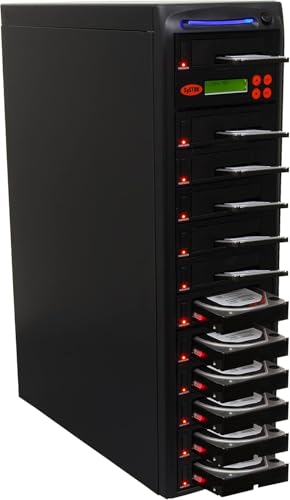
- Duplicates to up to 11 SATA targets simultaneously
- Reaches up to 150MB/s or 9GB/min
- Standalone copying and DoD-compliant erasure
Best For: High-volume SATA duplication for studios and teams
Best Multi-Bay Pick

- Five SATA bays with up to 120TB expansion
- Offline cloning with digital progress display
- USB 3.1, UASP, and up to 5Gbps transfers
Best For: Multi-drive editing, backups, and IT workflows
Best Dedicated Copier

- Duplicates one SATA drive to five targets
- Includes multiple drive-sanitization modes
- Stand-alone operation with up to 120MB/s transfers
Best For: Batch duplication and secure drive sanitization
Best Compact Hub

- Offline cloning for 2.5-inch and 3.5-inch SATA drives
- Up to 48TB stated total capacity
- Three USB 3.0 hub ports plus clone progress LEDs
Best For: Compact two-drive editing and backup setups
Best Multi-Drive Workstation – 4-Bay HDD/SSD Duplicator
For video editors managing several project drives, this StarTech.com unit combines standalone duplication, drive erasure, and four-bay SATA docking in one workstation. It supports 2.5- and 3.5-inch SATA drives, with USB 3.0 or eSATA connectivity for accessing files from a computer.
Best For: Editors, studios, and IT teams that need to clone, sanitize, and access multiple SATA HDDs or SSDs.
Pros:
- Four-bay design supports standalone 1:3 sector-by-sector cloning.
- Works with 2.5- and 3.5-inch SATA drives of any capacity, plus included IDE adapters.
- Offers Quick Erase and NIST SP 800-88 Rev. 1 Purge secure erase modes.
- USB 3.2 Gen 1 and eSATA host connections provide flexible drive access.
Cons:
- Target drives must be equal to or larger than the source drive for duplication.
- Sector-by-sector cloning copies empty sectors as well as data.
Its four-bay layout is particularly useful when a video-editing workflow involves multiple source, backup, or replacement drives. The LCD menu and push-button controls also allow duplication and erasure without relying on an operating system.
Fast Dual-Bay Pick – SATA Duplicator Dock
This dual-bay StarTech.com dock is a streamlined option among hard drive duplicators for video editing. It performs standalone, sector-by-sector cloning without a computer and doubles as a USB-to-SATA dock for accessing 2.5- or 3.5-inch HDDs and SSDs.
Best For: Video editors who need fast one-to-one SATA cloning and a simple drive-access dock.
Pros:
- Standalone cloning requires no PC or software.
- Supports 2.5- and 3.5-inch SATA drives, including 4Kn-compatible drives.
- Advertised duplication speed reaches up to 28 GB/min.
- USB 3.2 Gen 2 connectivity supports up to 10 Gbps host transfer rates.
Cons:
- Only supports two drives at a time.
- Cloning copies the entire drive, including empty sectors.
- IDE adapter is sold separately.
For a straightforward source-to-target workflow, this trayless dock offers a useful balance of speed and simplicity. Its target drive must be equal to or larger than the source, so check capacities before starting a clone.
Simple Budget Dock – USB 3.0 Dual-Bay Cloner
The SABRENT EC-HD2B is a compact, plug-and-play choice for hard drive duplicators for video editing. Its two bays accept standard 2.5- and 3.5-inch SATA HDDs or SSDs, while offline cloning lets you duplicate drives without installing software.
Best For: Editors who want an uncomplicated SATA cloning and drive-reading dock for home or small-studio use.
Pros:
- Supports both 2.5- and 3.5-inch SATA hard drives and SSDs.
- Offline cloning works without drivers or a computer.
- Supports hard drives up to 10TB and USB 3.0 transfer rates up to 5Gbps.
- Includes the docking station, power supply, USB 3.0 cable, and manual.
Cons:
- Only provides two drive bays.
- Offline cloning speed is listed at up to 60Mbps, slower than its USB 3.0 interface maximum.
- Warranty starts at one year unless registration extends coverage to two years.
This model focuses on accessible drive duplication rather than advanced sanitizing features. It makes sense for editors who primarily need to copy or read SATA media and value a simple, no-driver setup.
Best for Mixed Media – M.2 NVMe/SATA Duplicator
For modern video-editing systems that use both M.2 and traditional SATA storage, this StarTech.com duplicator handles cross-format cloning in a standalone enclosure. It supports M.2 PCIe NVMe, M.2 SATA, and 2.5- or 3.5-inch SATA drives, with configurable duplication and erasure modes.
Best For: Editors upgrading between NVMe, M.2 SATA, and conventional SATA project or system drives.
Pros:
- Duplicates between M.2 NVMe/SATA and 2.5/3.5-inch SATA drives without a PC.
- Supports M.2 sizes from 2230 through 22110 and multiple duplication modes.
- Provides five erase modes, including secure erase options aligned with NIST SP 800-88 Rev. 1.
- Full on-screen display reports drive information and errors.
Cons:
- Supports one source and one target drive at a time.
- IDE and mSATA compatibility requires separately sold adapters.
- Its broad feature set may be more than needed for basic SATA-to-SATA cloning.
This is the most versatile option in the group for workflows transitioning to NVMe or mixing storage generations. Adjustable partition, whole-drive, HPA, and erase settings give experienced users more control over migrations and drive reuse.
Best Standalone Starter – Systor SYS101HS-DP 1:1 Duplicator
For shoppers comparing hard drive duplicators for video editing, the Systor SYS101HS-DP is a straightforward 1:1 SATA option for copying or sanitizing one source drive at a time. It works without a computer or software, supports both 2.5-inch and 3.5-inch SATA HDDs and SSDs without an adapter, and reaches up to 90MB per second.
Best For: Editors, studios, and small businesses that need a simple standalone duplicator for SATA drives.
Pros:
- Standalone operation requires no computer or software.
- Supports 2.5-inch and 3.5-inch SATA HDDs and SSDs without an adapter.
- Copies data or entire drives and offers DoD 5220.22-M-compliant erasure.
- Includes lifetime technical support, plus a one-year parts and three-year labor warranty.
Cons:
- Its 1:1 design is less suited to producing many copies at once.
- Its listed 90MB-per-second speed is lower than the faster Systor model in this roundup.
This is a practical choice when ease of use and drive-format flexibility matter more than high-volume duplication. Hot-swappable support and the metal enclosure add useful convenience for recurring SATA-drive workflows.
Best Multi-Format Dock – ICY BOX Triple-Bay NVMe/SATA Cloner
The ICY BOX triple-bay cloner is a flexible pick among hard drive duplicators for video editing, especially when a workflow mixes M.2 PCIe NVMe drives with 2.5-inch or 3.5-inch SATA media. Its one-touch offline cloning avoids software installation, while USB 3.2 Gen 2 connectivity supports transfers up to 10Gbps when used as a dock.
Best For: Video professionals managing mixed NVMe and SATA storage across Windows and macOS systems.
Pros:
- Supports cloning between M.2 PCIe NVMe, 2.5-inch SATA, and 3.5-inch SATA drives.
- Three independent bays allow multiple drives to be connected simultaneously.
- One-touch offline cloning requires no software or complicated PC setup.
- Includes USB-C and USB-A connectivity with a 24-month warranty.
Cons:
- The enclosure is plastic rather than metal.
- USB transfer performance depends on the connected computer and drive.
- It is a docking station and cloner rather than a high-volume multi-target duplicator.
Choose this model when storage variety is the main concern. Its three-bay, tool-free design is convenient for swapping source and destination drives, and its broad format support can simplify mixed editing environments.
Best for Batch Copies – Systor SYS2011HS-DP 1:11
For teams creating several identical storage copies, the Systor SYS2011HS-DP is the most production-oriented option among these hard drive duplicators for video editing. Its standalone 1:11 configuration can copy multiple SATA HDDs or SSDs simultaneously at up to 150MB per second, or 9GB per minute, without requiring a computer or software.
Best For: Studios, production teams, and administrators who need to make many SATA drive copies in one run.
Pros:
- 1:11 architecture supports simultaneous copying to multiple drives.
- Listed speed reaches up to 150MB per second, or 9GB per minute.
- Standalone operation keeps duplication independent of a computer.
- Can copy data or complete drives and perform DoD 5220.22-M-compliant erasure.
Cons:
- Its supplied compatibility details focus on SATA and desktop drives.
- It is less appropriate for workflows centered on M.2 NVMe media.
- The 1:11 layout may be excessive for occasional one-drive cloning.
This Systor is the strongest fit when throughput and repeatable batch duplication outweigh compactness. Hot-swappable support, a consistent listed transfer rate, and standalone controls make it well suited to higher-volume SATA workflows.
Best Multi-Bay Pick – 5-Bay SATA Docking Station
For video editors who need to manage several drives, this MAIWO dock is one of the more flexible hard drive duplicators for video editing. It supports five 2.5-inch or 3.5-inch SATA HDDs or SSDs, offers offline cloning, and can read and write drives simultaneously when connected to a computer.
Best For: Editors, backup workflows, and IT users who need multi-drive access and high-capacity storage expansion.
Pros:
- Five bays support up to 120TB total capacity, based on five 24TB drives.
- Offline cloning works without a computer, with a digital 0%-100% progress display and completion alerts.
- USB 3.1 connectivity supports transfer rates up to 5Gbps and UASP.
- Tool-free installation and an open design support easier drive access and heat dissipation.
Cons:
- Its large five-bay design takes more desk space than a dual-bay dock.
- Offline cloning is intended for SATA drives and does not indicate support for NVMe media.
This is the strongest choice here for a busy editing setup that rotates multiple SATA drives. It combines cloning with simultaneous multi-drive access, although users with only one or two drives may not need its larger footprint.
Best Dedicated Copier – 1:5 SATA Duplicator
DupliM 1:5 SSD HDD SATA Duplicator and Hard Drive Sanitizer Stand-Alone Cloner Copier Burner
Check Price On AmazonThe DupliM 1:5 is a dedicated stand-alone option among hard drive duplicators for video editing. It can copy one source drive to up to five targets without a computer and also provides multiple drive-sanitization modes for workflows that reuse or retire storage media.
Best For: Production teams, technicians, and organizations duplicating or sanitizing several SATA drives in batches.
Pros:
- Copies one source to five target drives in a stand-alone design.
- Supports 3.5-inch SATA HDDs and SSDs, with 2.5-inch drives usable through optional adapters.
- Offers Secure Erase plus quick, one-pass, three-pass, verified, and DoD seven-pass sanitization.
- Supports FAT16/32, Linux ext2/3/4, and NTFS data-only copying, with HPA copy support.
Cons:
- The listed transfer rate is up to 120MB/s, below the 5Gbps interface claims of the MAIWO docks.
- 2.5-inch drive adapters are optional and not included.
- At 19 pounds, it is less portable than a compact docking station.
This model is better suited to repeatable duplication and media sanitization than casual file access. Its five-target design can save time in batch operations, but the slower SATA transfer specification and optional 2.5-inch adapters are worth factoring into an editing workflow.
Best Compact Hub – Dual-Bay SATA Cloner
This dual-bay MAIWO is a practical entry point for hard drive duplicators for video editing when you need offline cloning plus extra USB connectivity. It supports 2.5-inch and 3.5-inch SATA drives, provides up to 48TB of total capacity, and includes three USB 3.0 Type-A hub ports.
Best For: Editors who work with one source and one target drive while also needing a compact USB hub.
Pros:
- Offline cloning transfers a source drive to a target without a computer or drivers.
- Dual bays support 2.5-inch and 3.5-inch SATA HDDs and SSDs, with up to 24TB per bay.
- USB 3.0 offers up to 5Gbps bandwidth and includes three Type-A hub ports.
- LED indicators show clone progress at 25%, 50%, 75%, and 100%.
Cons:
- Two bays provide less simultaneous drive capacity than the five-bay MAIWO model.
- The enclosure uses ABS plastic rather than the aluminum-and-plastic construction listed for the five-bay dock.
- The product details list a 36TB memory capacity while the feature notes state 48TB total capacity, so buyers should verify the intended limit.
For a small editing desk, this dock balances cloning, drive reading, and USB expansion without the bulk of a larger duplicator. It is a sensible fit for two-drive projects, while larger post-production teams may benefit from more bays.
How We Picked These Hard Drive Duplicators for Video Editing
We focused on duplicators and docking stations that support the drive formats commonly used in video production: 2.5-inch and 3.5-inch SATA HDDs and SSDs, plus M.2 SATA or NVMe SSDs where specified. We also considered standalone operation, transfer speed, bay count, host connectivity, source-to-target flexibility, and practical features such as drive erasing, USB hubs, and large-capacity support.
A standalone duplicator can copy drives without a computer, while a dock generally combines cloning with file access through a desktop or laptop. Both can be useful, but they suit different workflows and levels of automation.
Quick Comparison
| Best For | Look For | Recommended Type |
|---|---|---|
| Frequent batch cloning | Multiple target bays and high rated speed | 4-bay or 1:11 duplicator |
| Mixed drive formats | SATA and M.2 NVMe compatibility | Multi-format duplicator dock |
| Simple workstation backups | Dual bays and USB 3.0 or USB-C | Dual-bay dock |
| Secure drive retirement | Standalone erase or sanitize modes | Duplicator with eraser functions |
| Large media libraries | 3.5-inch support and high capacity | Multi-bay SATA station |
Key Buying Factors for Hard Drive Duplicators for Video Editing
Drive Compatibility
Confirm the duplicator supports the exact source and destination drives in your kit. SATA-only models work with many desktop HDDs, 2.5-inch SSDs, and 3.5-inch hard drives, while M.2 support must be checked carefully. M.2 SATA and M.2 NVMe are different standards, and a model supporting one may not support the other.
Copy Speed and Workflow Capacity
Advertised speeds are usually maximum transfer rates and depend on the source drive, destination drive, data type, and thermal conditions. Higher-rated models are valuable when cloning several project drives, but a slower unit may be sufficient for occasional backups. More target bays can reduce repetitive handling during production crunches.
Standalone Operation Versus Computer Access
Standalone copying is convenient for direct drive-to-drive duplication and can keep the editing computer available for other work. Docking stations connected over USB are more flexible for browsing files, organizing footage, and using cloning software, but they may rely on the host computer for the operation.
Connectivity and Physical Design
USB 3.0 is adequate for many SATA workflows, while USB-C 10Gbps can better suit newer editing systems and fast SSDs. Check cable requirements, power delivery, bay spacing, and whether the enclosure accommodates bare 3.5-inch drives securely. A stable, well-ventilated design matters during long transfers.
Who Should Buy Which Hard Drive Duplicators for Video Editing?
Choose a multi-target standalone duplicator if you regularly prepare several working copies, distribute footage drives, or maintain repeatable backup procedures. Models with erasing or sanitizing functions are especially useful for production teams that reuse loaner or shuttle drives.
A dual-bay SATA dock is a practical choice for independent editors who need occasional cloning, drive migration, or quick access to bare drives without investing in a larger station. If your projects use modern M.2 storage, select a model explicitly supporting the required SATA or NVMe protocol.
For studios managing many disks, a five-bay station can simplify media organization and simultaneous access. Match the chosen unit to your computer’s ports and remember that the fastest duplicator cannot exceed the real-world performance of the installed drives.