The best monitor wall mounts for home offices free up valuable desk space while making it easier to position your screen at a comfortable height and viewing angle. The right model depends on your monitor’s size, weight, VESA pattern, and whether you need one screen or several.
We compared 10 wall-mounted monitor arms across those practical considerations, including full-motion adjustment, ultrawide compatibility, dual-monitor capacity, and installation flexibility.
Best 10 Monitor Wall Mounts for Home Offices Picks for 2026
Best Flexible Single-Screen Pick
WALI Single Monitor Wall Mount

- Supports 13-34-inch screens up to 22 pounds
- 19.3-inch extension with full-motion adjustment
- 75x75mm and 100x100mm VESA compatible
Best For: Flexible single-monitor home office setups
Best Flush-Mount Dual Setup
VIVO Black Dual Monitor Wall Mount

- Holds two 21-32-inch screens
- Supports up to 22 pounds per monitor
- Telescoping arms enable a flush-to-wall setup
Best For: Tidy dual-monitor workstations
Best for Tight Workspaces
ErGear Full Motion Monitor Wall Mount

- Fits 13-34-inch monitors up to 19.8 pounds
- Retracts to 3.54 inches and extends 20.47 inches
- Works with stud, concrete, or brick walls
Best For: Compact wall-side and corner desks
Best Dual-Monitor Adjustability
MOUNT PRO Dual Monitor Wall Mount

- Supports two screens up to 32 inches
- Each arm holds 4.4-19.8 pounds
- Extends up to 21.6 inches with full motion
Best For: Adjustable two-monitor home office layouts
Best Ultrawide Pick
VIVO Single Ultrawide Wall Mount

- Supports ultrawide screens up to 49 inches
- Holds up to 44 pounds
- Folds flat and extends 10.5 inches
Best For: Single ultrawide-monitor home office setups
Best Dual-Monitor Setup
HUANUO Gaming Dual Monitor Wall Mount

- Holds two monitors up to 32 inches
- Supports 17.6 pounds per arm
- Allows 360-degree screen rotation
Best For: Dual-monitor home office and gaming setups
Best Long-Reach Option
ErgoFocus Extra Long Arm Monitor Mount
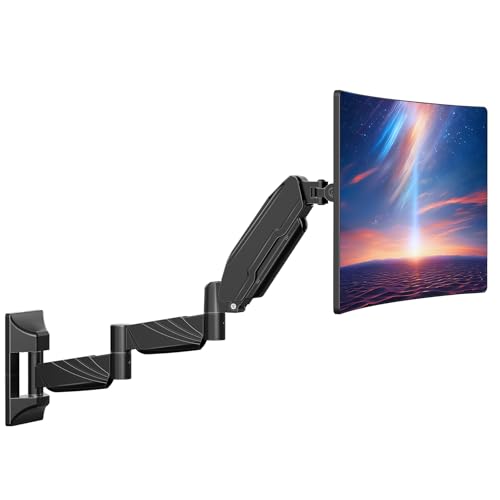
- Provides a 27.97-inch reach
- Supports screens up to 32 inches
- Offers full-motion positioning and cable channels
Best For: Small desks needing extended monitor placement
Best Dual-Monitor Pick
Large-Screen Gas-Spring Wall Mount

- Holds two screens up to 32 inches
- Smooth gas-spring movement and broad adjustment
- Compact 3.85-inch minimum wall profile
Best For: Dual-monitor home offices with larger displays
Best Single-Monitor Value

- Supports screens up to 32 inches
- Full-motion tilt, swivel, height, and rotation
- Works on studs, brick, and concrete
Best For: Single-monitor home office setups
Best for Flexible Positioning
Extended-Arm Monitor Wall Mount

- Fits 13–32-inch screens up to 19.8 pounds
- Extends up to 21.6 inches from the wall
- Wide tilt, swivel, and rotation range
Best For: Users who frequently reposition or rotate one monitor
Best Flexible Single-Screen Pick – WALI Single Monitor Wall Mount
The WALI GSWM001 is a practical choice among monitor wall mounts for home offices when you need flexible positioning for one screen. It supports monitors from 13 to 34 inches weighing up to 22 pounds and offers tilt, swivel, extension, and rotation adjustments.
Best For: Single-monitor workstations that need broad adjustment range and desk-space savings.
Pros:
- Supports 13- to 34-inch monitors up to 22 pounds.
- Extends 19.3 inches and retracts for adaptable positioning.
- Offers tilt, swivel, and 360-degree landscape-to-portrait rotation.
- Compatible with 75x75mm and 100x100mm VESA patterns.
Cons:
- Designed for a single monitor.
- Installation requires a suitable brick or wood wall surface.
With its 10-year warranty, full-motion adjustments, and relatively high 22-pound capacity, this is a versatile single-screen option for a wall-mounted home office setup.
Best Flush-Mount Dual Setup – VIVO Black Dual Monitor Wall Mount
The VIVO MOUNT-TS32B is built for two-screen workstations and fits monitors from 21 to 32 inches, with each arm supporting up to 22 pounds. Its telescoping arms are designed to create a clean, flush-to-wall arrangement while retaining useful viewing adjustments.
Best For: Dual-monitor home offices that want a tidy wall-side installation.
Pros:
- Holds two 21- to 32-inch monitors up to 22 pounds each.
- Telescoping arms expand outward and slide together for a flush setup.
- Provides tilt, swivel, height adjustment, and 360-degree rotation.
- Includes cable clips and hardware for wood-stud installation.
Cons:
- Does not support screens smaller than 21 inches.
- Has a shorter three-year warranty than some single-monitor alternatives.
The VIVO stands out when you need two large screens and want the arms to sit neatly against the wall when retracted. Its 22-pound-per-screen capacity also gives it a sturdy specification for heavier displays.
Best for Tight Workspaces – ErGear Full Motion Monitor Wall Mount
The ErGear EGDMA102B is a strong fit for monitor wall mounts for home offices where desk depth and clearance are limited. Its single arm retracts to 3.54 inches, extends to 20.47 inches, and supports 13- to 34-inch monitors weighing up to 19.8 pounds.
Best For: Compact, corner, thick-desk, and wall-side workspaces where a desk clamp is inconvenient.
Pros:
- Supports 13- to 34-inch monitors up to 19.8 pounds.
- Retracts close to the wall and extends 20.47 inches.
- Includes 12.2 inches of height adjustment and 360-degree rotation.
- Mounts to wood studs, concrete, or brick instead of relying on desk thickness.
Cons:
- Must not be mounted to drywall alone.
- Supports only one monitor.
- Its two-year warranty is relatively short.
The compact retracted depth and substantial extension range make this a particularly useful option when every inch matters. It also keeps monitor support off the desktop, reducing clamp and edge-clearance concerns.
Best Dual-Monitor Adjustability – MOUNT PRO Dual Monitor Wall Mount
The MOUNT PRO PR7002 is a dual-screen option for home offices that need broad monitor compatibility and independent positioning. Each arm supports 4.4 to 19.8 pounds, fits common 75x75mm or 100x100mm VESA patterns, and extends up to 21.6 inches.
Best For: Two-monitor setups that prioritize full-motion adjustment and flexible screen placement.
Pros:
- Supports two monitors up to 32 inches and 19.8 pounds each.
- Offers tilt, swivel, rotation, and extension up to 21.6 inches.
- Includes integrated cable management to organize power and AV cords.
- Works with wood studs and solid concrete walls.
Cons:
- Each monitor must weigh at least 4.4 pounds for the stated arm range.
- Installation requires careful attention to the appropriate wall hardware.
- It does not support screens larger than 32 inches.
With its long extension, full-motion range, and adjustable support system, the PR7002 is a practical choice for users who frequently reposition two displays. The included cable-management features help keep the freed desktop looking organized.
Best Ultrawide Pick – VIVO Single Ultrawide Wall Mount
For home offices built around a large display, this VIVO mount is one of the more capable monitor wall mounts for home offices. It supports most ultrawide monitors up to 49 inches and holds up to 44 pounds, while its low-profile design helps preserve wall and desk space.
Best For: Users with a single ultrawide monitor who want sturdy, full-motion positioning and a clean cable setup.
Pros:
- Supports compatible ultrawide screens up to 49 inches and 44 pounds.
- Extends up to 10.5 inches while folding flat against the wall.
- Offers tilt, swivel, and screen-leveling adjustments.
- Integrated cable management helps maintain a tidy workspace.
Cons:
- Limited to one monitor.
- Compatibility depends on a 75x75mm or 100x100mm VESA pattern.
Choose this model when a large ultrawide display is the priority. Its steel construction and 44-pound capacity provide substantial support, while the articulating arm gives you useful flexibility without permanently projecting far from the wall.
Best Dual-Monitor Setup – HUANUO Gaming Dual Monitor Wall Mount
This HUANUO model is a practical choice among monitor wall mounts for home offices when you need two screens without sacrificing desk space. It supports two 17- to 32-inch monitors, with independent movement for positioning each display comfortably.
Best For: Dual-monitor workstations, gaming setups, and users who want landscape or portrait screen orientation.
Pros:
- Supports two monitors up to 32 inches and 17.6 pounds per arm.
- Provides swivel, tilt, and 360-degree rotation adjustments.
- Can be installed on wood studs, solid concrete, or brick.
- Includes cable management and installation hardware.
Cons:
- Each monitor must use a 75x75mm or 100x100mm VESA pattern.
- Wall installation requires a suitable mounting surface.
This mount makes the most sense for a two-screen office where clear desk space and adjustability matter. Its dual-arm design supports flexible viewing angles, though you should verify both monitor weight and VESA compatibility before installation.
Best Long-Reach Option – ErgoFocus Extra Long Arm Monitor Mount
The ErgoFocus extra-long arm stands out among monitor wall mounts for home offices where the screen needs to sit farther from the wall. Its 27.97-inch reach can help small-desk users make room for a keyboard, notebook, or other essentials while retaining full-motion adjustment.
Best For: Small desks and users who need extended monitor reach for flexible viewing or screen sharing.
Pros:
- Offers a 27.97-inch arm for expanded monitor placement.
- Supports compatible 17- to 32-inch monitors weighing 4.4 to 17.6 pounds.
- Provides rotation, tilt, and swivel adjustments.
- Hidden wire channels help keep cables organized.
Cons:
- Should not be installed into drywall alone.
- Excludes ultra-curved 1000R, 1500R, and 1800R screens.
- Supports one monitor only.
If your desk is shallow or you want more freedom to position a single display, the extended arm is the main advantage here. Confirm the wall structure and monitor specifications before buying, particularly if your screen is curved.
Best Dual-Monitor Pick – Large-Screen Gas-Spring Wall Mount
For home offices running two displays, this dual monitor wall mount for home offices supports two 17–32-inch flat or curved screens. Its gas-spring arms, broad adjustment range, and compact wall profile make it a practical choice when you want to reclaim desk space without giving up ergonomic positioning.
Best For: Dual-monitor home offices using larger displays and needing flexible sit-stand positioning.
Pros:
- Supports two monitors up to 19.8 pounds each, with VESA 75×75 and 100×100 compatibility.
- Gas-spring adjustment provides fluid movement, while the center pole offers 11.02 inches of height adjustment.
- Offers ±45° tilt, 180° swivel, and 360° rotation, with a minimum 3.85-inch wall gap.
- Includes cable management, mounting hardware, and expansion screws for masonry installation.
Cons:
- Its 17–32-inch size range may not suit monitors outside that range.
- Dual-monitor installation requires more wall space and careful positioning than a single-arm mount.
With aviation-grade aluminum, heavy-duty steel construction, and testing to 25,000 cycles, this PUTORSEN mount is aimed at long-term daily adjustment. It is especially compelling for a clean, space-saving dual-screen workstation.
Best Single-Monitor Value – Adjustable 32-Inch Wall Mount
This MOUNTUP model is a straightforward option for shoppers comparing monitor wall mounts for home offices. It supports most flat or curved screens up to 32 inches, keeps the display off the desk, and provides full-motion adjustment for a more comfortable workstation setup.
Best For: Single-monitor users who want broad adjustability and a wall mount rated for up to 32-inch screens.
Pros:
- Fits 17–32-inch monitors weighing 4.4–19.8 pounds with VESA 75×75 or 100×100 patterns.
- Supports tilt, swivel, height adjustment, and 360° rotation for landscape or portrait viewing.
- Designed for wood studs, brick, and concrete walls, with mounting hardware and instructions included.
- Detachable VESA plate simplifies monitor attachment, and the product includes 3-year support.
Cons:
- It is not intended for drywall-only installation.
- The listed 17-inch minimum excludes smaller monitors.
The MOUNTUP MU2003 balances a 19.8-pound capacity with flexible positioning and a sturdy aluminum build. Confirm that your wall has a suitable stud or masonry surface before choosing it.
Best for Flexible Positioning – Extended-Arm Monitor Wall Mount
For a home office that needs frequent repositioning, this MOUNT PRO arm is one of the more flexible monitor wall mounts for home offices. It fits screens from 13 to 32 inches, extends up to 21.6 inches, and switches between portrait and landscape orientations.
Best For: Remote workers, programmers, creators, and other users who regularly change monitor angle or orientation.
Pros:
- Supports 13–32-inch monitors weighing 4.4–19.8 pounds with VESA 75×75 and 100×100 patterns.
- Provides +90° to -45° tilt, 180° swivel, 360° rotation, and up to 21.6 inches of extension.
- Includes integrated cable management and a height-adjustment system tested for 20,000 cycles.
- Fits wood studs and solid concrete walls, with labeled parts and installation instructions.
Cons:
- It is not compatible with 1000R, 1500R, or 1800R curved screens.
- Weight adjustment is required before use to match the monitor.
- Drywall-only installation is not supported.
The extended reach and wide tilt range make this mount useful for collaborative viewing or switching between portrait and landscape work. Check your monitor’s curve, VESA pattern, weight, and wall structure before installation.
How We Picked the Best Monitor Wall Mounts for Home Offices
We focused on the specifications that matter most in a home workspace: supported screen size and weight, VESA compatibility, range of movement, arm configuration, and mounting versatility. The lineup includes single-monitor arms, dual-monitor mounts, an ultrawide option, and an extra-long arm for desks that sit farther from the wall.
We also considered whether each mount can tilt, swivel, rotate, or adjust vertically. These features affect both comfort and how easily you can share a screen, switch between portrait and landscape orientation, or create a multi-monitor layout.
Quick Comparison
| Best For | Recommended Type | What to Check First |
|---|---|---|
| One standard monitor | Single-arm wall mount | Screen weight, size, and VESA pattern |
| Two monitors | Dual-monitor wall mount | Combined arm capacity and desk layout |
| Large curved display | Ultrawide wall mount | Maximum diagonal size and weight |
| Deep or unusually positioned desk | Extra-long arm | Reach, extension, and wall clearance |
| Frequent repositioning | Full-motion arm | Tilt, swivel, rotation, and height adjustment |
Key Buying Factors for Monitor Wall Mounts for Home Offices
Monitor Size, Weight, and VESA Pattern
Confirm that your display falls within the mount’s stated size and weight range. Do not rely on screen size alone: heavier monitors can exceed an arm’s capacity even when their diagonal measurement is supported. Most compatible displays use 75x75mm or 100x100mm VESA mounting patterns, but verify yours before ordering.
Movement and Viewing Position
A tilt-and-swivel arm is useful when your chair or desk position changes. Height adjustment helps reduce neck strain, while rotation is valuable for reading documents or coding in portrait mode. A fixed or limited-motion mount may be better if you want maximum stability and rarely reposition the screen.
Single Versus Dual Monitors
Dual mounts save more desk space, but they need a wider wall area and careful balancing. Check the capacity of each arm rather than the total advertised capacity. Curved or mismatched monitors may also require extra adjustment to align cleanly.
Wall Type and Installation
Mount the bracket into suitable structural support whenever possible. Drywall alone may not safely hold a heavy monitor, especially on a fully extended arm. Check stud spacing, included hardware, clearance behind the display, and whether the mount allows cable routing.
Who Should Buy Which Monitor Wall Mounts for Home Offices?
Choose a single-arm mount for a conventional one-screen office, especially if you want a clean desk and straightforward installation. A dual-monitor model suits productivity setups that use side-by-side screens, while an ultrawide mount is the better match for a large curved display. Select an extra-long arm when the monitor must reach over a deep desk or move substantially away from the wall. For the most flexible setup, prioritize full-motion adjustment and a generous weight margin rather than choosing a mount that operates at its limit.