A well-chosen monitor wall mount can free valuable desk space, improve screen positioning, and make a workstation more comfortable. The best option depends on your monitor’s size, weight, VESA pattern, and the range of adjustment you need.
We’ve gathered 10 full-motion monitor wall mounts covering single-screen, dual-monitor, ultrawide, gas-spring, and extra-long-arm designs. Use the guide below to compare compatibility and choose the right fit for your setup.
Best 10 Full Motion Monitor Wall Mounts Picks for 2026
Best Adjustable Pick
MOUNT PRO Single Monitor Wall Mount

- 13- to 32-inch compatibility
- 360° rotation and 21.6-inch extension
- Supports up to 19.8 pounds
Best For: Ergonomic desk, gaming, and collaborative setups
Best for Ultrawide Screens
VIVO Single Ultrawide Wall Mount

- Supports ultrawide screens up to 49 inches
- 44-pound maximum load
- Retracts flat and extends 10.5 inches
Best For: Large ultrawide monitor installations
Best Dual-Display Option
monTEK Dual Monitor Wall Mount

- Holds two monitors up to 32 inches
- 19.8-pound capacity per arm
- 360° rotation with 21.7-inch extension
Best For: Dual-monitor productivity and gaming setups
Best Large-Screen Value
WALI Single Monitor Wall Mount

- Supports screens up to 34 inches
- 22-pound maximum load
- 360° rotation and 19.3-inch extension
Best For: Large single-monitor home-office setups
Best Dual-Monitor Pick
MOUNT PRO Dual Monitor Wall Mount

- Fits two screens up to 32 inches and 19.8 pounds each
- Provides ±90° tilt, 180° swivel, and 360° rotation
- Includes cable management and stud/concrete hardware
Best For: Dual-monitor workstations that need flexible positioning
Best Long-Reach Option
WALI Full Motion Monitor Wall Mount

- Supports screens up to 32 inches and 33 pounds
- Extends 15 inches and retracts to 2 inches
- Works with wood studs, brick, and concrete
Best For: Single displays needing substantial extension from the wall
Best Height-Adjustment Design
VIVO Single Monitor Wall Mount
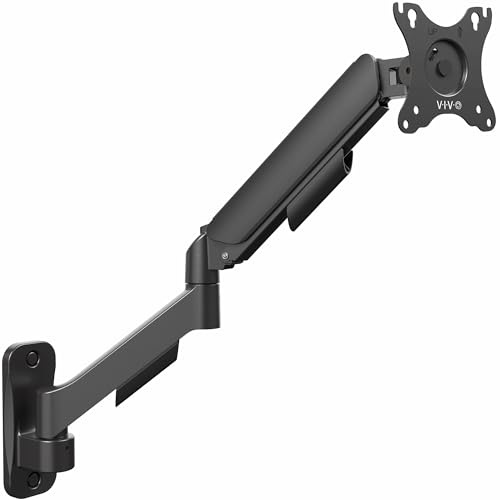
- Supports screens up to 32 inches and 19.8 pounds
- Uses a spring-assist counterbalance arm
- Provides broad tilt, swivel, and rotation adjustment
Best For: Single-monitor setups that prioritize ergonomic height changes
Best Overall
monTEK Single Monitor Wall Mount

- Supports 17-32-inch screens up to 19.8 pounds
- 360° rotation with extensive tilt and swivel adjustment
- Extends 21.7 inches and retracts to 4 inches
Best For: Flexible home office, gaming, or studio setups
Best for Single-Stud Mounting
Mount-It! Full-Motion Monitor Arm

- Fits 13-32-inch monitors up to 14.3 pounds
- Gas spring arm extends up to 17.1 inches
- Designed for single-stud or solid-concrete installation
Best For: Compact workstations and RV-compatible setups
Best Adjustable Pick – MOUNT PRO Single Monitor Wall Mount
If you want highly adjustable full motion monitor wall mounts for a standard computer display, this MOUNT PRO arm offers broad positioning control without taking up desk space. It fits 13- to 32-inch monitors, extends 21.6 inches, and supports screens weighing 4.4 to 19.8 pounds.
Best For: Remote workers, gamers, developers, traders, and anyone who frequently switches between portrait and landscape viewing.
Pros:
- Offers +90° to -45° tilt, 180° swivel, and 360° rotation.
- Supports 13- to 32-inch screens with 75×75 or 100x100mm VESA patterns.
- Includes integrated cable management and a height-adjustable spring mechanism.
- Works with wood studs and solid concrete walls.
Cons:
- Not compatible with 1000R, 1500R, or 1800R curved screens.
- Should not be installed in drywall alone.
With extensive movement and a long extension range, this is a practical choice when ergonomic positioning matters. Its compatibility limits make checking your monitor shape, VESA pattern, and wall type especially important before purchase.
Best for Ultrawide Screens – VIVO Single Ultrawide Wall Mount
For large displays, this VIVO model stands out among full motion monitor wall mounts because it supports most ultrawide monitors up to 49 inches and holds up to 44 pounds. Its arm collapses close to the wall but extends 10.5 inches when you need more viewing flexibility.
Best For: Owners of compatible ultrawide monitors who want strong support and a relatively low-profile wall installation.
Pros:
- Supports most ultrawide screens up to 49 inches and 44 pounds.
- Provides +5° to -12° tilt and +45° to -45° swivel.
- Collapses flat against the wall and extends up to 10.5 inches.
- Includes integrated cable management and a steel construction.
Cons:
- Limited to 75×75 and 100x100mm VESA patterns.
- Its tilt range is narrower than some highly articulating monitor arms.
This mount is a strong fit for a heavy ultrawide setup where load capacity and compact retraction matter more than a long reach. Confirm the display’s VESA pattern and weight before installation.
Best Dual-Display Option – monTEK Dual Monitor Wall Mount
This monTEK arm is designed for two-screen workstations, making it one of the more versatile full motion monitor wall mounts for multitasking. Each arm supports 17- to 32-inch monitors weighing 4.4 to 19.8 pounds, while the spring-assisted design provides extensive adjustment.
Best For: Productivity setups, gaming stations, studios, and live-streaming workspaces that use two monitors.
Pros:
- Supports two 17- to 32-inch monitors up to 19.8 pounds each.
- Provides +90° to -90° tilt, 180° swivel, and 360° rotation.
- Extends to 21.7 inches and offers a 9.84-inch height adjustment range.
- Retracts to about 4 inches from the wall and includes cable management.
Cons:
- Requires compatible 75×75 or 100x100mm VESA mounting holes.
- Not intended for drywall-only installation.
- Only a one-year manufacturer warranty is listed.
Its dual-arm layout and broad range of movement make it a useful space-saving choice for two-display workflows. Plan the wall location carefully, since both the combined screen arrangement and wall construction affect installation.
Best Large-Screen Value – WALI Single Monitor Wall Mount
The WALI GSWM001 is a practical option for larger single-screen setups, supporting monitors up to 34 inches and 22 pounds. It combines a 19.3-inch extension with tilt, swivel, rotation, and height adjustment for flexible viewing without a desktop stand.
Best For: Users who need a single wall-mounted monitor with broad positioning range and support for screens up to 34 inches.
Pros:
- Fits screens up to 34 inches and supports up to 22 pounds.
- Offers +70°/-45° tilt, +90°/-90° swivel, and 360° rotation.
- Extends 19.3 inches and supports landscape-to-portrait positioning.
- Includes a detachable VESA plate and hardware for brick and wood walls.
Cons:
- Compatibility is limited to 75×75 or 100x100mm mounting holes.
- The supplied notes do not specify a drywall-only installation option.
With a higher stated load limit than many standard monitor arms and support for displays up to 34 inches, this WALI mount suits larger single-monitor workspaces. Verify the screen’s VESA pattern, weight, and wall construction before mounting.
Best Dual-Monitor Pick – MOUNT PRO Dual Monitor Wall Mount
If you want full motion monitor wall mounts for a two-screen workstation, the MOUNT PRO PR7002 combines broad monitor compatibility with independently adjustable arms. Its articulating design supports tilt, swivel, rotation, and extension while moving your displays off the desk.
Best For: Dual-monitor home offices and workspaces where saving desk space and adjusting viewing angles are priorities.
Pros:
- Supports two monitors up to 32 inches and 19.8 pounds each with 75x75mm or 100x100mm VESA patterns.
- Offers ±90° tilt, 180° swivel, 360° rotation, and extension up to 21.6 inches.
- Includes cable management and installation hardware for wood studs and solid concrete walls.
- Passed a stated 20,000-cycle movement test and uses weight adjustment for a free-floating effect.
Cons:
- It is designed for two monitors, so it may be more mount than needed for a single-screen setup.
- Installation requires appropriate wood-stud or solid-concrete mounting; drywall alone is not suitable.
The PR7002 stands out when you need maximum flexibility across a dual-monitor setup. Be prepared to adjust the arms to match each monitor’s weight before use.
Best Long-Reach Option – WALI Full Motion Monitor Wall Mount
The WALI 1330LM is a straightforward choice among full motion monitor wall mounts for a single 13- to 32-inch display. Its arm extends up to 15 inches and retracts to 2 inches, making it useful when you need both close-to-wall storage and adjustable positioning.
Best For: Single-monitor office, bedroom, or gaming setups that benefit from long reach and simple articulating movement.
Pros:
- Supports 13- to 32-inch screens weighing up to 33 pounds with 75x75mm or 100x100mm VESA patterns.
- Provides ±15° tilt, 180° swivel, and 360° rotation for flexible viewing.
- Extends 15 inches from the wall and retracts to 2 inches to help conserve space.
- Mounts to wood studs, brick, or concrete and includes hardware and a user manual.
Cons:
- It does not support drywall alone.
- Its ±15° tilt range is narrower than some mounts in this roundup.
- The design is for one display rather than a dual-monitor arrangement.
Choose the WALI when reach and screen weight capacity matter more than an especially wide tilt range. Its compact retracted depth is useful for keeping the display close to the wall when extended positioning is unnecessary.
Best Height-Adjustment Design – VIVO Single Monitor Wall Mount
The VIVO MOUNT-V001G is a single-screen option for shoppers comparing full motion monitor wall mounts with spring-assisted adjustment. It supports monitors up to 32 inches and uses a counterbalance arm to help with ergonomic height changes, while the articulated head handles common viewing-angle adjustments.
Best For: Single-monitor users who want counterbalanced height adjustment and broad articulation.
Pros:
- Fits monitors up to 32 inches and 19.8 pounds with 75x75mm or 100x100mm VESA patterns.
- Offers +90° to -90° tilt, 180° swivel, and 360° rotation.
- Spring-assist counterbalance supports ergonomic height adjustment.
- Includes cable-management covers and hardware for wood stud and concrete/brick installation.
Cons:
- It holds only one monitor.
- Installation on drywall alone is not supported.
- The maximum supported weight is lower than the WALI’s 33-pound capacity.
The VIVO is a strong fit for users who frequently reposition one monitor and want a broad range of motion. Its 19.8-pound capacity makes checking your display’s weight an important step before buying.
Best Overall – monTEK Single Monitor Wall Mount
The monTEK is a versatile choice among full motion monitor wall mounts for 17- to 32-inch displays. Its spring arm offers broad adjustment, a sturdy steel-and-aluminum build, and a compact retracted profile for workstations, gaming setups, and studios.
Best For: Users who want wide motion range, height adjustment, and support for monitors up to 19.8 pounds.
Pros:
- Supports 17- to 32-inch monitors weighing 4.4 to 19.8 pounds.
- Offers +90°/-90° tilt, 180° swivel, and 360° screen rotation.
- Extends to 21.7 inches and retracts to 4 inches from the wall.
- Includes cable management and a quick-release VESA plate.
Cons:
- Requires a compatible 75x75mm or 100x100mm VESA pattern.
- Should not be installed into drywall alone.
With its higher weight capacity and extensive range of movement, the monTEK is a strong all-around pick. Confirm the VESA pattern and wall construction before installation.
Best for Single-Stud Mounting – Mount-It! Full-Motion Monitor Arm
The Mount-It! MI-765 is a practical option among full motion monitor wall mounts when you need a single-stud or solid-concrete installation. Its gas spring supports smooth positioning for 13- to 32-inch screens while freeing desk space.
Best For: Home offices, gaming areas, and RV setups using a monitor up to 14.3 pounds.
Pros:
- Fits most 13- to 32-inch monitors with 75x75mm or 100x100mm VESA patterns.
- Provides +90°/-45° tilt, 180° swivel, and 360° rotation.
- Extends up to 17.1 inches and uses a gas spring for fingertip adjustment.
- Includes cable management, hardware, anchors, and installation instructions.
Cons:
- Supports up to 14.3 pounds, less than some competing options.
- Installation is limited to a wood stud or solid concrete wall, not drywall alone.
This model balances smooth adjustment with straightforward installation hardware. It is especially useful where single-stud mounting and a relatively compact reach are priorities.
Best Extended Reach – MOUNT PRO Extra-Long Monitor Arm
The MOUNT PRO stands out among full motion monitor wall mounts for its extra-long 25.67-inch reach. The adjustable arm can position a 13- to 32-inch monitor well away from the wall, making it useful for corner placements and flexible room layouts.
Best For: Users who need maximum extension, flexible viewing positions, or a monitor that can be shared from different angles.
Pros:
- Extends 25.67 inches and retracts to 3.17 inches from the wall.
- Supports +90°/-45° tilt, ±90° swivel, and 360° rotation.
- Holds 13- to 32-inch monitors weighing 4.4 to 17.6 pounds.
- Includes cable management and fits wood studs, solid concrete, and brick walls.
Cons:
- Not compatible with 1000R, 1500R, or 1800R curved screens.
- Should not be mounted into drywall alone.
If reach is the main concern, this MOUNT PRO arm offers the most positioning flexibility of the three. Check your monitor’s VESA pattern, curved-screen profile, and wall type before buying.
How We Picked the Best Full Motion Monitor Wall Mounts
We focused on mounts with practical full-motion adjustment, including tilt, swivel, rotation, and height positioning where available. We also considered the monitor sizes and weight capacities supported, VESA compatibility, arm design, and whether each mount suits single, dual, or ultrawide displays.
The selection includes compact options for standard 13- to 32-inch monitors, stronger models for larger screens, dual-monitor arms, and mounts designed for ultrawide displays up to 49 inches. Because wall construction and installation quality affect safety, always verify the mounting surface and use suitable hardware.
Quick Comparison
| Best For | What to Look For | Featured Mount Type |
|---|---|---|
| Standard single monitor | 13- to 32-inch compatibility and adequate weight capacity | Single full-motion arm |
| Large or ultrawide screen | Wider size range, higher capacity, and broad VESA support | Ultrawide wall mount |
| Two monitors | Independent arm adjustment and balanced load limits | Dual-monitor wall mount |
| Easy positioning | Gas or spring assistance with smooth adjustment | Spring-arm or gas-spring mount |
| Extra desk clearance | Long reach and flexible extension | Extended wall arm |
Key Buying Factors for Full-Motion Monitor Wall Mounts
Monitor Size and Weight
Check both the diagonal screen-size range and the mount’s maximum supported weight. A mount rated for a particular size may still be unsuitable if your monitor is unusually heavy, especially after adding a stand adapter or accessories.
VESA Compatibility
Most computer monitors use 75 x 75mm or 100 x 100mm VESA mounting patterns, but you should confirm the exact pattern on your display. Some larger or specialized monitors require different hardware or an adapter.
Motion and Reach
Full-motion designs are useful when you need to tilt the screen, swivel it toward another seat, rotate it for portrait orientation, or pull it forward for access. Longer arms offer more flexibility but usually require better wall support and careful cable management.
Wall Type and Installation
Mount into studs or use hardware specifically rated for your wall material. Drywall anchors alone may not be appropriate for heavier displays or dual-monitor setups. Leave enough clearance for cables and make sure the finished position does not collide with nearby shelves or furniture.
Adjustment Mechanism
Gas-spring and spring-arm mounts can make frequent repositioning easier, while simpler articulated arms may be more economical and stable for a fixed workstation. Confirm that the adjustment range matches your monitor’s weight.
Who Should Buy Which Full Motion Monitor Wall Mounts?
Choose a standard single-monitor arm if you want to clear desk space without adding much complexity. A dual-monitor mount is better for productivity, trading, editing, or multitasking, provided both screens fall within its individual weight limits. Ultrawide users should prioritize a model explicitly rated for the display’s size and weight rather than relying on a general-purpose mount.
If you frequently change viewing angles, look for a spring-assisted or gas-spring design. For deep desks or shared work areas, an extra-long arm can provide useful reach. Finally, shoppers who mainly want a low-cost, straightforward installation may prefer a simpler full-motion mount with standard VESA support and fewer adjustment mechanisms.