A well-chosen keyboard tray can free up valuable desk space, improve wrist positioning, and make a home office feel less cramped. The best option depends on your desk construction, available legroom, keyboard size, and preferred typing height.
We compared 10 keyboard trays for home offices across mounting styles, adjustability, tray dimensions, stability, and extra features such as swivel movement, storage drawers, and laptop support.
Best 10 Keyboard Trays for Home Offices Picks for 2026
Best Clamp-On Space Saver

- No-drill C-clamp installation
- Holds up to 11 pounds
- Slides out for ergonomic typing
Best For: Flat-edged desks up to 1.25 inches thick
Best for Thick Desktops

- Fits desktops up to 1.97 inches thick
- No-drill protective C-clamps
- 25.6-by-11.8-inch platform
Best For: Thick, flat-edged desks with unobstructed undersides
Best Height-Adjustable Drawer
Fellowes Office Suites Keyboard Tray

- Three adjustable mounting heights
- Retractable mouse tray
- Fits keyboards up to 20 inches wide
Best For: Permanent installations with clear underside space
Most Versatile Organizer
Klearlook Adjustable Keyboard Tray

- Works above or below the desk
- Adjustable arm and typing angles
- Includes storage and accessory holders
Best For: Multipurpose home offices and gaming setups
Flexible Pick
VIVO Rotating Clamp-On Keyboard Tray

- 360-degree rotation for flexible positioning
- Holds keyboards and mice up to 11 lb
- Clamp fits desks up to 2 inches thick
Best For: Flexible placement and discreet under-desk storage
Adjustable Organizer
Height-Adjustable Keyboard Tray With Drawer

- 2 inches of height adjustment
- Smooth ball-bearing slide rails
- 22-lb capacity plus a storage drawer
Best For: Custom typing height and added accessory storage
Workspace Expander
PEGZONE Desk Extender With Laptop Holder
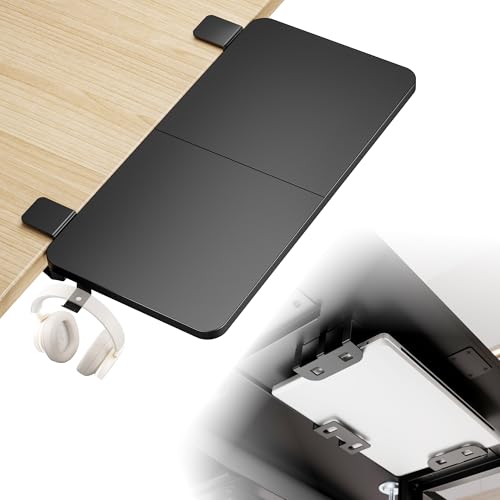
- 55-lb load capacity for varied equipment
- Built-in laptop and headphone holders
- Front- or side-mount clamp-on design
Best For: Expanding workspace beyond keyboard and mouse support
Best Under-Desk Mount
VIVO Black 25 x 10 in Keyboard Tray

- 25-by-10-inch platform fits most keyboards and mice
- 5 inches of height adjustment with side-to-side rotation
- Requires 14.25 inches of clearance beneath the desk
Best For: Direct-mount setups seeking adjustable typing support
Best No-Drill Option
AX WABER Adjustable C-Clamp Keyboard Tray

- Installs with adjustable C-clamps instead of screws
- Supports up to 11 pounds and slides out 5.7 inches
- Needs 32.5 inches of clamp-to-clamp desk space
Best For: Renters and desks that cannot be drilled
Best for Adjustability
LLDEPLL Swivel Tray with Storage Drawer

- 180-degree horizontal rotation and 30-degree tilt
- Adjusts up to 6.5 inches in height
- Includes a storage drawer and protective typing pad
Best For: Users needing flexible positioning and extra storage
Best Clamp-On Space Saver – VIVO 27-Inch Keyboard Tray
For home offices that need more surface area, this VIVO tray keeps a keyboard and mouse below the desktop. Its slide-out design and adjustable C-clamps make it a practical option among keyboard trays for home offices, provided your desk meets the size and edge requirements.
Best For: Users with flat-edged desks up to 1.25 inches thick who want a sturdy, no-drill keyboard tray.
Pros:
- Frees desktop space by placing the keyboard and mouse underneath.
- Slides out up to 8.5 inches for a comfortable typing position.
- Supports up to 11 pounds and includes adjustable C-clamps.
- Includes assembly hardware and instructions.
Cons:
- Not compatible with beveled desk edges.
- Requires 32.5 inches of desk width for the clamps.
- Only fits desktops up to 1.25 inches thick.
This is a solid pick when clamp clearance and desk dimensions line up. Measure the desktop before ordering, especially if your workspace has limited width or a thicker top.
Best for Thick Desktops – BONTEC Pull-Out Keyboard Tray
The BONTEC under-desk platform is designed to clear keyboards and mice from the desktop while installing without drilling. It stands out among keyboard trays for home offices because its clamps fit desktops up to 1.97 inches thick, but the desk must have a flat, unobstructed underside.
Best For: Home-office users with thicker, flat-edged desks who need a spacious pull-out keyboard and mouse platform.
Pros:
- Installs with protective C-clamps and no drilling.
- Supports up to 11 pounds.
- Provides a 25.6-by-11.8-inch platform for a keyboard and mouse.
- Protective pads help reduce scratches and improve grip.
Cons:
- Does not work with curved, beveled, or rounded desk edges.
- Needs at least 31.3 inches of width and 11.8 inches of underside depth.
- Vertical mice, oversized keyboards, and split ergonomic keyboards require extra clearance checking.
Choose this model when desktop thickness is the main concern and you have sufficient clearance underneath. Its generous platform is useful, but careful measuring is essential before purchase.
Best Height-Adjustable Drawer – Fellowes Office Suites Keyboard Tray
The Fellowes Office Suites tray mounts beneath the desk and uses three height settings to help tailor the typing position. For keyboard trays for home offices, it offers a compact drawer-style design with a mouse tray that tucks away when not needed.
Best For: Users who prefer a permanently mounted, height-adjustable tray for a standard keyboard and mouse.
Pros:
- Offers three mounting heights: 3.31, 2.87, and 2.48 inches.
- Accommodates keyboards up to 20 inches wide and 7 5/8 inches deep.
- Mouse tray extends to provide a 7.25-by-7.5-inch surface.
- Compact design moves input devices off the desktop.
Cons:
- Requires underside installation with Philips rounded-head screws.
- Needs 23.5 inches of width and 14.5 inches of depth.
- Crossbars and other underside obstructions can prevent installation.
This tray is a good fit for a dedicated workspace where screw-mounted hardware is acceptable. Its adjustable brackets and retractable mouse surface add flexibility, though installation clearance should be checked first.
Most Versatile Organizer – Klearlook Adjustable Keyboard Tray
The Klearlook tray is built for flexible setups, supporting both above-desk and under-desk use. Its adjustable arm, wrist rest, drawer, phone slot, and headphone hanger make it a feature-rich choice among keyboard trays for home offices, gaming areas, and multipurpose workspaces.
Best For: Users who want adjustable positioning plus built-in organization for accessories and a phone.
Pros:
- Supports above-desk and under-desk installation.
- Offers 360-degree horizontal rotation and 237-degree vertical arm adjustment.
- Includes a wrist rest, mouse pad, drawer, phone slot, and headphone hanger.
- 180-degree tilt adjustment helps accommodate different typing positions.
Cons:
- Its many adjustment features may be more than a basic setup requires.
- The listed dimensions include an 18.5-inch height, so surrounding clearance should be considered.
- No specific desktop thickness or clamp-compatibility limits are provided in the notes.
This is the most adaptable option in the group for people who value organization and positioning flexibility. Confirm the available space around your desk before choosing between above- and under-desk placement.
Flexible Pick – VIVO Rotating Clamp-On Keyboard Tray
For home offices that need adaptable under-desk organization, this keyboard trays for home offices option combines a compact surface with full rotation. Its single clamp lets you position the tray where it feels most comfortable, then move it out of the way when you need more desktop space.
Best For: Users who want a rotating keyboard and mouse tray for a standard, non-beveled desk.
Pros:
- Rotates 360 degrees for flexible placement and discreet under-desk storage.
- Supports up to 11 pounds and fits small to standard-size keyboards.
- Installs with an adjustable, damage-free C-clamp and included hardware.
Cons:
- Not compatible with lipped or beveled desk edges.
- Requires about 32 inches of clearance for the rotating circumference.
- Fits desks up to 2 inches thick.
The VIVO is a practical choice when positioning flexibility matters most. Confirm the desk edge and surrounding clearance before buying, since its rotating design needs more open space than a straightforward sliding tray.
Adjustable Organizer – Height-Adjustable Keyboard Tray With Drawer
This height-adjustable keyboard trays for home offices model is designed for users who want a more customizable typing position and extra organization. Its sliding tray includes metal rails, a small drawer, and enough capacity for a keyboard, mouse, and accessories.
Best For: Home-office users who want adjustable height, smooth slide-out access, and a small storage drawer.
Pros:
- Offers 2 inches of height adjustment across four set points.
- Ball-bearing metal rails provide smoother sliding operation.
- 22-pound capacity and a drawer for small accessories such as pencils or earplugs.
- Dual C-clamps install without drilling on desks 0.5 to 1.97 inches thick.
Cons:
- Requires at least 11.4 inches of under-desk clearance for the tray to slide.
- The clamp span reaches 31 inches, so desktop width clearance is important.
- Not suitable for desks with beveled edges.
Among these options, this tray offers the most adjustment and storage features. Measure both the desk thickness and the available width and depth underneath before ordering, especially if your workspace has limited clearance.
Workspace Expander – PEGZONE Desk Extender With Laptop Holder
The PEGZONE takes a broader approach to keyboard trays for home offices by extending the desktop rather than simply suspending a keyboard. Its 24-by-12-inch assembled surface can support a keyboard, mouse, laptop, or other equipment, while integrated holders help reduce clutter.
Best For: Users who need a sturdy multifunctional extension with laptop and headphone storage.
Pros:
- Supports up to 55 pounds for keyboards, laptops, printers, and other equipment.
- Includes an integrated laptop holder and headphone hook.
- Can mount on the front or side of desks 0.6 to 2.4 inches thick.
- Rounded edges and clamp-on installation add practical convenience.
Cons:
- Requires assembly because it consists of two connected panels.
- Needs a desk at least 22 inches wide.
- Not compatible with raised, beveled, or irregular desktop edges.
This PEGZONE is best viewed as a versatile desk extender that can double as a keyboard tray. It is a strong fit when you need added surface area and equipment support, but its larger footprint may be more than necessary for a keyboard-only setup.
Best Under-Desk Mount – VIVO Black 25 x 10 in Keyboard Tray
For home offices that need a traditional under-desk solution, the VIVO MOUNT-KB03B is a sturdy keyboard tray for home offices with a 25-by-10-inch platform, supportive rubber padding, and adjustable positioning. It mounts directly beneath the desk and includes the required mounting hardware.
Best For: Users who want a fixed under-desk tray with height adjustment and side-to-side rotation.
Pros:
- 25-by-10-inch tray fits most keyboards and mice.
- Offers 5 inches of height adjustment and full side-to-side rotation.
- Includes mounting hardware for assembly.
Cons:
- Requires at least 14.25 inches between the desktop edge and any crossbar.
- Height-adjustable desks may require the separately sold MOUNT-SPACER01 adapter.
- The tray weighs 10 pounds, so the desk must support the additional under-mounted weight.
This VIVO tray is a practical choice when your desk has adequate clearance and you prefer a directly mounted platform with multiple ergonomic adjustments.
Best No-Drill Option – AX WABER Adjustable C-Clamp Keyboard Tray
The AX WABER is a keyboard tray for home offices that attaches with adjustable C-clamps instead of desk-surface screws. Its slide-out platform holds a keyboard, mouse, and small accessories while extending up to 5.7 inches from the desk edge.
Best For: Renters or users who want a clamp-mounted tray without drilling into the desktop.
Pros:
- C-clamps attach without damaging the desk surface.
- Supports up to 11 pounds.
- Slides in and out for a more flexible typing position.
- Includes assembly hardware and instructions.
Cons:
- Requires up to 32.5 inches of total desk width from clamp to clamp.
- Fits desks up to 1.9 inches thick.
- Not compatible with desktops that have beveled edges.
Check the desk thickness, edge shape, and clamp-to-clamp space before buying. If those measurements work, this tray offers a convenient removable-style installation and useful under-desk storage.
Best for Adjustability – LLDEPLL Swivel Tray with Storage Drawer
The LLDEPLL combines a slide-out keyboard platform with a storage drawer and extensive positioning controls. For home offices or gaming setups, this keyboard tray for home offices can rotate horizontally, tilt vertically, and move in height to help align the keyboard with your arms and viewing position.
Best For: Users who prioritize broad positioning flexibility and extra under-desk storage.
Pros:
- Rotates 180 degrees and tilts 30 degrees vertically.
- Adjusts up to 6.5 inches in height.
- Slides up to 9.8 inches from the desk edge.
- Includes a soft protective pad and storage drawer.
Cons:
- Requires a desk at least 0.61 inches thick and adequate legroom.
- Needs clearance around crossbars, legs, and side obstacles for full sliding and rotation.
- The adjustment knob must be loosened and tightened correctly before repositioning or typing.
This model offers the widest range of movement in the group, but it also demands careful measuring. Confirm the desk’s thickness, under-desk obstacles, and available width before installation.
How We Picked the Best Keyboard Trays for Home Offices
We focused on the features that matter during everyday work: secure mounting, usable tray space, smooth pull-out movement, height and tilt adjustment, and compatibility with common home-office desks. The selection includes clamp-on models for renters and temporary setups, under-desk slides for a cleaner installation, and multifunction trays that add storage or laptop support.
We also considered practical constraints such as desk thickness, clamp clearance, keyboard and mouse room, legroom, installation requirements, and whether a tray can be removed without permanently modifying the desktop. Product specifications should be checked before purchase because capacity, dimensions, and mounting limits vary by model.
Quick Comparison
| Type | Best For | Main Advantage | Watch For |
|---|---|---|---|
| Clamp-on tray | Flexible or rental workspaces | Usually installs without drilling | Clamp clearance and desk-edge stability |
| Under-desk slide | Permanent, tidy setups | Clean appearance and reliable positioning | Requires compatible mounting space and hardware |
| Adjustable tray | Ergonomic positioning | Height, tilt, or swivel customization | More joints can mean more setup complexity |
| Tray with drawer | Small desks needing storage | Adds space for accessories | Greater depth and reduced legroom |
| Tray with laptop holder | Hybrid workstations | Supports a second device | May occupy more desktop and under-desk space |
Key Buying Factors for Keyboard Trays for Home Offices
Mounting and Desk Compatibility
Measure the desktop thickness, underside clearance, and distance to the front edge before ordering. Clamp-on trays need a firm, unobstructed edge, while screw-mounted trays need enough underside material for secure fasteners. Avoid mounting over fragile panels or surfaces that flex under pressure.
Size, Movement, and Ergonomics
Check the tray width and depth against your keyboard, mouse, wrist rest, and preferred mouse position. A pull-out tray should clear the desk edge smoothly. Height adjustment, tilt, and swivel features can help align your elbows and wrists, but only if the mechanism locks firmly and remains stable while typing.
Stability and Everyday Clearance
Look for sturdy clamps, reinforced rails, and a tray that does not bounce when you type. Confirm that the mounting hardware will not interfere with drawers, knees, chair arms, or a central desk support. A larger tray may be useful, but it can reduce legroom in compact offices.
Installation and Maintenance
Clamp-on options are generally easier to reposition, whereas screw-mounted designs may provide a cleaner, more permanent result. Verify included hardware and allow room to tighten clamps or access screws. Keep rails clear of dust and avoid exceeding the stated load limit.
Who Should Buy Which Keyboard Trays for Home Offices?
Choose a clamp-on model if you rent, change work locations, or want installation without drilling. An under-desk slide is a strong choice for a dedicated workstation where a clean, integrated appearance matters. Users with wrist or shoulder-position concerns should prioritize a height-adjustable, tilting, or swiveling design rather than choosing solely by price.
For narrow desks, select the smallest tray that fits your keyboard and mouse while preserving knee clearance. If storage is limited, a drawer-equipped model can hold small accessories, but measure its full extension first. Hybrid workers may prefer a tray with a laptop holder, provided the added size and weight do not compromise stability. When in doubt, prioritize a secure fit and comfortable typing height over extra features.