The right receipt printer keeps orders moving, reduces queue times, and helps front-of-house and kitchen staff receive clear, accurate tickets. For restaurants, speed and dependable connectivity matter just as much as print quality.
This roundup compares 10 thermal POS printers across paper sizes, interfaces, print speeds, cutter designs, and operating-system support so you can choose a model that fits your point-of-sale setup.
Best 10 Receipt Printers for Restaurants Picks for 2026
Flexible Wired Workhorse
Rongta RP850 80mm Thermal Receipt Printer

- USB, serial, and Ethernet connectivity
- Supports Windows, Mac, and Linux
- Auto cutter with 80mm or 58mm paper support
Best For: Desktop-based restaurant and kitchen printing
Fast Kitchen Station Printer
Rongta RP850P 80mm POS Printer
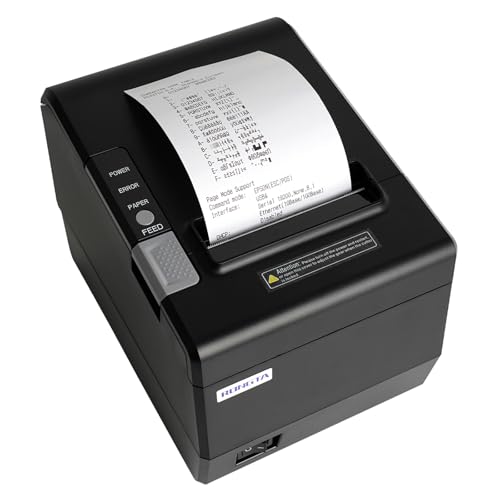
- Claimed 300mm/s printing speed
- USB, serial, and Ethernet interfaces
- Wall-mountable with auto cutter
Best For: High-volume wired kitchen printing
Cost-Conscious 80mm Printer
Rongta RP820 Thermal POS Printer
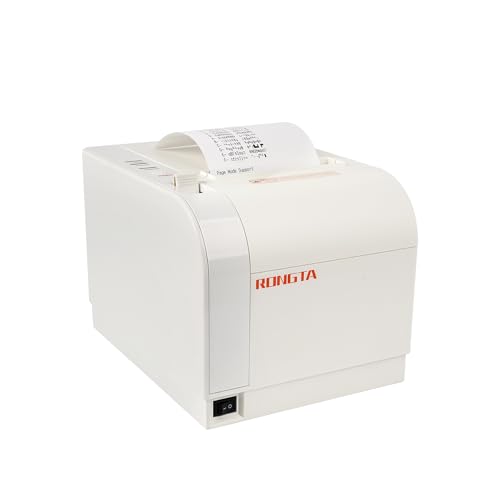
- Claimed 300mm/s printing speed
- USB, Ethernet, and serial ports
- Ink-free 80mm thermal printing with auto cutter
Best For: Wired commercial counters and restaurant stations
Best All-Around Epson Pick

- 310 mm/s thermal printing
- USB, serial, and Ethernet connectivity
- Supports Windows, Android, and iOS
Best For: Restaurants needing fast, flexible POS printing
Best USB Value

- 300 mm/s 80mm thermal printing
- Auto cutter and wall-mount option
- Works with Windows, Mac, and Linux
Best For: USB-only computer-based POS systems
Best Wireless Flexibility
NETUM NT-861 Bluetooth Printer

- Bluetooth, USB, and Ethernet interfaces
- 260 mm/s 80mm thermal printing
- Auto cutter with ESC/POS support
Best For: Restaurants wanting Bluetooth and network connectivity
Best Wired Value

- 160mm/s printing with auto cutter
- USB and Ethernet connectivity
- Inkless operation with overheating protection
Best For: Budget-conscious restaurants using compatible desktop POS systems
Best Flexible Mounting

- USB, serial, and Ethernet interfaces
- 250mm/s printing with auto cutter
- Wall-mount design and cash-drawer support
Best For: Restaurants needing wired installation flexibility and counter-space savings
Best High-Speed Option

- 300mm/s stated print speed
- USB and Ethernet interfaces
- Auto cutter with wall-mount option
Best For: High-volume restaurants with compatible wired ESC/POS systems
Flexible Wired Workhorse – Rongta RP850 80mm Thermal Receipt Printer
For restaurants looking for receipt printers for restaurants that connect to existing computers and wired networks, the Rongta RP850 offers USB, serial, and Ethernet interfaces. It supports 80mm or 58mm paper, includes an auto cutter, and works with Windows, Mac, and Linux systems.
Best For: Restaurants using Windows, Mac, or Linux desktops and laptops that need a wired receipt or kitchen printer.
Pros:
- Supports USB, serial, and Ethernet connections, including TCP/IP installation.
- Works with Windows, Mac, and Linux and supports ESC/POS and OPOS commands.
- Includes an auto cutter, cash-drawer support, and wall-mounting holes.
- Can use 80mm or 58mm thermal paper.
Cons:
- No Wi-Fi or Bluetooth connectivity.
- Not compatible with iPhone, iPad, Android devices, Chromebook, or several delivery and POS platforms.
- Driver setup may require using the included USB flash drive or the manufacturer’s website.
The RP850 is a practical choice when wired connectivity and broad desktop operating-system support matter more than mobile or cloud-POS compatibility. Confirm your restaurant software and device setup before ordering.
Portable Android Option – MUNBYN IMP001 58mm Mini POS Printer
The MUNBYN IMP001 is a compact option for restaurants that need portable receipt printers for restaurants. Its 58mm Bluetooth design works with Android devices and selected POS apps, while a USB connection supports Windows computers.
Best For: Android-based restaurant, delivery, bakery, café, and retail setups that value portability.
Pros:
- Compact 0.45 kg design with a belt for carrying.
- Bluetooth connection for Android devices within approximately 3 meters.
- USB connection supports Windows computers.
- Offers auto-sleep, auto-wake, and a stated 5–6 day standby time.
Cons:
- Not compatible with iPad, iPhone, iOS, Mac, DoorDash, Zettle POS, or Square.
- Android use is limited to the listed supported apps.
- Uses narrower 58mm paper rather than standard 80mm rolls.
This printer makes the most sense for a compatible Android workflow or a Windows computer. Its portability is useful for mobile service, but the extensive platform restrictions make compatibility checking essential.
Fast Kitchen Station Printer – Rongta RP850P 80mm POS Printer
For high-volume kitchens comparing receipt printers for restaurants, the Rongta RP850P combines a claimed 300mm-per-second print speed with USB, serial, and Ethernet connections. It supports 80mm or 58mm paper, includes an auto cutter, and can be mounted on a wall to save counter space.
Best For: Wired kitchen or counter stations using desktop computers and needing fast, low-noise receipt printing.
Pros:
- Claimed 300mm-per-second printing speed for faster order handling.
- USB, serial, and Ethernet interfaces with TCP/IP installation support.
- Supports Windows, Mac, and Linux systems plus ESC/POS and OPOS commands.
- Includes auto cutting, cash-drawer support, and wall-mounting holes.
Cons:
- No Wi-Fi or Bluetooth.
- Not compatible with iPhone, iPad, Android devices, Chromebook, Square, Clover, or several delivery platforms.
- Requires wired driver installation and software compatibility checks.
The RP850P is suited to restaurants with a fixed, wired workflow where speed and flexible mounting are priorities. It is not a fit for mobile tablets or unsupported third-party ordering platforms.
Cost-Conscious 80mm Printer – Rongta RP820 Thermal POS Printer
The Rongta RP820 is a straightforward choice for restaurants seeking receipt printers for restaurants with low ongoing consumable costs. It uses ink-free 80mm thermal paper, provides USB, Ethernet, and serial interfaces, and includes an auto cutter for busy counter or kitchen use.
Best For: Commercial restaurants, cafés, canteens, hotels, and retail counters using wired desktop or network connections.
Pros:
- Claimed printing speed of up to 300mm per second.
- USB, Ethernet, and serial connectivity for flexible wired installation.
- Auto cutter, cash-drawer support, and ESC/POS command compatibility.
- Ink-free thermal printing helps avoid ribbon or cartridge costs.
Cons:
- No Wi-Fi or Bluetooth.
- Not compatible with Grubhub, DoorDash, Square, or Chromebook.
- Designed for 80mm paper only, according to the supplied specifications.
The RP820 offers a practical mix of speed, wired connectivity, and simple maintenance. Before purchase, verify that your POS software supports its wired interfaces and that 80mm rolls fit your operation.
Best All-Around Epson Pick – Epson TM-T20IV
For restaurants seeking dependable receipt printers for restaurants, the Epson TM-T20IV combines fast 310 mm/s thermal printing with USB, serial, and Ethernet connectivity. Its compact design, paper-saving mode, and support for Windows, Android, and iOS make it a flexible fit for established or modern POS setups.
Best For: Restaurants that need fast, reliable printing and broad POS connectivity.
Pros:
- Prints at speeds up to 310 mm/s for quicker transactions.
- Offers USB, RS-232 serial, and Ethernet interfaces.
- Supports Epson ePOS printing from Windows, Android, and iOS devices.
- Includes auto cutter, wall-mount bracket, starter paper, and a 3-year limited warranty.
Cons:
- Uses wired connectivity rather than built-in wireless networking.
- May offer more connectivity and features than a very small operation requires.
The TM-T20IV is a strong choice when restaurant reliability, flexible installation, and POS compatibility matter more than choosing the simplest budget printer.
Best USB Value – NetumScan 8360
The NetumScan 8360 is a straightforward option for restaurants that want fast 80mm thermal printing through a USB-connected POS computer. It reaches up to 300 mm/s, includes an auto cutter, and offers wall mounting, but buyers should verify compatibility before ordering.
Best For: Windows, Mac, or Linux restaurant setups that use a USB-only connection.
Pros:
- Prints receipts at speeds up to 300 mm/s.
- Auto cutter helps keep printed receipts from falling to the floor.
- Supports wall mounting to save counter space.
- Overheating protection and one-touch paper loading simplify regular use.
Cons:
- USB-only; it does not support LAN, Wi-Fi, or Bluetooth.
- Not compatible with Square POS, iOS, Uber Eats, Clover, Postmates, Shopify, Lightspeed, or mobile devices according to the supplied notes.
- Compatibility should be confirmed before purchase.
This printer can make sense for a conventional computer-based POS, but its limited connectivity makes system compatibility the most important buying consideration.
Best Wireless Flexibility – NETUM NT-861 Bluetooth Printer
The NETUM NT-861 gives restaurants more connection choices than a basic wired printer, with Bluetooth, USB, and Ethernet interfaces. Its 260 mm/s thermal print speed, auto cutter, and ESC/POS support make it a practical option for restaurant or retail counters that need network-ready connectivity.
Best For: Restaurants that want Bluetooth alongside wired USB and Ethernet connections.
Pros:
- Provides Bluetooth, USB, and Ethernet connectivity.
- Prints 80mm receipts at up to 260 mm/s.
- Includes an auto cutter and supports ESC/POS.
- Package includes a USB cable, power accessories, paper roll, driver CD, manual, and paper separator.
Cons:
- Print speed is lower than the Epson TM-T20IV and NetumScan 8360 listed here.
- The supplied notes do not specify compatibility with particular POS platforms.
- Offers one listed USB port.
The NT-861 is appealing when Bluetooth or Ethernet flexibility is a priority, though restaurants should confirm that their chosen POS software supports the printer’s ESC/POS workflow.
Best Wired Value – ETprin POS895
The ETprin POS895 is a straightforward option for restaurants that need a wired thermal printer for receipts or kitchen tickets. It uses USB and Ethernet connections, prints on 80mm paper at up to 160mm per second, and includes an auto cutter. Confirm that your POS software supports ESC/POS commands before buying.
Best For: Restaurants seeking a cost-conscious USB or Ethernet printer for Windows, Mac, or Linux systems.
Pros:
- Prints at up to 160mm per second with an automatic cutter.
- Supports USB and Ethernet connections and standardized ESC/POS commands.
- Uses inkless thermal paper and includes overheating protection.
- One-button cover opening and a large paper compartment simplify maintenance.
Cons:
- No Wi-Fi or Bluetooth connectivity.
- Not compatible with Square, DoorDash, Uber Eats, or Grubhub according to the supplied notes.
- Requires compatible Windows, Mac, or Linux software rather than mobile devices.
Choose this model when dependable wired connectivity and low running costs matter more than mobile integration. Its stated 100 km printhead life and 800,000-cut cutter rating also suit regular restaurant use.
Best Flexible Mounting – Rongta RP332
The Rongta RP332 is a wired 80mm thermal printer for restaurant receipts or kitchen printing. It offers USB, serial, and Ethernet interfaces, supports Windows, Mac, and Linux, and can be wall-mounted to conserve counter space. Check your software and device compatibility carefully before ordering.
Best For: Restaurants that want multiple wired connection options, cash-drawer support, or a wall-mounted installation.
Pros:
- Supports USB, serial, and Ethernet connections, including TCP/IP installation.
- Prints at up to 250mm per second and includes an auto cutter.
- Supports cash-drawer driving and ESC/POS/OPOS commands.
- Bottom mounting holes allow wall installation in space-constrained areas.
Cons:
- No Wi-Fi or Bluetooth, and it does not support phones or tablets.
- Not compatible with Square, PayPal, Clover, Shopify, Lightspeed, DoorDash, Uber Eats, and other listed platforms.
- Setup may require selecting the correct 80mm or 58mm driver and connection settings.
The RP332 stands out for restaurants with a compatible computer-based POS and a need for flexible placement. Its DIP switches also provide control over settings such as cutter behavior, print density, language, and sound.
Best High-Speed Option – NetumScan NS8360L
The NetumScan NS8360L is a high-speed 80mm thermal printer designed for wired restaurant and retail setups. It connects through USB or Ethernet, prints at up to 300mm per second, and includes an auto cutter and wall-mount option. Verify compatibility with your POS platform before purchasing.
Best For: Busy restaurants using compatible Windows, Mac, or Linux ESC/POS systems that prioritize fast printing.
Pros:
- Rated for printing speeds up to 300mm per second.
- Provides both USB and LAN connectivity for desktop or networked setups.
- Includes an auto cutter, overheating protection, and a one-button paper cover.
- Wall-mount holes help save counter space.
Cons:
- No Wi-Fi or Bluetooth connectivity.
- Not compatible with Square POS, iOS devices, Uber Eats, Clover, Shopify, Lightspeed, and other listed systems.
- Designed for 80mm thermal paper rather than multiple paper widths.
For a compatible wired POS environment, the NS8360L offers the fastest stated print speed in this group. Its network port and wall-mount design make it practical for higher-volume service areas where quick output and efficient placement are important.
How We Picked the Best Receipt Printers for Restaurants
We focused on the features that affect daily restaurant operations: 80mm or 58mm paper compatibility, thermal print speed, automatic cutting, connection options, cash-drawer support, and compatibility with common POS platforms. Models with USB, Ethernet, serial, or Bluetooth interfaces can suit different counter layouts, while Windows, Mac, and Linux support may simplify installation.
We also considered whether a printer is better suited to customer receipts, compact takeaway counters, or kitchen ticket printing. Thermal printers generally avoid ink replacement, but they still require compatible paper and routine cleaning.
Quick Comparison
| Feature | What to look for | Why it matters |
|---|---|---|
| Paper width | 80mm for standard receipts; 58mm for compact setups | Determines receipt size and printer footprint |
| Connectivity | USB, Ethernet, serial, or Bluetooth | Matches your POS hardware and network layout |
| Print speed | Approximately 200–310mm/s | Helps reduce lines during busy periods |
| Auto cutter | Built-in automatic cutting | Speeds handoff and keeps receipts tidy |
| Cash-drawer support | Dedicated drawer connection where available | Allows the printer to trigger compatible drawers |
Key Buying Factors for Receipt Printers for Restaurants
POS and Operating-System Compatibility
Confirm that the printer supports your POS software before buying. ESC/POS support is common, but implementation can vary. Check the required drivers, ports, and operating systems, especially if you use a Mac, Linux terminal, tablet, or cloud-based POS system.
Counter, Kitchen, and Network Placement
Ethernet is useful for fixed networked stations and kitchen printers, while USB works well beside a single register. Bluetooth can help with mobile or space-limited setups, but wireless reliability depends on distance, interference, and device support.
Speed, Noise, and Paper Handling
Higher print speeds are valuable during rushes, although software and network delays can still affect total transaction time. For kitchens, consider whether the printer’s operating noise, paper loading, and cutter design suit the environment. Keep spare rolls nearby and verify the supported paper width.
Durability and Maintenance
Choose a sturdy model for high-volume service and place it away from spills, steam, grease, and excessive heat. Clean the thermal head and cutter according to the manufacturer’s instructions, and use the recommended paper to reduce jams and faded output.
Who Should Buy Which Receipt Printers for Restaurants?
- Busy full-service restaurants: Choose a fast 80mm Ethernet or USB printer with an auto cutter and cash-drawer support.
- Kitchen ticket stations: Prioritize reliable network connectivity, ESC/POS compatibility, and straightforward paper loading over a compact footprint.
- Small cafés and takeaway counters: A compact 58mm model may save space, provided its receipt width and POS integration meet your needs.
- Multi-terminal operations: Look for Ethernet connectivity and broad operating-system support for easier deployment across registers.
- Mobile or flexible setups: Consider Bluetooth, but verify pairing, driver, and POS compatibility before relying on it for service.
Before ordering, compare the printer’s interface, paper width, driver requirements, warranty, and return policy with your existing POS equipment. The best choice is the model that integrates cleanly and remains dependable throughout your busiest shifts.