An external hard drive with RAID can add substantial capacity while helping protect important files from a single drive failure. The right choice depends on whether you want a ready-to-use system, a diskless enclosure, or fast connectivity for demanding workflows.
We compare 10 options across capacity, RAID flexibility, connection standards, drive speed, expandability, and ease of use so you can choose storage that fits your desktop, studio, or backup strategy.
Best 10 External Hard Drive with Raid Picks for 2026
Performance Pick
SanDisk Professional G-RAID Project 2 24TB

- 24TB dual-drive RAID 0 storage
- Thunderbolt 3 with up to 540MB/s read
- PRO-BLADE SSD Mag expansion slot
Best For: High-throughput multimedia and professional desktop workflows
Flexible Enclosure
TerraMaster D2-320 2-Bay USB RAID

- Hardware RAID 0, 1, JBOD, and SINGLE
- USB 3.2 Gen 2 up to 10Gbps
- Diskless, tool-free two-bay design
Best For: Custom two-drive RAID builds and mirrored backups
High-Capacity Pro

- 48TB capacity with 7200RPM IronWolf Pro drives
- Configurable RAID 0 or RAID 1
- Five-year warranty with Rescue Data Recovery Services
Best For: Professional media creators needing massive desktop storage
Expansion Enclosure
TerraMaster D4-320 4-Bay USB Storage

- Four-bay diskless SATA enclosure
- Up to 120TB total capacity
- Hot-swappable, tool-free drive trays
Best For: Multi-drive direct-attached expansion without built-in RAID
Best High-Capacity Performance Pick
SanDisk Professional G-RAID Project 2 52TB

- 52TB capacity with two 7200RPM Ultrastar drives
- RAID 0 delivers up to 520MB/s read speeds
- Thunderbolt 3, USB, and PRO-BLADE SSD Mag support
Best For: Professional editing and very large project files
Best for Everyday Use

- Four bays support 2.5- and 3.5-inch SATA drives
- Eight modes include RAID 0, 1, 3, 5, and 10
- USB 3.0 and eSATA connectivity with up to 80TB support
Best For: Custom desktop RAID builds using your own drives
Best Plug-and-Play Desktop RAID

- 16TB capacity with RAID 0 ready out of the box
- Includes automatic backup software and USB hub ports
- 256-bit AES hardware encryption and password protection
Best For: Desktop backups, gaming, and everyday business storage
Best for Fast Creative Workflows
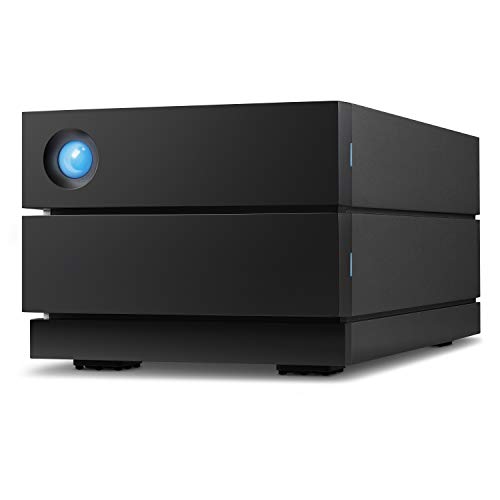
- 16TB capacity with speeds up to 440MB/s
- Configurable RAID 0 or RAID 1
- IronWolf Pro drives and five-year coverage
Best For: Photographers, filmmakers, and YouTubers
Best for Secure Everyday Backups
- 20TB desktop storage with RAID-0 readiness
- Auto and system backup software included
- 256-bit AES encryption and password protection
Best For: Home offices, businesses, and backup-focused users
Best for Maximum Desktop Capacity
- Largest capacity at 28TB
- RAID-0 ready with backup software
- Hardware encryption and password protection
Best For: Large media libraries, archives, and business storage
Performance Pick – SanDisk Professional G-RAID Project 2 24TB
The SanDisk Professional G-RAID Project 2 is a ready-to-use external hard drive with RAID for demanding desktop storage, multimedia work, and business backups. Its two 7200RPM Ultrastar enterprise-class drives ship in RAID 0 for performance, while Thunderbolt 3 provides a high-bandwidth connection.
Best For: Video editors, photographers, and professionals who want fast, high-capacity desktop storage with an SSD expansion option.
Pros:
- 24TB capacity with two 7200RPM enterprise-class hard drives
- Thunderbolt 3 connectivity and advertised speeds up to 540MB/s read
- PRO-BLADE SSD Mag slot adds optional SSD capacity and performance
- Aluminum enclosure, color-coded cables, and a five-year limited warranty
Cons:
- Ships in RAID 0, which prioritizes performance rather than mirrored redundancy
- Desktop-oriented design and 6.8-pound weight make it less portable
- SSD Mag expansion is an additional consideration for buyers seeking faster solid-state storage
This is a strong choice when throughput and capacity matter more than built-in drive mirroring. If your workflow benefits from Thunderbolt 3 and optional SSD expansion, the G-RAID Project 2 offers a particularly flexible external RAID setup.
Flexible Enclosure – TerraMaster D2-320 2-Bay USB RAID
The TerraMaster D2-320 is a diskless external hard drive with RAID enclosure for users who want to choose their own SATA drives. Its hardware RAID supports RAID 0, RAID 1, JBOD, and SINGLE modes, giving you a choice between performance, mirroring, and independent-drive operation.
Best For: Users building a customizable two-drive desktop storage system with RAID 1 protection or RAID 0 performance.
Pros:
- Supports RAID 0, RAID 1, JBOD, and SINGLE configurations
- USB 3.2 Gen 2 offers up to 10Gbps interface bandwidth
- Accepts two 3.5-inch or 2.5-inch SATA HDDs or 2.5-inch SATA SSDs
- Tool-free trays, push-lock design, and temperature-controlled cooling fan
Cons:
- Diskless design requires purchasing compatible drives separately
- This is a DAS enclosure, not a NAS, so it is intended for direct computer connection
- Actual performance depends on the installed drives and selected RAID mode
The D2-320 is appealing if you want control over drive capacity and RAID configuration instead of a pre-populated product. RAID 1 provides mirrored data protection, while RAID 0 can deliver higher performance with suitable drives.
High-Capacity Pro – LaCie 2big RAID 48TB
The LaCie 2big RAID is a high-capacity external hard drive with RAID designed for professional media storage. It combines two 7200RPM IronWolf Pro enterprise-class drives with USB-C connectivity and configurable RAID 0 or RAID 1 modes.
Best For: Photographers, indie filmmakers, and YouTubers who need substantial desktop capacity with a choice of speed or redundancy.
Pros:
- Large 48TB capacity for professional media libraries
- RAID 0 and RAID 1 can be configured through a step-by-step wizard
- 7200RPM IronWolf Pro enterprise-class drives are hot-swappable
- Includes a five-year limited warranty and Rescue Data Recovery Services
Cons:
- Desktop enclosure is less suited to portable use
- RAID 0 and RAID 1 require choosing between performance and redundancy
- Mechanical-drive storage is not as compact or inherently quiet as an SSD-based solution
For buyers who want ready-made, very high-capacity RAID storage, the 2big RAID is a well-rounded option. Its included recovery service and five-year coverage add reassurance for important creative projects, while USB-C supports modern desktop workflows.
Expansion Enclosure – TerraMaster D4-320 4-Bay USB Storage
The TerraMaster D4-320 is a diskless four-bay external storage enclosure for expanding a computer’s local drive capacity. It supports up to four SATA drives and USB 3.2 Gen 2, but it does not provide a built-in RAID function, so it is best considered a multi-drive DAS rather than a complete external hard drive with RAID.
Best For: Users who need four individually managed drives, hot-swappable storage, and up to 120TB of potential capacity.
Pros:
- Four-bay design supports 3.5-inch SATA HDDs and 2.5-inch SATA drives or SSDs
- Supports up to 30TB per drive and up to 120TB total capacity
- USB Type-C works with USB 3.0, USB 3.1, USB 3.2, Thunderbolt 3, and Thunderbolt 4 computers
- Hot swapping, tool-free trays, and temperature-controlled cooling
Cons:
- Does not include RAID functionality
- Diskless design requires separately purchased drives
- Individual-disk operation may be less suitable for users seeking automatic redundancy
The D4-320 makes sense when bay count and flexible drive management are more important than integrated RAID. Choose it for direct-attached expansion, and look to a RAID-enabled enclosure if you specifically need mirroring or striped arrays.
Best High-Capacity Performance Pick – SanDisk Professional G-RAID Project 2 52TB
For demanding workflows, the SanDisk Professional G-RAID Project 2 is a high-capacity external hard drive with RAID that combines two 7200RPM Ultrastar enterprise-class hard drives in RAID 0. Thunderbolt 3 and USB connectivity support fast transfers, with up to 520MB/s read and 510MB/s write speeds.
Best For: Professional video editing, large project files, business storage, and users who prioritize capacity and transfer performance.
Pros:
- 52TB maximum capacity across two 7200RPM enterprise-class hard drives.
- Ships in RAID 0 for improved performance, with up to 520MB/s read speeds.
- Thunderbolt 3 and USB 3.2 Gen 2 connectivity.
- PRO-BLADE SSD Mag slot adds SSD capacity and performance without requiring another enclosure.
Cons:
- RAID 0 prioritizes performance and does not provide drive redundancy.
- At 6.7 pounds, it is designed for desktop use rather than portability.
This is a strong choice when fast access to very large files matters most. Its RAID 0 setup and enterprise-class drives suit performance-focused work, while the optional SSD Mag slot offers room to expand the system’s workflow capabilities.
Best for Everyday Use – CENMATE 4-Bay RAID Enclosure
The CENMATE 4-Bay RAID Enclosure is a flexible external hard drive with RAID for users who want to install their own 2.5- or 3.5-inch SATA HDDs or SSDs. It supports up to 80TB total capacity, eight storage modes, and USB 3.0 or eSATA connections, but it is a DAS enclosure rather than a NAS.
Best For: Users building a customizable desktop RAID system from separately purchased SATA drives.
Pros:
- Four bays support 2.5- and 3.5-inch HDDs or SSDs.
- Supports up to 80TB total capacity and eight modes, including RAID 0, 1, 3, 5, and 10.
- USB A/C 3.0 and eSATA connectivity with Windows, Mac, and Linux compatibility.
- Aluminum construction and built-in cooling fans help support sustained use.
Cons:
- Drives are not included, so total system cost depends on the disks purchased separately.
- Fan noise is approximately 40–50 decibels.
- RAID mode changes require a manual power-off and reset procedure, and changing modes may cause data loss.
This enclosure offers considerable flexibility for a custom external RAID setup, especially if you already own compatible SATA drives. Confirm your computer’s eSATA RAID support before relying on that connection, and remember that this unit does not provide NAS functionality.
Best Plug-and-Play Desktop RAID – WD My Book Duo 16TB
The WD My Book Duo is a straightforward external hard drive with RAID for desktop users who want substantial storage without assembling an enclosure. It provides 16TB of capacity, is RAID 0 ready out of the box, and includes automatic backup software, password protection, and 256-bit AES hardware encryption.
Best For: Home offices, gaming libraries, personal backups, and business users seeking a ready-made desktop storage system.
Pros:
- 16TB desktop RAID storage with RAID 0 ready out of the box.
- Includes auto and system backup software.
- 256-bit AES hardware encryption and password protection help secure stored data.
- USB 3.1 connectivity plus two USB 3.0 hub ports.
Cons:
- Its 5.2-pound desktop design requires an AC-powered setup rather than portable use.
- The supplied specifications list a 360MB/s read speed, lower than the fastest Thunderbolt-based options.
- RAID 0 is performance-focused and does not provide redundancy.
The My Book Duo is a practical choice for buyers who want a complete, security-focused RAID desktop drive with backup tools included. Its USB connectivity and hub ports make it easy to add to an existing workstation, while the RAID 0 configuration favors capacity and speed over protection from drive failure.
Best for Fast Creative Workflows – LaCie 2big RAID 16TB
If you need an external hard drive with RAID for demanding desktop storage, the LaCie 2big RAID combines 16TB of capacity with speeds up to 440MB/s. Its USB-C connectivity, enterprise-class IronWolf Pro drives, and configurable RAID 0/1 make it a strong fit for large media libraries and project files.
Best For: Photographers, indie filmmakers, YouTubers, and desktop users who want a choice between performance and redundancy.
Pros:
- Offers 16TB of desktop RAID storage and read speeds up to 440MB/s.
- Supports RAID 0 for performance or RAID 1 for redundancy through a step-by-step wizard.
- Includes hot-swappable IronWolf Pro enterprise-class drives and five-year limited coverage with Rescue Data Recovery Services.
- Works with USB-C and USB 3.0 computers.
Cons:
- Its desktop form factor is less suitable for portable use.
- RAID configuration requires choosing between performance and redundancy.
The LaCie 2big RAID is a compelling external hard drive with RAID for creators who value faster transfers and flexible protection. Its long warranty and included recovery services add reassurance for important working files.
Best for Secure Everyday Backups – WD My Book Duo 20TB
The WD My Book Duo is an external hard drive with RAID designed for high-capacity desktop backup and storage. It provides 20TB, RAID-0 readiness, auto and system backup software, and USB 3.1 connectivity, making it practical for home offices and business files.
Best For: Users who want substantial desktop capacity, automated backups, password protection, and convenient USB hub access.
Pros:
- Provides 20TB of storage with RAID-0 ready out of the box.
- Includes auto and system backup software.
- Offers 256-bit AES hardware encryption and password protection.
- Includes two USB 3.0 hub ports and USB-C cables for flexible connectivity.
Cons:
- Its 3.5-inch desktop design is not intended for highly portable use.
- The listed read speed is 360MB/s, below the LaCie option in this roundup.
- It has a three-year warranty, shorter than the LaCie model’s coverage.
For buyers prioritizing capacity and backup features, the My Book Duo offers a straightforward external hard drive with RAID setup. Hardware encryption and password protection are useful additions when storing personal, gaming, or business data.
Best for Maximum Desktop Capacity – WD My Book Duo 28TB
When maximum capacity matters, the WD My Book Duo 28TB is an external hard drive with RAID that delivers a large desktop storage pool for personal or business files. It includes backup software, password protection, hardware encryption, and USB 3.1 connectivity.
Best For: Users managing exceptionally large media libraries, backups, or business archives who need 28TB of desktop storage.
Pros:
- Provides the largest listed capacity at 28TB.
- Comes RAID-0 ready with auto and system backup software.
- Includes 256-bit AES hardware encryption and password protection.
- Offers two USB 3.0 hub ports plus USB-C to USB-C and USB-C to USB-A cables.
Cons:
- At 7.1 pounds, it is heavier than the 20TB My Book Duo.
- The listed 5400 rpm drive speed and 360MB/s read speed favor capacity over top-end performance.
- It is formatted for Windows out of the box and requires reformatting for other operating systems.
The 28TB My Book Duo is the capacity-first choice in this roundup. Its security and backup tools make it more than a large storage box, though Mac users should plan for reformatting before use.
How We Picked the Best External Hard Drive with Raid
We focused on the factors that matter most in real-world desktop storage: usable capacity, supported RAID modes, interface speed, included or user-installed drives, cooling, warranty and recovery support, and compatibility with Windows and macOS. The roundup includes complete systems from WD, LaCie, and SanDisk Professional, along with diskless enclosures from TERRAMASTER and CENMATE for shoppers who want to install or reuse their own SATA drives.
We also considered product fit rather than treating maximum capacity as the only advantage. A compact two-bay unit may be better for a home office, while a four-bay enclosure can offer more flexible expansion and RAID configurations.
Quick Comparison
- Best for professional performance: SanDisk Professional G-RAID Project 2 models, with Thunderbolt 3 and high-capacity enterprise-class drives.
- Best for straightforward desktop backup: WD My Book Duo systems, which combine large capacities with password protection and backup software.
- Best for Mac and PC creative work: LaCie 2big RAID models, featuring USB-C, 7200 RPM enterprise-class drives, and Rescue Services.
- Best diskless two-bay option: TERRAMASTER D2-320, suited to users who already own compatible drives.
- Best diskless four-bay options: TERRAMASTER D4-320 or CENMATE enclosures for greater drive flexibility and expansion.
Key Buying Factors for an External Hard Drive with Raid
RAID Mode and Usable Capacity
RAID 0 combines drives for speed and capacity but provides no redundancy. RAID 1 mirrors data for protection, reducing usable capacity by about half. Some enclosures support additional modes, such as RAID 5 or JBOD, which can balance capacity, redundancy, and flexibility. Always check which modes the enclosure and included drives support before purchasing.
Connectivity and Performance
USB-C does not automatically mean the fastest transfer speeds. Check the actual USB generation, Thunderbolt support, and your computer’s ports. Thunderbolt is valuable for high-bitrate video, large photo libraries, and other demanding workflows, while USB 3-class connections are generally sufficient for backups and everyday file storage.
Capacity, Drive Type, and Cooling
Choose enough capacity for current files plus future growth, and remember that RAID formatting reduces the advertised total. 7200 RPM enterprise-class HDDs can deliver strong sustained performance, but they may produce more noise and heat than slower drives. Enclosures with active cooling are especially useful in always-on setups.
Preconfigured or Diskless
Preconfigured systems are simpler and typically include matched drives, management tools, and support. Diskless enclosures cost less initially and let you reuse existing drives, but you must verify SATA compatibility, install the drives, configure RAID, and arrange your own replacement strategy.
Who Should Buy Which External Hard Drive with Raid?
Choose a SanDisk Professional or LaCie model if you need a polished, high-capacity workstation drive for video, photography, audio, or other large project files. Pick a WD My Book Duo when convenient desktop backups, password protection, and large ready-to-use capacities matter most.
Choose the TERRAMASTER D2-320 for a flexible two-drive setup, or the TERRAMASTER D4-320 and CENMATE four-bay models if you want more drive slots and control over the installed disks. Whichever system you select, keep a separate backup of irreplaceable data: RAID improves availability after a drive failure, but it is not a substitute for a complete backup plan.